
Modern gaming PCs have officially migrated out from under dark laminate desks and into full view as integral components of home interior design. Whether resting atop a solid oak standing desk in a dedicated home office or sitting beside a media console in a shared living room, a desktop computer affects a room’s visual layout, acoustic profile, and thermal balance. When deciding between a liquid cooled prebuilt vs air cooled custom gaming pc, the choice is less about technical specs alone and more about how the machine integrates into your living space, daily routine, and long-term household maintenance plan.
A prebuilt system utilizing an All-In-One (AIO) liquid cooler delivers clean sightlines, lower ambient fan noise under initial load, and immediate plug-and-play convenience. On the other hand, a custom-built PC using a large metal air cooler offers unmatched mechanical longevity, simpler maintenance, and total freedom to choose every component to match your home’s decor and budget. Weighing these options requires examining desk real estate, noise tolerance, maintenance willingness, and overall cost over time.
As an Amazon Associate we earn from qualifying purchases at no extra cost to you.
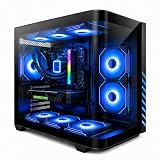

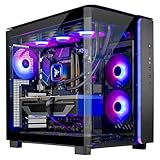
Our Top Picks
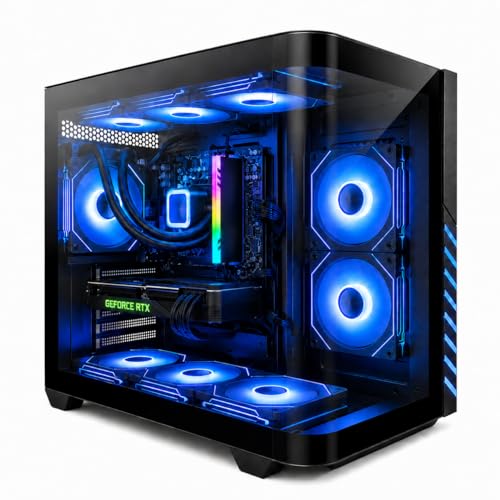


Top 3 picks at a glance
Quick Verdict
If you prioritize a sleek visual aesthetic, minimal setup effort, and quiet operation in a modern home office, a liquid cooled prebuilt PC is the clear winner. However, if you want zero risk of fluid leaks near expensive furniture, demand simple dust-and-go maintenance, and desire maximum component lifespan without pump failure worries, an air cooled custom gaming PC remains the superior choice for home integration.
Side by Side
Understanding how both configurations impact your living area requires analyzing physical, financial, and practical factors side by side:
| Factor | Liquid Cooled Prebuilt PC | Air Cooled Custom Gaming PC |
|---|---|---|
| Acoustic Comfort | Low pitch, smooth radiator airflow; whisper-quiet under light-to-moderate workloads. | Variable fan humming; quiet at idle, but larger air towers increase fan speed during heavy gaming. |
| Durability & Lifespan | AIO pumps typically last 4 to 6 years before fluid evaporation or pump wear requires replacement. | Air coolers last 10+ years; only inexpensive case fans require occasional replacement. |
| Price Range | $1,100 – $3,700+ (Includes factory assembly, warranty, and liquid cooling hardware premium). | $800 – $2,800+ (Saves money on assembly labor; allows budget allocation to higher GPU/CPU tiers). |
| Maintenance Requirements | Radiator fin dust removal every 6 months; full unit replacement when pump expires. | Simple compressed-air dusting every 6 to 12 months; virtually zero mechanical maintenance. |
| Space Needed & Weight | Sleek 18″ x 8.5″ x 18″ typical tower footprint; weighs roughly 24 to 32 lbs. | Slightly wider chassis needed for tall heat sinks (160mm clearance); weighs 22 to 30 lbs. |
| Visual Integration | Showpiece aesthetics; clean tempered glass views, uncluttered CPU zone, synchronized RGB lighting. | Industrial aesthetic; large metal heatsink block dominates internal interior viewing angle. |
| Resale & Upgrades | Proprietary cases or power supplies in some brands can complicate future individual component swaps. | 100% standardized hardware allows seamless drop-in upgrades over 5 to 7 years. |
| Best For | Minimalist work/play spaces, plug-and-play buyers, contemporary office decor. | DIY enthusiasts, homes with high dust/pet hair, buyers seeking low long-term maintenance. |
Where Liquid Cooled Prebuilt Wins
From an interior design and lifestyle perspective, liquid cooled prebuilt PCs offer a polished, minimalist presentation. Because liquid cooling transfers heat away from the processor through slim rubber tubing to a top- or front-mounted radiator, the center of the motherboard remains open and uncluttered. This creates a clean silhouette through tempered glass side panels, making the system look like a high-end electronic art piece rather than a bulky mechanical engine.
For buyers who do not want to spend weekends managing small screws, thermal paste, and complex wire routing, prebuilts eliminate setup friction. Mid-range options like a Gaming PC Desktop Liquid Cooled Ryzen 7 8700F RTX 4060 Ti 16GB DDR5 RAM (priced around $1158.88) or an Evounic Gaming PC Desktop Computer Ryzen 7 8700F RTX 5060Ti 16GB ($1348.88) arrive fully tested, neatly cabled, and ready to plug in. At the ultra-high end, extreme configurations such as the Skytech Gaming PC Desktop, Ryzen 7 9850X3D, RTX 5080, 32GB RAM, 2TB SSD ($3699.99) integrate heavy-duty liquid radiators directly into custom chassis designs that effortlessly complement high-end wooden desks and modern studio spaces.
Acoustically, liquid cooling distributes heat across a wide surface area of radiator fins. This allows large 120mm or 140mm fans to spin at lower RPMs during typical work sessions, keeping background noise low enough for video conference calls and late-night gaming in shared apartments.
Where Air Cooled Custom Gaming Pc Wins
While liquid prebuilts emphasize sleek style and turn-key installation, air cooled custom PCs excel in long-term reliability, child/pet resilience, and cost efficiency. An air cooler uses solid copper heat pipes and aluminum fins topped with standard electric fans. Because there are no motorized pumps or sealed liquid chambers, there is zero possibility of fluid permeation, internal gunk accumulation, or catastrophic leaks onto your hardwood floor or premium desk surface.
Custom air-cooled builds also grant total control over part selection. You can pick an extra-wide case with high-density dust filters to combat pet dander, select dead-silent low-RPM fans, or choose an understated, non-RGB black metal enclosure that blends seamlessly into traditional home furniture. Furthermore, every dollar spent goes directly into performance components rather than pre-assembly labor costs or liquid-cooling branding markup.
Repairability is another major advantage. If a fan fails on an air cooler after five years, replacing it costs under $20 and takes ten minutes with a standard screwdriver. In contrast, when an AIO liquid pump fails inside a prebuilt system, the entire liquid loop must be uninstalled and replaced, often requiring higher technical effort or manufacturer servicing.
Cost Over 5 Years
Evaluating the true expense of a PC requires looking beyond the initial checkout total to consider energy usage, maintenance, and replacement timelines over a typical five-year ownership cycle:
- Initial Outlay: An entry-to-mid liquid prebuilt costs roughly $1,150 to $1,400, while a top-tier enthusiast liquid prebuilt scales up to $3,700+. Building a comparable air-cooled custom rig yourself generally saves 10% to 20% upfront, putting equivalent power in the $900 to $3,000 range.
- Power Draw: Total electricity consumption is dictated primarily by the graphics card and processor, usually ranging between 400W and 750W under load. Liquid cooling adds a small extra power draw (5W to 15W) to run the continuous liquid pump, resulting in a negligible $2 to $5 annual energy difference under normal home use (around $0 per kWh average).
- Maintenance and Component Replacement: An air cooler’s metal heatsink lasts indefinitely; only its $15–$25 fan might need swapping after 40,000 hours of use. A liquid cooler’s sealed AIO loop faces pump wear or coolant loss over time, typically requiring a full $80–$180 cooler replacement around year four or five.
- Resale and Upgrade Value: Custom air-cooled PCs retain strong resale value because every component uses open-standard connectors, allowing future buyers to upgrade motherboards or cases easily. Prebuilts occasionally use custom front-panel wiring or tailored power supply dimensions that limit modular upgrades down the road.
Which One for Your Home
Small Apartment or Shared Space
In compact living quarters or studio apartments, background acoustics and desk depth matter immensely. A liquid cooled prebuilt shines here because its steady, lower-frequency acoustic profile won’t disturb partners or roommates reading nearby. Compact liquid-cooled towers easily fit onto 24-inch deep desks, maintaining a tidy visual profile that keeps small rooms feeling organized.
Family Home with Kids or Pets
Homes with dogs, cats, or young children face high dust, stray fur, and accidental bumps. Air cooled custom PCs built in solid steel chassis are ideal for this environment. Air coolers feature no delicate liquid lines, and pairing them with easily washable mesh dust filters prevents pet hair from clogging internal hardware. Placing an air-cooled system on a dedicated CPU stand off the carpet ensures long-lasting, trouble-free operation.
Rental or Frequent Mover
If you relocate frequently between rental properties, physical transport is a crucial risk factor. Heavy air cooling towers exert mechanical leverage on the motherboard CPU socket during car rides across town, often requiring temporary removal before moving. A liquid cooled prebuilt has a much lower-profile block attached directly to the CPU, making it significantly safer and easier to transport intact without disassembling internal hardware.
Dedicated Long-Term Home Office
For a permanent, executive home office where aesthetics, executive presentation, and high productivity align, both options work well. As desk design standards refine in 2026, many professionals prefer liquid cooled prebuilts with clean glass side panels and subtle amber or white interior lighting to match warm wood furniture tones. If low long-term maintenance and zero system downtime are your highest priorities, a custom air-cooled rig tucked quietly inside an acoustically insulated solid case remains an unmatched workspace partner.
FAQ
Does a liquid cooled PC heat up a room more than an air cooled PC?
No. Both systems output the exact same amount of thermal energy into your room for a given wattage. Heat generated by the CPU and GPU is transferred into ambient air whether it passes through radiator fins or a metal tower heatsink. Room temperature changes are determined by total system power draw, not the cooling medium used inside the case.
What is the risk of a liquid cooler leaking on home furniture or carpets?
With modern prebuilt systems using factory-sealed All-In-One (AIO) coolers, the risk of a leak is extremely low (under 1%). Flexible reinforced rubber tubing and anti-evaporation seals keep liquid contained. However, custom open-loop fluid systems carry higher risk and require periodic leak checks to protect nearby wooden furniture and flooring.
How often do you need to clean or service air cooled vs liquid cooled setups?
Air-cooled systems simply require dusting out the metal fins and intake mesh filters with compressed air every 6 to 12 months. Liquid-cooled AIO systems require clearing dust from radiator fans on the same schedule, but after 4 to 6 years of continuous operation, the internal pump or fluid levels will degrade, requiring a total replacement of the cooler unit.
Which setup is better for a quiet home office environment in 2026?
A liquid cooled prebuilt generally offers a smoother, less intrusive sound profile during light-to-medium office work, as the liquid buffer absorbs short thermal spikes without ramping up fan speeds instantly. However, a custom air-cooled build fitted with high-end, low-RPM fans inside an acoustically padded case can operate just as quietly during typical workday tasks.
Related guides
- Best Gaming PC for Fortnite: Eight Prebuilt Desktops Sorted by Refresh Rate Goal (2026)
- Best RX 9070 XT Prebuilt Gaming PCs: Seven Desktops and Three Cards Compared: 10 Compared (2026)
- CyberPowerPC vs iBUYPOWER Gaming PC: How the Two Brands Compare
- Best RX 9070 XT Prebuilt Gaming PC (2026): 5 Picks Compared









