
Our Top Picks
 Kado Dual 2-Pack 24.5" Curved 1500R 240Hz 1ms27" Curved 240Hz4.03 x 21.99 x 13.01 inches26.46 PoundsCheck on Amazon
The Short Answer
Yes, a dual PC setup is worth it for streaming — but only if you’re streaming hardware-intensive games at 1080p60 or higher and you’re already earning (or actively pursuing) income from your channel. If you’re a hobbyist streaming casual games a few nights a week, the money is far better spent on a better single PC. That’s the one condition: your stream needs to justify the cost, not the other way around.
What You Actually Get
A dual PC setup splits your workload across two machines. Your gaming PC does what it does best — runs the game at maximum settings. A second, dedicated streaming PC captures that gameplay feed and handles encoding, overlays, alerts, and chat, then uploads everything to Twitch, YouTube, or Kick.
As an Amazon Associate we earn from qualifying purchases at no extra cost to you.


The two machines connect through a capture card (internal PCIe cards like an Elgato 4K60 line, or external USB units), typically over HDMI. The gaming PC outputs gameplay to the capture card; the streaming PC reads that signal, encodes it with its CPU or GPU, and pushes it live. You’ll also need a way to control both — usually a KVM switch, shared keyboard/mouse software like Barrier, or just a second input set on your desk.
The realistic cost matters here. A used or budget streaming PC with something like a Ryzen 5 5600 or Intel i5-12400, 16GB of RAM, and an NVENC-capable GPU or a quality capture card runs $500–$800. A genuinely capable streaming box is $800–$1,200 once you add the capture card ($150–$400) and a KVM switch ($25–$60). Add the cables, an extra monitor or monitor arm, and you’re easily past $1,000 on the low end. That’s a serious investment, and it’s the number you should weigh against everything below.
By comparison, modern single-PC streaming is dramatically better than it was a few years ago. NVENC on RTX and recent Radeon cards encodes at a quality level that was considered “dual PC only” not long ago, and x264 on a strong 8-core CPU handles 1080p60 comfortably. That’s exactly why the dual PC question is harder to answer in 2026 than it was five years ago.
Pros
- Zero in-game performance loss. Encoding is completely offloaded, so you lose no frames, no DPC latency, and no headroom in CPU-heavy titles like sim racers, shooters, or open-world games at high refresh rates.
- A rock-solid stream. If your game crashes or your gaming PC freezes, your stream stays live on the second PC. Viewers never see a black screen; you just reboot and rejoin.
- Higher quality settings become free. You can run x264 medium or slower on the streaming PC’s CPU and push 1080p60 at 6,000–8,000 Kbps without touching game performance.
- Room to multitask. The stream PC handles Discord, browser dashboards, alerts, music bots, and chat — all while your gaming PC stays clean and dedicated.
- Better thermals and acoustics. Your gaming PC isn’t ramping fans under a combined gaming-plus-encoding load mid-match.
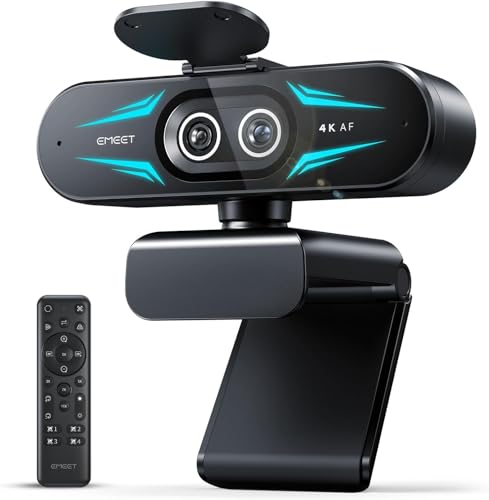
- Serious production options. With two machines, adding multi-camera work is trivial — something like the EMEET C60E dual-camera 4K webcam (~$54) plugs into the streaming PC so camera switching never touches your gaming rig.
Cons
- Cost. $1,000–$1,500 all-in for a meaningful upgrade over a modern single-PC setup, and more if you’re starting from zero on the second machine.
- Complexity. Two operating systems to maintain, two sets of drivers, audio routing via virtual cables or an audio interface, and scene setups that break in more ways.
- Desk clutter. Two towers, extra cabling, a capture card, and possibly a KVM. A dual-monitor desk gets crowded fast — most dual-PC streamers eventually run a second display like a 24.5-inch 1080p panel (roughly 21 x 14.5 inches with stand, 9–12 lbs each) on an arm just to manage the space.
- Audio is the hard part. Getting mic, game audio, Discord, and alerts routed correctly between two PCs is the most common failure point and takes real time to dial in.
- Diminishing returns for most viewers. At 1080p60 on Twitch’s bitrate caps, most audiences cannot tell the difference between a good single-PC encode and a dual-PC encode.
- Ongoing maintenance. Two Windows installs means two machines to update, secure, and troubleshoot at 11 p.m. before a stream.
Who Should Buy It
You should build a dual PC setup if you stream demanding games competitively or at high refresh rates (240Hz esports titles, 4K single-player games), if you stream 20+ hours a week and every dropped frame costs you, or if you’re a partnered or affiliate streamer whose income depends on broadcast reliability. It’s also the right call if your current gaming PC is maxed out and you’d rather add a $600 streaming box than replace a $2,000 gaming rig. Finally, if you run multi-camera or IRL setups with production ambitions, the second PC is less an upgrade and more a necessity.
Who Should Skip It
Skip it if you’re under ~15 hours a week, your games are light (indie titles, variety content, Just Chatting), or your current PC streams 1080p60 with NVENC without dropping frames. Skip it if you haven’t upgraded your GPU in the last three generations — a $400–$600 graphics card with a modern hardware encoder will do more for stream quality than a second PC will. And skip it if building, troubleshooting, and audio-routing across two machines sounds like a chore rather than a project; you’ll resent the setup within a month.
Cheaper Alternatives
| Option | Cost | Trade-off |
|---|---|---|
| Single PC with NVENC streaming | $0 (already own it) | Small performance cost in CPU-heavy games; one crash takes the stream down with it |
| Upgrade GPU or CPU in your current PC | $300–$650 | Huge encode quality gain, but still a single point of failure |
| Cloud streaming tools (Lightstream, restream studio overlays) | $8–$30/month | Offloads overlays and encoding overhead, but requires strong upload bandwidth and adds monthly cost |
| External capture-free workflow (phone/tablet as second display for chat and dashboard) | $0–$150 | Frees resources by moving chat and browser off your main display, without true dual-PC offloading |
FAQ
Do I need a capture card for dual PC streaming?
Yes, in almost every setup. The capture card is the bridge that carries gameplay from your gaming PC to your streaming PC. Budget around $150 for a solid 1080p60 internal card and $200–$400 for 1440p or 4K60 passthrough. Avoid ultra-cheap no-name dongles — latency and driver issues there will undo the entire point of the second PC.
How much should I spend on a streaming PC?
$500–$800 gets you a capable used or budget-built streaming PC: a 6-core CPU from the last few generations, 16GB of RAM, a 500GB NVMe drive, and a low-power GPU (or none, if you use CPU x264). Total project cost, including capture card and KVM, realistically lands between $800 and $1,200.
Is dual PC still worth it now that GPUs have good encoders?
For pure encode quality, the gap has narrowed a lot — modern hardware encoders are excellent at 1080p60. Dual PC is now mostly about reliability and zero performance impact, not picture quality. If you have a recent GPU and don’t feel frame drops, the honest answer is that a second PC buys you redundancy, not a visibly better stream.
What’s the hardest part of running two PCs?
Audio routing. Getting your mic, game sound, Discord, and alert sounds split correctly between two machines typically requires software like VoiceMeeter or a hardware mixer/interface, and it’s where most new dual-PC streamers lose a weekend. Plan for it before you buy, and budget $0–$200 for an audio interface if you don’t own one.
Related guides
- Best Gaming PC for Fortnite: Eight Prebuilt Desktops Sorted by Refresh Rate Goal (2026)
- Best RX 9070 XT Prebuilt Gaming PCs: Seven Desktops and Three Cards Compared: 10 Compared (2026)
- CyberPowerPC vs iBUYPOWER Gaming PC: How the Two Brands Compare
- Best RX 9070 XT Prebuilt Gaming PC (2026): 5 Picks Compared









