
Our Top Picks


The Short Answer
Yes, buying a barebones PC kit is worth it, but only if you want an ultra-compact, space-saving form factor (under 8 liters) or already own compatible components (like a CPU, RAM, or SSD) to repurpose. If you are starting entirely from scratch with no spare parts and expect a barebones kit to save you money over a standard pre-built desktop, it is generally not worth it. The individual retail costs of the missing components—especially the processor and operating system license—quickly erase any initial savings.
What You Actually Get
When you purchase a barebones PC kit, you are essentially buying the physical “skeleton” of a computer. Unlike a fully pre-built system that works right out of the box, or a completely custom DIY build where you select every single screw, a barebones kit strikes a middle ground. It handles the most tedious parts of system building while leaving the performance-defining choices to you.
As an Amazon Associate we earn from qualifying purchases at no extra cost to you.

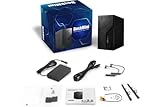
Typically, a barebones kit includes:
- The Chassis (Case): These are often highly specialized, compact enclosures designed to look sleek on a home office desk. For example, some ultra-small form factor kits, like the ASRock DeskMini B860, feature an incredibly tiny 1.92-liter volume footprint. Others, like the ASRock DeskMeet B660, are slightly larger (around 8 liters) but still far smaller than a traditional desktop tower.
- The Motherboard: This is pre-installed and custom-fitted to the exact dimensions of the chassis. It includes all front and rear input/output ports (such as USB-C, HDMI, DisplayPort, and sometimes high-end additions like Thunderbolt 4).
- The Power Supply Unit (PSU): The power supply is pre-mounted and pre-routed. This saves you from the headache of cable management. These range from external power bricks (similar to a laptop charger) for ultra-low-power mini PCs, up to integrated 500W internal power supplies for systems designed to house a dedicated graphics card.
- Basic Cooling: Some kits include customized system fans or low-profile CPU heatsinks designed specifically for the tight confines of the case.
To make the system functional, you must purchase and install the following separately: a compatible Central Processing Unit (CPU), System Memory (RAM), a solid-state drive (SSD) for storage, and an Operating System (such as Windows 11). If you choose a slightly larger kit designed for creative work or gaming, you may also need to supply a compact, dedicated graphics card (GPU).
Pros
- Unmatched Space Efficiency: Traditional computer towers take up massive amounts of physical and visual space. A barebones mini PC kit can easily tuck behind a monitor, mount to a VESA bracket, or sit elegantly on a minimalist floating shelf without cluttering your workspace.
- Simplified Assembly: The most frustrating parts of building a PC—mounting the motherboard to brass standoffs, figuring out which power cable goes where, and routing thick cords around fans—are done at the factory. You only need to slot in the CPU, RAM, and storage, which typically takes less than 20 minutes with a single screwdriver.
- Component Quality Control: Cheap pre-built computers often cut corners by using slow, single-channel RAM or unreliable, no-name storage drives. With a barebones kit, you choose the exact brand, speed, and capacity of your memory and solid-state storage.
- Modern, Premium Connectivity: Because these kits target enthusiasts, they often pack high-end ports that budget pre-builts omit. For instance, finding Thunderbolt 4, dual M.2 slots, or PCIe Gen5 support on a standard $500 pre-built is incredibly rare, but these features are readily available on premium barebones motherboards.
Cons
- The “Hidden” Cost Multiplier: A barebones kit priced at around $210 sounds like an incredible bargain. However, once you add a mid-range Intel Core or Ultra processor ($150 to $250), a 32GB kit of DDR4 or DDR5 RAM ($60 to $110), a 1TB NVMe SSD ($70 to $90), and a retail Windows license ($130), your actual out-of-pocket cost quickly climbs to $600 or more.
- Thermal and Noise Constraints: Small form factor systems have very little air volume inside. Under heavy processing loads, such as video rendering or gaming, the small cooling fans must spin at high speeds to keep components cool. This can result in a high-pitched whirring noise right on your desktop.
- Zero Component Reusability: If you decide you want a larger, more powerful computer in the future, you cannot reuse the case, motherboard, or power supply. They are proprietary and designed only to work together. If the custom motherboard or power supply fails out of warranty, finding a replacement part can be incredibly difficult.
- Limited Graphics Capabilities: Ultra-compact kits (under 2 liters) do not support dedicated graphics cards at all. You must rely entirely on the CPU’s integrated graphics. While modern integrated graphics are excellent for 4K video playback and light productivity, they struggle with modern, high-end 3D gaming or intensive 3D design software.
Who Should Buy It
A barebones PC kit is an ideal choice for home office minimalists and remote professionals who want a clean, clutter-free desk setup without sacrificing the performance of a desktop-class processor. As we look toward 2026, home workspaces are shifting heavily toward integrated, distraction-free environments where giant tower PCs are increasingly unwelcome.
It is also highly recommended for tech hobbyists who have spare hardware lying around. If you recently upgraded your main desktop computer and have an older compatible processor, some DDR4 memory, or an extra M.2 SSD sitting in a drawer, buying a $210 barebones kit is an incredibly cost-effective way to turn those spare parts into a powerful media server, a dedicated home theater PC, or a secondary workstation for a family member.
Who Should Skip It
You should skip a barebones kit if you are a complete beginner who wants a plug-and-play experience. If you do not feel comfortable handling sensitive silicon chips, applying thermal paste, or navigating a system BIOS to install an operating system from a USB thumb drive, a standard pre-built computer or a laptop is a much safer, stress-free purchase.
Furthermore, hardcore gamers and heavy workstation users should steer clear. These tiny systems simply do not have the physical space or thermal headroom to support high-end, triple-fan graphics cards or power-hungry 125W+ processors. For those workloads, a traditional mid-tower DIY build or a dedicated gaming pre-built is a necessity.
Cheaper Alternatives
If you are on a tight budget but still want a compact computer or a custom-built experience, there are several alternative pathways to consider. The table below outlines how these options compare to a typical barebones setup.
| Option | Estimated Cost Range | Trade-offs & Compromises |
|---|---|---|
| Refurbished Enterprise Mini PC (e.g., Lenovo ThinkCentre Tiny, HP EliteDesk) |
$150 – $300 (Fully Functional) | Uses older generation processors; very limited graphics performance; shorter or non-existent manufacturer warranties; limited upgrade options. |
| Traditional Budget DIY Build (Micro-ATX Case & Standard Components) |
$400 – $550 (Complete Build) | Much larger physical footprint (takes up significant desk space); requires full assembly, manual cable management, and matching all individual parts yourself. |
| Ready-to-Run Cheap Mini PC (Off-brand pre-builts with mobile processors) |
$200 – $350 (Complete Build) | Often uses lower-tier laptop-grade processors; cheaper build quality; questionable long-term software support and driver updates. |
FAQ
Does a barebones PC kit come with Windows?
No, barebones PC kits do not include an operating system. Because they do not come with a storage drive (SSD), there is no place for an operating system to be pre-installed. You will need to purchase a Windows license separately, create a bootable USB installation drive using another computer, and install the OS yourself once your hardware assembly is complete.
Can I install a graphics card in a barebones mini PC?
It depends entirely on the size of the kit. In ultra-small kits (like the 1.92-liter DeskMini series), there is physically no space or PCIe slot for a dedicated graphics card; you must use a processor with integrated graphics. In slightly larger kits (like the 8-liter DeskMeet series), there is a dedicated PCIe slot that can accommodate compact, dual-slot graphics cards up to a specific length (typically under 20 centimeters or 7.8 inches).
Do barebones kits support both Intel and AMD processors?
No, a single barebones kit cannot support both brands. The pre-installed motherboard is designed with a specific CPU socket and chipset. You must buy a kit specifically designated for Intel processors (which will list compatible generations, such as 12th, 13th, or 14th Gen) or a kit designed specifically for AMD processors (using sockets like AM4 or AM5). Always check the manufacturer’s official CPU support list before buying a processor.
Are barebones PCs noisier than regular desktop computers?
Generally, yes, under heavy loads. Because the enclosures are highly compact, they utilize smaller fans (often 40mm to 80mm in size) to push hot air out of the chassis. Smaller fans must spin at much higher revolutions per minute (RPM) than the large 120mm or 140mm fans found in traditional desktop towers to achieve the same cooling effect, which can create a more noticeable, high-pitched whirring sound when the system is working hard.
Related guides
- Best Gaming PC for Fortnite: Eight Prebuilt Desktops Sorted by Refresh Rate Goal (2026)
- Best RX 9070 XT Prebuilt Gaming PCs: Seven Desktops and Three Cards Compared: 10 Compared (2026)
- CyberPowerPC vs iBUYPOWER Gaming PC: How the Two Brands Compare
- Best RX 9070 XT Prebuilt Gaming PC (2026): 5 Picks Compared









