
Our Top Picks
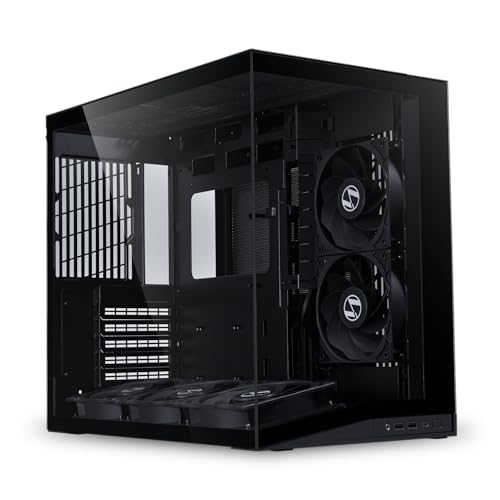
 MUSETEX Y6 PC Case16.73"D x 10.83"W x 15.67"H16.73 x 10.83 x 15.67 inches13.09 PoundsCheck on Amazon
The Short Answer
Yes, but only if you prioritize flawless desk aesthetics, plan to display your PC as a centerpiece, and have at least 12 to 14 inches of horizontal desk width to spare for the chassis alone. If your goal is purely performance-per-dollar or you are working with a compact, under-48-inch desk, a dual chamber case is generally not worth the premium price tag or the substantial physical footprint.
When deciding if is a dual chamber pc case worth it, the deciding factor is spatial economy. These cases trade vertical height and narrow profiles for a wider, double-compartment design. If you want to hide cable clutter completely behind the motherboard tray and enjoy an uninterrupted, aquarium-like view of your graphics card and liquid cooling loops, the investment makes perfect design sense. If you plan to tuck your computer under your desk or are building a budget-focused rig, a traditional mid-tower remains the smarter, more economical choice.
As an Amazon Associate we earn from qualifying purchases at no extra cost to you.


What You Actually Get
A dual chamber PC case splits the traditional computer chassis down the middle vertically, creating two distinct compartments side-by-side rather than stacking components vertically. In a standard mid-tower, your power supply sits in a basement shroud directly beneath your motherboard, and your hard drives are crammed into whatever space remains. In a dual chamber design, the chassis is partitioned into a clean “showroom” chamber and a hidden “machinery” chamber.
The front-facing chamber is dedicated entirely to your main visual components: the motherboard, central processing unit (CPU), graphics processing unit (GPU), and your primary cooling fans or liquid-cooling reservoirs. Because the power supply, storage drives, and bulk cable runs are relegated to the rear chamber, there is no unsightly clutter. This layout allows manufacturers to use wrap-around tempered glass panels—often offering a 270-degree view without a metal pillar blocking the front corner.
From a functional standpoint, this partition changes how your system manages heat and space. The rear chamber typically houses the power supply unit (PSU)—which can generate significant heat under 750-watt to 1000-watt loads—completely isolating its thermal output from your sensitive GPU and CPU. Physically, these cases are noticeably wider than standard towers. While a typical mid-tower measures about 8 to 9 inches wide, a dual chamber case like the MUSETEX Y6 or the Lian Li O11D Mini V2 Flow expands that width to 11 to 13 inches, requiring a much larger footprint on your tabletop.
Pros
- Unmatched Cable Management: Because the rear chamber is incredibly spacious (often 3 to 5 inches deep), you do not have to meticulously tie down every power cable to get the side panel to close. You can house fan hubs, excess PCIe cables, and SATA drives with room to spare.
- Superior Thermal Isolation: By placing the power supply and storage drives in a separate compartment, the main chamber only has to cool the CPU and GPU. This direct path of airflow from bottom/side intake fans to top/rear exhaust fans keeps internal temperatures exceptionally stable.
- Stunning Visual Presentation: Models featuring seamless glass corners offer an panoramic view of your components. This makes your PC build look less like a piece of office equipment and more like a high-end home decor accent or art piece.
- Easier Component Access: Swapping out a graphics card, adding RAM, or cleaning dust filters is incredibly easy because there are no bundles of power cables blocking your hands or limiting your physical maneuverability inside the main chamber.
Cons
- Demanding Desk Footprint: With widths often exceeding 12 inches and depths reaching 18 inches, these cases consume massive amounts of desk space. They are virtually impossible to place on small desks without sacrificing room for your keyboard, mouse, and dual monitors.
- Substantial Physical Weight: Due to the extra steel partitioning and multiple thick tempered glass panels, these cases are incredibly heavy. An empty dual chamber case can easily weigh 20 to 25 pounds; once fully built with a power supply, GPU, and liquid cooling, the total weight can surpass 40 pounds, requiring a sturdy, solid-wood desk to support it.
- Higher Starting Costs: The complex structural engineering and extra materials mean these cases generally cost more than standard towers. While budget-friendly options like the MUSETEX Y6 PC Case have emerged at around $59, premium modular options routinely run between $100 and $200.
- The “Empty Space” Dilemma: If you are building a modest system with a micro-ATX motherboard, a small GPU, and no liquid cooling radiators, a dual chamber case can look awkwardly empty. These chassis are designed to be filled with fans (often 6 to 10 total) to look their best, adding to your overall build cost.
Who Should Buy It
You should buy a dual chamber case if you are an enthusiast builder who views your PC as an extension of your room’s interior design. If you have a large desk (at least 60 inches wide), love custom RGB lighting, and plan to use an All-in-One (AIO) liquid cooler, this chassis style will showcase your hard work beautifully. It is also an excellent choice for first-time builders who are intimidated by cable management, as the rear chamber is incredibly forgiving of messy cable routing.
Who Should Skip It
You should skip this design if you are on a tight budget where every dollar needs to go toward performance components like a faster GPU or CPU. If you plan to place your PC tower on the floor, under your desk, or inside a cabinet, the visual benefits of a dual chamber case are completely lost, leaving you with only the disadvantage of its bulky size. Minimalists who prefer a small, discreet home office setup should also stick to compact ITX cases or slim ATX mid-towers.
Cheaper Alternatives
If you love the look of a dual chamber case but want to compare your options, there are several pathways to take depending on your budget and space constraints:
| Chassis Option | Price Range | Key Trade-offs |
|---|---|---|
| Traditional Mesh Mid-Tower | around $50 – around $85 | Requires meticulous cable management; smaller glass viewing area; lacks the clean, dual-compartment aesthetic. |
| Budget Dual Chamber (e.g., MUSETEX Y6) | around $55 – around $75 | Thinner steel panels; less modularity; pre-installed fans may lack advanced speed controls (PWM) or premium bearing types. |
| Premium Compact Dual Chamber (e.g., Lian Li O11D Mini V2 Flow) | around $90 – around $110 | May require a specialized, more expensive SFX power supply rather than a standard ATX power supply; tighter clearance for large components. |
| Vertical ITX Showcase Case | around $80 – around $140 | Requires a tiny, expensive Mini-ITX motherboard; highly limited upgrade path; challenging assembly process. |
FAQ
Do dual chamber cases have better airflow than standard cases?
Not automatically. While they isolate the heat of the power supply, their thermal performance depends heavily on fan placement. Because many dual chamber designs use solid glass front and side panels, they rely on pulling fresh air from the bottom or side vents. To get optimal thermal performance, you often need to install a high volume of fans (typically 6 to 9), whereas a traditional mesh-front tower can achieve excellent airflow with just 2 or 3 fans.
Can I use a standard ATX power supply in any dual chamber case?
Most mid-to-large dual chamber cases support standard ATX power supplies. However, some compact or “mini” versions, such as the Lian Li O11D Mini V2 Flow, are engineered to save space by requiring an SFX or SFX-L power supply. Always check the manufacturer’s specifications before purchasing, as SFX power supplies are smaller and generally cost 20% to 40% more than their standard ATX counterparts.
How do I clean dust out of a dual chamber case?
Cleaning is relatively straightforward but requires attention to multiple intake points. Because these cases often pull air from the bottom (to cool the GPU) and the side, they feature multiple magnetic or slide-out dust filters. You will need to clean the bottom, side, and top filters regularly. Because of the glass panels, dust buildup inside the main chamber is highly visible, so keeping a can of compressed air nearby is recommended for monthly maintenance.
Are dual chamber cases going out of style?
Quite the opposite. As we look toward the desk setups of 2026, the dual chamber layout has transitioned from a niche enthusiast choice to the modern standard for home office aesthetics. Builders increasingly prioritize clean workspaces, hidden wires, and personalized interior lighting, ensuring that the dual-compartment aquarium look will remain highly desirable for years to come.
Related guides
- Best Gaming PC for Fortnite: Eight Prebuilt Desktops Sorted by Refresh Rate Goal (2026)
- Best RX 9070 XT Prebuilt Gaming PCs: Seven Desktops and Three Cards Compared: 10 Compared (2026)
- CyberPowerPC vs iBUYPOWER Gaming PC: How the Two Brands Compare
- Best RX 9070 XT Prebuilt Gaming PC (2026): 5 Picks Compared









