
Buying a motherboard for a small-form-factor gaming PC is trickier than it looks. The board costs the same as a mid-tower ATX board but does half the work, and every mistake is amplified by the tight interior of an ITX case. The three mistakes I see most often: buyers overspend on VRM stages their 65W CPU will never use, they buy a board whose rear I/O clashes with their case’s specific cutout, and they pay a premium for WiFi 7 and PCIe 5.0 features that don’t improve frame rates on the games they actually play.
Here’s what actually matters, in the order you should think about it.
As an Amazon Associate we earn from qualifying purchases at no extra cost to you.


Our Top Picks
 ASUS ROG Strix B850-I Gaming WiFi AMD AM5Mini-ITX | M.2x2 | WiFi 79 x 3.8 x 7.3 inches2.3 PoundsCheck on Amazon


Top 3 picks at a glance
Decide These 3 Things First
1. Your CPU and its wattage. A Ryzen 7 9800X3D draws around 120W under load and is satisfied by an 8+2+1 power phase design. A Ryzen 9 9950X pulls 200W+ and wants 10+2+1 or better with substantial heatsinks. Match the board to the chip, not the marketing.
2. Your case and cooler clearance. All Mini-ITX boards are 170 x 170 mm, but VRM heatsinks, M.2 shields, and rear I/O armor vary by several millimeters. A low-profile air cooler like a Noctua NH-L12S or a 240mm AIO leaves no room for oversized heatsink stacks. Check the case’s CPU cooler height limit (usually 70mm for console-sized cases, 155mm+ for larger SFF) before falling in love with a board with a towering VRM shroud.
3. Your budget for the whole build. The motherboard should be roughly 12–18% of a $1,200–$2,000 build. If your board costs $330 (like flagship ITX boards do), your CPU, GPU, case, and cooler need to justify it.
Form Factor and Physical Fit
Every Mini-ITX board measures 170 x 170 mm with four mounting holes — that part is standardized. What isn’t standardized:
- Rear I/O height and pre-installed shields. Some boards, like the ASUS TUF Gaming B850I WiFi NEO, ship with a pre-mounted I/O shield, which eliminates the most annoying step in a cramped build and removes one loose part floating around a small chassis.
- Front-panel header placement. In a 10–15 liter case, a USB-C header at the board’s bottom edge may not reach your case’s front ports. Look for boards with headers along the right edge.
- GPU clearance interference. M.2 heatsinks and 24-pin connectors near the PCIe slot can block triple-slot GPUs. If you’re running a 3+ slot card, check photos of the board in an ITX case, not just the spec sheet.
Build Quality and Power Delivery
VRM (voltage regulator module) quality is where ITX boards differentiate most, because there’s physically less room for heatsinks:
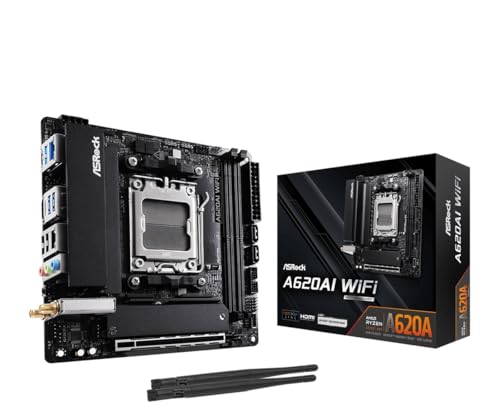
- Budget tier ($120–$170): 8+2+1 power phases, as on the ASRock B650I Lightning WiFi and A620AI WiFi. Fully adequate for 65W–105W CPUs like the Ryzen 5 9600X or Ryzen 7 9700X.
- Premium tier ($270–$330): 10+2+1 or 12+2+1 stages with larger heatsinks, as on the ASUS ROG Strix B850-I and TUF B850I. Needed for 170W+ chips like the 9900X and 9950X, especially in summer or a case with restricted airflow.
Also check board construction details: reinforced PCIe slot (supports heavy triple-fan GPUs without sag), solid caps rated for 10,000+ hours, and stacked rather than side-by-side M.2 slots, which save vertical space.
Performance Features That Actually Affect Gaming
Memory: All current AM5 ITX boards use DDR5. Budget boards support 7200+ MT/s overclocking, premium boards 8000+ (OC). Realistically, a 6000 MT/s CL30 kit is the sweet spot for Ryzen — don’t pay extra for rated speeds you won’t run. Two DIMM slots is the ITX standard, so buy a 2x16GB kit rather than 2x8GB if you want headroom.
Storage: Two M.2 slots is the norm. On budget boards like the ASRock A620AI, the secondary slot often runs at PCIe 4.0 x2 or hangs off the chipset — fine for a game drive, since even PCIe 4.0 x4 SSDs barely affect load times versus PCIe 5.0. One Gen 5-capable slot for your boot drive is plenty.
PCIe slot: PCIe 5.0 x16 for the GPU is on B850 boards; B650 boards typically offer Gen 4, which no current GPU meaningfully exceeds in real games.
Networking: 2.5Gb LAN should be your floor — all boards listed here have it. WiFi 6E is standard mid-tier; WiFi 7 appears on premium boards like the ROG Strix B850-I. Unless you own WiFi 7 routing equipment, 6E delivers the same latency for gaming.
Price Tiers: What Each Dollar Buys
- $120–$150 (entry): The ASRock A620AI WiFi at around $120 is the archetype — 8+2+1 phases, dual LAN, WiFi 6E, DDR5 support. You give up PCIe 5.0 and CPU overclocking. Pair with a 9600X and this is a complete $1,200 build.
- $160–$200 (mid): The ASRock B650I Lightning WiFi at around $170 adds PCIe 5.0 M.2 and higher-rated memory. Best value tier for most builders.
- $250–$330 (premium): The ASUS TUF B850I WiFi NEO at around $270 and ROG Strix B850-I at around $330 add B850 features (native USB 20Gbps, Gen 5 GPU slot), stronger VRMs, AI-assisted tuning tools, and better RGB/software ecosystems. Only worth it for 9800X3D/9950X-class CPUs or if you want the extra USB-C and fan-control polish.
Warranty and Support
ASUS and ASRock both carry a standard 3-year motherboard warranty in the US, extendable in some cases through registration. For ITX specifically, RMA turnaround matters more than for ATX — a dead board idles your entire PC since there’s no spare slot hierarchy to fall back on. Check whether the manufacturer offers cross-shipping for the first year; ASUS typically does for registered products. Also verify BIOS flashback (USB flashing without a CPU installed) — invaluable on AM5, which has had multiple BIOS generations since launch.
Delivery, Assembly, and Practical Logistics
Mini-ITX boards ship light — typically 1.5 to 2.5 pounds boxed — so shipping damage is rare, but inspect the CPU socket pins immediately. During assembly, budget extra time: ITX builds take 1.5 to 3 hours versus 45 minutes for an ATX build, mostly due to cable routing in tight corners. Boards with pre-mounted I/O shields and clearly labeled front-panel headers (Q-connectors help) shave meaningful time. Build the board outside the case first — socket the CPU, mount the M.2 drive and RAM — then install the assembly as a unit.
Spec Checklist
| Spec | Budget ($120–$160) | Mid ($160–$220) | Premium ($250–$330) |
|---|---|---|---|
| Chipset | A620 | B650 | B850 |
| Power phases | 8+2+1 | 8+2+1 | 10+2+1 or better |
| Memory support | DDR5 7200+ (OC) | DDR5 7200+ (OC) | DDR5 8000+ (OC) |
| M.2 slots | 2x PCIe 4.0 | 1x Gen 5 M.2 + 1x Gen 4 | 2x M.2, Gen 5 capable |
| GPU slot | PCIe 4.0 x16 | PCIe 4.0 x16 | PCIe 5.0 x16 |
| LAN | 2.5Gb | 2.5Gb | 2.5Gb |
| WiFi | WiFi 6E | WiFi 6E | WiFi 7 |
| Rear USB | USB 10Gbps, 1x Type-C | USB 10–20Gbps, Type-C | USB 20Gbps Type-C, 8+ ports |
| Best CPU pairing | Ryzen 5 9600X / Ryzen 7 9700X | Ryzen 7 9700X / 9800X3D | Ryzen 9 9900X / 9950X |
Red Flags
- Fewer than two fan headers. ITX cases need aggressive airflow; you shouldn’t have to buy splitters on a $250 board.
- No BIOS flashback button. On AM5 especially, a BIOS update requirement without a supported CPU installed is a deadlock.
- Single M.2 slot under the GPU heatsink zone. Thermal throttling on your only NVMe drive is a real risk in 10L cases.
- VRM heatsinks without any mass. Decorative aluminum fins under 30 grams suggest a board tuned for spec sheets, not sustained loads.
- Proprietary headers or nonstandard mounting. Avoid anything that locks you into one case or cooler brand.
- “OC” memory ratings with no listed QVL. If the vendor doesn’t publish a qualified vendor list for RAM, stability at rated speeds is a gamble.
FAQ
Do I need a B850 board for a Ryzen 7 9800X3D?
No. The 9800X3D draws around 120W and runs happily on a well-built B650 board with 8+2+1 phases, like the ASRock B650I Lightning WiFi. B850 buys you PCIe 5.0 and USB 20Gbps, not frames per second.
Is WiFi 7 worth paying extra for in an ITX board?
Only if your router supports WiFi 7 and your internet plan exceeds a gigabit. For gaming, latency on WiFi 6E and WiFi 7 is comparable in real conditions. The $50–$60 premium is better spent on a faster SSD or cooler.
How much should I spend on a motherboard for a mini ITX gaming build?
Aim for 12–18% of total build cost. On a $1,500 build, that’s $180–$270. Below $150, you’re making no meaningful gaming compromise with a mid-range CPU; above $300 only makes sense with 16-core chips or heavy peripheral use.
Can I use a regular ATX power supply with an ITX board?
Only if your case supports it. Most sub-15L cases require SFX or SFX-L power supplies (450–850W is typical for gaming builds), while larger SFF chassis accept ATX. Check your case’s PSU spec before buying — it’s a more expensive mistake than the motherboard.









