
Our Top Picks
 CORSAIR Vengeance LPX DDR4 RAM 32GB2 count (pack of 1)5.32 x 0.28 x 1.32 inches0 poundsCheck on Amazon

Top 3 picks at a glance
The Short Answer
For a custom PC under 1000 budget, 16GB of RAM is the sweet spot for most buyers. It gives you enough headroom for modern gaming, multitasking, and light creative work without eating too much of your budget. In 2026, a reliable 16GB kit (2x8GB) DDR4 costs $28 to $45 and a 16GB DDR5 kit (2x8GB) costs $42 to $65, leaving room for a stronger CPU and GPU where performance gains are more noticeable.
Choose 8GB only for strict budget office builds or light esports systems, and choose 32GB only if you specifically edit large video files, run virtual machines, or play heavily modded simulation games. For a sub-$1000 build, the hierarchy of value is clear: 16GB for gaming and general use, 32GB for creators and power users, 8GB as a temporary entry point you plan to upgrade.
As an Amazon Associate we earn from qualifying purchases at no extra cost to you.

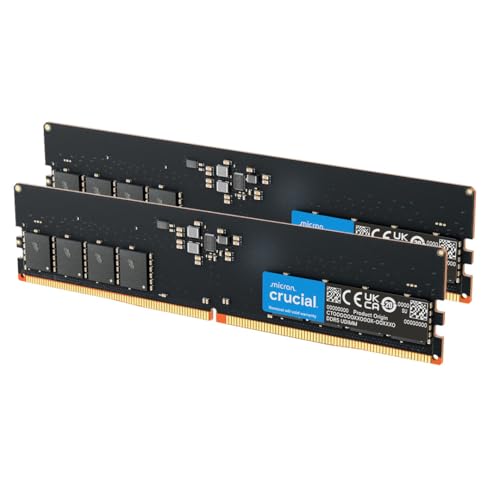

Standard Sizes
RAM for a custom PC is sized two ways: capacity (how much data it can hold) and physical form factor (whether it fits your motherboard and case). Most custom desktops under $1000 use full-size DIMMs. Compact cases and Mini-ITX builds use shorter SO-DIMMs. DDR4 and DDR5 look similar but are not interchangeable, so your motherboard dictates which type you can buy.
| RAM Type and Capacity | Configuration | Physical Dimensions (Inches) | Physical Dimensions (cm) | Typical Voltage | Typical Price Range |
|---|---|---|---|---|---|
| DDR4 DIMM 8GB | 1x8GB or 2x4GB | 5.25 x 1.18 x 0.15 | 13.33 x 3.0 x 0.38 | 1.2V | $18 – $30 |
| DDR4 DIMM 16GB | 2x8GB (Recommended) | 5.25 x 1.18 x 0.15 | 13.33 x 3.0 x 0.38 | 1.2V | $28 – $45 |
| DDR4 DIMM 32GB | 2x16GB | 5.25 x 1.20 x 0.15 | 13.33 x 3.05 x 0.38 | 1.2V | $52 – $85 |
| DDR5 DIMM 16GB | 2x8GB | 5.25 x 1.18 x 0.15 | 13.33 x 3.0 x 0.38 | 1.1V | $42 – $65 |
| DDR5 DIMM 32GB | 2x16GB | 5.25 x 1.20 x 0.35 | 13.33 x 3.05 x 0.89 | 1.1V | $68 – $110 |
| DDR4 SO-DIMM 16GB (Mini-ITX / Laptop) | 2x8GB | 2.66 x 1.18 x 0.15 | 6.76 x 3.0 x 0.38 | 1.2V | $32 – $50 |
Height with heatsink matters for clearance. Standard DIMMs without a tall heatsink are about 1.18 to 1.20 inches tall. Kits with RGB or oversized heatsinks can reach 1.73 to 2.05 inches (4.4 to 5.2 cm) tall and may conflict with large air coolers. Weight is negligible for furniture and desk load, typically 0.07 to 0.11 pounds (32 to 50 grams) per module, but cooler clearance is the real constraint to check.
How to Measure Your Space
RAM does not sit on your desk, but it does need physical and electrical space inside your case. Measure before you buy, especially in compact furniture setups like small desks or enclosed PC cabinets.
- Check your motherboard form factor and RAM type: Look up your motherboard model. If it lists DDR4, buy DDR4. If it lists DDR5, buy DDR5. Count the DIMM slots, usually 2 or 4 on boards used in sub-$1000 builds. This determines if you buy a 2-stick kit or have room to expand later.
- Measure cooler clearance: With the side panel off, measure from the top of the RAM slots to the bottom of your CPU air cooler fan. If that gap is under 1.6 inches (4.0 cm), choose low-profile RAM without tall heatsinks. For liquid coolers, this is rarely an issue.
- Measure case width for airflow: Most mid-tower cases are 7.5 to 8.5 inches (19 to 21.5 cm) wide and handle any standard DIMM. Small form factor cases under 6 inches wide often need SO-DIMMs or very low-profile DIMMs. Confirm maximum RAM height in your case manual.
- Confirm desk and power headroom: A complete custom PC under $1000 typically draws 350 to 550 watts under load and weighs 18 to 28 pounds (8.2 to 12.7 kg). Make sure your desk or TV stand is rated for at least 35 pounds and that your power strip can handle the load with a 550W to 650W 80 Plus Bronze power supply, which is standard at this budget.
- Plan for dual-channel spacing: For best performance, install two identical sticks in slots A2 and B2, which are usually the second and fourth slots from the CPU. This is not a measurement, but a placement rule that gives you 10 to 15 percent more bandwidth than a single stick.
By Room or Use Case
Where and how you use your custom PC determines how much RAM makes sense at the $1000 price point. Capacity is not one-size-fits-all.
Home Office and Family Room
For web browsing, video calls, Google Docs, and light photo management, 16GB is ideal. Even with 15 browser tabs, Zoom, and Spotify open, usage typically sits at 9 to 12GB. An 8GB single-stick setup will feel tight and cause stuttering when you multitask. Recommended kit: 2x8GB DDR4 3200MHz or DDR5 4800MHz. This keeps cost low, leaves two slots open on a 4-slot board for a future upgrade to 32GB, and keeps fan noise down since the system does not need to swap to slower storage.
Small Bedroom or Dorm Gaming Setup
For 1080p gaming on a budget GPU like an RTX 4060, RX 7600, or Arc A580, pair the GPU with 16GB in dual-channel. Most current titles use 10 to 14GB at 1080p high settings. Going to 32GB adds $25 to $50 but rarely adds frames per second in this setup. If you play competitive shooters and keep background apps closed, 16GB is the best dollar-for-dollar choice. Make sure the RAM is a 2-stick kit. A single 16GB stick cuts memory bandwidth in half and can lower gaming performance by 8 to 12 percent.
Living Room Entertainment and Compact Build
Mini-ITX builds on a bookshelf or inside a media console have tight physical limits. Choose low-profile 16GB (2x8GB) SO-DIMM if the board calls for it, or low-profile DIMMs no taller than 1.35 inches (3.43 cm). Measure interior case height before ordering RGB modules. These cases often sit in enclosed furniture with restricted airflow, so lower voltage DDR5 at 1.1V runs slightly cooler than DDR4, which helps in cabinets. Keep total system depth under 14 inches (35.5 cm) to fit most media consoles.
Creator Nook and Student Workstation
If you edit 4K video, work with large Photoshop files, compile code, or run Blender, choose 32GB (2x16GB). Under $1000 you will need to balance this by choosing a more modest GPU or a previous-generation CPU, but for creators the tradeoff is worth it. Expect memory usage of 18 to 26GB when editing 4K timelines with browser and creative apps open. This use case is the main exception where 32GB should be prioritized over a GPU step-up within the same total budget.
Common Sizing Mistakes
First, buying one stick instead of two. Two 8GB sticks outperform one 16GB stick because they run in dual-channel. If your budget only allows one 16GB stick today, make sure your motherboard has four slots so you can add a matching stick later, and buy the exact same model for compatibility.
Second, paying for speed you cannot use. For DDR4, 3200MHz CL16 is the value standard. For DDR5, 5200 to 5600MHz CL36 to CL40 is the value standard. Kits marketed at 7200MHz or higher cost $30 to $60 more and provide minimal gains on budget motherboards, which often cannot run those speeds stably anyway.
Third, mixing old and new kits. Adding a random 8GB stick to your existing 16GB kit can force all RAM to run at the slowest speed and loosest timings. If you need 32GB, sell the old kit and replace it with a tested 2x16GB matched kit.
Fourth, ignoring physical height. The most common fit issue in sub-$1000 builds is a tall RGB heatsink hitting a large air cooler like a 6.1-inch (155mm) tower cooler. If you plan to use a large air cooler, pick RAM that is 1.34 inches (34mm) tall or less, or switch to a 240mm liquid cooler that sits above the board.
Fifth, overspending on RAM and underspending on the GPU. In a $1000 build, RAM should be 5 to 10 percent of the total budget. If a 32GB RGB kit pushes you from a $280 GPU to a $200 GPU, you will lose more gaming performance than you gain from the extra capacity. For most users, 16GB plus the better GPU wins.
FAQ
Is 16GB enough for gaming on a custom PC under 1000?
Yes. For 1080p and most 1440p gaming at this budget, 16GB in a 2x8GB dual-channel kit is enough for current games. You will stay under 16GB in most titles with Discord or a browser open in the background. Only heavily modded games, simulation titles with large maps, or simultaneous streaming and gaming push you toward 32GB.
Should I get DDR4 or DDR5 for a sub-$1000 build?
Buy what your motherboard and CPU support. Do not switch platforms just for RAM type. At this budget, DDR4 motherboards and CPUs cost $40 to $80 less overall, which lets you afford a better GPU. DDR5 builds cost slightly more but run at lower voltage and give you a longer upgrade path. Both work well, so match the RAM to the board you have chosen rather than forcing a platform change.
Can I start with 8GB and add more later?
You can, but it is not ideal. 8GB will run Windows 11 and light tasks, but modern games and Chrome will quickly use 7 to 8GB and cause slowdowns as the system uses your SSD for overflow memory. If you must start with 8GB to stay under $1000, buy a single 16GB stick if your board has only two slots, or buy a single 8GB stick only if you have four slots and plan to add a second identical 8GB stick within a few months. Always match brand, speed, and timings.
Does more RAM make my PC faster?
Up to a point, yes. Going from 8GB to 16GB makes a noticeable difference in smoothness and load times because the system stops stuttering when it runs out of memory. Going from 16GB to 32GB does not make daily tasks or most games faster unless you were already exceeding 16GB. After 16GB, you are better off putting extra budget into a faster SSD, a better GPU, or a CPU with more cores.









