
When designing a modern home office, study, or gaming den, we naturally obsess over ergonomic chairs, solid wood writing desks, and ambient lighting. Yet, one of the most overlooked disruptors of domestic tranquility is the heat and noise generated by a high-performance computer. Whether you are rendering architectural models, editing family videos, or diving into immersive virtual worlds, your PC is a small space heater that requires a serious thermal strategy.
Just as we select specialized bedding like the QUTOOL Cooling Pillow for Sleeping or a supportive 1 MIDDLE ONE Cooling Body Pillow to regulate our personal microclimate at night, we must make an equally deliberate choice for our computer systems. This brings us to a classic hardware crossroads: the custom water loop vs all in one cooler. While both options use liquid to pull heat away from your processor, they offer vastly different experiences in terms of noise levels, maintenance, aesthetics, and spatial footprints within your home.
As an Amazon Associate we earn from qualifying purchases at no extra cost to you.



Our Top Picks



Top 3 picks at a glance
Quick Verdict
If you prioritize a zero-maintenance, set-and-forget setup that installs in twenty minutes and fits cleanly into standard mid-tower cases, the All-in-One (AIO) cooler is the clear winner for your home. It is affordable, highly reliable, and poses zero risk to your surrounding furniture or flooring.
However, if you demand absolute acoustic silence, plan to run hardware under sustained heavy workloads, and view your PC chassis as a piece of high-end kinetic art for your living space, the custom water loop is unmatched. It requires a significant upfront investment of both time and money, but it rewards you with unparalleled thermal control and a striking, bespoke aesthetic.
Side by Side
To help you visualize how these two cooling philosophies integrate into your household, here is a breakdown of their key practical and physical attributes.
| Feature | Custom Water Loop | All-in-One (AIO) Cooler |
|---|---|---|
| Acoustic Comfort | Near-silent (20 to 28 dB under typical loads due to massive radiator area). | Quiet to moderate (28 to 38 dB; pump and small fans ramp up under load). |
| Lifespan & Durability | Highly durable; individual fittings, blocks, and radiators can last 10+ years. | Limited to 3 to 6 years; if the pump dies, the entire unit must be replaced. |
| Price Range | $400 to $1,200+ (depending on complexity and premium blocks). | $70 to $250 (complete sealed system out of the box). |
| Maintenance Level | High; requires annual draining, flushing, and refilling to prevent buildup. | Zero; completely sealed system that requires only occasional dusting. |
| Space & Weight | Bulky; adds 8 to 15 lbs of liquid and hardware; requires a large chassis. | Compact; adds 2 to 4 lbs; fits easily into small-form-factor builds. |
| Visual Aesthetic | Bespoke luxury; hard or soft tubing, vibrant coolants, and glowing reservoirs. | Clean and minimalist; standard black or white braided hoses with RGB pump heads. |
| Resale Value | Moderate for raw parts (radiators/fittings); poor for custom-bent tubes. | Low; depreciates quickly as the pump reaches the end of its lifespan. |
| Best For | Dedicated home offices, quiet studios, and premium showpiece desks. | Family PCs, rentals, compact apartments, and budget-conscious builds. |
Where Custom Water Loop Wins
The custom water loop is the high-water mark of desktop engineering. Its primary advantage is absolute thermal headroom. By routing coolant through a bespoke pathway of independent reservoirs, pumps, and massive radiators, a custom loop can dissipate upwards of 500 watts of heat with ease. Because you have so much surface area dedicated to cooling, your radiator fans can spin at incredibly low, whisper-quiet speeds. In a shared home office or a quiet bedroom, this near-silent operation prevents the distracting, jet-engine whine associated with traditional air coolers and entry-level AIOs.
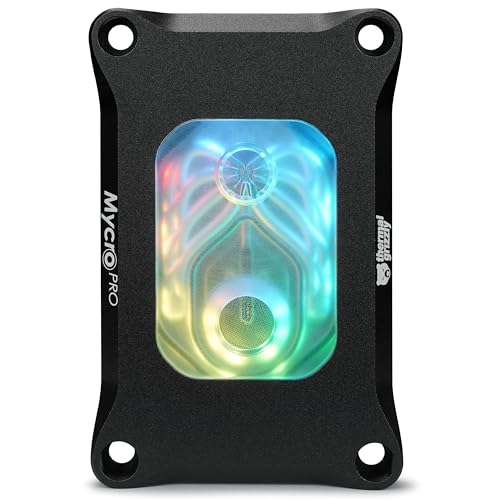
Aesthetics are another major victory for the custom loop. A well-designed loop transforms a computer from a boring black plastic box into a stunning centerpiece. You can match the coolant color to your room’s interior design, utilize beautifully machined metal fittings, and install premium blocks like the Thermal Grizzly Mycro Pro RGB to spotlight your motherboard. For those who want a comprehensive, premium starting point rather than sourcing dozens of individual fittings, a package like the CORSAIR XH505i RX 360 RGB Custom Cooling Kit provides a coordinated suite of high-end parts that ensures compatibility right out of the box.
Additionally, custom loops offer unmatched modularity. If you upgrade your graphics card three years from now, you do not need to throw away your entire cooling system. You simply drain the loop, swap out the GPU water block, adjust your tubing, and refill. The radiators, reservoir, pump, and fittings can remain in your system for a decade or more.
Where All in One Cooler Wins
For the vast majority of households, the all in one cooler is the most practical choice. The most compelling argument for an AIO is its absolute simplicity. It arrives at your doorstep as a pre-assembled, factory-sealed loop containing the pump, radiator, tubing, and coolant. There is no cutting of acrylic tubes, no leak-testing with paper towels, and no anxiety about dripping conductive fluid onto a thousand-dollar graphics card or a prized hardwood floor. You simply mount the radiator to your case, secure the pump block to your CPU, and plug in the cables.
This sealed nature also means AIOs require zero maintenance. Over a five-year period, you will never have to drain chemical coolants or scrub biological growth out of microfins. The only maintenance required is occasionally blowing dust out of the radiator fins with a can of compressed air.
AIOs are also incredibly space-efficient. They do not require a dedicated mounting location for a bulky pump-reservoir combo, freeing up precious desk space. This allows you to build a remarkably powerful computer inside a compact, minimalist chassis that sits neatly on a small writing desk or bookshelf without dominating the room.
Cost Over 5 Years
When comparing a custom water loop vs all in one cooler, looking at the initial purchase price only tells half the story. We must analyze the total cost of ownership over a five-year lifecycle, factoring in maintenance, replacement parts, and fluid upkeep.
An AIO cooler represents a highly predictable, front-loaded expense. A premium 360mm AIO costs roughly $150. Because it is a sealed unit, your maintenance cost over five years is exactly $0. However, because AIO pumps cannot be serviced, you must assume the unit will need to be replaced entirely around year four or five as the pump degrades or fluid permeates through the rubber tubes. Total 5-Year Cost: $150 to $300.
A custom water loop is a premium investment. A comprehensive starter set, such as the aforementioned CORSAIR XH505i RX 360 RGB Custom Cooling Kit, starts at around $520. If you decide to add a graphics card block, extra fittings, and specialty hard-line tubing, your initial hardware cost can easily climb to $800 or $1,000. Over five years, you will need to perform at least four coolant flushes, costing roughly $20 to $30 per bottle of premium biocide-treated fluid. You may also need to replace worn-out O-rings or soft tubing that has become cloudy over time. Total 5-Year Cost: $650 to $1,200+.
Which One for Your Home
Every home has its own unique layout, noise tolerance, and safety considerations. Here is how to choose between these two cooling methods based on your living situation.
The Small Apartment
In a compact apartment, every square inch of desk space is premium real estate, and your computer is often located in your main living or sleeping area. An AIO cooler is highly suited for this environment. Its compact design allows you to use space-saving, small-form-factor computer cases. Furthermore, if you need to rearrange your multi-functional living space, an AIO-cooled PC is light, durable, and easy to move from a desk to a media console without any risk of internal spills.
The Family with Kids and Pets
If your home features curious toddlers, playful cats, or energetic dogs, safety and durability are paramount. A custom water loop, with its external reservoirs, heavy glass panels, and intricate fittings, can be a magnet for trouble. A heavy pet bumping into a desk or a child pulling on a cable could cause a disaster if a custom fitting slowly begins to weep fluid. For family environments, a closed, sealed AIO cooler tucked safely inside a solid, locked steel PC case offers complete peace of mind.
The Rental Home
As we look forward to 2026, mobility is a major factor for modern renters who may move every single year. Transporting a custom water loop PC is a nerve-wracking ordeal. You must completely drain the system before moving to prevent the heavy liquid from cracking the motherboard mounts during transit, and then rebuild and leak-test it at your new destination. An AIO-cooled computer is highly robust and can be packed into a box and moved across town with zero preparation or disassembly required.
The Long-Term Home
If you own your home and have a dedicated, permanent home office or creative studio, a custom water loop is an exquisite addition. It allows you to build a truly customized workstation that acts as functional sculpture on your desk. Because you do not have to worry about moving logistics or pets knocking over your gear, you can fully enjoy the ultra-low noise profile, superior thermal performance, and beautiful visual presence of a bespoke liquid loop.
FAQ
Is a custom water loop significantly quieter than an AIO?
Yes. While both systems use pumps, a custom loop utilizes much larger, high-grade pumps (like D5 or DDC pumps) that can push large volumes of liquid at very low, low-frequency RPMs. Combined with thicker, larger radiators, a custom loop can keep your computer cool with its fans spinning at near-silent speeds, whereas an AIO pump often runs at a fixed, higher pitch that can be audible in a quiet room.
Can a custom water loop leak and ruin my desk or floor?
While modern compression fittings are incredibly secure, the risk of a leak in a custom water loop is always higher than in a factory-sealed AIO. If a tube is cut slightly unevenly or an O-ring is pinched during installation, a leak can occur. However, proper leak-testing using air-pressure testers before adding liquid virtually eliminates this risk.
Do I need to drain an AIO cooler?
No. All-in-One coolers are completely sealed at the factory. They are designed to never be opened, drained, or refilled. Attempting to open an AIO will void the warranty and likely ruin the unit, as they are not designed to be user-serviced.
How difficult is it to maintain a custom water loop?
It requires a moderate commitment of time. At least once a year, you should drain the system, flush the loop with distilled water or a specialized system prep solution to clear out any particulate buildup, check the microfins of your blocks, and refill it with fresh coolant. This process typically takes between two to four hours.









