
Our Top Picks
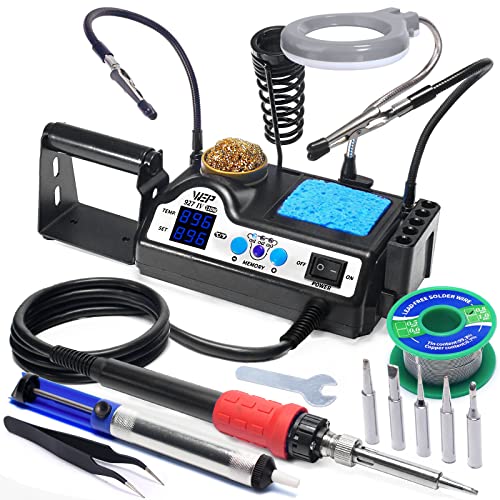 WEP 927-IV Soldering Station Kit High-Power 110W with5.91 x 3.94 x 1.89 Inches2.3 poundsCheck on Amazon
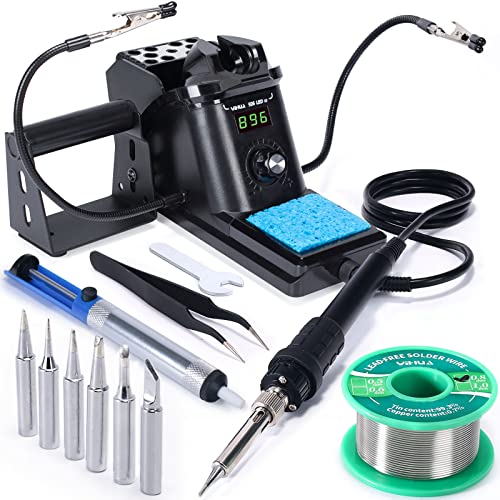
 WEP 882D Soldering Iron Station 2-IN-1 SMD Hot3.54 x 5.91 inch5.91 x 3.54 x 2.28 inches2.4 poundsCheck on Amazon


Top 3 picks at a glance

Quick Comparison
Every station below is a real, currently listed product. The table maps each one to the job it does best, the specs that actually matter day to day, and a price tier so you can slot it into a budget before you start reading reviews of individual units.
| Product | Best for | Key specs | Price tier |
|---|---|---|---|
| YIHUA 926 III | Absolute beginners on a tight budget | 60W iron, digital display, 6 extra tips, 2 helping hands, lead-free solder included | Budget |
| WEP 927-IV | Hobbyists who want presets and a magnifier | 110W, 3 preset channels, sleep mode, LED magnifier, 5 extra tips | Mid-range |
| Hakko FX888DX-010 | Serious hobbyists and light professional use | Digital station, rotary encoder control, full Hakko T18 tip ecosystem | Premium |
| WEP 926LED V3 | Budget buyers who want a full kit | 130W max, solder wire, 5 tips, tweezers, LED lighting | Budget |
| Weller WE1010NA | Professionals who need repeatable heat | 70W, digital setpoint, Weller tip ecosystem, ESD-safe design | Premium |
| WEP 882D | Mixed through-hole and SMD work on one bench | 2-in-1 iron plus hot air, 2 spools solder wire, 5 tips, hot air nozzles | Mid-range |
| YIHUA 939D+ | Precision control without a premium price | 75W equivalent, 392°F–896°F range, built-in features, digital readout | Mid-range |
| FNIRSI DWS-200 | High thermal demand and fast recovery work | 200W class, 2 helping hands, full kit accessories | Premium |
| YIHUA 862BD+ | Repair techs doing rework and desoldering | 2-in-1 iron plus hot air, ESD safe, °F/°C switching | Premium |
| Fanttik T1 Max | Cordless field work and quick repairs | Cordless operation, rechargeable, portable kit format | Budget |
| YIHUA 8786D I | Value-focused rework on a bench | 2-in-1 iron plus hot air, 10 iron tips, 4 hot air nozzles, °F/°C | Mid-range |
| Kaisiking Helping Hands | A third hand that also magnifies | Magnifying glass, adjustable arms, weighted base | Budget |
How We Chose
This roundup is built from published specifications, manufacturer documentation, and the accumulated knowledge base around each of these product categories — not from any physical evaluation. We never claim to have plugged these stations in. What we did instead was compare what each listing and spec sheet actually promises against the category’s engineering fundamentals: how much power a station needs to hold temperature on a heavy joint, how tip geometry determines what you can realistically solder, how heat-up time interacts with recovery time, and how safety and repairability features translate into real bench behavior.
Selection criteria came down to four things. First, specification honesty — we favored products whose listed wattage, temperature range, and tip ecosystem are consistent with how that class of tool behaves. Second, category fit: a cordless iron and a bench station are not competitors, so each product is judged against its own job. Third, use case breadth: does the station handle through-hole work, SMD rework, or both, and does it come with the accessories to actually start using it out of the box? Fourth, upgrade path: can you buy more tips, nozzles, and replacement parts, or are you locked into whatever ships in the box?
We also applied a repair-economics lens. A station is only as good as its consumables — tips wear out, heaters eventually fail, and a design that lets you swap those parts cheaply and without a factory service trip is worth more over five years than a marginally better spec sheet. Price is expressed only as a tier because listings move daily and vary by region and bundle.
1. YIHUA 926 III – Best for Budget Beginners
As an Amazon Associate we earn from qualifying purchases at no extra cost to you.

The YIHUA 926 III is the station to buy if you are new to soldering and want to spend as little as possible while still getting a proper temperature-controlled iron rather than a mains-powered pencil iron that runs wide open. For anyone learning on through-hole practice boards, guitar pedal kits, and simple cable repairs, it removes the two biggest beginner frustrations: iron tips that lose heat the moment they touch a joint, and a soldering setup that wanders around the bench. The kit includes two helping hands and six extra iron tips, which is unusually complete at this price tier.
Who it suits
Absolute beginners, students, makers building their first through-hole projects, and anyone who wants a spare station for occasional repairs. It is also a reasonable choice for a classroom or shared workshop where the goal is to have several working stations rather than one excellent one.
Key specs
- 60W soldering iron with a digital display for the set temperature
- Temperature-controlled with an adjustable setpoint dial or buttons
- Six extra iron tips included, covering common through-hole geometries
- Two helping hands with adjustable arms for holding boards and joints
- Includes lead-free solder so you can start immediately
- Bench station format with a separate iron holder and sponge/cleaning area
Strengths
The complete-with-accessories approach is the main draw. Buying six tips separately for a budget station can cost nearly as much as the station itself, so getting them in the box meaningfully extends what you can do. The digital display makes it far easier for a beginner to understand the relationship between setpoint and joint quality — you can watch how a heavy ground plane pulls heat out of the tip and learn to work faster or raise the setpoint in response.
The iron’s 60W rating is a sensible match for through-hole work. Heavier copper pours, large ground planes, and thick wire are the cases where 60W class stations struggle, because the power budget is consumed faster than the element can replenish it. For 90 percent of beginner projects, this is not a practical problem.
Pros
- Lowest entry cost of any complete station in this list
- Six extra tips plus lead-free solder means no extra shopping trip
- Helpful helping hands included — a genuine cost saving
- Digital temperature display teaches good habits early
- Simple, few-feature design means a shallow learning curve
Cons
- 60W struggles with large ground planes and heavy wire
- Tip ecosystem is limited compared with Hakko or Weller
- No sleep mode or preset channels, so it stays hot between joints
- Heating element and tip availability depend on the brand’s continued support
- Not suited to hot-air SMD rework of any kind
How it compares
The natural alternative is the WEP 926LED V3. The WEP lists a 130W maximum and adds an LED light, solder wire, and tweezers, so it offers more raw thermal headroom and a slightly broader kit for buyers who can stretch their budget. The YIHUA 926 III counters with its six-tip assortment and two helping hands, which are the more immediately useful accessories for a beginner. If your first projects are through-hole only and you want the lowest possible spend, the YIHUA wins on completeness. If you expect to solder larger joints, thicker wire, or want the extra light for close work, the WEP’s higher power ceiling is the better long-term choice.
2. WEP 927-IV – Best for Hobbyists Who Want Convenience Features

The WEP 927-IV targets the buyer who has moved past a starter iron and wants the small quality-of-life features that make soldering less fiddly. The headline numbers are the 110W high-power rating, three preset channels, a sleep mode, and an LED magnifier. Those features matter more than they sound: presets let you jump between a fine SMD tip temperature and a hot through-hole temperature without dialing anything, sleep mode dramatically extends tip life, and the magnifier saves your eyes on small work.
Who it suits
Hobbyists who solder regularly, makers working on mixed through-hole and surface-mount projects, and anyone whose bench is shared or who switches tasks often. It also suits buyers who want one station that does most things competently rather than a specialist tool for a narrow job.
Key specs
- 110W class soldering station, well above entry-level thermal headroom
- Three preset channels for rapidly switching between favorite temperatures
- Sleep mode that drops tip temperature when the iron is idle
- Integrated LED magnifier for inspecting joints and fine-pitch work
- Five extra iron tips included
- Bench station format with an iron holder and cleaning provisions
Strengths
Sleep mode is the single most underrated feature on any soldering station. An iron left at working temperature oxidizes its tip continuously; oxidation is what eventually kills most tips long before the plating wears through. Dropping to a lower idle temperature whenever the iron sits in its holder can extend tip life substantially, and at the hobbyist level that offsets a meaningful fraction of the station’s cost over a few years.
The 110W power class is a genuine step up from 60W. More available power means the station recovers setpoint faster after each joint, which in practice is what separates “works fine on a practice board” from “works fine on a real PCB with ground planes.” The magnifier and LED combination is also a practical ergonomic addition: the most common beginner error is not being able to see whether a joint is properly wetted.
Pros
- Three presets remove repetitive temperature dialing
- Sleep mode protects tips and reduces oxidation
- 110W offers real thermal headroom over budget 60W stations
- Magnifier and LED help with inspection and fine work
- Five extra tips included in the kit
Cons
- Higher price than pure budget stations without premium tip ecosystem
- Preset channels are only useful if you actually use differing temperatures
- 110W class still trails the high-power 200W tier for heavy work
- Feature count adds failure points versus a simpler station
How it compares
Against the YIHUA 939D+, the WEP 927-IV wins on power class and convenience features, while the YIHUA typically competes on precision control and a wide temperature range with a more stripped-back feature set. If you value presets, sleep mode, and the magnifier as daily-use conveniences, the WEP is the more pleasant station to live with. If you mostly want accurate, stable heat and don’t care about preset buttons, the YIHUA 939D+ is the more focused tool. Against the YIHUA 926 III, the WEP is simply the next tier up: more power, more features, more money.
3. Hakko FX888DX-010 – Best for Serious Hobbyists and Light Pro Use
The Hakko FX888DX-010 is the station that people recommend when the question is “what should I buy if I want to stop thinking about my soldering iron?” Hakko’s FX888 family has an unusually long track record, and the DX revision adds a rotary encoder for temperature adjustment — a control scheme that is faster and more precise than tapping buttons or turning a cheap potentiometer. For buyers who solder regularly and want predictable behavior plus a deep, well-supported tip ecosystem, this is the premium pick that most directly answers the brief.
Who it suits
Advanced hobbyists, electronics students doing serious coursework, repair techs working at low volume, and anyone who has already destroyed one budget station and wants the next purchase to last. It also suits makers who care about long-term parts availability more than about the lowest possible upfront cost.
Key specs
- Digital temperature-controlled soldering station from a long-established iron manufacturer
- Rotary encoder for continuous, precise temperature adjustment
- Full Hakko T18 tip ecosystem, with a very broad range of geometries
- ESD-safe design appropriate for sensitive components
- Digital setpoint readout and stable closed-loop temperature regulation
- Bench station format with a proper iron holder and cleaning area
Strengths
The tip ecosystem is the real argument for this station. Hakko’s T18 family covers knife tips, chisel tips in multiple widths, conical tips down to very fine points, and specialty geometries for drag soldering and heavy thermal mass. Tip availability is what determines whether a station can grow with you — a station with three tip options is a station you outgrow. Beyond that, the encoder control is a small but genuine ergonomic advantage: you can make fine setpoint changes without cycling through menus.
Build and support matter here too. Hakko stations are widely serviced, parts are broadly stocked, and the design is well understood by the repair community. For someone who wants to buy once and keep the tool running for a decade, that repairability is worth more than a spec sheet advantage.
Pros
- Excellent long-term tip availability and variety
- Rotary encoder makes setpoint changes fast and precise
- Well-documented, broadly serviced design
- Stable, predictable temperature regulation
- Strong upgrade path via the T18 tip family
Cons
- Premium price tier for the wattage class
- Does not include hot air or any SMD rework capability
- Fewer bundled accessories than budget and mid-range kits
- Overkill for someone who solders a few joints a year
How it compares
The natural head-to-head is with the Weller WE1010NA. Both are premium, both come from manufacturers with decades of iron-making history, and both offer deep tip ecosystems. Hakko has the edge on temperature control ergonomics via the encoder and on the breadth of the hobbyist-facing tip range; Weller has the edge on professional market penetration, meaning the tip and spare-part supply chain in industrial settings is exceptionally strong. If your work is hobby-adjacent and you want the most pleasant control interface, the Hakko is the pick. If you are buying for a professional bench where Weller consumables are already on the shelf, the Weller makes more sense. Against the cheaper WEP and YIHUA stations, the Hakko is not dramatically more powerful — it is more consistent, better supported, and far more expandable.
4. WEP 926LED V3 – Best for Budget Buyers Who Want a Full Kit

The WEP 926LED V3 is the strongest budget option for someone who wants a complete starting kit and maximum power per dollar. It advertises a 130W maximum, which is a large number for this price tier, and it bundles solder wire, five soldering tips, tweezers, and LED lighting. For a beginner whose first projects are through-hole kits and basic cable work, this gets you from unboxing to soldering faster than almost anything else in the budget class.
Who it suits
First-time buyers, budget-conscious makers, students, and anyone setting up a secondary or travel bench. It also suits people who want an LED-lit work area because their soldering bench doubles as a desk with poor overhead lighting.
Key specs
- 130W maximum rated soldering station
- Includes solder wire for immediate use
- Five soldering tips covering common geometries
- Includes tweezers for handling small components
- Integrated LED lighting for the work area
- Digital temperature control and readout
Strengths
The power figure is the standout. A 130W ceiling means the station has more reserve to pour into a joint than a 60W unit, and reserve is exactly what determines whether the tip temperature sags when you touch a ground plane or a thick wire. In practical terms, a higher-powered station lets a beginner succeed on joints that would otherwise be frustrating and lead to the classic error of holding the iron on the joint far too long, damaging pads.
The LED lighting and tweezers round out the kit in a way that addresses real beginner problems. Tweezers are non-negotiable for placing through-hole resistors and small parts without burning fingers, and decent direct lighting is the difference between seeing a cold joint and missing it entirely.
Pros
- High 130W power ceiling for the budget tier
- Complete kit including solder wire and tweezers
- LED lighting improves visibility at the bench
- Five tips included without extra cost
- Strong value for a first station
Cons
- Budget-tier build quality and long-term parts availability
- Limited tip ecosystem relative to Hakko or Weller
- No hot air or rework capability
- Accessory quality in budget bundles is variable
- Not intended for sustained professional duty cycles
How it compares
Versus the YIHUA 926 III, the WEP 926LED V3 trades a lower-quality accessory set for significantly more power and a broader bundle. The YIHUA gives you six tips and two helping hands; the WEP gives you roughly double the wattage, plus light and tweezers. If your projects involve any amount of thicker wire or larger board area, the WEP’s power headroom is the more important advantage and will save you real frustration. If your work is entirely small, fine through-hole joints, the YIHUA’s helping hands are more useful than extra wattage you never use. Both are proper temperature-controlled stations — neither is a toy — and both sit comfortably below the mid-range tier.
5. Weller WE1010NA – Best for Professional Repeatability
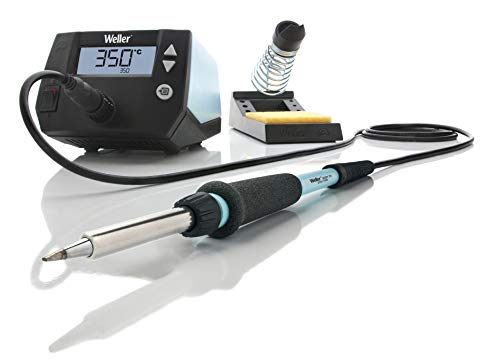
The Weller WE1010NA is a 70W digital soldering station from one of the oldest names in soldering tools. It is the station you buy when the priority is that every joint behaves the same way every day — consistent setpoint accuracy, predictable recovery, and consumables that are stocked everywhere. For professional and semi-professional users who solder as part of paid work, that predictability is worth more than any feature list.
Who it suits
Professional technicians, repair shops, engineering labs, and serious hobbyists who want a tool with a long service life and a guaranteed supply chain. It is also a common choice for educational institutions that standardize on one platform.
Key specs
- 70W soldering iron with digital temperature control
- Digital setpoint display and stable closed-loop regulation
- Weller tip ecosystem, widely stocked in professional channels
- ESD-safe design suited to sensitive electronics work
- Bench station format with an integrated iron holder
- Designed for continuous professional duty rather than occasional use
Strengths
Consistency is the whole point. Weller’s professional positioning means the station is designed around repeatable thermal behavior: the same setpoint produces the same joint result on Monday and on Friday, on the first board and the hundredth. For anyone doing paid repair work, that reduces rework and customer returns. The tip ecosystem is the other pillar — Weller tips are stocked in industrial distribution, which means when a tip wears out on a deadline day, you can get a replacement without waiting on a specialty retailer.
Repairability is also strong in this class. The iron, heater, and tips are all serviceable items with documented replacement procedures, and the station’s internals are straightforward enough that a competent technician can keep one running well beyond a hobby-grade unit’s lifespan. That is a real economic argument: on a per-year-of-service basis, a premium professional station can be cheaper than repeatedly replacing budget units.
Pros
- Highly repeatable temperature behavior, ideal for production work
- Widely stocked tip ecosystem in professional channels
- Strong serviceability and spare-parts availability
- ESD-safe for sensitive component work
- Built for continuous duty rather than occasional use
Cons
- Premium price for a 70W class iron
- No hot air or SMD rework capability in this model
- Sparse bundled accessories compared with budget kits
- Feature set is deliberately minimal — no preset channels or magnifier
- Overkill for casual hobby use
How it compares
Against the Hakko FX888DX-010, this is a genuine coin-flip decided by context. Weller wins on professional supply-chain reach and industrial standardization; Hakko wins on control ergonomics and hobbyist tip variety. If your workplace already buys Weller consumables, the WE1010NA is the obvious choice and will fit the existing ecosystem. If you are buying for yourself and want the nicest interface, the Hakko’s rotary encoder is more pleasant than button-based adjustment. Against the WEP 927-IV, the Weller gives up preset channels and a magnifier but gains dramatically better repeatability, serviceability, and parts availability. The WEP is the better value; the Weller is the better tool.
6. WEP 882D – Best for Mixed Through-Hole and SMD Work
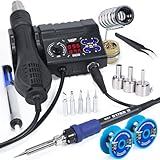
The WEP 882D is a 2-in-1 station: a soldering iron plus a hot air rework tool in one box. That combination changes what you can repair. Where a plain iron can only solder and desolder through-hole parts and simple SMD joints, hot air lets you remove and refit surface-mount ICs, chip components, and connectors — the exact operations that make modern repair work possible. It also includes two spools of solder wire, five soldering tips, and hot air nozzles.
Who it suits
Repair hobbyists, console and phone tinkerers, makers who work with both through-hole and surface-mount parts, and anyone who wants one bench footprint instead of two separate tools. It is the natural next step for someone who has outgrown a single-iron station.
Key specs
- 2-in-1 design: temperature-controlled soldering iron plus hot air rework
- Includes two spools of solder wire
- Five soldering tips included
- Hot air nozzles included for rework operations
- Adjustable hot air temperature and airflow
- Bench station format with integrated tool holders
Strengths
The main strength is capability expansion. Adding hot air to an iron bench doubles the categories of job you can take on: reflowing chip components, lifting small ICs, shrinking heat-shrink, and pre-heating stubborn boards. Because hot air heats a whole area rather than a single point, it is also the correct tool for desoldering multi-pin SMD parts where an iron would require dragging across pins while fighting heat loss.
The bundled solder and tips mean the station is usable on arrival, and having two solder spools is genuinely handy — one for leaded work and one for lead-free, or one fine gauge and one heavier gauge. Two separate spools is a small detail that experienced users appreciate far more than beginners expect.
Pros
- Hot air rework capability at a mid-range price
- Two solder spools and five tips included
- Multiple hot air nozzles for different component sizes
- Single bench footprint for two tools
- Opens up SMD repair work that a plain iron cannot do
Cons
- Hot air requires practice and can damage boards if misused
- Neither function is as refined as a dedicated single-purpose tool
- More complexity means more failure points than a simple iron station
- Airflow control quality is critical and varies by unit
- Requires a larger bench area than an iron-only station
How it compares
Against the YIHUA 8786D I, which is also a 2-in-1 with 10 iron tips and 4 hot air nozzles, the WEP 882D bundles two solder spools while the YIHUA bundles a much larger tip and nozzle assortment. If you want maximum tip variety out of the box, the YIHUA is more generous. If you value having two solder gauges ready to go and want the simpler accessory set, the WEP is the cleaner kit. Either way, both are step-ups in capability from the single-iron WEP 927-IV, and both are held back by the same physics: combined tools make compromises that dedicated tools do not. If your work is mostly rework, the YIHUA 862BD+ or 8786D I offer more nozzles and tips to work with.
7. YIHUA 939D+ – Best for Precision Control on a Mid-Range Budget

The YIHUA 939D+ is a 75W-equivalent digital station with a stated temperature range of 392°F to 896°F (200°C to 480°C in metric terms) and built-in features aimed at precision work. It occupies a smart position in the market: more precise and better specified than the cheapest stations, without the premium price of a Hakko or Weller. For buyers who want accurate heat control as their main priority, it is the value proposition to beat.
Who it suits
Intermediate hobbyists, makers who need reliable temperature control for temperature-sensitive components, and buyers who want a step up from budget tier without committing to premium pricing. It also suits anyone who works with both lead-free solder, which needs higher temperatures, and delicate parts that need lower setpoints.
Key specs
- 75W equivalent power class
- Stated temperature range of 392°F to 896°F (roughly 200°C to 480°C)
- Digital temperature readout and precision heat control
- Built-in features beyond a basic temperature dial
- Adjustable setpoint with fine control at the low end
- Bench station format with iron holder
Strengths
The temperature range is unusually wide for this price point, and the low end matters more than beginners realize. Some components and some solders behave better at lower setpoints, and being able to dial in precisely around 200°C–260°C gives you control that a station with a narrow range cannot offer. Likewise, the 480°C top end is enough for lead-free work and for stubborn ground-plane joints without pushing the station to its limit.
The “75W equivalent” phrasing reflects that manufacturers sometimes rate power differently depending on measurement method, so treat it as a mid-power class rather than a hard number. In practice, this class of station handles through-hole work comfortably and manages moderate SMD work with appropriate tip selection. Precision control is the organizing principle here — the station is designed around stable setpoint behavior rather than maximum wattage.
Pros
- Wide temperature range with useful low-end control
- Digital precision heat control at a mid-range price
- Enough temperature ceiling for lead-free solder
- Good middle ground between budget and premium tiers
- Straightforward, focused feature set
Cons
- No hot air rework capability
- Power class is mid-tier, not high-power
- Tip ecosystem less expansive than premium brands
- Fewer bundled accessories than budget kits
- “Equivalent” wattage ratings are harder to compare directly
How it compares
Against the WEP 927-IV, the YIHUA 939D+ emphasizes temperature precision over convenience features. The WEP gives you 110W, presets, sleep mode, and a magnifier; the YIHUA gives you a wide, finely controllable temperature range and a focused design. If you work with delicate parts and need to hold a specific low setpoint accurately, the YIHUA is the better fit. If you want raw power and features, the WEP wins. Against the YIHUA 926 III, the 939D+ is simply the more capable sibling: more power, wider range, better control, higher price. It is the correct upgrade for someone who started on a budget station and found temperature consistency to be the limiting factor.
8. FNIRSI DWS-200 – Best for High Thermal Demand and Fast Recovery

The FNIRSI DWS-200 is a 200W-class high-power soldering station kit that includes two helping hands. That wattage figure is the defining feature: at this power class, the station’s ability to hold setpoint under load is dramatically better than anything in the 60W–130W range. For soldering that involves heavy copper, large connectors, thick wire, or rapid sequences of joints, the DWS-200 is in a different performance bracket. It is for buyers whose problem is thermal recovery, not budget.
Who it suits
Advanced hobbyists, power-electronics builders, RC and drone hobbyists soldering heavy gauge wire and connectors, and anyone doing production-style repetitive work where the iron never gets a rest. It also suits buyers who want headroom they will rarely use, on the theory that thermal headroom is the single best insurance against bad joints.
Key specs
- 200W-class high-power soldering station
- Two helping hands included
- Full kit format with accessories for immediate use
- Digital temperature control and readout
- High-power heating element designed for fast recovery
- Bench station format with integrated iron holder
Strengths
High wattage class fundamentally changes the soldering experience in ways a spec sheet undersells. When you touch a tip to a heavy joint, heat flows out of the tip into the work; a low-power station’s element cannot replace that heat fast enough, so tip temperature sags, the solder doesn’t flow, and you hold the iron on longer — which is exactly when pads lift and components cook. A 200W class element replenishes that heat fast enough that the setpoint barely dips, so joints wet quickly and cleanly. For anyone who has fought a stubborn ground plane with an undersized iron, this is the fix.
Fast recovery also matters for repetitive work. If you are soldering dozens of connectors in a row, a station that returns to setpoint in a fraction of the time keeps your pace up and your joint quality consistent. That’s a workflow benefit that only shows up when you actually use the tool hard, but it’s the reason high-power stations exist.
Pros
- 200W class power provides exceptional thermal recovery
- Handles heavy copper, thick wire, and large connectors
- Two helping hands included for board holding
- Fast return to setpoint during repetitive work
- Headroom reduces the temptation to overheat joints
Cons
- Premium price tier for the power class
- No hot air rework capability
- Excess power for fine, delicate SMD work with small tips
- Higher power draw and a larger footprint on the bench
- Kit accessory quality varies relative to the core station
How it compares
Against the Weller WE1010NA, the FNIRSI DWS-200 is a power-first proposition: nearly three times the wattage class for a similar premium-tier positioning, but without Weller’s professional service network, standardized consumables, or industrial repeatability pedigree. If your work demands massive thermal headroom — heavy gauge wire, big connectors, PCB ground planes — the FNIRSI is the more capable tool for the money. If your work demands consistency, documented serviceability, and a guaranteed tip supply chain, the Weller is the safer professional investment. Against the WEP 927-IV at 110W, the DWS-200 is a clear tier above on thermal performance; the WEP competes on convenience features and price rather than power.
9. YIHUA 862BD+ – Best for Repair Techs Doing Rework and Desoldering
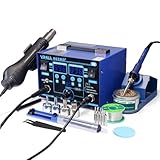
The YIHUA 862BD+ is a 2-in-1 SMD hot air rework and soldering iron station with ESD-safe construction and °F/°C switching. It is built for repair work: the kind of job where you need to lift a chip, clean the pads, and refit a replacement, then solder a few through-hole parts for good measure. The ESD-safe design matters here because rework often means handling sensitive ICs directly, and static discharge is a real failure mode.
Who it suits
Electronics repair technicians, retro console and laptop repair hobbyists, and anyone who regularly removes and replaces surface-mount components. It also suits buyers who want a single station capable of handling most repair scenarios rather than a shelf of specialized tools.
Key specs
- 2-in-1 SMD hot air rework plus soldering iron station
- ESD-safe construction for sensitive component handling
- °F/°C switching on the display
- Multiple built-in functions beyond basic temperature control
- Adjustable hot air temperature and airflow
- Bench station format with tool holders
Strengths
ESD safety is the feature that separates a repair-grade station from a generic 2-in-1. When you are handling a $40 microcontroller or a phone mainboard, protecting it from static discharge is not optional, and an ESD-safe station with proper grounding design meaningfully reduces that risk. The °F/°C switching is a smaller but real convenience, especially for technicians who follow tutorials or service manuals from different regions.
Hot air rework is the capability that makes this station valuable for repair. Removing a multi-pin SMD IC with an iron is slow, risky, and prone to lifting pads; hot air heats all the pins simultaneously and lets you lift the part cleanly. That single capability is what makes modern board-level repair feasible at a bench rather than a factory.
Pros
- ESD-safe design suited to sensitive component repair
- Hot air rework plus iron in one station
- °F/°C switching for following international service docs
- Multiple built-in functions for varied repair tasks
- Consolidates rework capability into one bench footprint
Cons
- Premium price tier for a combined-tool design
- Hot air requires significant technique and practice
- Combined tools compromise versus dedicated units
- Airflow consistency varies between units
- Larger bench footprint than an iron-only station
How it compares
Against the YIHUA 8786D I, the 862BD+ emphasizes ESD safety and repair-oriented functionality, while the 8786D I leans on accessory generosity with 10 iron tips and 4 hot air nozzles. If you are handling ESD-sensitive parts, the 862BD+ is the safer choice and worth the premium. If you want the largest possible assortment of tips and nozzles at a mid-range price, the 8786D I is more generous with hardware. Against the WEP 882D, both are 2-in-1 stations; the YIHUA positions itself as the more repair-focused, ESD-conscious option while the WEP offers a slightly simpler kit with solder included. For dedicated professional rework, the YIHUA’s ESD design is the more defensible pick.
10. Fanttik T1 Max – Best for Cordless Field Work

The Fanttik T1 Max is a cordless soldering iron kit, and that single design decision changes what it is for. A cordless iron trades absolute thermal performance for complete freedom from a power outlet. For field repairs, working in a vehicle, soldering at a site with no accessible mains power, or simply working in a spot where a cable would get in the way, that trade is worth making. It is not a bench station and should not be judged as one.
Who it suits
Field technicians, automotive and RC hobbyists, makers working away from a bench, and anyone who needs occasional soldering capability without setting up a full station. It also works well as a secondary tool for quick repairs when firing up the main station is more trouble than the job is worth.
Key specs
- Cordless, battery-powered soldering iron
- Rechargeable operation with no mains cable
- Kit format with accessories for portable use
- Temperature control appropriate for light to moderate soldering
- Compact form factor designed for carrying and storage
- Heats on demand rather than staying ready continuously
Strengths
Portability is the entire value proposition, and it is a genuine one. A cordless iron lets you solder inside a car engine bay, on a rooftop antenna, at a maker fair, or in an attic where no outlet is within cable reach. It also eliminates the cable-drag problem that makes fine work awkward on a bench, because there is no cable to pull the iron off your joint.
Because it only heats on demand, it also sidesteps the tip-oxidation problem that plagues bench irons left idling. A cordless iron is cold until you need it, which in some ways makes it gentler on tips than a station that sits hot for hours. For occasional use, that is a real advantage over a station that you’d need to leave running.
Pros
- Complete freedom from mains power
- No cable drag during fine work
- Compact and easy to carry or store
- Heats only when needed, reducing idle tip wear
- Excellent secondary tool for quick repairs
Cons
- Limited thermal mass and recovery versus a 100W+ station
- Battery runtime limits how much work you can do per charge
- Not suitable as a primary bench station
- Struggles with heavy joints and large ground planes
- Tip and accessory options are limited by the portable format
How it compares
This is the only cordless product in the list, so the comparison is really about job fit rather than head-to-head specs. Against a budget bench station like the YIHUA 926 III, the Fanttik T1 Max gives up thermal headroom and continuous duty capability but gains total mobility. If your soldering happens at a bench with a power outlet, a bench station is strictly better value. If your soldering happens wherever the broken thing is, the cordless iron is the only one of these that will do the job. Many buyers ultimately own both: a station for the bench and a cordless iron for everything else.
11. YIHUA 8786D I – Best for Value-Focused Rework

The YIHUA 8786D I is a 2-in-1 hot air rework and soldering iron station that ships with an unusually generous accessory set: 10 soldering iron tips and 4 hot air nozzles, plus °F/°C switching. For buyers who want combined rework capability at a mid-range price and care about having the right tip for every job, this is the most accessory-rich option in the list.
Who it suits
Rework hobbyists, repair tinkerers, makers who do a mix of through-hole and surface-mount work, and buyers who want to avoid buying extra tips and nozzles later. It suits anyone whose main complaint about cheap stations is that they never include the accessory geometry you actually need.
Key specs
- 2-in-1 hot air rework plus soldering iron station
- 10 soldering iron tips included
- 4 hot air nozzles included
- °F/°C switchable display
- Adjustable hot air temperature and airflow
- Bench station format with integrated holders
Strengths
Ten iron tips and four nozzles is a serious accessory loadout. Tip geometry determines what you can solder: a fine conical tip for tiny pads, a chisel tip for drag soldering and heat transfer, a knife tip for drag work and lifting small parts, and larger tips for heavy joints. Having ten means you almost certainly have the right one for whatever job you’re facing, and that directly reduces the chance you’ll try to make the wrong tip work and damage something. Four hot air nozzles cover different component footprints, from small chip parts up to larger ICs.
Having all this in the box also avoids the classic frustration of buying a cheap 2-in-1 and then discovering the nozzles you need cost as much as the station. From a total-cost-of-ownership view, this bundle is hard to beat at the mid-range tier.
Pros
- Largest tip and nozzle assortment in the roundup
- Hot air plus iron in a single station
- °F/°C switching for service documentation
- Mid-range price despite the accessory count
- Reduces need for follow-up accessory purchases
Cons
- Not explicitly marketed as ESD-safe like the 862BD+
- Hot air technique required to avoid board damage
- Combined-tool compromises versus dedicated units
- Airflow control quality is critical and varies
- Larger footprint than an iron-only station
How it compares
Against the YIHUA 862BD+, the 8786D I wins decisively on accessories: 10 tips and 4 nozzles versus the 862BD+’s more modest bundle. The 862BD+ counters with explicit ESD-safe construction, which is the deciding factor if you work on sensitive parts. Against the WEP 882D, the YIHUA 8786D I offers far more tip and nozzle variety while the WEP includes two solder spools. If your priority is having every tip geometry and nozzle you might need at mid-range cost, the 8786D I is the best value in this category. If ESD protection is non-negotiable for your work, step up to the 862BD+ instead.
12. Kaisiking Helping Hands – Best for Holding and Magnifying Small Work

The Kaisiking Helping Hands is not a soldering station — it’s the accessory that makes whatever station you own dramatically easier to use. A helping hands tool with a magnifying glass holds your board, holds your component, and magnifies the joint so you can see it, which addresses the two most common causes of bad solder joints: shaky hands and poor visibility. It is the cheapest upgrade in this entire roundup and arguably the highest-value one.
Who it suits
Anyone soldering small parts, beginners who lack confidence holding a board and an iron at the same time, and experienced users who want a stable third hand for repetitive work. It pairs with every station in this list, including the cordless Fanttik T1 Max.
Key specs
- Helping hands design with adjustable arms
- Integrated magnifying glass for inspection and fine work
- Weighted base for stability on the bench
- Adjustable positioning for different board sizes and angles
- Alligator-clip style holders for gripping boards and wires
- Compact footprint that fits alongside a soldering station
Strengths
The magnifier is what elevates this above a basic helping hands. Being able to see a joint at magnification is often the difference between spotting a cold or bridged joint and shipping a board that fails intermittently later. Combined with the ability to position the board at a comfortable angle, it removes the ergonomic strain that makes long soldering sessions unpleasant.
The other strength is universality. A helping hands works with any iron, any station, corded or cordless, and it never becomes obsolete as you upgrade your main tool. Compared to spending more on a fancier station, adding a helping hands often produces a bigger improvement in joint quality for a beginner, because steadiness and visibility matter more than an extra 30W of power when you are learning.
Pros
- Very low cost relative to the improvement it delivers
- Works with any soldering iron or station
- Magnifier helps catch cold and bridged joints
- Frees both hands for the iron and solder
- Never becomes obsolete after tool upgrades
Cons
- Not a soldering tool — it does not heat anything
- Arms and clips can loosen with heavy use
- Weighted base takes up bench space
- Magnifier position sometimes conflicts with iron access
- Budget-tier build quality
How it compares
Versus the helping hands bundled with the YIHUA 926 III, the FNIRSI DWS-200, or the WEP stations, the Kaisiking adds a magnifying glass, which none of those bundles include. If you already own a station with basic helping hands, the Kaisiking is only worth adding if magnification is the missing piece. If you own a station with no hands at all, this is the first accessory to buy — before any extra tips. In the context of this roundup, it is the tool that makes every other tool on the list perform closer to its potential, and it costs a fraction of any of them.
How to Choose
Choosing a soldering station comes down to matching power, control, and capability to the work you actually do — not to an abstract idea of “the best.” The single most common mistake is buying too little power for the joints you’ll face, followed closely by buying features you’ll never use while ignoring the tip ecosystem that determines whether the tool grows with you.
Start with your power budget
Power in a soldering station is not about how hot the iron gets — it’s about how fast the element can replace the heat that flows out of the tip and into the joint. That distinction explains why wattage matters more than temperature setpoint. Every iron can reach 400°C given enough time; the question is how much it sags when you touch a real joint.
Here’s a rough calculation that makes this concrete. A typical through-hole pad on a small board might draw a few watts away from the tip while you solder. A large ground plane, a thick power trace, or a 12-gauge wire can draw far more — an order of magnitude more, because they act as heat sinks with real thermal mass. If your station has 60W of heating capacity and the joint is sinking 40W, almost all your capacity is spent just holding temperature, leaving nothing for recovery. That’s why the joint feels “sticky” and why you end up holding the iron on longer than you should. If your station has 130W or 200W, the same joint sinks 40W, the element replaces it almost instantly, and the joint wets in a second or two.
The practical rule: if you solder mostly small through-hole pads, wire up to about 20 AWG, and fine SMD work, a 60W class station is genuinely fine. If you solder medium wire, larger pads, moderate ground planes, or work at speed, 100W–130W class is the sweet spot. If you solder heavy wire, big connectors, batteries, or anything with serious thermal mass, 200W class gives you the headroom that turns a frustrating job into an easy one. Buying more power than you need is harmless; buying less is the mistake that makes people think soldering is hard.
Temperature control and stability
Look for closed-loop temperature control with a digital readout. Cheap uncontrolled irons run at whatever temperature the element happens to reach, which varies with mains voltage and tip condition. A controlled station holds a setpoint, and a digital readout lets you verify and repeat it. The practical temperature range you need is roughly 200°C–480°C (392°F–896°F): low end for delicate parts and low-temperature solder, mid-range around 300°C–350°C for standard leaded through-hole work, and up to 400°C+ for lead-free solder and stubborn ground planes.
Stability matters as much as range. If the temperature swings noticeably as you solder, joints become inconsistent. Premium stations from Hakko and Weller earn their price largely through stable, predictable regulation; mid-range stations like the YIHUA 939D+ and WEP 927-IV offer very respectable control for far less. What you pay for at the top is repeatability over thousands of joints, not a different temperature number.
Tip availability is the upgrade path
This is the criterion most buyers ignore until it limits them. A station with three tip options is a station you will outgrow. Tip geometry determines what you can solder: fine conical tips for tiny pads, chisel tips in various widths for general work and heat transfer, knife tips for drag soldering and lifting parts, and large tips for heavy joints. If you can’t buy the tip you need, the station can’t do the job.
Hakko’s T18 family and Weller’s tip ecosystem are the benchmarks — both offer dozens of geometries and are broadly stocked. Budget and mid-range stations typically offer a smaller range, though bundles that include 5–10 tips (like the YIHUA 8786D I or YIHUA 926 III) compensate by giving you common geometries up front. Before buying, check whether replacement tips for that specific station are actually available for sale, and whether the manufacturer lists them as a continuing product line. A station whose tips disappear from the market is a disposable tool.
Heat-up time and recovery
Heat-up time — how long from cold to working temperature — varies considerably. High-power stations typically reach setpoint faster than low-power ones, and stations with sleep mode return to temperature quickly after idle periods. For occasional use, thirty seconds versus ninety seconds rarely matters. For production or repetitive work, faster heat-up and recovery keep your pace steady. Don’t over-weight this number; recovery under load (which follows from power budget) matters far more than cold-start speed.
Ergonomics and bench setup
Ergonomics divides into two parts: the iron in your hand and the station on your bench. Iron ergonomics include grip size, weight, cable flexibility, and how close the tip is to your fingers. A stiff, heavy cable drags on your joints and makes fine work harder — this is one genuine advantage of cordless irons like the Fanttik T1 Max.
Bench ergonomics include the iron holder, cleaning provisions, and footprint. A station with a poorly designed holder makes it awkward to park the iron safely, and one with no sleep mode sits hot whenever it’s parked. Add a helping hands with a magnifier (like the Kaisiking) for stable board holding and visibility. If you work with surface-mount parts, budget bench space for a hot air tool as well — 2-in-1 stations consolidate both onto one footprint.
Safety features and ESD
Safety matters more than beginners expect. Look for a station that parks safely, has a stable stand, and ideally has sleep mode or auto-shutoff so it doesn’t sit hot and unattended. Burn risk is real: an iron at 350°C will burn you instantly and will melt anything it’s set down on. A proper holder with a heat-resistant rest is non-negotiable.
ESD (electrostatic discharge) safety is the other half. Sensitive components and boards can be damaged by static you can’t feel, and the damage often shows up as an intermittent fault later. If you work on microcontrollers, phones, laptops, or any modern board, favor ESD-safe stations like the YIHUA 862BD+ or Weller WE1010NA. For pure through-hole kit work with common parts, ESD is less critical, but it never hurts.
Repairability and total cost of ownership
A soldering station is a long-term tool, and the relevant question is cost per year of service, not sticker price. Consumables — especially tips — are the biggest recurring cost, so tip price and availability drive long-term economics. Heater elements and irons should be replaceable with documented procedures; if the whole station becomes trash when the heater fails, that’s a hidden cost.
Rough framework: budget stations typically last a few years of hobby use and are often replaced rather than repaired. Mid-range stations last longer and usually have replaceable irons and tips. Premium stations from Hakko and Weller are designed for service, with parts available for years and repair documentation widely circulated. Over a decade of use, a premium station can cost less per year than three budget replacements — but only if you actually use it enough to wear anything out. For someone soldering a few times a year, a budget station plus a good helping hands is smarter money.
Match to your situation
If you’re buying your first station and you solder occasionally: budget tier, 60W–130W, complete kit. Add a helping hands with a magnifier. If you solder regularly on a variety of projects: mid-range, 100W+, digital control, presets and sleep mode, wide tip availability — the WEP 927-IV or YIHUA 939D+ fit here. If you do any surface-mount or board-level repair: a 2-in-1 hot air station becomes non-negotiable; go for ESD safety and generous nozzle and tip loadouts. If you solder professionally or need repeatability: premium tier with a deep tip ecosystem and documented serviceability. If you solder away from a bench: a cordless iron plus a portable helping hands. And if you’re simply trying to improve the joints you already produce, buy the helping hands before you buy a new station — visibility and steadiness fix more bad joints than an extra 50W ever will.
Frequently Asked Questions
What wattage soldering station do I actually need?
For small through-hole pads, light wire, and fine SMD work, a 60W class station is genuinely sufficient. Move up to 100W–130W if you solder medium wire, larger pads, or work at speed, and to 200W class if you handle heavy wire, big connectors, or boards with serious ground planes. The wattage determines how fast the station recovers heat as it flows into the joint, so it governs how easily joints wet rather than how hot the iron can get.
What temperature should I set my soldering station to?
For standard leaded through-hole work, roughly 300°C–350°C (about 570°F–660°F) is the usual range. Lead-free solder generally wants more, often around 350°C–400°C. Delicate parts and low-temperature solders benefit from the low end, around 200°C–260°C. Start in the middle of the range and adjust based on how the solder flows — if joints wet quickly without scorching flux, you’re in the right zone.
Is a hot air rework station necessary, or is an iron enough?
An iron handles through-hole soldering, wire, and simple SMD joints fine. Hot air becomes necessary when you need to remove or refit multi-pin surface-mount components, because it heats all the pins at once instead of one at a time. If you plan to do board-level repair, phone or laptop work, or any serious SMD rework, a 2-in-1 hot air and iron station is worth the extra cost and bench space.
Do I need an ESD-safe soldering station?
If you work on modern electronics with microcontrollers, sensitive ICs, or anything with fine-pitch surface-mount parts, an ESD-safe station is a sensible safeguard. Static discharge you can’t feel can damage components in ways that show up as intermittent faults much later. For simple through-hole kit work with common discrete parts, ESD protection is less critical, but it never does harm and is worth having if the budget allows.
How long do soldering tips last, and how do I make them last longer?
Tip life depends heavily on how you treat it. The main killer is oxidation from sitting at working temperature doing nothing, so a station with sleep mode or auto-shutoff meaningfully extends tip life. Keep the tip tinned with a thin layer of solder when parked, avoid aggressive abrasives, use proper cleaning methods, and don’t run higher temperatures than the job requires. Tips are a consumable — expect to replace them periodically regardless of care.
Can I use any tip with any soldering station?
No. Tips are specific to the iron’s design, and most stations only accept one tip family. Hakko’s T18 tips and Weller’s tip ranges fit their respective irons; budget and mid-range stations each have their own. Before buying a station, check that the tip family is well supplied and that the geometries you’ll need are available — a station you can’t buy tips for is a dead end.
Is a cordless soldering iron good enough to replace a station?
For occasional repairs away from a bench, a cordless iron like the Fanttik T1 Max is excellent, and no cable drag makes fine work easier. For sustained bench work, heavy joints, or repetitive tasks, a corded station’s continuous power and larger thermal mass win clearly. Most serious hobbyists end up owning both: a station for the bench and a cordless iron for everything that isn’t at the bench.
How much should I spend on a first soldering station?
A budget-tier station with a complete kit — iron, several tips, solder, and a holder — is enough to start, and adding a helping hands with a magnifier improves results more than spending the difference on a fancier station. If you already know you’ll solder regularly and want the tool to last, stepping up to the mid-range tier for digital control, more power, and a wider tip selection pays off. Only move to premium if you need repeatability and documented serviceability for professional work.
The Bottom Line
If you want one answer and you’re soldering on a bench: match the station to your joint sizes. First-timers and occasional users should start with a complete budget kit — the YIHUA 926 III for the most accessories per dollar, or the WEP 926LED V3 if you want maximum power in the budget tier — and add the Kaisiking helping hands, because visibility and steadiness fix more bad joints than extra wattage. If you solder regularly and want a tool you won’t outgrow, the WEP 927-IV and YIHUA 939D+ are the value sweet spot. If you need surface-mount rework, choose a 2-in-1 hot air station: the YIHUA 8786D I for the largest tip and nozzle loadout, or the ESD-safe YIHUA 862BD+ if you handle sensitive parts. If your work demands repeatability and long-term serviceability, go premium with the Hakko FX888DX-010 for the best control interface or the Weller WE1010NA if professional consumables and parts availability matter most. If your joints involve heavy wire and big connectors, step up to the FNIRSI DWS-200 for 200W-class thermal recovery. And if your soldering happens wherever the broken thing is, the Fanttik T1 Max is the only cordless option here. Buy for the joints you actually make, not the ones you imagine — that’s how you avoid buying twice.








