
For a first PC build, the PC Building Tool Kit 140-IN-1 is the best overall choice here: it centers on a magnetic precision driver with a large bit set, a flexible shaft, a magnetic mat and small pry tools, which together cover case screws, motherboard standoffs, M.2 screws and cooler brackets. The Hi-Spec 56-piece kit is the pick if you want an anti-static wrist strap and a compact case. A PC building tool kit is simply a screwdriver with interchangeable bits and a handful of helpers, because assembling a desktop needs far fewer tools than most kits advertise.
Our Top Picks
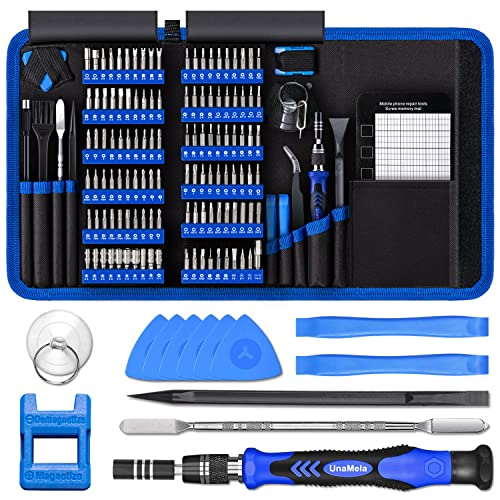 PC Building Tool Kit 140-IN-1: Computer Tool KitSmall9.45 x 5.7 x 1.57 inches1.6 PoundsCheck on Amazon
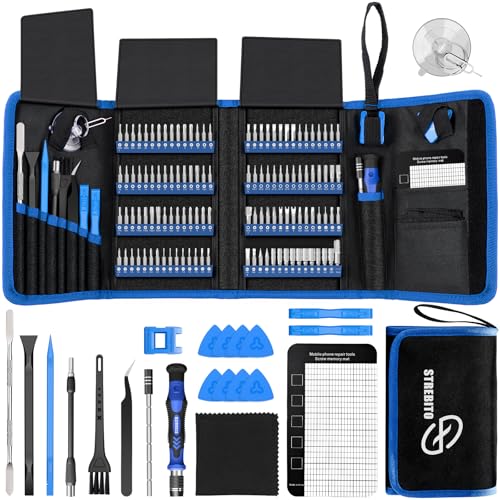 STREBITO Electronics Precision Screwdriver Sets 142-Piece with 1201428.66 x 5.51 x 1.57 Inches1.8 PoundsCheck on Amazon


Top 3 picks at a glance
Quick List
- PC Building Tool Kit 140-IN-1 – best overall for a first desktop build with a magnetic mat and flexible shaft
- STREBITO 142-Piece Precision Set – best for builders who also repair laptops, phones and consoles
- DEKOPRO 94-Piece Household Tool Set (runner-up, not PC-specific) – best for general home repairs rather than PC assembly
- QeeHeng Kids Real Tools Set (runner-up, not PC-related) – best as a children’s woodworking toy set, not for PC building
- Hi-Spec 56-Piece Repair Kit – best for a compact case with an anti-static wrist strap
- Fippy 101-Piece Model Tools Kit (runner-up, hobby use) – best for hobby model assembly, not for PC building
Which One Is Right for You?
| If you… | Choose |
|---|---|
| are building your first desktop and want a ready-made kit | PC Building Tool Kit 140-IN-1 |
| also plan to open laptops, phones or controllers | STREBITO 142-Piece Precision Set |
| want an anti-static strap and a smaller, organized case | Hi-Spec 56-Piece Repair Kit |
| need hammers, pliers and a tape measure for home projects | DEKOPRO 94-Piece Household Tool Set |
| are buying for a child to build wooden projects | QeeHeng Kids Real Tools Set |
| assemble plastic or resin hobby models | Fippy 101-Piece Model Tools Kit |
Only three of the six listings are built around electronics: the 140-IN-1, the STREBITO set and the Hi-Spec kit. The other three are general-purpose or hobby sets that appear in the same search results. They are described honestly below so you can rule them out quickly if your goal is a gaming PC.
All 6 Picks in Detail
1. PC Building Tool Kit 140-IN-1 – Best Overall for a First Build
As an Amazon Associate we earn from qualifying purchases at no extra cost to you.

This kit is named for the job. The listing describes a computer tool kit for repair and assembly, with CRV bits, a flexible shaft and kit contents aimed at laptops, phones and consoles as well as desktops. Retailer descriptions count 120 precision bits plus roughly 19 accessories, such as extension rods, a magnetizer, ESD tweezers, spudgers, a suction cup, a cleaning brush and a magnetic mat.
For a first PC build, the useful parts are a magnetic screwdriver handle, a Phillips bit for most case and motherboard screws, a small Phillips bit for M.2 retention screws, and the mat that keeps stray screws from rolling into the case. The flexible shaft helps reach screws near the rear panel or behind a motherboard tray. Most of the remaining bits are for phones and consoles and will stay in their rack.
- About 120 bits plus accessories, 140 items per the title
- Chrome-vanadium bits in a labeled rack
- Flexible shaft and extension rod
- Magnetic mat and magnetizer
- Carrying bag; exact bag and bit-material details: confirm on listing
Pros:
- Includes the bits and mat a first build actually needs
- Useful for later laptop or console repairs
Cons:
- Most bits are unnecessary for a desktop build
- Item count in the title exceeds the count some retailers list
A common beginner mistake is trying to use every bit in a kit. Pick the Phillips tip that fits snugly, ignore the rest and put the rack away. The mat is worth setting up before you open the first box, because a lost standoff screw is far easier to prevent than to find. It overlaps heavily with the STREBITO set, so the choice often comes down to which accessories you prefer.
2. STREBITO 142-Piece Precision Set – Best for Builders Who Also Repair Devices
The STREBITO set is the closest rival to the 140-IN-1. The listing describes a 142-piece electronics precision screwdriver set with 120 bits and a magnetic repair tool kit for phones, laptops, computers and consoles. Retailer descriptions list a precision driver, about 21 repair tools, a magnetizer, a magnetic mat, a suction cup, a spudger, tweezers, a cleaning brush and a bag, and name bit types such as Phillips, Torx, Pentalobe, tri-wing and hex.
Its strength is breadth. A person who builds a PC this month and swaps a phone battery next month will use more of the set than a pure PC builder. The flexible shaft and rubberized handle are practical, and a rack with labeled sizes saves time hunting for bits. As with the other precision kits, the driver is small, so apply modest force to avoid stripping heads.
- 120 bits and about 21 accessories (counts vary by retailer)
- Magnetic mat and magnetizer
- Flexible shaft and suction cup
- Bits described as chrome-vanadium steel
- Carrying bag with labeled bit rack
Pros:
- Wide range of bit types for repairs
- Organized storage
Cons:
- Overkill for a single desktop build
- Small handle can tire the hand on stiff cooler screws
Two details are worth checking before you buy: the retailer descriptions disagree on whether the accessory count is 21 or 22, and model numbers differ between colors, so make sure the product page matches the contents you expect. For a person with a home workbench and several gadgets to maintain, that breadth is the main selling point. Against the 140-IN-1, it offers a nearly identical bit selection with a slightly different accessory mix.
3. DEKOPRO 94-Piece Household Tool Set – Best for General Home Tasks (Runner-Up, Not PC-Specific)
This listing is a general household set and does not target PC assembly. It is described as a 94-piece tool set for household DIY with a storage toolbox, suited to home repair and apartment use. A typical set of this kind contains a hammer, pliers, a tape measure, a few screwdrivers and an assortment of hardware, but the exact contents are not stated in the listing title, so confirm them before relying on it.
If it includes a medium Phillips screwdriver with a magnetic tip, that single tool can cover most of a PC build, because case screws, motherboard screws and drive screws are mostly standard sizes. Treat the remaining pieces as useful household extras. It lacks the precision bits needed for M.2 screws and any anti-static protection, so it is better as a second kit than as the only one.
- 94 pieces in a storage toolbox per the listing
- General hand tools; contents: confirm on listing
- Not designed for electronics work
- May include one usable Phillips screwdriver
- Toolbox storage
Pros:
- Handy for furniture, shelves and home fixes
- Hard case keeps everything together
Cons:
- Not intended for PC assembly
- Likely lacks small precision bits
If you already own a set like this, check the screwdriver: a magnetic Phillips #2 is all a basic build requires, and you can add a small precision driver for M.2 screws later. Buying it only for PC assembly would be a mismatch, because the household extras would stay in the box. Compared with the Hi-Spec kit, it covers broader household jobs but far fewer electronics tasks.
4. QeeHeng Kids Real Tools Set – Best as a Children’s Woodworking Set (Runner-Up, Not for PC Building)

This product does not belong in a PC building guide. It is described as a 30-piece set of real hand tools for children, with woodworking and construction learning in mind. It is built around a young builder’s projects rather than electronics, so it is not designed for motherboards, coolers or drive bays.
Children interested in computers are better served by supervised assembly with an adult-sized precision driver. A kids’ set can still teach safe tool habits, but sizes, materials and tolerances are different from electronics tools. Keep it away from sensitive components.
- 30 pieces per the listing
- Woodworking and construction focus
- Made for children
- Not an electronics kit
- Contents: confirm on listing
Pros:
- Good for teaching basic tool use to children
- Small sizes suit small hands
Cons:
- Unsuitable for PC building
- No precision bits or anti-static items
It sits at the opposite end of the list from the electronics-focused kits and is included only because it appears in the same results.
5. Hi-Spec 56-Piece Repair Kit – Best for a Compact Case With an Anti-Static Strap

The Hi-Spec kit is smaller and more PC-focused than it first looks. The listing describes a 56-piece electronics repair and opening kit for laptops, devices and computers with organized portable storage. Retailer and maker descriptions list around 20 S2 steel bits and 16 chrome-vanadium bits, a handle with a flexible extension, pry levers, a suction cup, long-nose pliers, wire cutters and an anti-static wrist strap, in a zippered case.
The wrist strap is the reason to choose it. Static discharge is a small but real risk to memory and drives, and a strap clipped to a bare metal part of the case keeps you at the same potential as the parts you handle. Some included tools, such as the utility knife and pliers, are more than a PC build needs, and the exact itemized breakdown of the 56 pieces is not confirmed in the listing, so check the product page for the bit types you want.
- 56 pieces in a zippered case
- S2 and chrome-vanadium bits per retailer descriptions
- Anti-static wrist strap
- Pry tools, pliers and suction cup
- Itemized contents: confirm on listing
Pros:
- Includes an anti-static strap
- Compact and organized
Cons:
- Fewer bits than the 120-bit kits
- No magnetic mat mentioned in the title
The pliers and utility knife are not needed for assembly, but they help with opening retail packaging, trimming zip ties and general cable tidying, provided you cut away from the board and any cables. The case also makes it easy to keep the kit in a closet and carry it to a friend’s house for an upgrade. Next to the 140-IN-1, it trades bit variety for a strap and a smaller footprint.
6. Fippy 101-Piece Model Tools Kit – Best for Hobby Models (Runner-Up, Not for PC Building)

The Fippy kit is a hobby set. The listing describes 101 pieces for model making, with tools for basic model assembling, building and repairing. These sets usually contain hobby knives, files, sanding sticks, tweezers and cutters for plastic or resin models, so they do not replace a screwdriver for a PC build.
A few items could help at the edges, such as tweezers for retrieving a dropped jumper or a soft brush for dust, but the knife blades and files can damage circuit boards if used carelessly. Use this set for the hobby it was designed for, and keep it away from the motherboard.
- 101 pieces per the listing
- Hobby and model-making tools
- Not a screwdriver set
- Sharp blades require care
- Exact contents: confirm on listing
Pros:
- Good for plastic model assembly
- Tweezers and brushes can be handy as extras
Cons:
- Not intended for PC assembly
- No precision screwdriver bits
It is the least relevant kit here and works only as an add-on to a proper screwdriver.
Specs Compared
| Kit | Pieces | Intended use | Bits | Key extras | PC build ready? |
|---|---|---|---|---|---|
| PC Building Tool Kit 140-IN-1 | 140 per title | PC, laptop and console repair | About 120 CRV bits | Flexible shaft, magnetic mat, magnetizer | Yes |
| STREBITO 142-Piece | 142 per title | Electronics repair | 120 bits | Magnetic mat, suction cup, spudger | Yes |
| DEKOPRO 94-Piece | 94 per title | Household DIY | Confirm on listing | Storage toolbox | Only if a Phillips driver is included |
| QeeHeng Kids Real Tools | 30 per title | Children’s woodworking | None stated | Kid-sized hand tools | No |
| Hi-Spec 56-Piece | 56 per title | Electronics repair | About 36 bits per retailer descriptions | Anti-static strap, pry tools, zipper case | Yes |
| Fippy 101-Piece | 101 per title | Hobby model making | None stated | Hobby knives and files, confirm | No |
How We Chose These
This guide is built from desk research. We began with the products shown in current catalog listings and read titles and specification fields for piece count, intended use, bit types and included accessories. We then compared those fields with manufacturer-style descriptions and retailer text where available. Kits were ranked by how well their stated contents match the real needs of assembling a desktop: a magnetic driver with Phillips bits, small bits for M.2 screws, a way to organize screws and, ideally, anti-static protection. Listings that are clearly general-purpose or hobby sets are labeled as runners-up so readers are not misled by piece counts.
What to Look For
What a PC build actually needs
Most desktop assembly relies on a single tool: a Phillips screwdriver, typically a size #2 for case screws, motherboard standoffs and many cooler brackets, plus a smaller bit for M.2 retention screws. Some cases use hex or Torx heads on specific parts, and some coolers ship with their own driver. Everything else is a convenience, from a flexible shaft to a magnetic mat.
That is why a kit with 140 pieces is not meaningfully better for a PC than one with 50 if both include the same few bits. Judge a kit by the bits you will use, not the total count.
Magnetic tips, mats and organization
A magnetic tip holds small screws and saves you from fishing them out of a case. A magnetic mat or tray keeps the screws sorted by step. Magnetized tools are generally fine around modern solid-state parts, but keep strong magnets away from any old mechanical hard drive platters and avoid dragging a magnetized tip across exposed circuitry.
Practical habit: sort screws into groups as you remove them, such as case, motherboard standoff, drive and cooler screws, because lengths and thread types differ.
Static protection and safe handling
Static discharge can damage memory, drives and processors without any visible sign. A wrist strap clipped to bare, unpainted metal on the case, or regularly touching the metal chassis while working, equalizes your charge with the parts. Work on a hard surface rather than carpet, and handle boards by the edges.
Never rely on a strap for mains-powered work. Always switch off and unplug the power supply before connecting cables, and note that a strap does not make it safe to open the power supply itself, which holds hazardous energy even when unplugged.
Bit quality, steel and driver feel
Chrome-vanadium and S2 steel are both common for precision bits and are hard enough for electronics screws. The important points are bits that fit snugly in the driver and screw heads without wobble, because loose bits strip heads. Apply gentle, straight pressure and turn slowly, especially on small M.2 screws, which can snap or round off when forced.
A rule of thumb: stop tightening when resistance rises. Most PC screws want firm hand tension, not force.
A worked example: where each tool is used in a build
Walk through a typical assembly and the tool list shrinks quickly. First, fit the processor, memory and an M.2 drive on the motherboard outside the case on its box, which needs only the small bit for the drive’s retention screw. Second, mount the motherboard on its standoffs inside the case with a #2 Phillips bit, using roughly eight to nine screws. Third, fix the power supply, graphics card and storage drives with the same bit. Fourth, tidy cables with zip ties or hook-and-loop straps.
In that sequence, a single magnetic handle with two Phillips sizes does almost everything, and the mat keeps the screws sorted by step. The flexible shaft helps only if you need to reach a screw near a rear panel or behind a bracket. If your kit also has a pair of tweezers, you can use them to set tiny jumper connectors for front-panel pins, which is usually the fiddliest part of a first build.
Add-ons worth having
Small extras can make a build smoother: flush cutters or scissors for zip ties, a headlamp or flashlight for dark case corners, tweezers for jumper pins and a soft brush for dust. Many of these appear in the electronics kits, which is another reason to prefer them over hobby or household sets.
Questions
What screwdriver size is needed to build a PC?
A medium Phillips screwdriver, usually size #2, handles most case, motherboard and drive screws. A smaller Phillips bit is used for M.2 drive screws, and some coolers or cases need a hex or Torx bit.
Do I need a magnetic screwdriver?
It is not required, but it helps hold tiny screws and prevents dropped parts inside the case. Keep the magnetic tip away from old mechanical hard drives and avoid touching exposed circuitry with it.
Is an anti-static wrist strap necessary?
It is optional but low-effort insurance. If you do not use one, touch the bare metal of the case often, handle parts by their edges and avoid working on carpet.
Can I use a household tool set to build a PC?
Possibly, if it includes a magnetic Phillips screwdriver in a suitable size. General sets usually lack small bits for M.2 screws, so a precision kit is a better primary choice.
How many pieces do I really need?
Very few. A magnetic driver with two Phillips sizes, a tray for screws and a pair of flush cutters cover nearly every build. Additional pieces matter only if you also plan to repair phones, laptops or consoles.
Are kits for children safe for electronics work?
Children’s tool sets are made for woodworking, not electronics, so they lack proper bits and static protection. Adults should supervise any computer assembly by a young builder and supply a proper precision driver.
Update History
- October 20, 2026 – Initial publication; product set drawn from current catalog listings.
- Check the product page for current specifications and availability before buying.
Sources
- Manufacturer-style product descriptions and retailer text for the listed kits
- Retailer listing titles and specification fields


