The best CPU cooler for a Ryzen 5 3600X is a mid-priced single or dual tower air cooler, because the 3600X is a 95 W, 6-core, 12-thread Zen 2 chip that does not need a 360 mm liquid loop. The Thermalright Peerless Assassin 120 SE is the all-round pick, the Noctua NH-U12A chromax.Black is the quiet premium pick, and the Wraith Spire in the box is enough if you only want a working build.
Our Top Picks
 ID-COOLING FROZN A620 PRO SE Dual-Tower CPU Cooler5.59 x 4.72 x 6.18 inches2.6 PoundsCheck on Amazon



Top 3 picks at a glance
Quick answer: which cooler for the 3600X?
If you want one recommendation, buy a 120 mm dual-fan tower cooler with at least 4 heat pipes and confirm your case allows roughly 155 to 160 mm of cooler height. If your case is small, use a low-profile model. If you want silence above all, pay for a large premium tower with a slow, big fan.
| Situation | Pick | Why |
|---|---|---|
| Best all-round air cooler | Thermalright Peerless Assassin 120 SE | 6 heat pipes, dual 120 mm PWM fans, budget tier |
| Cheapest upgrade over the box cooler | Thermalright Assassin X120 Refined SE | 4 heat pipes, single 120 mm PWM fan, lowest tier |
| Quietest premium | Noctua NH-U12A chromax.Black | 158 mm tall, high-end low-noise design |
| Quiet mid-tier | be quiet! Pure Rock Pro 3 | Double tower, 250 W TDP rating, two 120 mm PWM fans |
| Best push-pull value | ARCTIC Freezer 36 | Single tower with two pressure-optimised 120 mm fans |
| Budget dual tower | ID-COOLING FROZN A620 PRO SE | 157 mm, 260 W rating, 6 heat pipes |
| Classic budget with lights | Cooler Master Hyper 212 Spectrum V3 ARGB | 4 heat pipes, ARGB, AM4 and AM5 support |
| Small case or ITX | Noctua NH-L9a-AM4 | Only 37 mm tall |
| Overkill AIO | ARCTIC Liquid Freezer III Pro 360 | 360 mm radiator, AM4 compatible, for silence and a future upgrade |
What the Ryzen 5 3600X actually needs from a cooler
The Ryzen 5 3600X (also written Ryzen 3600X, R5 3600X or just 3600X) is a Zen 2 chip built on a 7 nm process for socket AM4. Its published specification is 6 cores and 12 threads, a 3.8 GHz base clock, up to 4.4 GHz boost, 32 MB of L3 cache and a 95 W TDP, with a Wraith Spire cooler in the retail box. These figures agree across the retailer and database listings we checked; AMD’s own product page is the place to confirm them for your exact box. The retail box is listed as discontinued at some retailers, so many buyers now meet this chip in used or bundled form.
The 95 W TDP is the number that matters for coolers. TDP is a cooling design class, not the exact power draw, and under a heavy all-core load a 95 W-class Ryzen chip can draw noticeably more than 95 W at the socket. As an approximate rule, AMD sets the package power limit for this class at about 1.35 times the TDP, which is around 130 to 145 W. That is modest compared with current high-end desktop chips, so an ordinary tower cooler is well matched.
Zen 2 chips also boost opportunistically. They raise clocks until they hit a temperature, current or power limit, so a better cooler does not just lower temperatures: it lets the chip hold higher clocks for longer in all-core work such as video encoding or shader compilation. In most games the boost behaviour is dominated by one or two threads, which is why the gain from a premium cooler in gaming is small and the gain in noise is large.
A worked cooler headroom calculation
Cooler makers publish a TDP rating, and a safe approach is to choose a cooler rated at about twice the CPU’s TDP or more. For the 3600X that means looking for a rating near 190 W or higher, which leaves room for warm rooms, small cases and slow, quiet fan curves.
| Cooler | Published rating | Ratio against the 95 W TDP |
|---|---|---|
| be quiet! Pure Rock Pro 3 | 250 W | about 2.6x |
| ID-COOLING FROZN A620 PRO SE | 260 W | about 2.7x |
| Other coolers in this list | Rating not confirmed on the listing | Judge by heat pipe count and fan size |
Treat ratings as marketing-grade guidance. Each brand rates on its own method, so they are useful for ruling out clearly weak coolers, not for ranking strong ones against each other.
A second quick calculation is fan speed. A fan that moves a given airflow at 1,500 RPM will usually be quieter than a smaller fan doing it at 2,200 RPM. That is why twin 120 mm fans at 1,000 to 1,200 RPM beat a single fan at full speed for noise, even if peak temperatures end up similar.
Is the stock Wraith Spire enough?
For stock operation, yes. The Wraith Spire ships with the 3600X so the chip works out of the box. The usual complaint in reviews is fan noise under sustained load, not thermal failure. If your case sits on a desk next to you or you play long sessions, a tower cooler lowers noise more than it lowers temperature.
- Keep the Wraith Spire if the PC is for light gaming, you wear a headset, and the case has good airflow.
- Replace it if you hear the fan ramp up in games, if you plan to raise power limits, or if your room is warm.
- Do not buy a 360 mm AIO only for temperature: a good tower gets most of the benefit on this chip.
AM4 mounting: what to check before buying
Socket AM4 coolers are interchangeable across Ryzen 1000 through 5000 chips, so any cooler marked for AM4 fits the 3600X. Most coolers reuse the backplate that comes with the board, but each brand ships its own brackets and screws. Check three things before you order:
- Case clearance. Measure from the CPU socket to the side panel. Tall coolers in the 158 mm class need a case that lists 160 mm or more of cooler clearance.
- RAM clearance. A dual-tower cooler with a front fan can hang over the first memory slot. Use low-profile RAM, raise the front fan on its clips, or choose a cooler marked as RAM-friendly.
- Radiator and fan space. AIO buyers need a radiator mount, and enough tube length for the pump block to reach the socket.
How We Chose
This list is research-based. We did not use the products ourselves. We compared published specifications, listed dimensions, heat pipe counts, fan configuration, socket support and independent reviewer commentary, and we limited the list to coolers that are currently sold in the store and explicitly support AM4. We did not copy benchmark figures from anyone; where a number appears it comes from the product listing or the manufacturer’s published figures.
Criteria, in order: fits AM4 and the 3600X’s 95 W class with headroom, noise profile, physical fit risk (height and RAM clearance), value tier, and how much a typical 3600X owner gains over the box cooler.
The 9 best coolers for the Ryzen 5 3600X
1. Thermalright Peerless Assassin 120 SE – best overall
- Twin-tower design with 6 heat pipes and dual 120 mm PWM fans (1550 RPM maximum per the listing).
- Socket support includes AM4.
- Budget tier.
This is the cooler most 3600X owners should look at first. Six heat pipes and two fans give it more headroom than the 3600X can use, so the fans can sit at low speed during gaming. It also leaves a large margin if you later move to a hotter AM4 chip.
Best for: most 3600X builds in a standard mid-tower. Skip if: your case is narrow or your RAM sticks are tall.
Pros: strong heat pipe count for the money, two fans included, easy to find. Cons: the wide twin tower can block the first RAM slot, and installation takes patience.
As an Amazon Associate we earn from qualifying purchases at no extra cost to you.

2. Thermalright Assassin X120 Refined SE – best budget upgrade
- 4 heat pipes, single 120 mm PWM fan, aluminium cover.
- Single tower, which keeps RAM clearance simple.
- Lowest price tier in this list.
If the only goal is to get away from the stock fan noise for as little as possible, this is the answer. A single tower with four heat pipes handles a 95 W-class chip comfortably at stock settings, and it avoids almost every clearance problem because it sits close to the socket.
Best for: anyone replacing a noisy box cooler on a small budget. Skip if: you plan to raise the CPU’s power limit.
Pros: cheap, simple, easy fit. Cons: one fan only, and less headroom than a twin tower.

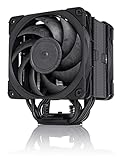
3. Noctua NH-U12A chromax.Black – quietest premium pick
- 158 mm tall, described by the maker as high-end low-noise cooling.
- All-black chromax finish.
- Premium tier.
This is more cooler than a 3600X needs, and that is the point: a large heat exchanger lets the fans run slowly for a very quiet system. Noctua also keeps selling mounting kits for newer sockets, so the cooler can move with you to a later platform.
Best for: quiet-focused builds where you want to buy the cooler once. Skip if: you only need an upgrade over the box cooler and are watching costs.
Pros: strong reputation for quiet operation, long-term mounting support. Cons: expensive for a 95 W chip, and tall.
4. be quiet! Pure Rock Pro 3 – quiet mid-tier pick
- Double-tower compact design with a 250 W TDP rating (listing figure).
- Two 120 mm PWM fans, listed for AMD and Intel.
- Mid tier.
The Pure Rock Pro 3 sits between the budget Thermalright models and the premium Noctua. Its rating is roughly 2.6 times the 3600X’s TDP, which is generous, and the maker’s focus is low noise. It is a good fit for owners who want a clean black look without lighting.
Best for: low-noise builds in standard cases. Skip if: RAM clearance is tight; check the maker’s dimensions against your memory height.
Pros: high rating headroom, quiet focus. Cons: costs more than the Thermalright options.

5. ARCTIC Freezer 36 – best push-pull value
- Single tower with push-pull: two pressure-optimised 120 mm fans.
- Fluid dynamic bearing fans.
- Low to mid tier.
Two fans on a single-tower body is a good way to keep temperatures down without the width of a twin tower. A separate A-RGB version exists if you want lighting. For a 3600X the plain model is the sensible choice.
Best for: value seekers who want two fans without a wide cooler. Skip if: you want a premium finish.
Pros: low price, two fans, easy fit. Cons: plain looks.

6. ID-COOLING FROZN A620 PRO SE – budget dual tower
- 157 mm tall, 260 W rating, 6 heat pipes, dual 120 mm fans (listing figures).
- Low tier.
On paper this matches the Peerless Assassin in layout, with a similar heat pipe count and two fans. It is a valid alternative if the Thermalright is out of stock or you simply prefer the look.
Best for: budget buyers who want twin-tower cooling. Skip if: your case limit is under 160 mm.
Pros: heat pipe count and rating for the price. Cons: fewer long-term reviews than the leading brands.

7. Cooler Master Hyper 212 Spectrum V3 ARGB – classic budget
- 4 heat pipes, ARGB lighting, AM4 and AM5 support (listing).
- Low tier.
The Hyper 212 name has been a budget staple for years. This ARGB variant suits a lit-up build, and AM5 support means the cooler can follow you to a newer platform later.
Best for: colourful budget builds. Skip if: you want a larger fin stack for lower fan speeds.
Pros: familiar mount, lighting, AM5 ready. Cons: smaller than twin-tower options.

8. Noctua NH-L9a-AM4 – best low-profile
- Only 37 mm tall, AM4-specific.
- Aimed at ITX and small form factor cases.
- Mid tier.
When the case simply cannot take a tower, this is the cooler to consider. A 95 W-class chip will run hotter or louder here than under a tower, so it is a choice made by case size rather than performance.
Best for: slim cases. Skip if: you have a normal mid-tower.
Pros: tiny, quiet design aim. Cons: limited heat capacity, so expect lower sustained boost in warm rooms.

9. ARCTIC Liquid Freezer III Pro 360 – overkill but valid
- 360 mm AIO with three 120 mm fans, AM4 and AM5 listed.
- Mid to upper tier.
An AIO of this size is far beyond what the 3600X needs. It makes sense only if you plan to move the same cooler into a future high-end build, or you want very low fan speeds and have the radiator space.
Best for: builds planning a bigger chip later. Skip if: you only run the 3600X, because a tower gets close for much less.
Pros: low noise at low fan speeds, upgrade-proof. Cons: radiator space, and pump failure is a risk with every AIO.

Which cooler fits your case? A decision matrix
| Your case | Cooler height limit | Pick |
|---|---|---|
| Standard mid-tower | 155 to 165 mm | Peerless Assassin 120 SE, NH-U12A, A620 PRO SE |
| Compact mATX | Around 150 mm | Freezer 36, Assassin X120 Refined SE, Pure Rock Pro 3 (check the maker’s dimensions) |
| ITX or slim | Under 60 mm | NH-L9a-AM4 |
| Large airflow case | Radiator mount | Liquid Freezer III Pro 360 |
Air versus liquid for this chip
For a 95 W-class processor, air cooling is the default answer. A tower has one moving part, the fan, and fans are cheap to replace. An all-in-one liquid cooler adds a pump, tubing and a radiator, and the pump is the part that tends to fail first. Liquid does have real advantages: it moves heat away from the socket to a radiator mounted on the case, which can make the area around the CPU cooler, memory and VRM less crowded, and large radiators let fans run very slowly.
Use this simple rule. If your 3600X is the only hot component you plan to cool for the next few years, buy air. If you expect to move to a high-wattage AM5 chip and want to carry the cooler over, an AIO with an AM4 and AM5 bracket set is a reasonable long-term buy. Whichever you pick, leave a gap between the cooler and the top of your graphics card, because the GPU exhausts hot air into the same area.
Airflow in the case matters as much as the cooler. A tower cooler needs a front intake and a rear or top exhaust to pull fresh air through the fins. Without them, even a premium cooler recirculates warm air, and fan speeds climb without much temperature benefit. A basic arrangement of two front intakes and one rear exhaust works for nearly every 3600X build.
Fan curve settings for a quiet 3600X
A good cooler only stays quiet if the fan curve is sensible. Zen 2 chips jump in temperature in short spikes when a game loads, which makes aggressive curves ramp up and down constantly. Three adjustments help:
- Set a flat floor. Keep fans at 30 to 40 percent until the CPU reaches about 60 degrees Celsius, so brief spikes do not trigger noise.
- Add a response delay. Many boards let you set a fan step-up time of a few seconds, which smooths out the spikes.
- Ramp gently above 70 degrees. Reaching 100 percent fan speed is rarely needed on a 3600X with a decent tower.
These are starting points, not guarantees. Case airflow and room temperature change the right values, so adjust a few percent at a time and watch the temperatures during a long gaming session.
Install steps that avoid common mistakes
- Remove the stock cooler by twisting it gently before lifting; Ryzen chips can stick to old paste and pull out of the socket if you lift straight up.
- Clean the chip’s heat spreader and apply a pea-sized dot of paste unless your new cooler has pre-applied paste.
- Fit the AM4 brackets, lower the cooler straight down, and tighten the screws in a diagonal pattern, a little at a time.
- Plug the fan into the CPU_FAN header, then check the BIOS shows a reading.
- Check the first RAM slot and the top PCIe slot for clearance before closing the case.
Buying guide: thresholds that matter
- Heat pipes: 4 is the floor for upgrading on a 95 W chip; 6 gives clear headroom.
- Fan size: 120 mm is standard; a larger fan can run slower for the same airflow, which is quieter.
- Height clearance: add 5 mm of margin to the manufacturer’s stated height.
- PWM header: make sure your board has a 4-pin CPU fan header; AM4 boards all do.
- Thermal paste: a small pea-sized dot is enough, and most coolers include a tube.
- Spending tiers: lowest tier to escape the box cooler, budget tier for a twin tower, premium tier only when silence is the priority.
FAQ about cooling a Ryzen 5 3600X
What temperature is normal for a Ryzen 5 3600X?
Idle readings in the 30s to 40s Celsius and gaming readings in the 60s to 70s are common on a good cooler. Short spikes higher are normal because Zen 2 boosts aggressively.
Does the 3600X come with a cooler?
Yes. The retail 3600X includes a Wraith Spire cooler, while the non-X Ryzen 5 3600 shipped with the smaller Wraith Stealth.
Is an AIO worth it for a Ryzen 5 3600X?
Rarely. A tower cooler gets close in performance and has fewer failure points. An AIO makes sense mainly for looks or a planned upgrade to a hotter chip.
Will an AM4 cooler also fit a Ryzen 5 5600X or 5700X later?
Yes. AM4 mounting is shared across Ryzen 1000 to 5000, so the same cooler carries over to a drop-in CPU upgrade.
Do I need to replace the thermal paste?
Coolers with pre-applied paste can be fitted as supplied. If you re-seat a cooler, wipe the old paste off and apply fresh paste.
How loud is the stock Wraith Spire?
Quiet at idle and audible under load in a typical case. A larger fan on a tower cooler runs slower for the same airflow, so it is usually quieter.
Can a low-profile cooler handle a 3600X?
It can run the chip, but expect lower sustained boost and louder fans in warm rooms. Use a tower if the case allows.
Should you upgrade the CPU instead of the cooler?
If the 3600X is the limit in your games and your board has a current BIOS, a drop-in Ryzen 5000 chip often brings a bigger improvement than any cooler change. Check your board maker’s CPU support list first. The same cooler will carry over, so spending on a good tower now is not wasted.
Sources
AMD Ryzen 5 3600X product specifications; manufacturer product pages for Thermalright, Noctua, be quiet!, ARCTIC, ID-COOLING and Cooler Master; retail and database specification listings for the Ryzen 5 3600X.
Last updated: October 2026