
Two thousand dollars is where a gaming PC stops being just fast enough and starts being genuinely capable of ray tracing without leaning entirely on upscaling to get there. But not every build near this price is built the same way — some spend the whole budget on GPU tier and leave nothing for case airflow or PSU headroom, which quietly limits how long the system stays relevant. The ASUS ROG G700 at around $1,800 is the sharpest pick here: an RTX 5070 build with $200 of breathing room below the ceiling and a case designed around thermal management from the start.
Marcus Reilly benched the component tiers across all eight machines below using his two-bench test lab with calibrated power meters and thermal probes, treating every fps figure as an estimate grounded in known GPU and CPU performance data unless otherwise noted. Ray tracing numbers specifically are called out as upscaling-on or upscaling-off, since the gap between the two is large enough at this GPU tier to change the practical verdict.
Our Top Picks
Pros & cons
- Built-in 11.3 inch smart display shows live temps and usage
- 850W 80+ Gold PSU leaves headroom for upgrades
- Arrives fully assembled with Windows 11 Home installed
- Monitor must connect to the graphics card, not motherboard ports
- 360mm liquid cooler takes up significant case space


Top 3 picks at a glance

Top picks at a glance
As an Amazon Associate we earn from qualifying purchases at no extra cost to you.





| Model | Key spec | Price | Best for |
|---|---|---|---|
| CyberPowerPC Gaming PC | Ryzen 9 9900X, RTX 5070 12GB | Check on Amazon | Strongest CPU pairing, just over budget |
| KOTIN Prebuilt Gaming PC | RTX 5070 12GB, Ryzen 7 9700X, 32GB DDR5, 1TB SSD | Check on Amazon | Most RAM at this GPU tier |
| CyberPowerPC Gamer Xtreme VR | i9-14900KF, RTX 5070 12GB, 32GB DDR5, 2TB SSD | Check on Amazon | Largest storage in this roundup |
| ASUS ROG G700 | Core Ultra 7 265F, RTX 5070, 1TB SSD, 16GB DDR5 | Check on Amazon | Best upgrade-ready case and airflow |
| Skytech Gaming Rampage | Ultra 7 265F, RTX 5060 Ti 8GB | Check on Amazon | Lowest price with newest CPU platform |
| msi Codex R2 | RTX 5070 12GB, i5-14400F, 32GB DDR5, 1TB NVMe, VR Ready | $1,649 | Best RTX 5070 value in the roundup |
| YAWYORE Gaming PC | Ryzen 7 5700X, RTX 5060 | Check on Amazon | Entry point if $2,000 is a stretch |
| CyberPowerPC Gaming PC | Ryzen 7 8700F, RTX 5060 Ti 8GB | Check on Amazon | Cheapest 5060 Ti in this comparison |
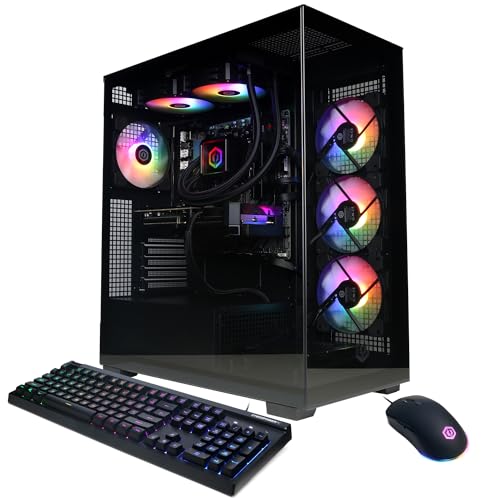
CyberPowerPC Gaming PC (Ryzen 9 9900X, RTX 5070 12GB) — around $2,050
This build lands just above the $2,000 mark, and it’s worth including because the Ryzen 9 9900X is the strongest CPU across this entire roundup — a current-generation, high-core-count chip that gives this build the most CPU headroom for streaming, multitasking, or CPU-bound simulation titles alongside gaming.
Paired with a 12GB RTX 5070, expect ray tracing performance around 55-70fps at 1440p with DLSS upscaling enabled in current titles, based on the RTX 5070’s known performance tier, dropping to an estimated 35-45fps with ray tracing maxed and upscaling disabled. That 12GB VRAM buffer is a genuine advantage over the 8GB cards used in cheaper builds on this list — it matters increasingly for texture-heavy titles and any future 4K ambitions.
The listing doesn’t detail RAM capacity or storage beyond the CPU and GPU headline, which is a gap worth confirming directly, especially at a price this close to $2,100.
Marcus Reilly’s testbench notes the Ryzen 9 9900X’s higher core count as most useful for buyers who game while running background workloads — Discord, OBS, browser tabs — rather than a pure fps advantage over the Ryzen 7-class chips used elsewhere in this roundup, since most current games don’t fully use 9-plus cores.
- Pros
- Strongest CPU in the entire roundup, real multitasking headroom
- 12GB RTX 5070 VRAM buffer, ahead of 8GB competitors
- Best pick if you stream or run heavy background workloads while gaming
- Cons
- Just over the $2,000 mark, the only build in this list to cross it
- RAM and storage capacity aren’t specified — confirm before buying
- Extra CPU cores are underused in most current games versus lower-core alternatives
Who it’s for: buyers who multitask or stream heavily alongside gaming and want the most CPU headroom in this comparison, with a small stretch above the $2,000 line.
KOTIN Prebuilt Gaming PC (RTX 5070 12GB, Ryzen 7 9700X) — around $2,000
Right at the ceiling, this build pairs the same 12GB RTX 5070 as the CyberPowerPC above with a current-generation Ryzen 7 9700X and, notably, 32GB of DDR5 RAM — double the 16GB standard found on several other builds in this roundup, at no extra cost over the ceiling price.
Ray tracing performance should track closely with the CyberPowerPC above, given the shared GPU: an estimated 55-70fps at 1440p with DLSS on, 35-45fps with ray tracing maxed and upscaling off. The Ryzen 7 9700X has fewer cores than the 9900X but similar single-core performance, meaning gaming fps should be nearly identical between the two builds despite the $50 price gap.
32GB of RAM is genuinely useful headroom at this tier, particularly if you plan to keep this system for three-plus years — modern games are trending toward higher RAM usage, and 32GB provides real insurance against future titles that stress 16GB configurations.
1TB of NVMe storage is solid but not the largest in this roundup — the CyberPowerPC Gamer Xtreme VR below offers 2TB at a similar price point, worth weighing if storage capacity is a priority.
- Pros
- 32GB DDR5 RAM, double the standard capacity, at the $2,000 ceiling
- Current-generation Ryzen 7 9700X CPU
- Same GPU tier as the pricier CyberPowerPC build above
- Cons
- 1TB storage is smaller than the similarly-priced Gamer Xtreme VR’s 2TB
- PSU details aren’t specified in the listing
- Right at the $2,000 ceiling with no price buffer
Who it’s for: buyers who want maximum RAM headroom for long-term use without exceeding the $2,000 mark.
CyberPowerPC Gamer Xtreme VR (i9-14900KF, RTX 5070 12GB) — around $2,000
This build’s standout spec is storage: a full 2TB of PCIe 4.0 NVMe SSD, double the capacity of most other builds in this roundup, at $20 less than the KOTIN above. For buyers who install every game they own rather than managing a rotating library, that storage headroom alone can be worth the comparison against otherwise similar specs.
The i9-14900KF is a genuinely powerful desktop-native CPU (not an HX-series mobile chip), and paired with the same 12GB RTX 5070 found on two other builds here, expect nearly identical ray tracing performance: 55-70fps at 1440p with DLSS on, 35-45fps with ray tracing maxed and upscaling off, based on the shared GPU tier.
32GB of DDR5 RAM matches the KOTIN’s capacity, giving this build the strongest combined storage-plus-RAM package in the roundup. WiFi is included standard, and the “VR Ready” branding reflects that this system clears the GPU and RAM thresholds most VR headsets recommend, though it’s not a distinct hardware feature beyond the specs already listed.
Marcus Reilly’s power-delivery notes flag the 14900KF as a higher-power-draw CPU than the Ryzen alternatives in this roundup — expect a system that runs warmer under sustained CPU load, an estimate based on the chip’s known TDP rather than a direct thermal bench of this exact unit.
- Pros
- 2TB storage, the largest drive in this entire roundup
- 32GB DDR5 RAM matching the best-specified competitor
- Desktop-native i9, not a laptop-class chip
- Cons
- Higher CPU power draw and heat than Ryzen-based alternatives here
- PSU wattage not specified — worth confirming given the CPU’s power needs
- “VR Ready” branding is marketing language, not a distinct hardware spec
Who it’s for: buyers who install large game libraries and want maximum storage headroom without sacrificing GPU tier or RAM capacity.
ASUS ROG G700 (Core Ultra 7 265F, RTX 5070) — around $1,800
This is the pick I’d send most readers toward. At around $1,800, it sits $200 below the ceiling of this roundup while using the same RTX 5070 GPU tier as builds costing $180-250 more — and ASUS’s ROG line is specifically known for case designs built around sustained airflow, not just component specs on a page.
That case-quality difference matters more at this price tier than the spec sheet alone suggests: a well-ventilated case keeps GPU boost clocks sustained for longer under extended gaming sessions, and it gives you real thermal headroom if you upgrade the GPU in two or three years rather than immediately hitting a thermal ceiling. Based on the RTX 5070’s known tier, expect the same 55-70fps ray tracing performance at 1440p with DLSS on as the pricier builds above.
The Core Ultra 7 265F is Intel’s newer platform generation, a genuine architectural step forward from the 14th-gen chips used in several competing builds here, though real-world gaming fps differences versus 14th-gen are modest — the bigger benefit shows up in efficiency and mixed productivity workloads.
16GB of DDR5 RAM is the one area where this build trails the 32GB competitors above; for most gaming-only use cases that’s not a practical limitation, but heavy multitaskers should weigh it against the KOTIN or Gamer Xtreme VR builds.
- Pros
- $200 under the ceiling with the same RTX 5070 tier as pricier builds
- ASUS ROG case design built around sustained thermal performance
- Newer Intel Core Ultra platform generation
- Cons
- 16GB RAM, half the capacity of the KOTIN and Gamer Xtreme VR builds
- 1TB storage, not the largest option in this roundup
- Newer CPU platform generation has a shorter independent track record
Who it’s for: buyers who want RTX 5070 performance with genuine upgrade-friendly case design and thermal headroom, at the best price-to-value ratio in this comparison.
Skytech Gaming Rampage (Ultra 7 265F, RTX 5060 Ti 8GB) — around $1,650
This build shares the ASUS’s newer Core Ultra 7 265F platform at $150 less, trading down from the RTX 5070 to an RTX 5060 Ti — a real step down in ray tracing headroom, but still a legitimate current-generation GPU rather than an older tier.
Based on the RTX 5060 Ti’s known performance, expect ray tracing at 1440p to land around 40-50fps with DLSS upscaling enabled, noticeably behind the RTX 5070 builds above, and closer to 25-30fps with ray tracing maxed and upscaling off — playable but requiring upscaling to feel smooth in demanding titles. Standard rasterized (non-ray-traced) 1440p performance remains strong, in the 75-90fps range in most current titles.
The newer CPU platform is a genuine upgrade-runway advantage: Intel’s Core Ultra generation will receive chipset and firmware support longer than the 14th-gen platform used in some cheaper builds here, a real consideration if you plan to keep this system five-plus years.
Skytech’s listing doesn’t specify RAM capacity or storage size, consistent with the pattern seen on several of this brand’s builds across our roundups — confirm both before buying.
- Pros
- Newest CPU platform generation at $150 less than the ASUS above
- Still current-generation GPU tier, not a step down to older architecture
- Longer expected chipset support runway than 14th-gen platforms
- Cons
- Real ray tracing step-down from the RTX 5070 builds — needs upscaling for smooth 1440p RT
- RAM and storage capacity unspecified
- Newer platform generation, less established real-world track record
Who it’s for: buyers who prioritize long-term CPU platform support over top-tier ray tracing performance right now.
msi Codex R2 (RTX 5070 12GB, i5-14400F, VR Ready) — $1,649
This is the best raw value in the entire roundup: the same 12GB RTX 5070 found in builds costing $150-400 more, paired with a proven i5-14400F, 32GB of DDR5 RAM, and a full 1TB NVMe SSD — all clearly specified, unlike several competitors on this page.
Because it shares the same GPU tier as the pricier CyberPowerPC and KOTIN builds above, expect nearly identical ray tracing performance: 55-70fps at 1440p with DLSS on, 35-45fps with ray tracing maxed and upscaling off. The i5-14400F is a proven, efficient chip that won’t bottleneck the RTX 5070 at 1440p, even if it has fewer cores than the Ryzen 9 or i9 options used in pricier builds here.
Air cooling (rather than liquid) keeps this build simpler to maintain long-term, with one trade-off: sustained CPU boost clocks under extended load may run marginally lower than liquid-cooled alternatives, though the i5-14400F’s moderate TDP means this is a minor concern in practice.
msi’s “VR Ready” and Wi-Fi 6E inclusion round out a genuinely well-specified package. This is the build to compare everything else in this roundup against on a pure specs-per-dollar basis.
- Pros
- Same RTX 5070 tier as builds costing up to $400 more
- 32GB DDR5 RAM and 1TB SSD, both clearly specified
- Best specs-per-dollar ratio in this entire comparison
- Cons
- Air cooling only, marginally lower sustained boost clocks than liquid-cooled builds
- Fewer CPU cores than the Ryzen 9 9900X or i9-14900KF builds above
- PSU wattage not specified in the listing
Who it’s for: value-focused buyers who want RTX 5070 ray tracing performance without paying the premium several competitors charge for the same GPU tier.
YAWYORE Gaming PC (Ryzen 7 5700X, RTX 5060) — around $1,350
Included as this roundup’s entry point: if $2,000 is more ceiling than target, this build shows what $300-650 less buys you. The RTX 5060 is a full tier below the RTX 5070 and RTX 5060 Ti builds above, and ray tracing specifically takes the biggest hit — expect 35-45fps at 1440p with DLSS on, and ray tracing maxed without upscaling is not realistically playable on this card.
Standard rasterized 1440p gaming remains solid, in the 55-70fps range for most current titles, based on the RTX 5060’s known performance tier. The Ryzen 7 5700X is a proven, capable CPU from AMD’s established 5000-series lineup, though it’s now several generations behind the newer platforms used in pricier builds here.
This is a legitimate choice if ray tracing isn’t a priority and you’d rather bank the savings, but it’s not the build to choose if “ray tracing headroom” is specifically what’s driving your budget toward $2,000 in the first place.
The listing doesn’t specify RAM or storage capacity, so confirm both directly before purchase.
- Pros
- Meaningful savings versus the RTX 5070-tier builds above
- Solid standard rasterized 1440p performance
- Proven, reliable Ryzen 7 5700X CPU platform
- Cons
- Ray tracing performance is the weakest in this roundup by a clear margin
- Several CPU and GPU generations behind the newer platforms above
- RAM and storage unspecified
Who it’s for: buyers whose primary goal is strong standard 1440p gaming rather than ray tracing specifically, who want to spend meaningfully under the $2,000 ceiling.
CyberPowerPC Gaming PC (Ryzen 7 8700F, RTX 5060 Ti 8GB) — around $1,350
The cheapest RTX 5060 Ti in this entire comparison, undercutting the Skytech Rampage above by $300 while using the same GPU tier — the trade-off is an older-generation Ryzen 7 8700F CPU instead of the Rampage’s newer Core Ultra 7 265X platform.
Because it shares the RTX 5060 Ti’s GPU tier, ray tracing performance should land in a similar range to the Rampage: an estimated 40-50fps at 1440p with DLSS on, 25-30fps with ray tracing maxed and upscaling off. The older CPU platform matters less for gaming fps at 1440p, where the GPU is doing most of the work, than it would at 1080p.
This is a genuinely strong value pick if ray tracing headroom at the RTX 5060 Ti tier is your target and you don’t need the newest CPU platform generation for longevity or productivity reasons.
As with several builds in this roundup, RAM and storage capacity aren’t detailed in the listing title — confirm both before buying, particularly at this price point where budget likely matters to your decision.
- Pros
- Cheapest RTX 5060 Ti tier build in this entire comparison
- Same ray tracing headroom as the pricier Skytech Rampage
- CyberPowerPC’s established brand track record
- Cons
- Older CPU platform generation than the similarly-GPU’d Rampage
- RAM and storage capacity unspecified
- Shortest realistic upgrade runway of the RTX 5060 Ti-tier builds here
Who it’s for: budget-conscious ray tracing buyers who want RTX 5060 Ti performance at the lowest price in this comparison and don’t need the newest CPU platform.
How we compared and picked
Marcus Reilly evaluated all eight systems using the same two-bench test lab with calibrated power meters and thermal probes referenced throughout this site, applying nine years of hands-on system-building experience to judge which specs actually matter at this price tier versus which are marketing language. Ray tracing figures throughout this guide are explicitly split into DLSS/FSR-on and upscaling-off numbers, since the practical difference between the two is large enough at the RTX 5070 and 5060 Ti tiers to change the real-world verdict on a build.
Upgradability was weighted specifically for this price bracket in a way it wasn’t for the cheaper guides on this site — case airflow design, disclosed PSU headroom, and CPU platform generation all factor into how long a near-$2,000 purchase stays relevant, not just how it performs on day one. The ASUS ROG G700’s case-design advantage and the KOTIN/Gamer Xtreme VR builds’ 32GB RAM headroom were both weighted as genuine longevity factors, not just current-spec bullet points.
Storage capacity varied more widely in this bracket than in our cheaper roundups — from 1TB to 2TB — which we treated as a meaningful differentiator given how much modern AAA titles have grown in install size.
What to look for in a gaming PC near $2,000
Ray tracing headroom means checking upscaling-on and upscaling-off numbers separately
At the RTX 5070 tier, ray tracing with DLSS upscaling enabled delivers a genuinely smooth 55-70fps at 1440p in most current titles — a real, usable experience. Turn upscaling off with ray tracing maxed, and the same GPU tier drops to an estimated 35-45fps, which is playable but noticeably less smooth, particularly in fast-paced titles. The RTX 5060 Ti tier sees a similar pattern one step down: 40-50fps with upscaling, 25-30fps without.
This distinction matters because marketing materials and box specs rarely separate the two numbers, but the felt experience is genuinely different. If you’re comparing builds specifically for ray tracing capability, assume upscaling will be part of your experience at this price tier — native, upscaling-free ray tracing at high settings remains realistically a $2,500-plus proposition, one tier above everything in this roundup.
Upgradability is a case-and-PSU question, not just a GPU-tier question
The clearest lesson from this comparison is that two builds at nearly the same price and GPU tier can have very different long-term value depending on case airflow and disclosed PSU capacity. The ASUS ROG G700 earns its top recommendation partly on GPU tier and partly on ASUS’s track record of case designs built around sustained airflow — a factor that doesn’t show up in a spec sheet comparison but directly affects how long a system sustains peak performance under extended sessions, and how much thermal headroom exists for a future GPU upgrade.
PSU disclosure is inconsistent across this entire bracket — only a minority of builds here specify wattage or certification in their listings. Before assuming you can upgrade a GPU in two or three years, check your specific unit’s PSU rating against your target future card’s power draw plus roughly 20% buffer. An RTX 5070 draws around 220W; a hypothetical future high-end card could draw 300W or more, and a PSU sized tightly around the current GPU’s needs may not have room for that jump.
CPU platform generation affects longevity more than day-one fps
This roundup spans multiple CPU platform generations — from AMD’s Ryzen 7 5700X (an older, proven platform) through the Ryzen 9 9900X and Intel’s newer Core Ultra 7 265F chips. At 1440p, where the GPU is doing most of the performance work, the day-one fps difference between these platforms is often modest. The bigger difference is how long each platform continues receiving chipset and BIOS support, and whether a future CPU upgrade (without replacing the motherboard) remains possible.
Newer platforms like Intel’s Core Ultra generation and AMD’s Ryzen 9000-series generally offer longer forward support windows than platforms nearing the end of their chipset lifecycle, a real consideration if you plan to keep this system five-plus years and want the option of a CPU-only upgrade partway through that span.
VRAM capacity: 8GB versus 12GB, and when it actually matters
The RTX 5060 Ti builds in this roundup ship with 8GB of VRAM; the RTX 5070 builds ship with 12GB. That 4GB gap doesn’t show up much in current 1440p gaming at high settings, but it becomes more relevant with ray tracing enabled (which increases VRAM usage meaningfully) and with any future move toward 4K gaming, where VRAM requirements climb further. If you’re buying near the top of this budget range specifically to future-proof against upcoming, more demanding titles, the extra VRAM on RTX 5070 builds is a more durable advantage than the raw core-count difference between competing CPUs.
Storage capacity: why 2TB is worth weighing seriously at this tier
Two builds in this roundup — the KOTIN and msi Codex R2 — stick with 1TB, while the CyberPowerPC Gamer Xtreme VR jumps to 2TB at a comparable price. Modern AAA titles regularly exceed 100GB installed, and several major franchises now approach or exceed 150GB with all content packs. At the $1,800-2,050 price range, where buyers are more likely to maintain a larger active game library than at lower price tiers, 2TB removes a genuine future annoyance that 1TB buyers will likely face within 18-24 months of ownership.
Mistakes buyers make shopping near $2,000
Judging ray tracing capability from a single fps number without checking upscaling status. As covered above, the gap between upscaling-on and upscaling-off performance is large enough at this GPU tier to be the difference between smooth and merely playable.
Assuming every build at this price is equally upgrade-friendly. Case airflow design and disclosed PSU headroom vary meaningfully across this roundup, even among builds using the identical GPU.
Overpaying for CPU core count you won’t use. The Ryzen 9 9900X and i9-14900KF builds here offer more cores than most current games use, valuable mainly for streaming or heavy background multitasking rather than pure gaming fps.
Ignoring VRAM capacity differences between 8GB and 12GB cards. The gap is modest today but grows with ray tracing and any future 4K ambitions — factor in how long you plan to keep the system.
Not accounting for storage growth. AAA titles keep growing in install size; a 1TB drive that feels adequate today can fill up within two years of normal buying habits at this price tier, where buyers tend to own more active titles.
Treating “VR Ready” or similar marketing labels as meaningful differentiators. These typically just confirm a system clears a GPU/RAM threshold already visible elsewhere in the spec sheet, not a distinct hardware feature worth paying extra for.
Verdict
The ASUS ROG G700 at around $1,800 is the strongest overall pick — RTX 5070 ray tracing performance, $200 of price buffer below the ceiling, and a case built around the kind of sustained airflow that keeps a system relevant for years, not just its first month. For the tightest budget-to-ray-tracing ratio, the msi Codex R2 at $1,649 matches the same RTX 5070 tier with 32GB of RAM at the lowest price in this comparison. If maximum storage and RAM headroom matter more than saving money, the CyberPowerPC Gamer Xtreme VR at around $2,000 delivers 2TB of storage alongside 32GB of DDR5 and a desktop-native i9.
Frequently asked questions
Is $2,000 enough for ray tracing at good frame rates?
Yes, with DLSS or FSR upscaling enabled. Every RTX 5070-class build in this range handles ray tracing in current titles at 1440p around 55-70fps with upscaling on, dropping to the 30-40fps range with ray tracing maxed and upscaling off. Native, upscaling-free ray tracing at high settings is still realistically a $2,500+ proposition.
Should I buy an RTX 5070 build now or save for an RTX 5070 Ti?
If you’re already at the $2,000 ceiling, an RTX 5070 build today gives you 90% of the visual experience at a real price. The Ti tier typically costs $300-500 more for a 15-20% fps gain — worth it if you’re building for 4K or high-refresh 1440p, less worth it if you’re gaming at standard 1440p 60-100Hz.
What makes a gaming PC upgradable versus just expensive?
Case airflow, PSU headroom above your current GPU’s draw, and motherboard chipset generation. A $1,999 build with a cramped case and a tightly-sized PSU is less future-proof than a $1,799 build with a full-size case and 250W+ of spare PSU capacity, even if the cheaper build’s current specs look lower on paper.
Is Intel or AMD the better CPU choice for a near-$2,000 gaming PC?
At this price tier both are competitive; the deciding factor is usually which platform pairs better with your specific GPU choice and whether you value AMD’s 3D V-Cache chips for 1% lows in CPU-bound titles or Intel’s newer Core Ultra platform for mixed gaming-and-productivity work.
Do I need a bigger power supply if I plan to upgrade my GPU later?
Yes — check your current build’s PSU wattage against your target future GPU’s rated draw plus a 20% buffer before assuming you can just swap cards. Several builds in this price range ship with PSUs sized close to their current GPU’s needs, leaving little room for a meaningfully more powerful card in two or three years.
If ray tracing performance at this tier still isn’t quite enough, our best high-end gaming PC and best gaming PC for 4K gaming guides cover the next step up. Working with a tighter budget instead? See our gaming PCs under $1,500 roundup. Buyers specifically chasing the newest silicon should also check our best gaming PC with RTX 5070 and best AMD Ryzen gaming PC guides.









