
For most mid-range gaming builds, the MSI MAG A750GL is the 750W power supply to start with: it is fully modular, 80 PLUS Gold rated, compact enough for small and mid-size cases, and ships with a native 12V-2×6 cable for current graphics cards. Anyone matching a 750W unit to a card in the 180W to 250W class will find it a comfortable fit, and the other picks below cover quieter, simpler and roomier alternatives. A 750W rating simply means the unit can deliver up to 750 watts continuously, which suits one mid-range GPU plus a modern 8-core processor with room to spare.
Our Top Picks
 Thermaltake GF1 Fully Modular ATX 750W Power Supply750W5.9 x 5.5 x 3.4 inches3.37 PoundsCheck on Amazon
 ASUS Prime 750W Gold Power Supply750W Gold|2 in 1 Color5.9 x 5.9 x 3.3 inches3.2 PoundsCheck on Amazon


Top 3 picks at a glance
Quick List
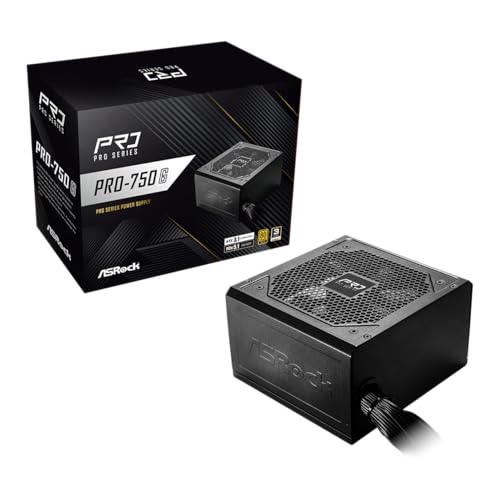
- ASRock PRO 750G – best for a simple Gold-rated build with a native 12V-2×6 connector
- MSI MAG A750GL PCIE5 – best all-round 750W choice for compact, tidy builds
- ARESGAME AGV 750W – best for a Bronze-rated, semi-modular unit with a long warranty
- MSI MAG A850GL PCIE5 (850W runner-up) – best for builders who want extra headroom beyond 750W
- Thermaltake GF1 750W – best for quiet operation with a zero-RPM fan mode
- ASUS Prime 750W Gold – best for a fully modular unit with a dual-ball-bearing fan
Which One Is Right for You?
| If you… | Choose |
|---|---|
| want a tidy, fully modular unit that fits compact cases | MSI MAG A750GL PCIE5 |
| care most about low fan noise at light loads | Thermaltake GF1 750W |
| want a fully modular unit with a long-lasting fan bearing | ASUS Prime 750W Gold |
| are happy with fixed cables and want a straightforward Gold unit | ASRock PRO 750G |
| plan to upgrade to a hungrier graphics card later | MSI MAG A850GL PCIE5 (850W) |
| are building to a tight budget and accept Bronze efficiency | ARESGAME AGV 750W |
Most buyers should weigh three things in order: certification and connector standard, modularity, and fan behavior. If your graphics card uses a 12V-2×6 or 12VHPWR connector, favor units that include a native cable rather than relying on an adapter. If your case is cramped, modular cabling matters more than a small efficiency difference.
All 6 Picks in Detail
1. ASRock PRO 750G – Best for Straightforward Gold-Rated Builds
As an Amazon Associate we earn from qualifying purchases at no extra cost to you.

The ASRock PRO 750G is aimed at builders who want a current-standard unit without paying for extras. The listing describes a 750W, 80 PLUS Gold power supply that is ATX 3.1 and PCIe 5.1 ready with a native 12V-2×6 connector, a 120mm low-noise fan and a 3-year warranty. That is a sensible feature set for a mid-range gaming rig with a modern graphics card, and it removes the need for a separate 16-pin adapter.
The listing name does not state whether the cables are modular. Manufacturer and retailer specification sheets appear to describe fixed, flat cables, so confirm this on the product page if cable routing in a small case is a priority. Fixed cables are fine in a roomy chassis with a power supply shroud, but they make leftover connectors harder to hide.
- 750W rated output, 80 PLUS Gold
- ATX 3.1 and PCIe 5.1 ready
- Native 12V-2×6 graphics connector
- 120mm low-noise fan
- 3-year warranty per the listing
Pros:
- Modern connector standard without an adapter
- Gold efficiency rating at 750W
Cons:
- Warranty is shorter than several competitors in this list
- Cable modularity should be confirmed before buying
Compared with the MSI MAG A750GL, it gives up fully modular cabling and a longer warranty in exchange for a simpler design.
2. MSI MAG A750GL PCIE5 – Best for Compact, Tidy Builds

The MSI MAG A750GL is the best overall pick here because it ticks nearly every box a mid-range gaming build needs. The listing calls it a fully modular, compact 750W gaming power supply with 80 PLUS Gold efficiency, ATX 3.1 and PCIe 5.1 readiness, and a native dual-color 12V-2×6 cable. Fully modular cabling lets you connect only what the system uses, which keeps airflow clear in a mid-tower and makes small-form cases far less frustrating.
Manufacturer specifications describe a 120mm fluid-dynamic-bearing fan and a body about 140mm wide by 150mm long by 86mm tall, so it clears most standard ATX power supply bays. The listing and retailer pages cite a 10-year warranty, though terms can vary by region, so check the product page.
- 750W, 80 PLUS Gold
- Fully modular, compact body
- Native dual-color 12V-2×6 cable
- ATX 3.1 and PCIe 5.1 ready
- Warranty cited as 10 years on retailer pages; confirm regionally
Pros:
- Fully modular with a native modern graphics cable
- Compact dimensions suit smaller cases
- Long warranty term cited
Cons:
- Manufacturer pages do not describe a semi-passive fan mode, so the fan may spin at idle
- Only one 12V-2×6 cable, so dual high-power cards are out of scope
It is the closest match to the ASUS Prime 750W Gold, with the MSI taking the edge on size and the ASUS on fan bearing type.
3. ARESGAME AGV 750W – Best for Bronze-Rated, Semi-Modular Builds

The ARESGAME AGV 750W is the most basic option in the group, and its specification reflects that. The listing describes a 750W, 80 PLUS Bronze certified, semi-modular power supply with a 5-year warranty. Bronze means a lower guaranteed efficiency than Gold, which translates to a bit more waste heat and a slightly higher electricity draw at the wall under the same load.
Specification pages for the AGV750 describe a 120mm fan and conventional PCIe 6+2 pin connectors, with the main 24-pin and CPU cables fixed and the drive and graphics cables detachable. Nothing in the listing name mentions ATX 3.1 or a native 12V-2×6 cable, so a card that needs a 16-pin connector would require the adapter that ships with the graphics card. That makes it a better fit for cards that use standard 8-pin PCIe power.
- 750W, 80 PLUS Bronze
- Semi-modular cabling
- 5-year warranty per the listing
- Specification pages describe a 120mm fan
- No native 12V-2×6 cable stated in the listing
Pros:
- Semi-modular design eases cable routing
- Five-year warranty is respectable for the category
Cons:
- Bronze efficiency means more heat and wasted power than the Gold units
- No stated modern 16-pin connector support
Compared with the ASRock PRO 750G, you trade a Gold rating and a native 12V-2×6 connector for partially detachable cables.
4. MSI MAG A850GL PCIE5 – Best for Extra Headroom (850W Runner-Up)

This unit is an 850W model, so it does not match the 750W facet of this guide; it is included as a runner-up for readers who want headroom. The listing describes a fully modular, compact 850W power supply with 80 PLUS Gold efficiency, ATX 3.1 and PCIe 5.1 readiness and a native dual-color 12V-2×6 cable. In every other way it mirrors the 750W MAG A750GL, including the 140 x 150 x 86mm body listed by the manufacturer.
Who benefits from 850W in a mid-range build? Mostly people who plan to step up to a card in the 300W class within a few years, those who run several drives and accessories, or anyone who prefers a unit that rarely works hard. Manufacturer data lists a single +12V rail rated around 70 amps, a notable step above the 750W sibling.
- 850W, 80 PLUS Gold
- Fully modular, compact body
- Native dual-color 12V-2×6 cable
- ATX 3.1 and PCIe 5.1 ready
- Warranty cited as 10 years on most retailer pages; confirm regionally
Pros:
- Plenty of headroom for a future graphics upgrade
- Same compact footprint as the 750W model
Cons:
- Rated above the 750W target of this guide
- More capacity than a typical mid-range build will ever use
Choose it over the MAG A750GL only if you expect your graphics card to get hungrier.
5. Thermaltake GF1 750W – Best for Quiet Operation

The Thermaltake GF1 appeals to people who notice fan noise. The listing describes a fully modular ATX 750W power supply with 80 PLUS Gold efficiency, an ultra-quiet design and a zero-RPM mode. Zero-RPM, sometimes called semi-passive operation, keeps the fan stopped at light loads so the build is silent during browsing, video and light work, then spins it up when demand rises.
Be careful with the exact revision: two similarly named GF1 variants exist, and retailer pages disagree on fan size. The part number in this listing corresponds to the newer variant, which sources most often describe with a 120mm fan, though some pages list 140mm. The listing name does not mention ATX 3.1 or a native 12V-2×6 cable, so check that detail on the product page before pairing it with a card that needs a 16-pin connector.
- 750W, 80 PLUS Gold
- Fully modular
- Zero-RPM fan mode at light load
- Manufacturer warranty cited as 10 years; confirm
- Fan size and 12V-2×6 cable inclusion: confirm on listing
Pros:
- Silent at idle and light use
- Fully modular with a long warranty cited
Cons:
- Revision confusion makes some details hard to verify
- Native 16-pin cable not stated in the listing name
Next to the ASUS Prime 750W Gold, the Thermaltake wins on idle silence, while the ASUS wins on documented ATX 3.1 support.
6. ASUS Prime 750W Gold – Best for Fully Modular Builds With a Durable Fan

The ASUS Prime 750W Gold is a clean, no-surprises option. The listing describes a fully modular 750W power supply with 80 PLUS Gold efficiency, ATX 3.1 and PCIe 5.1 support, a 12V-2×6 cable, dual-ball fan bearings and two color options. Dual-ball bearings are generally chosen for long service life and stable operation across temperatures, and the white option suits light-themed builds.
Manufacturer information lists a 135mm fan, an 8-year warranty and a body about 150mm deep, a touch longer than the compact MSI unit. It does not offer a zero-RPM mode, so the fan turns whenever the system is on. That is a minor point for most cases but worth noting for ultra-quiet builds.
- 750W, 80 PLUS Gold
- Fully modular, ATX 3.1 and PCIe 5.1
- 12V-2×6 cable included per the listing
- Dual-ball fan bearings, 135mm fan per manufacturer data
- Black or white color options
Pros:
- Fully modular with an included 16-pin cable
- Color options for matching builds
Cons:
- No zero-RPM mode
- Slightly longer body than the most compact units
It is the closest rival to the MSI MAG A750GL, trading a little size and warranty length for a bearing design built for longevity.
Specs Compared
| Model | Wattage | Efficiency | Modularity | 12V-2×6 / ATX 3.1 | Fan / warranty |
|---|---|---|---|---|---|
| ASRock PRO 750G | 750W | 80 PLUS Gold | Confirm on listing | Native 12V-2×6, ATX 3.1 | 120mm, 3 years |
| MSI MAG A750GL PCIE5 | 750W | 80 PLUS Gold | Fully modular | Native 12V-2×6, ATX 3.1 | 120mm FDB, cited 10 years |
| ARESGAME AGV 750W | 750W | 80 PLUS Bronze | Semi-modular | Not stated | 120mm per specs, 5 years |
| MSI MAG A850GL PCIE5 | 850W | 80 PLUS Gold | Fully modular | Native 12V-2×6, ATX 3.1 | 120mm FDB, cited 10 years |
| Thermaltake GF1 750W | 750W | 80 PLUS Gold | Fully modular | Confirm on listing | Zero-RPM mode, fan size and warranty: confirm |
| ASUS Prime 750W Gold | 750W | 80 PLUS Gold | Fully modular | 12V-2×6 cable, ATX 3.1 | 135mm dual-ball, 8 years per maker |
How We Chose These
This list is built from desk research of specifications. We started with the products shown in current catalog listings and read each listing’s title and specification fields for wattage, efficiency certification, modularity, connector standard and warranty. We then cross-checked those claims against manufacturer product pages where available and flagged places where listings and maker pages disagree. We favored units that state support for current graphics connectors, gave extra weight to fully modular cabling for mid-range cases, and treated ambiguous details as items to confirm rather than facts. One listing is an 850W model and appears as a clearly labeled runner-up.
What to Look For
How much wattage a mid-range build really needs
Start with the two biggest consumers: the processor and the graphics card. A modern 8-core gaming processor commonly peaks somewhere between 90W and 150W under heavy load, and many mid-range graphics cards are rated for roughly 150W to 250W of total board power. Add about 50W to 75W for the motherboard, memory, fans and storage. A typical sum lands between 400W and 500W at full tilt.
A rule of thumb: pick a power supply whose rating is roughly 1.4 to 1.6 times your estimated peak draw. For a 450W build that points to 650W to 720W, which makes 750W a sensible rounded choice with room for brief spikes. Check your graphics card maker’s recommended power supply figure and never go below it.
80 PLUS ratings and what they mean
The 80 PLUS program certifies minimum efficiency at set load points. At 115V, a Bronze unit must reach about 82 percent at 20 percent load, 85 percent at 50 percent and 82 percent at 100 percent. Gold raises those marks to 87, 90 and 87 percent. In practice, Gold converts more wall power into usable power and wastes less as heat, which can help with fan noise and component life.
Certification is not a measure of build quality on its own. Two Gold units can differ in capacitor quality, protection circuits and voltage regulation, so pair the rating with a reputable manufacturer, a sensible warranty and published protections such as over-current, over-voltage and short-circuit protection.
ATX 3.1, PCIe 5.1 and the 12V-2×6 connector
ATX 3.1 is the current revision of the power supply design guide, and it pairs with PCIe 5.1 for graphics power delivery. The 12V-2×6 connector replaces the earlier 12VHPWR design and carries up to 600W through a single 16-pin plug. Newer graphics cards use it, and a power supply with a native cable avoids a fragile multi-plug adapter.
Safety guidance matters here. Push the 16-pin connector in until it is fully seated, leave a few centimeters of straight cable before any bend, and avoid forcing the side panel against the plug. A partly seated or sharply bent connector can overheat, so re-check the fit after your first power-on.
Modularity and cable management
Non-modular units have every cable permanently attached. Semi-modular units keep the 24-pin and CPU cables fixed, while fully modular units let you detach everything. If your case has a spacious shroud, fixed cables are manageable. In compact or glass-panel builds, fully modular cabling means fewer leftover cables and better airflow.
Count the connectors you actually need before shopping: one 24-pin, one or two CPU connectors, the graphics cables, and SATA or Molex for drives and accessories.
Fan behavior, size and noise
Larger fans move the same air at lower speeds, which is usually quieter. A zero-RPM mode stops the fan at low loads, trading complete silence at idle for a fan that starts abruptly when load rises. Fluid-dynamic and dual-ball bearings are both designed for long service life, so weigh the warranty length alongside the bearing type.
Always confirm unit depth against your case. Most units listed here are about 140mm to 150mm long, but the manufacturer figure is the one to trust.
A worked example: sizing a 750W unit for a typical build
Imagine a build with an 8-core processor that peaks near 140W, a graphics card rated at 250W, and 70W for the board, two memory modules, an NVMe drive, a SATA drive and four case fans. The total is about 460W at the worst moment. Multiply by 1.5 and you get roughly 690W, so a 750W unit is the nearest standard size. At 460W the supply is working at about 61 percent of its rating, which is a healthy zone for both efficiency and fan noise.
Now change one variable. If you later fit a card rated near 320W, the same build rises to about 530W, still only 70 percent of a 750W rating. That is why 750W is a popular ceiling for mid-range gaming: it absorbs one generation of graphics upgrades without forcing a new power supply. Anything beyond that, such as a 400W-class card, is where the 850W runner-up begins to make sense.
Warranty, protections and what the listing does not tell you
Listing titles are written to fit a character limit, so they often omit protections, fan size, cable counts and revision details. Before buying, scan the manufacturer page for over-current, over-voltage, under-voltage, short-circuit, over-temperature and over-power protection, and check the number of PCIe connectors if your graphics card needs two or three 8-pin cables. Also note the warranty period: several units here cite 8 to 10 years, while others offer 3 to 5, and the length often reflects how confident the maker is in its capacitors and fan.
Questions
Is 750W enough for a mid-range gaming PC?
Yes, for most builds with one mid-range graphics card and a mainstream processor, 750W leaves comfortable headroom. Check your graphics card maker’s recommended power supply and add the wattage of any extra drives or accessories.
Should I buy a Gold or a Bronze power supply?
Gold is the safer choice because it wastes less energy as heat and usually comes with better components and longer warranties. Bronze can work for a lower-power system, but it is a poorer match for gaming loads that run for hours.
Do I need a native 12V-2×6 cable?
Only if your graphics card uses the 16-pin connector. A native cable is neater and avoids adapters, which add extra connections. Cards with standard 8-pin connectors work with any unit that provides enough PCIe cables.
Is fully modular worth it over semi-modular?
It is worth it in small cases or builds with a visible interior, because you only connect the cables you need. In a large case with a shroud, semi-modular is perfectly adequate.
Can I reuse my old power supply cables with a new unit?
No. Modular cable pinouts are specific to the manufacturer and often to the product line, so mixing cables between different power supplies can send the wrong voltages to components. Always use the cables that came with the unit you are installing, and keep spares in the original bag.
What should I check before my first power-on?
Confirm that the 24-pin, CPU and graphics connectors are fully clicked into place, that the voltage switch (if present) matches your region, and that the graphics cable is seated all the way into the card. Route cables so nothing presses against fan blades, and leave a small gap before any bend at the 16-pin connector.
Update History
- October 20, 2026 – Initial publication; product set drawn from current catalog listings.
- Check the product page for current specifications and availability before buying.
Sources
- Manufacturer product and specification pages for ASRock, MSI, ASUS, Thermaltake and ARESGAME
- Retailer listing titles and specification fields
- 80 PLUS published efficiency level tables


