
Most people building a streaming setup spend money in the wrong order. They buy a $300 graphics card, then plug a $12 earbud mic into it and wonder why viewers keep mentioning the audio. Or they grab the cheapest barebones PC kit they can find, discover it can’t run their streaming software and game at the same time, and start over. A barebones kit — a case, power supply, and motherboard sold together, with CPU, RAM, storage, and GPU added by you — is a smart way to build a streaming rig on a budget, but only if you plan the whole setup before buying anything. That includes the camera, microphone, and lighting, because those matter as much to your stream quality as the silicon inside the case. This guide walks through what actually matters, in the order you should decide it.
Our Top Picks


Top 3 picks at a glance

Decide These 3 Things First
Before comparing any kit, answer these honestly:
As an Amazon Associate we earn from qualifying purchases at no extra cost to you.


1. What are you streaming, and at what resolution? Streaming at 1080p60 with a single-camera setup is a very different workload than 1440p gameplay plus a 4K webcam feed. If you’re streaming console gameplay or just chatting, you can get away with integrated graphics and a modest CPU. If you’re gaming and encoding at the same time, you need dedicated GPU headroom or a CPU with a dedicated hardware encoder.
2. What’s your true total budget? A barebones kit is only part of the spend. A realistic streaming setup budget breaks down roughly like this: 40% PC components, 25% audio, 20% camera and lighting, 15% peripherals and network. If you have $600 total, that means roughly $240 for the kit and components — not $500 for the PC and whatever’s left for a mic.
3. Where will the setup live? A desk in a small bedroom changes your decisions: smaller case, smaller desk footprint for the mic arm and light, and attention to fan noise, since a loud PC sits two feet from a sensitive condenser microphone.
Size: Case Dimensions and Desk Reality
Barebones kits come in three broad sizes. Mini-ITX builds run roughly 8–13 inches per side (around 0.7–1.2 cubic feet) and fit under a monitor arm, but they limit cooler height (usually under 2.7 inches) and GPU length (often under 12 inches). Mid-tower ATX cases typically measure about 18 inches tall, 8–9 inches wide, and 16–20 inches deep, weighing 15–25 pounds empty, and accept nearly any component you’ll reasonably buy. Compact micro-ATX cases split the difference at roughly 14–16 inches tall.
For most streamers, a mid-tower is the right call. You’ll want the airflow, the room for a 240mm liquid cooler, and the space to route a microphone USB cable and camera cable without fighting a cramped interior. Measure your desk clearance before buying: you need at least 4–6 inches behind the case for cables and exhaust, and don’t block front intake vents against a wall or drawer unit.
Material and Build Quality
Case material is mostly steel (0.6–0.8mm SPCC steel is standard) with a tempered glass side panel on most mid-range and above kits. Thicker steel under 0.8mm flexes when you screw in a power supply or mount a heavy air cooler, and thin panels resonate with fan vibration — which your microphone will pick up. Tempered glass panels are typically 4mm thick; check that the mounting is toolless or uses thumbscrews, because you’ll open the case more than you expect.
Look closely at the power supply included in the kit. This is where barebones builders cut corners hardest. A quality PSU carries an 80 Plus Bronze certification at minimum (80 Plus Gold is better), delivers its rated wattage continuously, and includes protections against over-voltage and short circuits. A no-name 500W PSU that weighs half of what a reputable unit weighs is a genuine fire and equipment risk. An 80 Plus Gold 650W unit from a known manufacturer adds maybe $20–30 over a junk unit and will outlast two PC upgrades.
Construction: Airflow, Noise, and Connectivity
Streaming is a sustained load — your CPU encodes video for hours — so thermals and noise matter more than peak benchmark numbers. Prioritize kits with a mesh front panel rather than a solid or glass front; mesh can drop CPU temperatures 5–10°C under sustained load compared to restricted intakes. You want support for at least three 120mm case fans (front intake, rear exhaust) and a CPU cooler rated for your processor’s thermal design power with margin — a 65W CPU is fine on a $20 tower cooler, while a 120–150W CPU wants a 240mm liquid cooler or a large dual-tower air cooler.
Check the rear I/O and internal headers against your streaming peripherals. You need, at minimum: two USB 3.2 Type-A ports on the front panel, a USB Type-C header if your webcam or capture card uses it, and enough rear ports for a microphone interface, keyboard, mouse, and audio interface. Count your devices and add two. Wi-Fi 6 (802.11ax) on the motherboard is worth having even if you use Ethernet, and 2.5Gb Ethernet is increasingly common and future-proofs your upload path — important because streaming quality depends on a stable upload, typically 6–10 Mbps for 1080p60.
Comfort and Performance: The Parts You Actually Add
The barebones kit gives you the shell; your component picks decide stream quality. For smooth 1080p60 streaming in 2026, these are realistic targets:
- CPU: 6 cores minimum, 8 cores preferred. Modern chips with built-in hardware encoders handle game-plus-stream workloads efficiently at this core count.
- RAM: 32GB (2x16GB) running at DDR5-6000 or comparable. Streaming software, a browser with chat, and a game together eat more than 16GB comfortably.
- Storage: A 1TB NVMe SSD as the system drive (PCIe 3.0 speeds, around 3,500 MB/s sequential, are plenty) plus a second 1–2TB drive for recordings if you archive VODs locally.
- GPU: A current mid-range card with 8–12GB of VRAM handles 1080p gaming while its hardware encoder does the streaming work. If you don’t game, integrated graphics save $150–250 that’s better spent on audio.
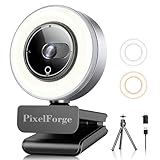
Then spend on the parts viewers actually notice. A condenser microphone setup — the kind bundled in packages like a BM-800 condenser with a voice changer mixer, which sell for around $35–50 — gets you shockingly far for the price, though expect to add a pop filter and treat the room, since condensers pick up fan noise and echo. Camera-wise, a 4K webcam with a built-in ring light and privacy cover runs about $35–40 and lets you crop to a clean 1080p frame with better low-light performance than 1080p-native webcams. A 71-inch tripod and desk stand kit with fill light runs $50–60 and solves framing and lighting in one purchase. Prioritize in this order: microphone, lighting, camera.
Price Tiers: What Each Level Buys You
Budget ($250–450 for the barebones kit, $600–900 all-in): A basic case-and-motherboard bundle with an 80 Plus Bronze PSU. You’ll add a 6-core CPU, 32GB RAM, a 1TB NVMe SSD, and rely on integrated graphics or an entry GPU. Fine for chat streams, podcasts, and console gameplay via a $20–25 capture card.
Mid-range ($450–700 for the kit, $900–1,400 all-in):** A mesh-front mid-tower, 80 Plus Gold 650–750W PSU, Wi-Fi 6 motherboard, and support for modern DDR5 and PCIe 4.0. This tier handles 1080p60 gaming streams comfortably and is the sweet spot for most creators.
Premium ($700–1,000+ for the kit, $1,500–2,500 all-in):** Premium cases add better stock fans, USB-C front panels, 2.5Gb Ethernet, and cleaner cable management. Components scale to 8–12 core CPUs, PCIe 5.0 storage, and GPUs that enable 1440p or dual-PC setups. Buy this tier only if you’re already monetizing or committed to high-production content.
Spec Checklist
| Spec | Budget | Mid | Premium |
|---|---|---|---|
| Kit price (case + board + PSU) | $250–450 | $450–700 | $700–1,000+ |
| PSU rating | 80 Plus Bronze, 550–600W | 80 Plus Gold, 650–750W | 80 Plus Gold/Platinum, 750–850W |
| Case size | Micro-ATX (~15″ tall) | Mid-tower ATX (~18″ tall) | Mid/full tower, mesh front |
| CPU (added) | 6 cores | 8 cores | 10–12+ cores |
| RAM | 16–32GB DDR4/DDR5 | 32GB DDR5-6000 | 32–64GB DDR5-6000+ |
| Storage | 1TB NVMe SSD | 1TB NVMe + 1TB HDD/SSD | 2TB NVMe + 2TB archive |
| Networking | Gigabit Ethernet | Wi-Fi 6 + 1–2.5Gb | Wi-Fi 6E/7 + 2.5Gb |
| All-in setup cost | $600–900 | $900–1,400 | $1,500–2,500 |
Red Flags
- “500W PSU” with no efficiency certification listed. If the listing doesn’t name an 80 Plus rating and the manufacturer, assume it’s unsafe and budget $60–90 for a replacement.
- Bundle pricing that seems too good. A $400 “complete gaming streaming PC” listing usually means used or ESUs (enterprise off-lease CPUs), a motherboard with no support for current RAM, and a PSU from an unbranded source.
- Microphone bundles without specs. Condenser kits under $40 like the BM-800 packages are genuinely usable, but check that the mixer/interface lists a sample rate (look for 48kHz/16-bit or better) — some no-name voice changers add latency you’ll hear as an echo in your headphones.
- Webcams advertising “4K” with no sensor size or frame rate. A true 4K webcam streams 30fps at full resolution and 60fps at 1080p; if neither number is listed, it’s interpolated.
- Missing front-panel connectors or unclear header support. Confirm USB-C and HD audio headers exist before checkout.
- No return window or a restocking fee on motherboards. Boards arrive dead often enough that a 30-day no-fee return policy is non-negotiable.
FAQ
Is a barebones kit cheaper than a prebuilt streaming PC?
Usually yes, by 10–20% for equivalent parts, and you control component quality. The savings shrink at the budget end, where prebuilts sometimes bundle a Windows license and warranty coverage that offset the price gap. If you value a single point of support over savings, a prebuilt with named components is a fair choice.
Can I stream with integrated graphics?
Yes, for non-gaming content. A modern CPU with a hardware encoder handles a 1080p60 stream of chatting, art, or console gameplay through a capture card without a discrete GPU. For PC gaming plus streaming, a dedicated GPU with a modern encoder is strongly recommended.
How much upload speed do I need to stream?
Plan for roughly 1.5x your target bitrate. A 1080p60 stream at 6,000 Kbps wants at least 9–10 Mbps of stable upload, plus headroom for anything else on your network. Run a wired Ethernet connection; Wi-Fi dropouts show up on stream as stutter even when it feels fine locally.
Should I buy the cheap mic bundle or a standalone microphone?
Start with the bundle if you’re under $60 total for audio. A $35–45 condenser package with a voice changer mixer delivers clean audio for a bedroom setup, and you can upgrade later to a dynamic USB microphone ($70–100) once you know your room’s acoustics. Audio is the single highest-return upgrade in any streaming setup.
Related guides
- Best Gaming PC for Fortnite: Eight Prebuilt Desktops Sorted by Refresh Rate Goal (2026)
- Best RX 9070 XT Prebuilt Gaming PCs: Seven Desktops and Three Cards Compared: 10 Compared (2026)
- CyberPowerPC vs iBUYPOWER Gaming PC: How the Two Brands Compare
- Best RX 9070 XT Prebuilt Gaming PC (2026): 5 Picks Compared









