
Choosing between a barebones kit and a full custom PC build is not just about performance on paper. It is about how much time you want to spend building, how much control you want over every part, and how that computer will actually live in your home. A barebones kit gives you a tested foundation where the hardest compatibility work is already done, while a full custom build lets you hand-pick every component from the case to the cooler. In 2026, both approaches can deliver a fast, quiet, and great-looking setup, but they suit very different buyers, budgets, and living situations.
Our Top Picks


Top 3 picks at a glance
Quick Verdict
Pick a barebones kit if you want to save time, avoid compatibility headaches, and get a reliable system with room to personalize later. It is ideal for first-time builders, busy households, and anyone who wants a clear upgrade path without sourcing every screw and cable.
As an Amazon Associate we earn from qualifying purchases at no extra cost to you.


Pick a full custom PC build if you want total control over aesthetics, cooling, acoustics, and performance. It is ideal for enthusiasts, gamers, and creators who know exactly what CPU, GPU, memory, and case they want and are comfortable assembling and tuning everything themselves. If you value a showpiece that fits your desk perfectly and can be tuned watt by watt, full custom is worth the extra effort and cost.
Side by Side
| Feature | Barebones Kit | Full Custom PC Build |
|---|---|---|
| Comfort & Ease of Build | High. Core components pre-selected and pre-wired. Typical build time 45 to 90 minutes. | Moderate to low. You research, source, and assemble 8 to 12 separate components. Typical build time 3 to 6 hours for beginners. |
| Durability & Reliability | Very good. Factory-tested motherboard, power delivery, and chassis fit. Fewer compatibility surprises. | Excellent if parts are well-matched, but reliability depends on your part choices and build quality. |
| Price Range | $45 to $350 for keyboard barebones like the BOYI GMK67 at around $47 or GMK104 at around $78; $600 to $1,200 for PC barebones with case, motherboard, and PSU. | $900 to $3,500+ total. Example complete system like the Build Redux Gaming Desktop with RTX 5070 at around $1,950; premium cases like the Cooler Master MasterFrame 360 around $280 alone. |
| Maintenance | Low. Fewer custom loops or exotic parts. Dusting every 3 to 4 months, simple driver updates. | Moderate to high. Custom cooling, cable management, and RGB software may need more frequent tuning and cleaning. |
| Space Needed | Compact options available. 65% kits are about 12.3 x 4.3 inches; ATX barebones still fit standard desks 48 to 60 inches wide. | Varies widely. Full ATX tower with 360mm radiator needs 18 to 22 inches of height and 9 to 10 inches of width, plus clearance for airflow. |
| Look & Personalization | Clean and streamlined. Choose switches, keycaps, or RAM/storage while keeping a cohesive factory design. | Unlimited. Pick case material, LCD displays, lighting, cooling, and layout for a true one-of-one look. |
| Resale Value | Good. Recognizable kit names and working foundation hold value well. | Variable. High-end parts can retain value, but highly personalized builds may appeal to a smaller buyer pool. |
| Power & Noise | Efficient and predictable. Most barebones target 65W to 125W CPU and 150W to 250W GPU profiles with balanced fan curves. | Fully tunable. You can build a 35W silent office rig or a 600W+ gaming rig with 240mm to 360mm liquid cooling. |
| Best For | Beginners, upgraders, and anyone who wants a fast, low-stress path to a custom-feeling setup. | Enthusiasts, competitive gamers, and creators who want every spec dialed in. |
Where Barebones Kit Wins
A barebones kit removes the most stressful part of building: making sure everything actually works together. The motherboard, chassis, and core wiring are already matched, so you do not have to cross-reference CPU socket types, RAM speeds, cooler clearance, or front-panel connectors for hours.
Take mechanical keyboards as a clear example. A kit like the BOYI GMK67 Barebones Keyboard Kit gives you the gasket-mounted case, hot-swap PCB, tri-mode connectivity with BT5.0, 2.4GHz and Type-C, and a 4000mAh battery in a compact 65 percent layout. You just add your preferred switches and keycaps. At around $47, it delivers the satisfying feel and programmability of a custom board through QMK/VIA without sourcing stabilizers, plates, and foam separately. The larger GMK104 Barebones Keyboard Kit at around $78 does the same for people who need a full-size layout with a screen and knob, offering the same tri-mode flexibility and hot-swap convenience in a footprint around 17.5 x 5.5 inches and roughly 2.5 to 3 pounds once built.
The same logic applies to PC barebones. You get a case, motherboard, and power supply that are known to fit, with standoffs, risers, and cables included. That cuts research time dramatically and lowers the chance of ordering a cooler that is 5mm too tall or RAM that blocks your air cooler. For a home office or family computer, that predictability matters. You can be up and running in an evening, and you still get the fun part of personalizing the final feel.
Barebones kits are also easier to live with day to day. Fewer exotic parts means simpler troubleshooting, standard replacement parts, and less time spent updating multiple control apps for lighting and fans. If a switch feels scratchy or you want a different memory capacity later, a hot-swap board or an open DIMM and M.2 slot lets you change one thing without tearing the whole system apart.
Where Full Custom Pc Build Wins
A full custom PC build wins when you want zero compromises. You choose every part for your exact workload, whether that is high-refresh gaming, 4K video editing, or a near-silent work-from-home setup.
Control over performance is the biggest advantage. With a full custom approach you can pair an AMD Ryzen 7 9700X with an NVIDIA GeForce RTX 5070, 16GB to 32GB of DDR5 RAM, and a 1TB NVMe M.2 SSD exactly like you see in a curated system such as the Build Redux Gaming Desktop PC at $1959.99, or swap any of those for alternatives that better fit your budget or game library. You decide if you need a 240mm liquid cooler for balanced cooling and noise, or you step up to a 360mm radiator for lower temperatures under sustained loads. You also set your power target, from a quiet 300W total system draw for everyday use to 650W or more for an overclocked rig.
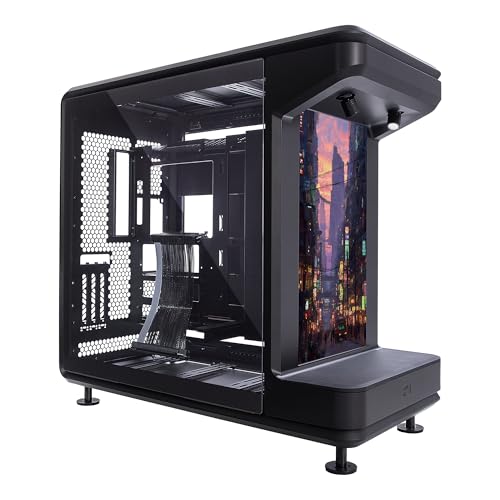
Custom building also gives you complete aesthetic freedom. If you want an ATX case that acts as furniture, not just a box, you can choose something like the Cooler Master MasterFrame 360 Stage LCD ATX PC Case at around $280, with its integrated LCD display and open-frame-inspired design. You control the case dimensions, exterior finish, glass versus mesh panels, and cable routing, so the final PC fits your room rather than the other way around. Premium cases in this class typically weigh 22 to 30 pounds empty and measure about 18 to 20 inches high, 9 to 10 inches wide, and 18 to 19 inches deep, which is important to measure before you buy.
Finally, full custom is the best path for long-term tuning. You can select a motherboard with the exact rear I/O you need, a power supply with the efficiency rating and wattage headroom you want, and fans with the acoustic profile you prefer. That level of detail is hard to match with any pre-configured foundation, and for hobbyists, the process itself is part of the reward.
Cost Over 5 Years
Upfront price only tells part of the story. Over five years, your total cost includes upgrades, peripherals, and power.
A keyboard barebones path is very affordable long term. Starting at around $47 to around $78 for the kit, plus $25 to $60 for switches and $30 to $80 for keycaps, your initial investment is $105 to $210. Year two to five costs are minimal, often $0 to $40 for a new switch set or cable, since there is no power draw beyond charging a 3000mAh to 4000mAh battery every few weeks.
A PC barebones path is a middle ground. Expect $650 to $1,200 for the foundation, plus $150 to $400 for CPU, GPU, or storage upgrades in year three. Power for a mainstream 400W system running 4 hours per day at around $0 per kWh adds about $85 to $90 per year.
A full custom PC build costs more at the start but can be more efficient if you plan well. A complete high-performance build at $1,500 to $2,200, such as the $1959.99 example with a 240mm liquid cooler and modern DDR5 platform, may only need a $100 to $200 storage or memory bump in years three to four instead of a full replacement. However, if you choose a 600W showpiece with heavy lighting and a large cooler, power alone can reach $130 to $160 per year for the same daily use, and premium fans or coolant maintenance can add $40 to $80 over the ownership period. Buying quality parts once usually beats buying twice, so budgeting an extra $100 to $200 for a good power supply and case pays off by year three.
Which One for Your Home
The right choice depends on your space, household, and how long you plan to stay.
Small Apartment
Go barebones if space is tight. A 65 percent barebones keyboard like the BOYI GMK67 keeps your desk footprint under 13 inches wide, leaving room for a laptop, notebook, or dining table that doubles as a desk. If you are building a PC, a barebones micro-ATX or compact ATX foundation helps you avoid a massive tower that dominates a 10 x 12 foot room. You get a clean look with less visual clutter and less heat in a small space.
Family With Kids or Pets
Choose barebones for durability and simplicity, or a restrained full custom build with easy-to-clean features. Hot-swap keyboards are family-friendly because a single damaged switch can be pulled and replaced in seconds without soldering. For PCs, prioritize a case with a solid front filter, simple fan curves, and no open loops. A system with a sealed 240mm liquid cooler and a mesh front panel will handle dust and the occasional bump better than an elaborate custom loop with exposed tubing.
Rental
Barebones is usually the smarter rental choice. It is lighter to move, easier to pack, and less likely to require modifications to your space. A compact wireless keyboard that runs on BT5.0 or 2.4GHz avoids cable clutter on a rented desk, and a mid-tower under 35 pounds is far easier to carry up stairs than a fully loaded custom tower at 45 to 55 pounds. If your lease limits how much gear you can have, a kit that does more with fewer boxes is a real advantage.
Long-Term Home
A full custom PC build shines when you are settled. You can measure your desk, plan cable runs, and invest in a case you love looking at for years, like a display-focused ATX chassis that shows temperatures or artwork on an integrated LCD. You can run proper airflow with 3 to 6 case fans, set a quiet nighttime profile at 30 to 35 decibels, and wire peripherals exactly where you want them. In a long-term home, the extra hours spent planning pay you back every day in comfort and pride of ownership.
FAQ
Is a barebones kit actually cheaper than buying everything separately?
Usually yes for beginners. You avoid paying for mismatched parts, extra shipping, or return fees, and you get a case, PCB or motherboard, and connectivity that are already compatible. Once you know exactly which switches, GPU, or cooler you prefer, a full custom build can be cost-competitive, but you should budget $50 to $150 extra for tools, thermal paste, and small accessories if you go fully separate.
Do I need soldering or special tools for these kits?
Most modern barebones keyboard kits are hot-swap, so no soldering is needed. You will need a keycap puller and a switch puller, which are usually included. For PC barebones and full custom builds, a Phillips head screwdriver is the main tool, plus careful cable management. An anti-static wrist strap for $8 to $12 is a sensible add-on for any PC build.
How much desk space should I plan for?
For keyboards, allow 13 to 14 inches wide for a 65 percent board and about 18 inches for a full-size board, plus 6 to 8 inches of depth for wrist rest space. For PCs, leave at least 24 inches of depth for an ATX tower and 4 to 6 inches of clearance behind it for cables and exhaust. If you choose a large ATX case like the MasterFrame 360, confirm your desk can support 30 to 50 pounds total once the system is fully loaded.
Can I upgrade a barebones kit later to feel more custom?
Yes, and that is the point. On keyboards you can swap switches, keycaps, and stabilizers, and reprogram layers with VIA without buying a new board. On PCs you can start with a barebones foundation and later add more storage, faster RAM, or a stronger GPU as prices drop or your needs change. Full custom just lets you make those choices from day one instead of in stages.









