Buying an American gaming laptop is a choice between two kinds of machines. Big brands such as Dell and HP sell polished, widely supported flagships, while boutique builders such as Razer and ORIGIN PC sell thinner, more configurable machines with stronger cooling. Both groups use the same NVIDIA graphics and Intel or AMD processors, so the real differences sit in the display, the weight, the cooling, and the support that comes after the sale.
This guide fits competitive players who want a fast display, creators who edit video between matches, travelers who carry a laptop every day, and buyers who want a United States brand with United States support. We chose these four laptops from the names and specifications shown on their Amazon product pages, one flagship from each American brand, and compared them on graphics, display, weight, cooling, and upgrade room.
Top 3 picks at a glance
Quick Picks
As an Amazon Associate we earn from qualifying purchases
| Product | Best for | Key spec from title |
|---|---|---|
| Alienware m16 R2 | Competitive play on a big fast display | 16-inch QHD+ 240Hz display with RTX 4070 |
| HP OMEN 16 Slim | Newest graphics in a slim body | RTX 5070 with Core Ultra 9 285H |
| Razer Blade 14 (2025) | Thin and light travel gaming | 14-inch 3K OLED 120Hz display |
| ORIGIN PC EON15-SL | Boutique build with strong cooling | Vapor chamber cooling with RTX 4070 |
How to Choose
Graphics Card and Resolution
Start with the graphics card, because it sets the games you can play and the settings you can use. An RTX 5070 handles modern titles at 1440p with ray tracing turned on, while an RTX 4070 still runs most games smoothly at the same resolution with slightly lower settings. Match the card to the display: a 240Hz panel only helps when the card can push high frame rates, and a 3K OLED panel shines for single-player games where color and contrast matter more than raw speed. Check the card wattage too, since a thin laptop may run the same GPU at a lower power limit than a thicker one.
Processor, Memory, and Storage
Look for a current-generation processor with plenty of cores, because modern games and background apps share the load. A 16-core Intel Core Ultra 9 or a 24-core Core i9 keeps frame rates steady while streaming or recording, and an AMD Ryzen AI 9 adds strong efficiency for travel. Pair it with 32GB of memory, since 16GB can feel tight when a game, a browser, and a chat app run together. Storage matters as well: a 1TB drive fills fast with large game installs, so a 2TB drive or a second slot saves you from constant uninstalls.
Display, Weight, and Battery
A gaming laptop lives or dies by its display. A 240Hz panel suits competitive shooters where every frame counts, while a 120Hz OLED panel suits story-driven games with its deep blacks and vivid color. Resolution matters too: 1440p hits the sweet spot between sharpness and performance, and 3K looks stunning but asks more of the graphics card. Weight is the other trade-off. A 3.6-pound machine slips into a bag for daily travel, while a 7-pound machine stays on a desk. Battery life rarely exceeds a few hours of gaming, so plan on carrying the charger.
Support, Warranty, and Upgrades
American brands differ most after the sale. Dell and HP run large support networks with next-day parts and on-site service in many areas, while boutique builders such as Razer and ORIGIN PC offer direct support and longer build-to-order options. Read the warranty terms before you buy: accidental damage cover and on-site repair are worth more than a slightly faster graphics card when a laptop travels daily. Check upgrade room too. Soldered memory cannot grow later, while a laptop with two memory slots and a spare drive bay stays useful for years.
The 5 Best Options
Alienware m16 R2

The Alienware m16 R2 is Dell’s flagship gaming laptop for players who want maximum power on a big screen. Its 16-core Intel Core Ultra 9 185H processor and NVIDIA GeForce RTX 4070 graphics drive a 16-inch QHD+ display at 240Hz, so fast shooters stay smooth and detailed. The listing pairs that power with 64GB of DDR5 memory and a 2TB PCIe 4.0 SSD, which leaves room for a large game library and heavy multitasking. Wi-Fi 7 and a full set of ports, including USB-C, HDMI, and Ethernet, round out a machine built to sit at the center of a desk setup.
Specs
- Processor: Intel Core Ultra 9 185H, 16 cores
- Graphics: NVIDIA GeForce RTX 4070, 8GB GDDR6
- Memory: 64GB DDR5
- Storage: 2TB PCIe 4.0 SSD
- Display: 16-inch QHD+ (2560×1600), 240Hz
- Wireless: Wi-Fi 7, Bluetooth
- Operating system: Windows 11 Pro
- Weight: 7 lbs
Best for: Competitive players who want a large, fast display and room for a big game library.
Watch out for: This listing is a seller-upgraded bundle that adds a PDG HDMI cable, so confirm the exact configuration before ordering; at 7 pounds it is a desk machine, not a travel laptop.
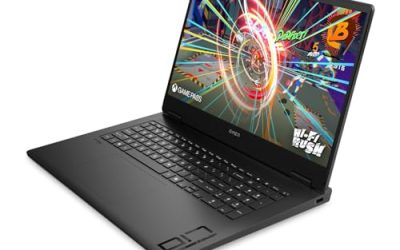
HP OMEN 16 Slim
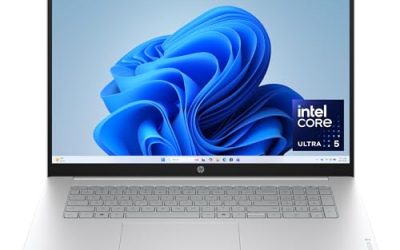
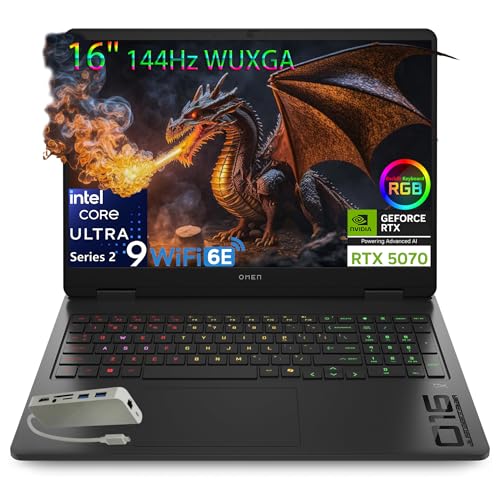
The HP OMEN 16 Slim brings the newest graphics in this group into a thin body. Its Intel Core Ultra 9 285H processor and NVIDIA GeForce RTX 5070 graphics sit behind a 16-inch WUXGA display that runs up to 144Hz, and HP’s OMEN Tempest Cooling keeps the slim chassis steady during long sessions. The listing pairs 32GB of DDR5-5600 memory with a 1TB PCIe NVMe SSD, while a 4-zone RGB keyboard, HyperX dual speakers, and a 1080p camera with a privacy shutter cover work and play. Wi-Fi 6E and an HDMI 2.1 port complete a laptop that travels well for its size.
Specs
- Processor: Intel Core Ultra 9 285H, 16 cores, up to 5.4GHz
- Graphics: NVIDIA GeForce RTX 5070, 8GB GDDR7
- Memory: 32GB DDR5-5600
- Storage: 1TB PCIe NVMe SSD
- Display: 16-inch WUXGA (1920×1200), 60-144Hz, IPS
- Wireless: Wi-Fi 6E, Bluetooth 5.3
- Operating system: Windows 11 Home, Copilot+ PC
- Weight: 5.35 lbs
Best for: Players who want the newest graphics in a slim laptop they can carry.
Watch out for: The 1920×1200 display is lower resolution than the QHD+ panels here, and the slim body leaves less thermal headroom than thicker machines.
Razer Blade 14 (2025)
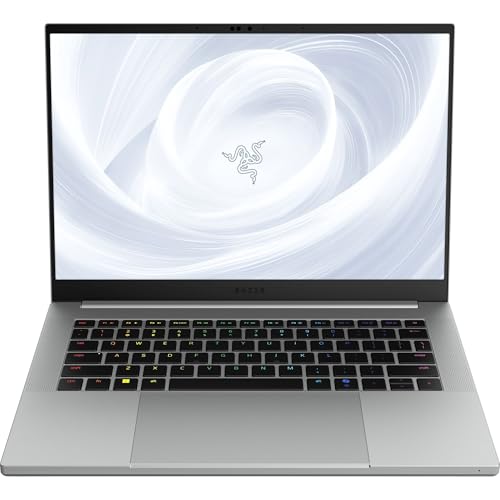
The Razer Blade 14 is the thinnest and lightest laptop in this group, and it still carries flagship hardware. Its AMD Ryzen AI 9 365 processor and NVIDIA GeForce RTX 5070 graphics drive a 14-inch 3K OLED display at 120Hz, with Calman Verified color that suits both games and creative work. The listing pairs 32GB of LPDDR5X memory with a 1TB SSD, and the CNC aluminum body measures just 0.62 inches thin at 3.59 pounds. Vapor chamber cooling, Chroma RGB lighting, and THX Spatial Audio round out a machine built for players who move between desk, couch, and travel.
Specs
- Processor: AMD Ryzen AI 9 365
- Graphics: NVIDIA GeForce RTX 5070, up to 115W TGP
- Memory: 32GB LPDDR5X, 8000MHz
- Storage: 1TB SSD
- Display: 14-inch 3K OLED (2880×1800), 120Hz, 0.2ms response
- Operating system: Windows 11 Home
- Battery: Up to 11 hours
- Weight: 3.59 lbs
Best for: Travelers and creators who want a thin, light laptop with an OLED display.
Watch out for: The 32GB of memory is soldered and cannot be upgraded later, so buy the configuration you will need for years.
ORIGIN PC EON15-SL

The ORIGIN PC EON15-SL is the boutique pick in this group, built to order in the United States with cooling that larger brands rarely match. Its Intel Core i9-14900HX processor and NVIDIA GeForce RTX 4070 graphics sit behind a 15.3-inch WQXGA display at 240Hz, while vapor chamber cooling and liquid metal thermal paste keep temperatures down during long sessions. The listing pairs 32GB of DDR5 memory with a 1TB NVMe SSD, and the whole machine measures 0.78 inches thin at under 5 pounds. Wi-Fi 6E, Bluetooth 5.2, and Ethernet cover every connection a player needs.
Specs
- Processor: Intel Core i9-14900HX, up to 5.4GHz
- Graphics: NVIDIA GeForce RTX 4070
- Memory: 32GB DDR5
- Storage: 1TB NVMe M.2 SSD
- Display: 15.3-inch WQXGA, 240Hz
- Wireless: Wi-Fi 6E, Bluetooth 5.2, Ethernet
- Operating system: Windows 11
- Weight: Under 5 lbs
Best for: Buyers who want a boutique, build-to-order laptop with strong cooling.
Watch out for: Only one new offer was showing on Amazon, so check availability and the exact configuration before ordering; boutique builds can take longer to ship.
Which One Fits Your Situation
For Competitive Play at Home
Pick the Alienware m16 R2. Its 16-inch QHD+ display at 240Hz gives fast shooters the smoothest picture in this group, and the 64GB of memory plus 2TB of storage means a large library stays installed. The 7-pound body suits a permanent desk setup with an external monitor and keyboard.
For Travel and Everyday Carry
Pick the Razer Blade 14. At 3.59 pounds and 0.62 inches thin, it is the lightest machine here by a wide margin, and the 14-inch OLED display looks superb on the road. The 11-hour battery claim covers work and media between charges, though gaming still needs the power adapter.
For Creators Who Also Game
Pick the HP OMEN 16 Slim or the Razer Blade 14. The OMEN pairs a current RTX 5070 with a 1080p camera and HyperX speakers for streams and calls, while the Blade adds a Calman Verified OLED panel for color-accurate editing. Both carry 32GB of memory, which keeps editing apps and games running side by side.
For a Boutique Build with Strong Cooling
Pick the ORIGIN PC EON15-SL. Its vapor chamber cooling and liquid metal thermal paste are built for long sessions, and the build-to-order approach lets you choose the exact configuration. The white chassis and 240Hz display stand out from the black slabs that dominate gaming laptops.
Common Mistakes
- Buying a graphics card without checking its wattage: the same RTX 5070 runs faster in a thick chassis than in a thin one, so match the card to the cooling.
- Choosing a display for the wrong games: a 240Hz panel helps competitive shooters, while an OLED panel suits story-driven games and creative work.
- Settling for 16GB of memory: modern games plus a browser and chat app can fill it, and soldered memory cannot grow later.
- Ignoring the listing details: some Amazon listings are seller-upgraded bundles with added accessories, so confirm the exact processor, memory, and storage before ordering.
- Forgetting the charger and the weight: a 7-pound laptop plus its power brick is a desk machine, not a daily carry.
Frequently Asked Questions
Are American gaming laptops better than imported brands?
Not by default. American brands such as Dell, HP, Razer, and ORIGIN PC compete on support, warranty, and build quality rather than raw speed, since every brand uses the same NVIDIA graphics and Intel or AMD processors. The advantage is local support and easier warranty service, while imported brands often match them on hardware and sometimes cost less for the same parts.
Which graphics card should I choose for 1440p gaming?
An RTX 5070 is the safer pick for 1440p with ray tracing turned on, while an RTX 4070 still runs most games smoothly at the same resolution with slightly lower settings. Check the card wattage in the listing, since a thin laptop may run the same GPU at a lower power limit. A 240Hz display only helps when the card can push high frame rates.
Is 32GB of memory enough for gaming and streaming?
Yes, 32GB is the sweet spot for gaming with streaming, editing, or a browser open at the same time. It keeps frame rates steady while background apps run, and it leaves room for large game installs to load quickly. Avoid 16GB if you plan to stream or edit video, especially on a laptop where the memory is soldered and cannot be upgraded later.
Should I buy a seller-upgraded laptop bundle on Amazon?
It depends on the listing. Some bundles add memory, storage, or accessories at a fair value, while others only add a cable or a mouse pad. Read the full listing to confirm the exact processor, memory, storage, and operating system, and check who handles the warranty. A bundle from a trusted seller can be a good deal, but the base configuration matters more than the extras.
Related guides
More from Amazon
Programs that pair well with the guide above. Offers and eligibility are set by Amazon and may change.
Free shipping on eligible items, Prime Video and more. Eligible new members can start with a free trial.
Start a Prime free trialAd-free music streaming. Eligible new subscribers can start with a free trial.
Try Music Unlimited freeA Prime membership for ages 18-24 with a trial period. Eligibility is set by Amazon.
See Prime for Young AdultsAudiobooks and podcasts to listen to on the go. Eligible new members can start with a free trial.
Try Audible freeAs an Amazon Associate we earn from qualifying purchases.