As an Amazon Associate, we earn from qualifying purchases.
Our Top Picks


Top 3 picks at a glance
The Short Answer
The best X370 motherboard for most AM4 builders is the ASUS ROG Crosshair VI Hero. It pairs strong power delivery with two PCIe 3.0 x16 slots for multi-GPU setups, eight SATA ports, a single M.2 slot, and BIOS Flashback, which updates the BIOS without a CPU installed. If you want built-in Wi-Fi and a second M.2 slot, the ASRock X370 Taichi is the better-rounded board. The MSI X370 Gaming Pro Carbon is the sensible middle ground, and the MSI X370 XPower Gaming Titanium is the showpiece pick for a silver-themed build.
One honest note first: X370 is a discontinued chipset from 2017. New stock is scarce, and listings are typically remaining new stock or previously owned boards. You buy X370 when you already own an AM4 CPU and DDR4 memory, when you want the full X370 feature set with SLI and CrossFire support, or when you are rebuilding a period-correct Ryzen system. If you are building a brand-new system from scratch, a B550 board is usually the more practical buy, and this guide says so openly. The four boards below are genuine X370 boards with a real Amazon US listing history.
Our Top Picks
- ASUS ROG Crosshair VI Hero — Best overall. Flagship power delivery and BIOS Flashback. Check on Amazon
- ASRock X370 Taichi — Best feature set. Built-in Wi-Fi, dual M.2, and quad-GPU support. Check on Amazon
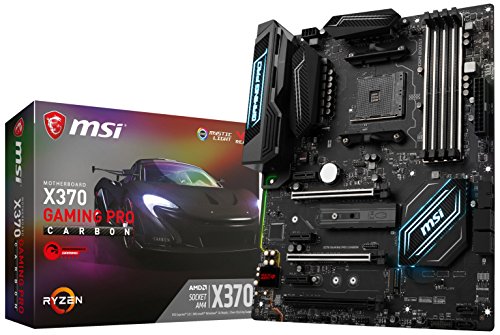
- MSI X370 Gaming Pro Carbon — Best mid-range. Dual M.2 slots and USB 3.1 Gen 2 Type-C. Check on Amazon
- MSI X370 XPower Gaming Titanium — Best showpiece. Silver titanium finish with the full X370 feature set. Check on Amazon
Quick Comparison
| Board | Form Factor | Memory | Storage | Standout Feature |
|---|---|---|---|---|
| ASUS ROG Crosshair VI Hero | ATX | 4 x DDR4, up to 64 GB, DDR4 3200 (OC) | 1 x M.2, 8 x SATA 6 Gb/s | BIOS Flashback and SupremeFX audio |
| ASRock X370 Taichi | ATX | 4 x DDR4 | M.2, SATA3 | Built-in Wi-Fi and quad-GPU support |
| MSI X370 Gaming Pro Carbon | ATX | 4 x DDR4, up to DDR4 3200 (OC) | 2 x M.2, 6 x SATA 6 Gb/s | USB 3.1 Gen 2 Type-A/C |
| MSI X370 XPower Gaming Titanium | ATX | 4 x DDR4 | M.2, SATA | Titanium silver styling |
How to Choose
Check the chipset first
Every board in this guide uses the AMD X370 chipset on the AM4 socket. X370 was AMD’s flagship AM4 chipset at the Ryzen launch, and it is the only first-generation AM4 chipset with full two-way SLI support alongside CrossFire, plus the widest PCIe layout of its generation. B350 boards can overclock too, but they lack the dual x8 PCIe layout, and X470 and X570 are later chipsets, not X370. Read the chipset line on the listing, not just the model name: a board named “Gaming Pro Carbon” exists in X370, X470, and B450 versions.
Check CPU support and the BIOS version
X370 boards launched alongside first-generation Ryzen CPUs, and most gained BIOS updates adding support for later Ryzen generations, but the exact CPU list varies by board and BIOS version. Some support Ryzen 3000 series CPUs with a late BIOS, and a few gained support for even later chips. A board that arrives with an old BIOS may not boot with your CPU at all.
Before buying, check the maker’s CPU support list for the exact board model and the BIOS version your CPU needs, then confirm on the listing which BIOS version the board ships with. Boards with BIOS Flashback, such as the Crosshair VI Hero, update the BIOS without a working CPU. If the board lacks that feature and you cannot confirm the BIOS version, think carefully.
Memory: DDR4 only
All X370 boards use DDR4 memory and do not accept DDR5. Every board here has four DDR4 DIMM slots, with most supporting up to 64 GB and speeds of DDR4 3200 when overclocked. First-generation Ryzen CPUs were sensitive to memory speed, so check the maker’s memory QVL, the qualified vendor list, for your exact memory kit.
Expansion: PCIe 3.0, SLI, and CrossFire
X370 is a PCIe 3.0 platform, with no PCIe 4.0 on any X370 board. That is a genuine limitation for a current-generation graphics card or PCIe 4.0 NVMe drive at full speed, though a PCIe 3.0 x16 slot still feeds most graphics cards well. What X370 does give you is the best multi-GPU layout of its generation: the boards here run their two main PCIe x16 slots at x16 or dual x8, which is what two-way SLI needs, and they support CrossFire as well. For a single graphics card this is irrelevant; for two, it is the main reason to pick X370 over B350.
Storage and connectivity
M.2 support varies across X370 boards: the Crosshair VI Hero has a single M.2 slot, while the MSI Gaming Pro Carbon and the ASRock Taichi have two, and SATA port counts range from six to eight. Count your drives before you choose, since two NVMe drives plus several SATA drives will force compromises on a single-M.2 board.
All four boards have USB 3.1 Gen 2 ports. The MSI Gaming Pro Carbon has both Type-A and Type-C Gen 2 ports on the rear panel, and the Crosshair VI Hero has Type-A and Type-C USB 3.1 ports plus a front-panel USB 3.1 connector. Networking is another split: the ASRock X370 Taichi is the only board here with built-in Wi-Fi, while the other three rely on wired Gigabit Ethernet. Audio is a quiet strength across this group, with the Crosshair VI Hero using the SupremeFX S1220 codec with a dedicated DAC, and the other boards carrying capable onboard audio with S/PDIF output.
Condition and accessories
Because X370 is discontinued, the condition of the board matters as much as its specifications. A previously owned board may arrive without the rear I/O shield, SATA cables, SLI bridge, Wi-Fi antennas, or M.2 screws, and the I/O shield is model-specific and hard to find. Confirm what is included on the listing, check the seller’s description, confirm the exact model and revision, and confirm whether the board is new old stock or previously owned.
The Picks in Detail
1. ASUS ROG Crosshair VI Hero
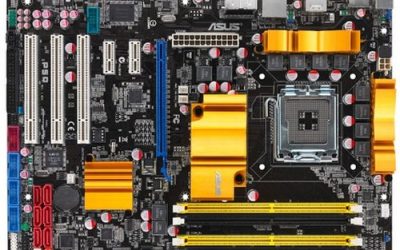
The Crosshair VI Hero was ASUS’s flagship X370 board. It is an ATX board with four DDR4 DIMM slots supporting up to 64 GB of DDR4 3200 memory when overclocked, two PCIe 3.0 x16 SafeSlots at x16 or dual x8, a third PCIe 2.0 x16 slot at x4, and three PCIe 3.0 x1 slots. Storage is a single M.2 Socket 3 slot with PCIe 3.0 x4 and SATA support, plus eight SATA 6 Gb/s ports with RAID 0, 1, and 10. Networking is an Intel I211-AT Gigabit controller, and audio is the SupremeFX S1220 codec with an ESS ES9023P DAC.
BIOS Flashback lets you update the BIOS from a USB stick without a CPU or memory installed, which is exactly the feature you want when buying a 2017 board for a later Ryzen CPU. The board has onboard power, reset, Safe Boot, and ReTry buttons, an LN2 mode switch, a Q-Code LED readout, and a water-cooling flow header, and its 8-pin plus 4-pin CPU power connectors handle overclocked eight-core Ryzen chips without complaint.
Pros:
– BIOS Flashback removes the biggest risk of buying a legacy board
– Strong power delivery with 8-pin plus 4-pin CPU power
– Eight SATA ports and a full M.2 slot
– SupremeFX audio with a dedicated DAC
– Onboard overclocking buttons, Q-Code readout, and LN2 mode
Cons:
– Only one M.2 slot, while some rivals have two
– No built-in Wi-Fi; the separate Wi-Fi AC variant is a different model
– Remaining stock is limited and condition varies by listing
2. ASRock X370 Taichi
The X370 Taichi is the most feature-complete board in this group. It is an ATX board with four DDR4 DIMM slots and support for both NVIDIA SLI and AMD Quad CrossFireX, the widest multi-GPU support of any board here. It has M.2 storage, SATA3 ports, USB 3.1, Gigabit Ethernet, and built-in Wi-Fi, so it needs no add-in card for wireless networking.
The Taichi also has the most understated look of the group, with a black and grey cogwheel design that fits a workstation as easily as a gaming rig. Confirm the M.2 slot count and SATA port count on the listing, and confirm the Wi-Fi antennas are included if you are buying a previously owned board.
Pros:
– Built-in Wi-Fi, the only pick here with wireless networking onboard
– Quad CrossFireX and SLI support for multi-GPU builds
– M.2 and SATA3 storage with USB 3.1 connectivity
– Understated styling that suits gaming and workstation builds alike
Cons:
– Exact M.2 and SATA counts vary by revision, so confirm on the listing
– Wi-Fi antennas may be missing from previously owned boards
– Less overclocker-focused than the Crosshair VI Hero
– Remaining stock is limited, as with all X370 boards
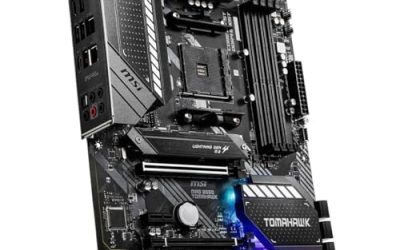
3. MSI X370 Gaming Pro Carbon
The Gaming Pro Carbon is the balanced middle of the X370 range. It is an ATX board with four DDR4 DIMM slots supporting DDR4 3200 when overclocked, two PCIe 3.0 x16 slots plus a PCIe 2.0 x16 slot, and three PCIe x1 slots, with two-way SLI and three-way CrossFire support. Storage is a strong point: two M.2 slots and six SATA 6 Gb/s ports, so you can run a pair of NVMe drives without giving up SATA storage. USB 3.1 Gen 2 is present in both Type-A and Type-C forms, networking is an Intel I211AT Gigabit controller, and audio is 7.1-channel high definition with S/PDIF output.
Mystic Light RGB covers the board’s I/O shroud and heatsinks, and the black and silver carbon styling is more restrained than the titanium board below. It is also the board in this group most likely to appear in listings, since it sold in larger numbers than the flagship models.
Pros:
– Two M.2 slots plus six SATA ports for flexible storage
– USB 3.1 Gen 2 in both Type-A and Type-C
– Two-way SLI and three-way CrossFire support
– Mystic Light RGB with restrained black and silver styling
– The most widely sold board here
Cons:
– Six SATA ports instead of eight, so heavy SATA users should count first
– No built-in Wi-Fi
– No BIOS Flashback, so confirm the BIOS version before buying for a later Ryzen CPU
– Power delivery is a step below the flagships for heavy overclocking
4. MSI X370 XPower Gaming Titanium

The XPower Gaming Titanium is the showpiece of the X370 generation: an ATX board with the full X370 feature set, wrapped in a silver and titanium finish that still stands out years later. If you are building a silver, white, or titanium-themed system, no other X370 board matches it, and that is the honest reason to choose it over the Gaming Pro Carbon. Under the styling it is a proper flagship-class board, with four DDR4 DIMM slots, M.2 storage, SATA ports, USB 3.1, and multi-GPU support for SLI and CrossFire.
Because it was a low-volume flagship, it appears in listings less often than the other boards here. Confirm the exact model, the included accessories, the BIOS version, and the M.2 and SATA counts on the listing before buying. If you find one stripped of its I/O shield and cables, weigh the cost of tracking those parts down.
Pros:
– Distinctive titanium silver styling no other X370 board matches
– Full X370 feature set with multi-GPU support
– Suits silver, white, and titanium-themed builds perfectly
Cons:
– The rarest board in this guide, so listings are infrequent
– Accessories such as the I/O shield may be missing from previously owned boards
– Confirm M.2 and SATA counts on the listing
– Styling carries a premium over the Gaming Pro Carbon
Who Should Choose What
Choose the ASUS ROG Crosshair VI Hero for the safest legacy purchase. BIOS Flashback is worth it when you cannot confirm the BIOS version in advance, and the power delivery and onboard tools make it the best board here for pushing an eight-core Ryzen chip.
Choose the ASRock X370 Taichi for the most complete board with the fewest add-in cards. Built-in Wi-Fi, dual M.2 support, and quad-GPU support cover networking, storage, and expansion without extras.
Choose the MSI X370 Gaming Pro Carbon for the best balance of features and availability. Two M.2 slots, USB 3.1 Gen 2 Type-C, and SLI support cover the needs of most builders.
Choose the MSI X370 XPower Gaming Titanium if the build is themed and the board is part of the look. It is functionally close to the Gaming Pro Carbon, so buy it for the titanium styling, not for a feature you cannot get elsewhere.
If you are building a brand-new system with a new CPU and new memory, consider a B550 board instead. X370 makes sense when you already own AM4 parts, when you need its specific multi-GPU layout, or when you are restoring a period system.
Common Mistakes
Assuming any AM4 board is an X370 board. AM4 covers B350, X370, B450, X470, B550, and X570, and model names repeat. Read the chipset line on the listing every time.
Ignoring the BIOS version. A board with a 2017 BIOS may not boot with a Ryzen 3000 series CPU. Check the maker’s CPU support list and confirm the board’s BIOS version before buying. Boards with BIOS Flashback forgive this mistake. Boards without it do not.
Expecting PCIe 4.0. X370 is PCIe 3.0 throughout. A PCIe 4.0 graphics card or NVMe drive will still work, but it will run at PCIe 3.0 speeds. If PCIe 4.0 matters to you, X370 is the wrong chipset.
Forgetting that DDR5 does not fit. All X370 boards take DDR4 only, and DDR5 modules are physically keyed differently. If your memory is DDR5, you need a different platform entirely.
Buying a board without its accessories. A previously owned X370 board may arrive without the I/O shield, Wi-Fi antennas, M.2 screws, SATA cables, or SLI bridge, and the I/O shield is model-specific and hard to replace. Confirm what is included on the listing.
Skipping the CPU support list. CPU support varies by board and BIOS, and the maker’s CPU support list is the authoritative source. If your CPU is not on it for that board and BIOS version, do not assume it will work.
FAQ
Is X370 still good in 2026?
For the right build, yes. X370 handles Ryzen CPUs up to the limits of its BIOS support, runs DDR4 memory well, and feeds a single graphics card through a PCIe 3.0 x16 slot without issue. Its limits are PCIe 3.0 only, DDR4 only, and a used or old-stock market. If you need PCIe 4.0 or DDR5, it is not.
Does X370 support Ryzen 5000 series CPUs?
It depends on the board and the BIOS. Some X370 boards received late BIOS updates adding support for later Ryzen generations, while others stopped at Ryzen 3000 series. Check the maker’s CPU support list for the exact board and BIOS version, and confirm on the listing which BIOS the board ships with.
Does X370 support overclocking?
Yes. X370 fully supports CPU and memory overclocking, unlike the entry-level A320 chipset. The Crosshair VI Hero is the strongest overclocker here, with BIOS Flashback, onboard buttons, and robust power delivery.
Does X370 have PCIe 4.0?
No. X370 is a PCIe 3.0 platform, and no BIOS update can add PCIe 4.0. PCIe 4.0 devices still work in X370 slots, but they run at PCIe 3.0 speeds. For most graphics cards this makes little practical difference, but for PCIe 4.0 NVMe drives the gap is real.
What should I check before buying a used X370 board?
Confirm the exact model and chipset, the BIOS version, the included accessories, and the physical condition. Confirm the I/O shield, Wi-Fi antennas, M.2 screws, and SATA cables are included, check the maker’s CPU support list for your CPU, and confirm on the listing whether the board is new old stock or previously owned.
Conclusion
The best X370 motherboards remain the ones that led the Ryzen launch: the ASUS ROG Crosshair VI Hero for overclockers and the safest legacy purchase, the ASRock X370 Taichi for the most complete feature set with built-in Wi-Fi, the MSI X370 Gaming Pro Carbon for the best balance of features and availability, and the MSI X370 XPower Gaming Titanium for a showpiece silver build. Each one is a genuine X370 board with a real Amazon US listing history.
Buy X370 with open eyes. It is discontinued, stock is limited, and every listing deserves a careful read: check the chipset, the BIOS version against your CPU, the included accessories, and the board’s condition on the listing. Do that, and an X370 board can anchor a capable AM4 system. If any of those checks fail, a B550 board is the more practical path for a new build.
Related guides
More from Amazon
Programs that pair well with the guide above. Offers and eligibility are set by Amazon and may change.
Free shipping on eligible items, Prime Video and more. Eligible new members can start with a free trial.
Start a Prime free trialAd-free music streaming. Eligible new subscribers can start with a free trial.
Try Music Unlimited freeA Prime membership for ages 18-24 with a trial period. Eligibility is set by Amazon.
See Prime for Young AdultsAudiobooks and podcasts to listen to on the go. Eligible new members can start with a free trial.
Try Audible freeAs an Amazon Associate we earn from qualifying purchases.