As an Amazon Associate I earn from qualifying purchases.
A workstation motherboard decides what the rest of the machine can become. A gaming board is built around one graphics card and fast memory for a single processor family. A workstation board is built around different demands: many-core processors, error-correcting memory, several full-length expansion slots, fast wired networking, and remote management for machines that keep working unattended. Every board here is a workstation board, and every one supports ECC memory.
The wrong board can quietly limit a build for years: four memory slots cap a Threadripper PRO system at four modules, and two full-length PCIe slots cap a multi-GPU build at two cards. This guide compares five workstation boards across the two platforms that dominate professional builds: AMD Threadripper and Threadripper PRO on the sTR5 socket with the TRX50 chipset, and Intel Xeon W on the LGA 4677 socket with the W790 chipset. Specs come from the manufacturer and Amazon listings; anything unstated is flagged for you to confirm.
Our Top Picks

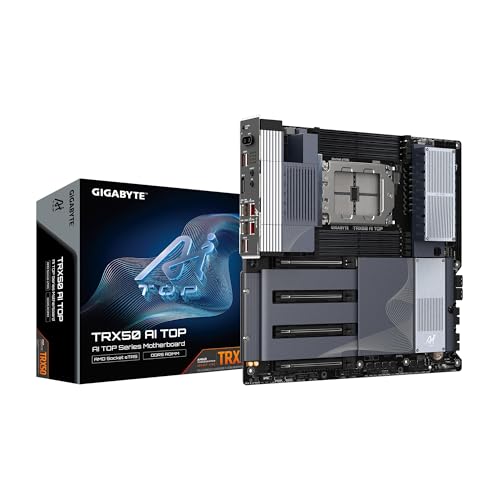


Top 3 picks at a glance

The Short Answer
For the widest range of professional work, start with the ASUS Pro WS TRX50-SAGE WIFI. It pairs the AMD sTR5 socket with the TRX50 chipset, supports Threadripper PRO 7000 WX and Threadripper 7000 processors, and carries four DDR5 ECC registered memory slots, three PCIe 5.0 x16 slots, Wi-Fi 7, and both 10GbE and 2.5GbE wired networking. It is the most balanced board in this guide.
For local AI work, the GIGABYTE TRX50 AI TOP is the standout: the only board here with eight DDR5 sockets, listing up to 2TB of ECC memory with a Threadripper PRO processor, plus four PCIe 5.0 x16 slots. For an Intel Xeon W build, the ASUS Pro WS W790E-SAGE SE is the pick, with seven PCIe 5.0 x16 slots, eight DDR5 slots, and dual 10GbE networking. For the most onboard storage, the GIGABYTE TRX50 AERO D lists four M.2 connectors and eight SATA ports, plus two rear USB4 ports. If USB4 matters most, the ASUS Pro WS TRX50-SAGE WiFi A adds two USB4 ports and a fourth M.2 slot.
Our Top Picks
- ASUS Pro WS TRX50-SAGE WIFI — Best overall workstation motherboard for Threadripper PRO builds. Check on Amazon
- GIGABYTE TRX50 AI TOP — Best for local AI work and maximum memory capacity. Check on Amazon
- ASUS Pro WS W790E-SAGE SE — Best for Intel Xeon W builds and maximum PCIe expansion. Check on Amazon
- GIGABYTE TRX50 AERO D — Best for onboard storage and rear USB4 connectivity. Check on Amazon
- ASUS Pro WS TRX50-SAGE WiFi A — Best for USB4 peripherals and a fourth M.2 slot. Check on Amazon
Quick Comparison
| Motherboard | Socket and Chipset | Memory | PCIe x16 Slots | M.2 Slots | Wired Networking | Wireless |
|---|---|---|---|---|---|---|
| ASUS Pro WS TRX50-SAGE WIFI | AMD sTR5, TRX50 | 4 x DDR5 ECC R-DIMM, up to 1TB | 3 x PCIe 5.0, 2 x PCIe 4.0 | 3 | 10GbE + 2.5GbE | Wi-Fi 7 |
| GIGABYTE TRX50 AI TOP | AMD sTR5, TRX50 | 8 x DDR5 ECC R-DIMM, up to 2TB | 4 x PCIe 5.0 | 4 | Dual 10GbE | Wi-Fi 7 |
| ASUS Pro WS W790E-SAGE SE | Intel LGA 4677, W790 | 8 x DDR5 ECC R-DIMM, up to 2TB | 7 x PCIe 5.0 | 3 | Dual 10GbE | Confirm on the listing |
| GIGABYTE TRX50 AERO D | AMD sTR5, TRX50 | 4 x DDR5 ECC R-DIMM, up to 1TB | 2 x PCIe 5.0, 1 x PCIe 4.0 | 4 | 10GbE + 2.5GbE | Wi-Fi 7 |
| ASUS Pro WS TRX50-SAGE WiFi A | AMD sTR5, TRX50 | 4 x DDR5 ECC R-DIMM, up to 1TB | 3 x PCIe 5.0, 1 x PCIe 4.0 | 4 | 10GbE + 2.5GbE | Wi-Fi 7 |
Memory capacities are manufacturer-listed maximums. On the TRX50 AI TOP, the 2TB figure and eight-channel operation apply with a Threadripper PRO processor; with a non-PRO processor the board uses four-channel memory.
How to Choose
Start with the processor, not the board
The four AMD boards use the sTR5 socket and TRX50 chipset, supporting Ryzen Threadripper PRO 7000 WX and Ryzen Threadripper 7000 processors, The Intel board uses the LGA 4677 socket and W790 chipset for Xeon W-3400 and W-2400 processors. These sockets do not cross over, so decide on the processor family first, based on your software and core counts.
ECC memory is the workstation baseline
Every board in this guide supports ECC registered DDR5 memory, which detects and corrects single-bit data corruption and reduces the chance of a crash or a silently corrupted render, simulation, or dataset during a long job. Check the board memory support list for the exact modules you plan to buy, because population rules vary by processor and board.
Count PCIe slots by electrical width, not by length
A full-length PCIe slot is not always wired for full bandwidth. The ASUS Pro WS TRX50-SAGE WIFI lists two PCIe 5.0 x16 slots, one PCIe 5.0 x16 slot at x8, one PCIe 4.0 x16 slot, and one PCIe 4.0 x16 slot at x4. The GIGABYTE TRX50 AI TOP lists four PCIe 5.0 x16 slots, and the ASUS Pro WS W790E-SAGE SE lists seven. Check each slot’s electrical width for your processor and confirm physical clearance.
Storage, networking, and form factor
The GIGABYTE TRX50 AERO D lists four M.2 connectors and eight SATA ports, the most onboard storage connections in this guide. The two ASUS TRX50 boards add a SlimSAS NVMe connection, which needs a compatible cable and enclosure and is not another M.2 slot. Every board here carries at least one 10GbE port, and two carry dual 10GbE. Wi-Fi 7 is listed on all four AMD boards. For remote management, the ASUS Pro WS TRX50-SAGE WIFI lists server-grade IPMI support through an expansion card, and the ASUS Pro WS W790E-SAGE SE lists an AST2600 BMC. The ASUS TRX50 boards use CEB, the GIGABYTE TRX50 boards use E-ATX, and the ASUS W790E-SAGE SE is a large board whose form factor label differs between retailer listings, so confirm it on the listing before ordering a case.
The Picks in Detail
1. ASUS Pro WS TRX50-SAGE WIFI — Best Overall
The ASUS Pro WS TRX50-SAGE WIFI is the most balanced workstation board in this guide. It uses the AMD sTR5 socket and TRX50 chipset for Ryzen Threadripper PRO 7000 WX and Ryzen Threadripper 7000 processors. Four DDR5 DIMM slots carry ECC registered memory up to 1TB, and the board lists CPU and memory overclocking support. Expansion covers two PCIe 5.0 x16 slots, one at x8, and two PCIe 4.0 x16 slots, one at x4. Storage covers three M.2 slots, four SATA ports, and one SlimSAS NVMe connection. Networking pairs 10GbE with 2.5GbE, plus Wi-Fi 7 and Bluetooth 5.4.
Pros:
- Balanced TRX50 layout, three PCIe 5.0 x16 slots
- Four DDR5 ECC slots, up to 1TB
- 10GbE plus 2.5GbE and Wi-Fi 7
Cons:
- Only four memory slots
- One PCIe 5.0 slot runs at x8, one PCIe 4.0 slot at x4
- No rear USB4 port
2. GIGABYTE TRX50 AI TOP — Best for Local AI Work and Maximum Memory
The GIGABYTE TRX50 AI TOP is built for local AI training and inference, where memory capacity and multi-GPU expansion matter most. It is the only board here with eight DDR5 memory sockets, and GIGABYTE lists support for up to 2TB of ECC registered memory. That figure applies with a Threadripper PRO processor; with a non-PRO processor the board uses four-channel memory. Expansion lists four PCIe 5.0 x16 slots, with the fourth slot at PCIe 4.0 x16 with Threadripper 7000 processors. Storage lists four PCIe 5.0 M.2 slots, though the fourth is processor-dependent. Networking carries dual 10GbE, Wi-Fi 7, and dual USB4 Type-C ports.
Pros:
- Eight DDR5 sockets, up to 2TB ECC memory with a PRO processor
- Four PCIe 5.0 x16 slots for multi-GPU builds
- Dual 10GbE, Wi-Fi 7, and dual USB4 Type-C
Cons:
- Memory channels depend on the processor
- Fourth M.2 and PCIe slot behavior vary by processor
3. ASUS Pro WS W790E-SAGE SE — Best for Intel Xeon W Builds
The ASUS Pro WS W790E-SAGE SE is the Intel pick in this guide and its expansion champion. It uses the Intel LGA 4677 socket with the W790 chipset for Xeon W-3400 and W-2400 processors. Eight DDR5 DIMM slots carry ECC registered memory up to 2TB. Its seven PCIe 5.0 x16 slots suit builds with several graphics cards or accelerators. Storage lists three M.2 slots, two wired for PCIe 5.0 and one for PCIe 4.0. Networking carries dual 10GbE, and the board lists server-grade remote management through an AST2600 BMC. Retailer listings differ on the form factor label, so confirm it on the listing before ordering a case.
Pros:
- Seven PCIe 5.0 x16 slots, the most expansion here
- Eight DDR5 ECC slots, up to 2TB
- Dual 10GbE and server-grade BMC remote management
Cons:
- Form factor label differs between retailer listings
- Wireless connectivity is not clearly stated; confirm on the listing
4. GIGABYTE TRX50 AERO D — Best for Onboard Storage and Rear USB4
The GIGABYTE TRX50 AERO D is the TRX50 board to choose when onboard storage connections and rear USB4 matter most. It uses the AMD sTR5 socket with the TRX50 chipset for Ryzen Threadripper PRO 7000 and Ryzen Threadripper 7000 processors, with newer listings also naming Threadripper 9000 families. Four DDR5 DIMM slots carry ECC registered memory up to 1TB. Storage is the headline: four M.2 connectors and eight SATA ports, the most onboard storage here. Expansion lists two PCIe 5.0 x16 slots and one PCIe 4.0 x16 slot. Networking pairs 10GbE with 2.5GbE, and wireless is Wi-Fi 7 with Bluetooth 5.3. Rear USB includes two USB4 Type-C ports. The board is E-ATX at 30.5 by 26.4 cm, so check case fit against those dimensions.
Pros:
- Four M.2 connectors and eight SATA ports
- Two rear USB4 Type-C ports
- 10GbE plus 2.5GbE and Wi-Fi 7
Cons:
- Two PCIe 5.0 x16 slots, fewer than the other TRX50 boards here
- Only four memory slots
5. ASUS Pro WS TRX50-SAGE WiFi A — Best for USB4 Peripherals
The ASUS Pro WS TRX50-SAGE WiFi A is easy to confuse with the Pro WS TRX50-SAGE WIFI: they are distinct models with different connectivity. The WiFi A model uses the same AMD sTR5 socket and TRX50 chipset, supports the same Threadripper PRO 7000 WX and Threadripper 7000 processor families, and carries the same four DDR5 ECC registered memory slots with support up to 1TB. Where it differs: three PCIe 5.0 x16 slots and one PCIe 4.0 x16 slot, four M.2 slots, two USB4 ports, and SlimSAS NVMe support. Networking is the same 10GbE and 2.5GbE combination with Wi-Fi 7. Power delivery is built around 20 power stages, fewer than the 36 stages listed on the non-A model. Check the full model name on the listing and on the product label before ordering.
Pros:
- Two USB4 ports and four M.2 slots
- Same sTR5 socket and Threadripper PRO support as the non-A model
- 10GbE plus 2.5GbE and Wi-Fi 7
Cons:
- 20 power stages, fewer than the 36 on the non-A model
- Easy to confuse with the Pro WS TRX50-SAGE WIFI
Who Should Choose What
For a general-purpose Threadripper PRO workstation for rendering, video editing, software development, or CAD, the ASUS Pro WS TRX50-SAGE WIFI is the balanced starting point.
For local AI training, fine-tuning, or inference with large models, the GIGABYTE TRX50 AI TOP is the clear pick: eight memory sockets and four PCIe 5.0 x16 slots built for that workload. Confirm the memory channel behavior for your exact processor first.
For an Intel Xeon W build, the ASUS Pro WS W790E-SAGE SE is the only Intel board in this guide, and its seven PCIe 5.0 x16 slots make it the expansion leader for simulation, engineering, and rendering workflows built around Xeon.
For a Threadripper build where storage comes first, the GIGABYTE TRX50 AERO D is the pick, with four M.2 connectors, eight SATA ports, and two rear USB4 ports. Where USB4 docks and fast external storage matter, the ASUS Pro WS TRX50-SAGE WiFi A adds two USB4 ports and a fourth M.2 slot.
Common Mistakes
The most common mistake is buying a gaming motherboard for workstation work. Gaming boards often lack ECC memory support, carry fewer full-length PCIe slots, and leave out remote management and 10GbE networking.
The second mistake is choosing a board before choosing a processor. The sTR5 and LGA 4677 sockets are not interchangeable, and memory type, capacity, and PCIe behavior all depend on the processor installed.
The third mistake is counting PCIe slots by length instead of by electrical width. A slot that looks like x16 may operate at x8 or x4, and a slot that shares lanes with an M.2 connector may change behavior when a drive is installed.
The fourth mistake is ignoring the case. Workstation boards are CEB or E-ATX size, and a standard mid-tower case may not fit them. Check the board dimensions against the case manual, and check clearance for thick graphics cards.
The fifth mistake is confusing the two ASUS TRX50 models. The Pro WS TRX50-SAGE WIFI and the Pro WS TRX50-SAGE WiFi A are distinct boards with different PCIe layouts, M.2 counts, USB4 support, and power stage counts, so check the full model name on the listing and on the product label. Finally, check the board memory support list before buying memory, because population rules vary by board and processor.
FAQ
Do I need a workstation motherboard, or will a gaming motherboard work?
A gaming motherboard can run professional software, but it usually lacks ECC memory support, carries fewer full-length PCIe slots, and leaves out 10GbE networking and remote management. For long renders, simulations, large datasets, or machines that run unattended, a workstation board is the safer foundation.
What is the difference between Threadripper and Threadripper PRO?
Threadripper PRO processors support more memory channels and larger memory capacities, and they unlock the full memory behavior of boards like the GIGABYTE TRX50 AI TOP. Non-PRO Threadripper processors work on the same TRX50 boards but with fewer memory channels on some models.
How much memory can a workstation motherboard hold?
It depends on the board and the processor. The four-slot TRX50 boards in this guide list up to 1TB of ECC registered DDR5 memory, and the eight-slot boards, the GIGABYTE TRX50 AI TOP and the ASUS Pro WS W790E-SAGE SE, list up to 2TB.
Do workstation motherboards support overclocking?
Some do. The ASUS Pro WS TRX50-SAGE WIFI, the ASUS Pro WS TRX50-SAGE WiFi A, and the ASUS Pro WS W790E-SAGE SE all list CPU and memory overclocking capability. Overclocking trades stability for speed, so validate the result for your workload.
Is 10GbE networking worth it on a workstation motherboard?
It is worth it when the workstation regularly moves large files across a local network or works from network-attached storage. Every board in this guide carries at least one 10GbE port, and two carry dual 10GbE.
Can I use a workstation motherboard in a regular PC case?
Only if the case supports the board form factor and dimensions. The boards in this guide are CEB or E-ATX size, larger than standard ATX. Check the board dimensions against the case manual before ordering.
Conclusion
The best workstation motherboards share a clear identity: ECC memory support, several full-length PCIe slots, fast wired networking, and remote management, all built for many-core processors and workloads that run for hours. The ASUS Pro WS TRX50-SAGE WIFI is the most balanced pick for a Threadripper PRO build, the GIGABYTE TRX50 AI TOP is the pick for local AI work and maximum memory, the ASUS Pro WS W790E-SAGE SE is the pick for Intel Xeon W builds and maximum expansion, the GIGABYTE TRX50 AERO D is the pick for onboard storage and rear USB4, and the ASUS Pro WS TRX50-SAGE WiFi A is the pick for USB4 peripherals and a fourth M.2 slot.
Start with the processor family, then match the board to your cards, memory, storage, and networking. Confirm the exact model name, the memory support list, and the form factor on the listing before ordering. The right board leaves room for the build to grow.
Related guides
More from Amazon
Programs that pair well with the guide above. Offers and eligibility are set by Amazon and may change.
Free shipping on eligible items, Prime Video and more. Eligible new members can start with a free trial.
Start a Prime free trialAd-free music streaming. Eligible new subscribers can start with a free trial.
Try Music Unlimited freeA Prime membership for ages 18-24 with a trial period. Eligibility is set by Amazon.
See Prime for Young AdultsAudiobooks and podcasts to listen to on the go. Eligible new members can start with a free trial.
Try Audible freeAs an Amazon Associate we earn from qualifying purchases.