Choosing a B550 board in 2026 is not about chasing the newest platform. The real decision is fit: which board matches the Ryzen chip you already own or found well priced, the case sitting under your desk, and the way your PC connects to the network. Every B550 board delivers PCIe 4.0 for the graphics card and one fast SSD, so the differences that actually matter are power delivery for higher-core Ryzen chips, board size, WiFi, and the small headers and ports you will plug into for years.
This guide is for builders upgrading an older AM4 machine, anyone putting together a Ryzen 5000 gaming PC around DDR4 memory they already have, and small-case builders who need the same chipset in a shorter board. The picks below were chosen from the names and specifications on each Amazon product page, and they split into three full-size ATX boards and one micro-ATX board.
Our Top Picks
 MSI B550M PRO-VDH WiFi ProSeries Motherboard(Pack of 1)9.6 x 9.6 x 1.5 inches2.4 poundsCheck on Amazon

Top 3 picks at a glance
Quick Picks
As an Amazon Associate we earn from qualifying purchases.
| Product | Best for | Key spec from title |
|---|---|---|
| MSI MAG B550 Tomahawk | Wired gaming builds in a mid tower | 2.5Gbps LAN |
| ASUS ROG Strix B550-F Gaming WiFi II | Wireless builds with a strong power design | WiFi 6E |
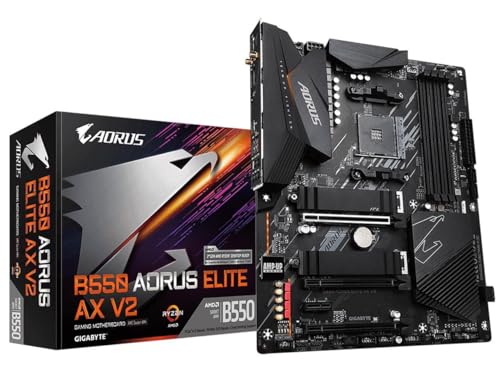
| Gigabyte B550 Aorus Elite AX V2 | ATX builds that want WiFi and a front USB-C header | 12+2 power phase |
| MSI B550M PRO-VDH WiFi | Compact micro-ATX builds on a parts budget | Micro-ATX with Wi-Fi |
How to Choose
Match the Power Design to Your Ryzen Tier
A Ryzen 5 5600 runs happily on almost any B550 board, but a Ryzen 9 5900X or a Ryzen 7 5800X3D under long gaming and rendering loads asks more of the voltage regulation hardware. Listings that state a phase count, like the 12+2 design on the Aorus Elite AX V2, are telling you how the board feeds the CPU. Heatsink size over that circuitry matters too, because a board that throttles power on a hot day quietly caps the chip you paid for. Count your CPU’s cores first, then read the board’s stated power design.
Pick the Form Factor Before Anything Else
ATX, micro-ATX and mini-ITX B550 boards share a chipset but not a footprint. A micro-ATX board like the PRO-VDH WiFi drops expansion slots and sometimes an M.2 slot to fit smaller cases, while full ATX boards keep extra PCIe slots for capture cards or sound cards. Measure your case’s supported sizes before falling for a feature list, because no amount of WiFi or fast LAN fixes a board that physically will not mount. If your case takes both, ATX usually gives you the easier cable routing and the wider choice of boards.
Decide on WiFi and Fast Ethernet Now
Some B550 boards are wired only, and that single fact shapes the whole build. The Tomahawk gives you a 2.5Gbps Ethernet port and no wireless at all, which is perfect beside a router and a dead end across the house. Boards with WiFi 6 or WiFi 6E in the title carry the antennas and Bluetooth with them, saving a PCIe slot and a USB port you would otherwise spend on adapters. Think about where the PC will actually live for the next few years, not where it sits during the build weekend.
Count M.2 Slots, Headers and the BIOS Button
On B550, the first M.2 slot talks to the CPU at PCIe 4.0 speed while a second slot usually runs through the chipset at PCIe 3.0, so slot count and placement decide how your storage grows. Front-panel USB-C needs a matching header on the board, which the Aorus Elite AX V2 lists and many rivals skip. Finally, a BIOS Flashback or Q-Flash Plus button lets you update firmware with no CPU installed, which turns a scary compatibility problem into a ten-minute chore. Check for that button if you are pairing the board with a later Ryzen release.
The 4 Best Options
MSI MAG B550 Tomahawk

The Tomahawk is the wired-workhorse pick of this group: a full ATX board built around fast Ethernet and a layout aimed at gaming machines that live next to the router. Its listing leads with 2.5Gbps LAN, dual M.2 slots and USB 3.2 Gen 2, and the board keeps the extra PCIe x16-length slot that smaller boards give up. If your build plan is a Ryzen 7 chip, one quick NVMe drive and a cabled connection, this is the board that covers it without charging you for wireless hardware you will never switch on.
Specs
- Socket AM4 with AMD B550 chipset
- ATX form factor
- DDR4 memory with DDR4 Boost up to 4866MHz (OC)
- 1 x PCIe 4.0 x16 and 1 x PCIe 3.0 x16 slot
- 2 x M.2 slots
- USB 3.2 Gen 2
- HDMI and DisplayPort outputs
- 2.5Gbps LAN
Best for: A wired mid-tower gaming build around a Ryzen 7 processor.
Watch out for: There is no onboard WiFi or Bluetooth, so a wireless setup means adding an adapter.
ASIN: B089CWDHFZ
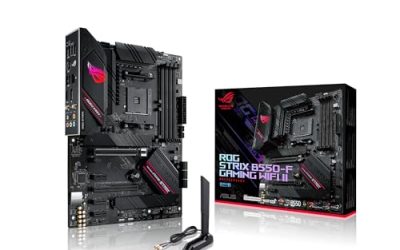
ASUS ROG Strix B550-F Gaming WiFi II
The Strix B550-F Gaming WiFi II is the board for builders who want the wireless side finished at the factory: WiFi 6E, Bluetooth support through the wireless module, and a 2.5Gb Ethernet port for the days the PC sits near a cable. ASUS also lists BIOS Flashback, which makes this the least stressful pick if your Ryzen chip turns out to need newer firmware than the board shipped with. The addressable RGB headers and Aura Sync support suit windowed cases, and dual M.2 slots leave room for a second drive later.
Specs
- Socket AM4 with AMD B550 chipset
- ATX form factor
- DDR4 memory
- PCIe 4.0 support
- WiFi 6E
- 2.5Gb Ethernet LAN
- Dual M.2 slots
- USB 3.2 Gen 2
- BIOS Flashback
- HDMI 2.1 output
- Addressable Gen 2 RGB headers with Aura Sync
Best for: A wireless gaming build that may need a CPU-free BIOS update.
Watch out for: Listings exist under more than one code for this model, so confirm the page you buy from names the WiFi II version.
ASIN: B09GP7P1XS
Gigabyte B550 Aorus Elite AX V2
Gigabyte’s entry leads its listing with the power design: a 12+2 phase layout feeding Ryzen 5000, 4000 and 3000 series processors, which is the kind of headroom that suits a higher-core chip. It is also the only board here whose title calls out a front USB-C connection, so cases with a front Type-C port actually get to use it. WiFi 6 and 2.5GbE LAN cover both connection styles, Q-Flash Plus gives you the same CPU-free BIOS updating as the ASUS, and dual M.2 slots handle storage growth.
Specs
- Socket AM4 with AMD B550 chipset
- ATX form factor
- Supports Ryzen 5000, 4000 and 3000 series processors
- DDR4 memory
- 12+2 power phase design
- 2 x M.2 slots
- PCIe 4.0 support
- Front USB-C connection
- WiFi 6
- 2.5GbE LAN
- Q-Flash Plus
- RGB Fusion
Best for: An ATX build with a higher-core Ryzen and a case that has front USB-C.
Watch out for: This board has been sold in several hardware revisions, so check the revision notes if a specific feature matters to you.
ASIN: B08KGVH7YC
MSI B550M PRO-VDH WiFi
The PRO-VDH WiFi shrinks the B550 formula into micro-ATX without dropping the things a first build actually needs: PCIe 4.0 for the graphics card and main SSD, onboard Wi-Fi and Bluetooth, and three display outputs for troubleshooting or a Ryzen G-series chip with integrated graphics. It trades away the second full-length expansion room and the faster wired networking of the ATX boards, and in return it fits the compact cases those boards cannot enter. For a Ryzen 5 build in a small box, that is the right trade almost every time.
Specs
- Socket AM4 with AMD B550 chipset
- Micro-ATX form factor
- DDR4 memory
- PCIe 4.0 support
- M.2 slot for NVMe storage
- SATA 6Gb/s ports
- USB 3.2 Gen 1
- Wi-Fi and Bluetooth
- D-Sub, HDMI and DisplayPort outputs
Best for: A compact Ryzen 5 gaming build in a micro-ATX case.
Watch out for: The wireless is an older, slower standard than the WiFi 6 boards above, and wired networking is standard gigabit.
ASIN: B089D1YG11
Which One Fits Your Situation
You Are Upgrading Around a Ryzen 7 5800X3D
Take the MSI MAG B550 Tomahawk if the PC lives near your router. The 5800X3D asks nothing exotic of a board beyond stable power delivery, and the Tomahawk pairs that with 2.5Gbps wired networking and two M.2 slots, so the upgrade becomes a board-and-chip swap that keeps your DDR4 and case exactly as they are.
Your PC Sits Nowhere Near a Cable
Choose the ASUS ROG Strix B550-F Gaming WiFi II. WiFi 6E from the factory beats any USB dongle for a gaming connection, Bluetooth is there for controllers and headsets, and BIOS Flashback removes the one compatibility headache that still catches AM4 buyers out when old stock meets a newer chip.
You Want One Board That Covers Every Port on Your Case
The Gigabyte B550 Aorus Elite AX V2 is the checklist board: front USB-C header, WiFi 6, 2.5GbE LAN, dual M.2 and a stated 12+2 power design. If your case has a front Type-C port you refuse to leave dead, this is the only pick here whose listing promises the header for it.
You Are Building Small and Counting Every Part
The MSI B550M PRO-VDH WiFi is the compact answer. Micro-ATX sizing, built-in wireless and display outputs for setup day cover a Ryzen 5 gaming build in a small case. The parts you skip, like a separate WiFi card, stay out of the budget entirely, and the board still leaves PCIe 4.0 headroom for a faster graphics card later.
Common Mistakes
- Assuming every B550 board boots every Ryzen chip out of the box. Later Ryzen 5000 releases can need a newer BIOS than early board stock carries, so check the CPU support list or pick a board with a CPU-free update button.
- Ordering an ATX board for a case that only accepts micro-ATX, then discovering the mounting holes and cable cutouts were never going to line up.
- Buying a wired-only board for a room with no Ethernet run, and spending the savings on adapters that work worse than factory WiFi would have.
- Expecting both M.2 slots to run at PCIe 4.0 speed. On B550 the second slot normally runs through the chipset at PCIe 3.0, which is fine for a game library but worth knowing before you buy two identical fast drives.
- Forgetting that AM4 is a finished platform. A B550 board uses DDR4 and Ryzen 5000 or older chips only, so buy it as a complete, balanced build rather than a stepping stone.
Frequently Asked Questions
Is a B550 motherboard still worth buying in 2026?
Yes, if you already own DDR4 memory or a Ryzen processor, or you found either at a sensible price. B550 gives you PCIe 4.0 for current graphics cards and fast NVMe storage, which covers gaming needs well. It stops making sense when every part is new and similarly priced AM5 hardware is on the same shelf.
Will a B550 board need a BIOS update for a Ryzen 5000 CPU?
Sometimes. Boards manufactured later usually ship with a BIOS that supports Ryzen 5000, but older stock may not, especially for the newest releases on the platform. The support page for your exact board lists the minimum BIOS per chip, and boards with BIOS Flashback or Q-Flash Plus can be updated without a working CPU installed.
What do I give up with B550 instead of X570?
Mainly expansion bandwidth. X570 offers more PCIe 4.0 lanes, so more slots and M.2 connectors run at full speed, while B550 limits PCIe 4.0 to the main graphics slot and one M.2. For a single-GPU gaming PC with one or two SSDs, that difference rarely shows up in daily use.
Can I use DDR5 memory or a Ryzen 7000 processor on a B550 board?
No. B550 is an AM4 platform, and AM4 processors use DDR4 memory only. Ryzen 7000 and newer chips use the AM5 socket and DDR5, and they are not interchangeable with AM4 boards in either direction. If an upgrade path matters more than reusing parts, start with an AM5 board instead.
Related guides
More from Amazon
Programs that pair well with the guide above. Offers and eligibility are set by Amazon and may change.
Free shipping on eligible items, Prime Video and more. Eligible new members can start with a free trial.
Start a Prime free trialAd-free music streaming. Eligible new subscribers can start with a free trial.
Try Music Unlimited freeA Prime membership for ages 18-24 with a trial period. Eligibility is set by Amazon.
See Prime for Young AdultsAudiobooks and podcasts to listen to on the go. Eligible new members can start with a free trial.
Try Audible freeAs an Amazon Associate we earn from qualifying purchases.