Disclosure: As an Amazon Associate, we earn from qualifying purchases made through links on this page, at no extra cost to you.
SLI is a legacy technology, and any honest guide to SLI motherboards has to start there. NVIDIA stopped adding new SLI profiles to its GeForce drivers in 2021, and the GeForce RTX 3090 was the last graphics card sold with an NVLink bridge connector for consumer multi-GPU use. Modern boards built for current graphics cards almost never list SLI support at all, because NVIDIA no longer licenses or promotes the feature. So the boards in this guide are not new releases. They are the AM4 and LGA1151 flagships from the X570 and Z390 generations whose makers published genuine NVIDIA SLI support in their official specifications, and which still turn up through Amazon listings as remaining stock, renewed units, or third-party seller inventory.
That makes this a guide for a specific kind of builder. If you run an existing dual GeForce setup and your motherboard has failed, you need a replacement board with certified SLI support and the correct slot layout. If you maintain a period-correct machine built around GTX 10-series or RTX 20-series cards, the same applies. And if you are assembling a legacy dual GPU system for older titles that shipped with working SLI profiles, the board has to carry published SLI support, because two long PCIe slots on their own do not enable SLI. NVIDIA required board makers to license and certify SLI, and a board without that certification will not expose the feature in the driver, no matter how its slots are arranged.
Every board below was checked against the maker’s own published specification for an explicit SLI listing, and each one splits its primary slots to x8/x8 with two cards installed, which is the configuration SLI needs. Read the buying notes after the picks for the platform and condition checks that matter when a board generation has been discontinued by its maker.
Top 3 picks at a glance


What Makes a Motherboard SLI Capable
The first requirement is certification. SLI support appears as a line in the maker’s multi-GPU specification, separate from AMD CrossFire support. Many boards from the same era list CrossFire only, and those boards cannot run SLI even though two cards physically fit. The five boards here each carry an explicit NVIDIA SLI entry in the manufacturer’s published specification.
The second requirement is lane splitting. SLI needs at least eight PCIe lanes per card, so a capable board runs its two primary slots at x16/x0 with one card and x8/x8 with two. Boards whose second long slot is wired for x4 through the chipset cannot run SLI, even when the slot accepts a full-length card. The slot tables in each Specs block below show the published split for each board.
The third piece is the bridge. Classic SLI setups link the cards with a bridge connector across the fingers on top of each card. High-bandwidth (HB) bridges suit the GTX 10-series and later, and the spacing of the bridge has to match the slot spacing on the board. RTX 3090 pairs use an NVLink bridge instead. Two of the boards below were published with an SLI HB bridge in the box, which is worth confirming on any listing, since a missing bridge is an extra part to source for a legacy build.
1. MSI MEG X570 Godlike

The MEG X570 Godlike was MSI’s flagship AM4 board, and its published specification is the broadest in this guide: MSI lists support for 2-way SLI alongside 4-way CrossFire, across four PCI Express 4.0 x16 slots. With third-generation Ryzen processors, the three CPU-connected slots run at x16/x0/x0 with a single card, x8/x0/x8 with two cards, or x8/x4/x4 with three, and the fourth slot adds a further x4 connection through the chipset. For an SLI pair, the x8/x8 split comes with full PCIe 4.0 bandwidth per card, which no other board in this guide matches.
Around that slot layout, the Godlike stacks the rest of the X570 platform’s high-end hardware. Three Lightning Gen4 M.2 connectors handle storage, and MSI bundled an M.2 Xpander-Z Gen4 card in the box for two additional Gen4 drives. Networking combines a Killer E3000 2.5 gigabit controller, a Killer E2600 gigabit controller, Killer Wi-Fi 6, and a bundled 10G Super LAN card. Audio runs through what MSI calls Xtreme Audio DAC, built on a Realtek ALC1220 codec with an ESS DAC, and the board carries a Dynamic Dashboard OLED display plus Mystic Light Infinity II lighting. The E-ATX footprint is wide, so check case clearance before planning around it. As a home for an existing AM4 dual GPU rig, it is the most complete board here.
Specs
- Socket / chipset: AM4, AMD X570
- Form factor: E-ATX (12 x 10.7 in)
- PCIe layout: 4 x PCIe 4.0 x16 slots; x16/x0/x0, x8/x0/x8, or x8/x4/x4 across the CPU slots, fourth slot x4
- SLI support: 2-way NVIDIA SLI and 4-way AMD CrossFire, as published by MSI
- Memory: 4 x DIMM, dual-channel DDR4 up to 5000+ MHz (O.C.), up to 128GB
- Storage: 3 x Lightning Gen4 M.2, 6 x SATA 6Gb/s, bundled M.2 Xpander-Z Gen4 card
- Networking: Killer E3000 2.5G LAN, Killer E2600 GbE, Killer Wi-Fi 6 AX1650, bundled 10G Super LAN card
- Audio: Realtek ALC1220 with ESS Xtreme Audio DAC, 7.1 channel
2. ASUS ROG Crosshair VIII Hero (Wi-Fi)
The ROG Crosshair VIII Hero (Wi-Fi) is the other AM4 board in this guide, and ASUS publishes its multi-GPU support plainly: NVIDIA 2-way SLI and AMD 3-way CrossFireX. Its two PCIe 4.0 x16 SafeSlots run at x16 with one card or x8/x8 with two, fed by the processor, with a third PCIe 4.0 x16 slot wired at x4 and a PCIe 4.0 x1 slot completing the layout. The SafeSlot construction reinforces the slots for heavy cards, which matters when two large GeForce cards sit side by side.
ASUS built the Hero around a 14+2 power stage design with alloy chokes and durable capacitors, and its OptiMem III memory routing supports DDR4 speeds of 4800 MHz and beyond in overclocked profiles, across four DIMM slots and up to 128GB. Storage covers two M.2 sockets and eight SATA ports. Networking pairs a Realtek 2.5 gigabit controller with an Intel I211-AT gigabit controller, and the Wi-Fi edition adds an Intel Wi-Fi 6 AX200 module. The SupremeFX S1220 codec works with an ESS ES9023P DAC for the audio path. For an AM4 SLI replacement board in a standard ATX case, the Hero is the more conventional fit than the E-ATX Godlike.
Specs
- Socket / chipset: AM4, AMD X570
- Form factor: ATX
- PCIe layout: 2 x PCIe 4.0 x16 SafeSlots (x16 or x8/x8), 1 x PCIe 4.0 x16 slot (x4 mode), 1 x PCIe 4.0 x1 slot
- SLI support: NVIDIA 2-way SLI and AMD 3-way CrossFireX, as published by ASUS
- Memory: 4 x DIMM, dual-channel DDR4 4800+ MHz (O.C.), up to 128GB, OptiMem III
- Storage: 2 x M.2 Socket 3, 8 x SATA 6Gb/s
- Networking: Realtek 2.5G LAN, Intel I211-AT GbE, Intel Wi-Fi 6 AX200
- Audio: SupremeFX S1220 codec with ESS ES9023P DAC
3. Gigabyte Z390 Aorus Master
Moving to Intel’s LGA1151 platform, the Z390 Aorus Master carries the strongest SLI wording of any board in this guide. Gigabyte’s official specification lists support for NVIDIA Quad-GPU SLI and 2-Way NVIDIA SLI technologies, alongside AMD Quad-GPU CrossFire and 3-way/2-way CrossFire. In practice, 2-way SLI is the configuration that matters for GeForce pairs, and the Master’s slot layout delivers it: the primary PCIEX16 slot runs at x16 alone, and when the PCIEX8 slot is populated the pair shares bandwidth as x8/x8, as SLI requires. A PCIEX4 slot and three PCIe x1 slots complete the expansion layout.
The board’s 12-phase IR digital VRM design with PowIRstage controllers feeds overclocked Coffee Lake processors, and Gigabyte rates the four DIMM slots for DDR4 4400 in overclocked profiles and up to 128GB. Three M.2 connectors wear Thermal Guard heatsinks, backed by six SATA ports. Audio is a highlight: a Realtek ALC1220-VB codec paired with an ESS SABRE 9118 DAC. Networking combines Intel gigabit Ethernet with Intel CNVi 802.11ac Wave 2 Wi-Fi and Bluetooth 5, and RGB Fusion 2.0 handles lighting. For a Z390 dual GPU build, the Master’s official SLI listing is as explicit as this generation gets.
Specs
- Socket / chipset: LGA1151, Intel Z390
- Form factor: ATX
- PCIe layout: 1 x PCIe 3.0 x16 (x16), 1 x PCIe 3.0 x16 (x8, shares bandwidth with the x16 slot for x8/x8), 1 x PCIe 3.0 x16 (x4), 3 x PCIe 3.0 x1
- SLI support: NVIDIA Quad-GPU SLI and 2-Way SLI, plus AMD CrossFire, as published by Gigabyte
- Memory: 4 x DDR4 DIMM, up to 128GB, DDR4 4400 (O.C.) support
- Storage: 3 x M.2 with Thermal Guards, 6 x SATA 6Gb/s
- Networking: Intel GbE LAN, Intel CNVi 802.11ac Wave 2 Wi-Fi, Bluetooth 5
- Audio: Realtek ALC1220-VB codec with ESS SABRE 9118 DAC
4. ASUS ROG Maximus XI Hero (Wi-Fi)

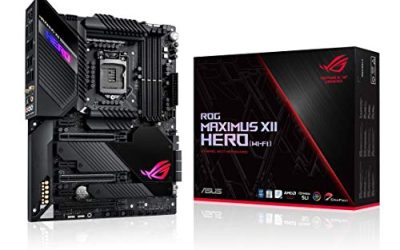
The ROG Maximus XI Hero (Wi-Fi) is ASUS’s Z390 counterpart in this guide, and its published specification lists multi-GPU support for NVIDIA 2-way SLI and AMD 3-way CrossFireX. The two PCIe 3.0 x16 SafeSlots run at x16 with a single card or x8/x8 with a pair, and ASUS also documents an x8/x4+x4 mode across the layout, with a third PCIe 3.0 x16 slot limited to x4 and three PCIe 3.0 x1 slots for other cards. Notably, ASUS published the board with an SLI HB bridge in the package contents, which suits GTX 10-series pairs directly; confirm the bridge is still included when a listing describes a used or opened unit.
ASUS aimed this board at memory and processor tuning, with four DIMM slots specified for DDR4 4400 MHz and beyond in overclocked profiles. Storage covers two M.2 sockets and six SATA ports. Networking uses an Intel I219-V gigabit controller plus Intel Wireless-AC 9560 Wi-Fi with MU-MIMO and Bluetooth 5.0. The SupremeFX S1220 codec and ESS ES9023P DAC handle audio, and the board adds a pre-mounted I/O shield and USB BIOS Flashback for firmware updates without a processor installed. Between the two Z390 boards here, the Maximus XI Hero is the pick when the bundled bridge and ASUS’s tuning toolkit matter more than the Aorus Master’s third M.2 slot and DAC hardware.
Specs
- Socket / chipset: LGA1151, Intel Z390
- Form factor: ATX
- PCIe layout: 2 x PCIe 3.0 x16 SafeSlots (x16, x8/x8, x8/x4+x4), 1 x PCIe 3.0 x16 slot (x4 mode max), 3 x PCIe 3.0 x1
- SLI support: NVIDIA 2-way SLI and AMD 3-way CrossFireX, as published by ASUS; SLI HB bridge listed in package contents
- Memory: 4 x DIMM, dual-channel DDR4 4400+ MHz (O.C.)
- Storage: 2 x M.2 Socket 3, 6 x SATA 6Gb/s
- Networking: Intel I219-V GbE, Intel Wireless-AC 9560 (802.11ac, MU-MIMO), Bluetooth 5.0
- Audio: SupremeFX S1220 codec with ESS ES9023P DAC
5. MSI MPG Z390 Gaming Pro Carbon

The MPG Z390 Gaming Pro Carbon closes the guide as the most attainable Z390 board here with genuine published SLI support. MSI’s datasheet for the board lists three PCI Express 3.0 x16 slots and states graphics support for 2-way SLI and 3-way CrossFire directly. With two cards installed, the primary pair splits to x8/x8 as SLI requires, and three PCIe 3.0 x1 slots handle additional cards. MSI also included a high-bandwidth SLI bridge in the box when the board shipped, a detail worth verifying on any listing for a used unit, since the bridge is matched to standard two-slot spacing.
The rest of the specification follows the Z390 performance pattern. Four DIMM slots accept DDR4 up to 4400 MHz in overclocked profiles and up to 128GB in total. Two Turbo M.2 slots, one fitted with an M.2 Shield Frozr heatsink, pair with six SATA ports for storage. An Intel I219-V gigabit controller handles wired networking, the Realtek ALC1220P codec drives Audio Boost 4 sound, and Mystic Light provides the lighting controls across the board’s carbon-styled heatsinks. For a Coffee Lake SLI machine that does not need the flagship extras of the Aorus Master or Maximus XI Hero, the Gaming Pro Carbon covers the essential requirement, certified and published SLI support, without giving up the x8/x8 layout or memory speed.
Specs
- Socket / chipset: LGA1151, Intel Z390
- Form factor: ATX
- PCIe layout: 3 x PCIe 3.0 x16 slots (x8/x8 split for two cards), 3 x PCIe 3.0 x1 slots
- SLI support: 2-way NVIDIA SLI and 3-way AMD CrossFire, as published by MSI; high-bandwidth SLI bridge included when new
- Memory: 4 x DIMM, dual-channel DDR4-4400 (O.C.), up to 128GB
- Storage: 2 x Turbo M.2 (one with M.2 Shield Frozr), 6 x SATA 6Gb/s
- Networking: Intel I219-V GbE LAN
- Audio: Realtek ALC1220P codec, Audio Boost 4, 7.1 channel
Buying Notes for a Legacy Platform
Because X570 and Z390 are discontinued platforms, most Amazon listings for these boards come from third-party sellers or remaining warehouse stock rather than fresh production runs. Read each listing’s condition notes carefully, and favour listings that describe the full retail package: the SLI or HB bridge where the maker bundled one, M.2 screws and standoffs, SATA cables, and the I/O shield where it is not pre-mounted. A bare board without its bridge can leave an SLI build waiting on a small part that is increasingly hard to source on its own.
Match the board to the cards you already own. SLI pairs must be identical GPU models, and the bridge type follows the card generation: HB bridges for GTX 10-series and RTX 20-series pairs, an NVLink bridge for RTX 3090 pairs. Also confirm the processor platform before ordering — the two X570 boards need an AM4 Ryzen processor, while the three Z390 boards need an 8th- or 9th-generation Intel Core processor on LGA1151, and neither group accepts the other’s chips. Finally, plan cooling around two cards sitting one slot apart: the x8/x8 layout places both cards in the top slots, so case airflow and card thickness decide whether a dual GPU machine stays composed under load.
Frequently Asked Questions
Can any motherboard with two PCIe x16 slots run SLI?
No. SLI requires published certification from the board maker, which appears as an explicit SLI entry in the multi-GPU specification, plus a slot layout that splits to x8/x8 with two cards installed. Boards that list only CrossFire support, or whose second long slot runs at x4 through the chipset, cannot enable SLI even though two cards physically fit.
Which graphics cards still work in an SLI setup?
SLI pairs must use two identical GeForce models with bridge fingers, such as GTX 10-series or RTX 20-series cards, while RTX 3090 pairs use an NVLink bridge. NVIDIA stopped adding new SLI profiles to its drivers in 2021, so support lives in the profiles that already exist for older titles rather than in ongoing updates for new releases.
Do these boards include the SLI bridge?
It depends on the board and the listing. ASUS published the Maximus XI Hero (Wi-Fi) with an SLI HB bridge in the package contents, and MSI included a high-bandwidth bridge with the MPG Z390 Gaming Pro Carbon when new. On used or opened listings, confirm the bridge is still in the box, because bridge spacing has to match the slot layout of the board.
Are these motherboards still sold new?
The X570 and Z390 platforms have been discontinued by their makers, so Amazon listings are generally remaining stock, renewed units, or third-party seller inventory rather than current production. Check the condition description and the included accessories on the listing before ordering, and verify the socket matches the processor you plan to install.
Related guides
More from Amazon
Programs that pair well with the guide above. Offers and eligibility are set by Amazon and may change.
Free shipping on eligible items, Prime Video and more. Eligible new members can start with a free trial.
Start a Prime free trialAd-free music streaming. Eligible new subscribers can start with a free trial.
Try Music Unlimited freeA Prime membership for ages 18-24 with a trial period. Eligibility is set by Amazon.
See Prime for Young AdultsAudiobooks and podcasts to listen to on the go. Eligible new members can start with a free trial.
Try Audible freeAs an Amazon Associate we earn from qualifying purchases.