A Zen 3 motherboard is the foundation of a Ryzen 5000 build, and the wrong board can limit a good processor for years. The socket must be AM4, the chipset must handle the chip you plan to install, and the board must carry enough memory slots, storage connections, and rear USB ports for the system you actually want. A board that looks fine on a short specification list can still fall short when you add a second NVMe drive, a large graphics card, and a wired network connection at the same time.
This guide is for builders putting together a new Ryzen 5000 gaming PC, for owners of an older AM4 system who want a board that pairs cleanly with a Zen 3 chip, and for buyers who want built-in wireless without adding a separate card. The three boards below were chosen from the names and specifications stated on their Amazon pages, so you can compare chipset, memory, storage, and networking side by side before you commit to one board.
Our Top Picks


Top 3 picks at a glance

Quick Picks
As an Amazon Associate we earn from qualifying purchases
| Product | Best for | Key spec from title |
|---|---|---|
| ASUS ROG Strix B550-F Gaming WiFi II | A feature-rich B550 build with fast wireless | PCIe 4.0, WiFi 6E, 2.5Gb LAN, BIOS Flashback, HDMI 2.1 |
| MSI MAG B550 Tomahawk | A balanced B550 board for a Ryzen 5000 gaming PC | AMD Ryzen 5000 Series, AM4, DDR4, PCIe 4.0, M.2, USB 3.2 Gen 2, HDMI/DP, 2.5Gbps LAN |
| ASUS AM4 TUF Gaming X570-Plus (Wi-Fi) | An X570 board with more chipset lanes and storage | AM4 Zen 3 Ryzen 5000, PCIe 4.0, Dual M.2, 12+2 with Dr. MOS Power Stage |
How to Choose
Chipset first: B550 or X570 for a Zen 3 build
The chipset decides how many fast lanes and ports the board can carry, so it deserves attention before brand or appearance. B550 gives a Ryzen 5000 system PCIe 4.0 on the graphics slot and the main M.2 slot, which covers most single-card gaming builds without waste. X570 adds PCIe 4.0 across the chipset as well, plus more USB and SATA connections, which suits builders who run several fast drives and many peripherals at once. Both chipsets use socket AM4 and DDR4 memory, so the choice is about how much connectivity you need rather than raw gaming speed. Pick B550 for a focused build and X570 when the parts list keeps growing.
Memory support and the DDR4 kit you already own
Every board in this guide uses DDR4, so a Zen 3 build reuses the memory standard that AM4 owners already know. Four DIMM slots are the norm on the ATX boards below, and the listings state support for large dual-channel kits up to 128 GB, with high memory clock speeds reached through overclocking profiles. Check the memory speed your kit is rated for and confirm the board lists that speed among its supported settings, because a kit that runs below its rated speed wastes money you already spent. Also confirm the number of slots you need, since a two-slot board limits future memory additions. A board with four slots leaves room to add a matching pair later.
Storage lanes, M.2 slots, and USB on the rear panel
Storage is where many AM4 boards differ most, even when their chipsets match. Count the M.2 slots first, because a fast NVMe drive needs one, and a second drive for games needs another. Then count SATA ports for hard drives and older solid-state drives, and check whether any SATA port shares bandwidth with an M.2 slot, since a shared port can turn off when the M.2 slot is filled. Rear USB matters just as much for daily use, so look for USB 3.2 Gen 2 ports for fast external drives and enough USB-A ports for a keyboard, mouse, headset, and controller. A board that covers storage and USB together avoids add-in cards later.
Networking, wireless, and BIOS support for Ryzen 5000
Networking decides whether a board fits your room and your connection. A 2.5Gb LAN port suits a fast home network and large game downloads, while built-in Wi-Fi suits a PC that sits far from the router. Wi-Fi 6E adds a wider band for crowded wireless environments, and Bluetooth support matters when you pair wireless headsets and controllers without a separate adapter. BIOS support is the other half of the decision, because a board made before Ryzen 5000 may need a BIOS update before the chip works at all. A board with BIOS Flashback lets you update without a working processor installed, which removes a common headache for builders who buy the board and the chip together.
The 3 Best Options
ASUS ROG Strix B550-F Gaming WiFi II
The ROG Strix B550-F Gaming WiFi II is the most connected B550 board in this guide, and it suits a Ryzen 5000 build that needs wireless without a separate card. Its AM4 socket and B550 chipset pair with Ryzen 5000 processors, while PCIe 4.0 covers the graphics slot and the main storage slot for a fast NVMe drive. WiFi 6E and 2.5Gb LAN give the board two strong networking paths, and BIOS Flashback helps when a board needs a newer BIOS before a Ryzen 5000 chip will run. HDMI 2.1 on the rear panel covers systems that use integrated graphics for setup or for a second display.
Specs
- Socket AM4, chipset AMD B550, form factor ATX
- Memory type DDR4
- PCIe 4.0, WiFi 6E, 2.5Gb LAN
- BIOS Flashback, HDMI 2.1
- Addressable Gen 2 RGB Header and Aura Sync
Best for: Builders who want a B550 board with fast wireless, fast wired networking, and BIOS Flashback in one package.
Watch out for: The listing names 3rd Gen Ryzen in its title, so confirm Ryzen 5000 support and BIOS version with the seller before you install a Zen 3 chip.
ASIN: B09GP7P1XS
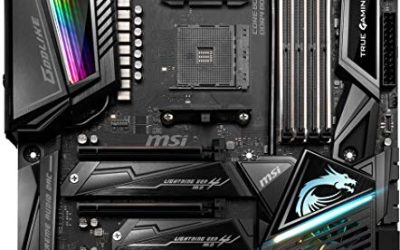
MSI MAG B550 Tomahawk
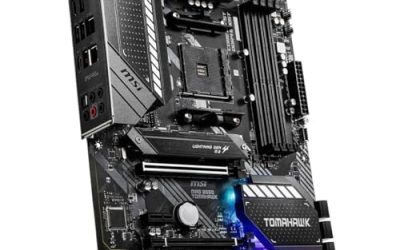
The MAG B550 Tomahawk is a balanced ATX board for a Ryzen 5000 gaming PC, with a specification list that covers the parts most builders actually install. Its AM4 socket and B550 chipset support AMD Ryzen 5000 Series processors, and its dual-channel DDR4 support reaches up to 128 GB, so a large memory kit fits without compromise. PCIe 4.0 serves the graphics card and a Lightning Gen 4 M.2 slot with M.2 Shield Frozr, while USB 3.2 Gen 2, HDMI, and DisplayPort cover fast external storage and display connections. Dual LAN, with 2.5G LAN plus Gigabit LAN, gives a wired connection a useful fallback when one network path is busy.
Specs
- Socket AM4, chipset AMD B550, form factor ATX
- Memory type DDR4, dual channel up to 128 GB
- PCIe 4.0, Lightning Gen 4 M.2 with M.2 Shield Frozr
- SATA 6Gb/s, M.2, USB 3.2 Gen 2, HDMI/DP
- 2.5Gbps LAN plus Gigabit LAN
Best for: A single-card Ryzen 5000 gaming PC that needs strong memory support, fast storage, and dual wired networking.
Watch out for: The listing states support for 3rd Gen Ryzen processors and future Ryzen processors with a BIOS update, so check the BIOS version before installing a Ryzen 5000 chip.
ASIN: B089CWDHFZ
ASUS AM4 TUF Gaming X570-Plus (Wi-Fi)
The TUF Gaming X570-Plus (Wi-Fi) is the X570 board in this guide, and its Amazon title names Zen 3 and Ryzen 5000 directly. Its AM4 socket and X570 chipset suit builders who want more chipset lanes than B550 provides, and its dual M.2 slots with PCIe 4.0 give two fast NVMe drives room to run. The 12+2 power stage design with Dr. MOS supports a demanding Ryzen 5000 chip under sustained load, while USB 3.2 Gen 2 and Aura Sync RGB lighting cover fast external devices and a matching build theme. Built-in Wi-Fi keeps the board useful in a room where running a cable is awkward.
Specs
- Socket AM4, chipset AMD X570, form factor ATX
- AM4 Zen 3 Ryzen 5000 and 3rd Gen Ryzen
- PCIe 4.0, Dual M.2
- 12+2 with Dr. MOS Power Stage
- USB 3.2 Gen 2, Aura Sync RGB lighting
Best for: Builders who want an X570 board for a Zen 3 system with two fast NVMe drives and room for more connected devices.
Watch out for: This is an older X570 board, so confirm current availability and the BIOS version with the seller before you buy.
ASIN: B07SXF8GY3
Which One Fits Your Situation
You are building a new Ryzen 5000 gaming PC from scratch
The MSI MAG B550 Tomahawk fits a build best, because its specification list covers a Ryzen 5000 chip, a large DDR4 kit, a fast NVMe drive, and dual wired networking. B550 keeps the board focused on the parts a single-card gaming PC needs, and the ATX layout leaves room for a large graphics card and a second M.2 drive later. Choose it when the parts list is settled and you want a board that handles the core build well.
You are upgrading an older AM4 system to a Ryzen 5000 chip
The ASUS ROG Strix B550-F Gaming WiFi II suits an upgrade, because BIOS Flashback lets you update the board without a working processor installed. That matters when the board leaves the factory with an older BIOS that cannot yet run a Ryzen 5000 chip. Its DDR4 slots accept the memory from many older AM4 systems, and its WiFi 6E and 2.5Gb LAN add modern networking to an older case and power supply.
You want built-in Wi-Fi and strong wired networking
Both ASUS boards carry built-in Wi-Fi, so the choice comes down to chipset and board layout. The ROG Strix B550-F Gaming WiFi II adds WiFi 6E and 2.5Gb LAN on a B550 board, which suits a gaming PC in a room far from the router. The TUF Gaming X570-Plus (Wi-Fi) adds X570 connectivity for a system with more drives and peripherals. Pick the Strix for a focused wireless build and the TUF when the rest of the system needs X570.
You need room for two fast NVMe drives and several SATA drives
The ASUS AM4 TUF Gaming X570-Plus (Wi-Fi) fits a storage-heavy build best, because X570 gives the chipset more fast lanes than B550, and the board lists dual M.2 slots with PCIe 4.0. That layout suits a system with one NVMe drive for the operating system and a second for games, plus SATA drives for media and backups. Check the manual for any shared SATA ports before you fill every drive bay, so no port turns off unexpectedly.
Common Mistakes
- Buying an AM4 board without confirming that its BIOS supports the exact Ryzen 5000 chip you plan to install.
- Choosing DDR5 memory for an AM4 board, when every board in this guide uses DDR4 memory only.
- Filling both M.2 slots without checking whether one of them shares bandwidth with a SATA port on that board.
- Picking a board for its wireless feature and forgetting to check whether its wired LAN speed matches your home network.
- Ignoring the rear USB layout and then needing a hub for a keyboard, mouse, headset, controller, and external drive.
Frequently Asked Questions
Do all AM4 motherboards work with Zen 3 processors?
No, not every AM4 board works with Zen 3 out of the box. Most B550 and X570 boards support Ryzen 5000 processors, but a board made before those chips launched may need a BIOS update first. Older AM4 chipsets have narrower support, so check the board maker’s CPU support list for your exact processor model. A board with BIOS Flashback lets you apply that update without a working processor installed.
Is B550 or X570 better for Zen 3?
Neither chipset is better, because the right choice depends on how many devices you plan to connect. B550 covers a single graphics card, one fast NVMe drive, and standard USB and SATA needs, which suits most gaming PCs. X570 adds PCIe 4.0 across the chipset and more USB and SATA connections, which suits storage-heavy builds. Pick B550 for a focused build and X570 when the parts list keeps growing.
Do I need DDR5 memory for a Zen 3 motherboard?
No, Zen 3 motherboards use DDR4 memory, not DDR5. The AM4 socket and the B550 and X570 chipsets were built around DDR4, and the boards in this guide all list DDR4 slots. If you already own a DDR4 kit, check its speed against the board’s supported memory list before you reuse it. Buying DDR5 for an AM4 board would leave you with memory that cannot fit the slots.
Can I use my old AM4 cooler on a new Zen 3 motherboard?
Yes in most cases, because the AM4 mounting pattern stayed the same across these boards. A cooler that fits an AM4 socket should mount on a B550 or X570 board without a new bracket. Check clearance around the memory slots and the first PCIe slot, since a tall cooler can crowd nearby parts. Confirm the cooler’s rated support for your exact Ryzen 5000 chip.
Related guides
More from Amazon
Programs that pair well with the guide above. Offers and eligibility are set by Amazon and may change.
Free shipping on eligible items, Prime Video and more. Eligible new members can start with a free trial.
Start a Prime free trialAd-free music streaming. Eligible new subscribers can start with a free trial.
Try Music Unlimited freeA Prime membership for ages 18-24 with a trial period. Eligibility is set by Amazon.
See Prime for Young AdultsAudiobooks and podcasts to listen to on the go. Eligible new members can start with a free trial.
Try Audible freeAs an Amazon Associate we earn from qualifying purchases.