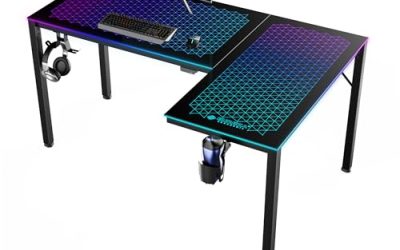
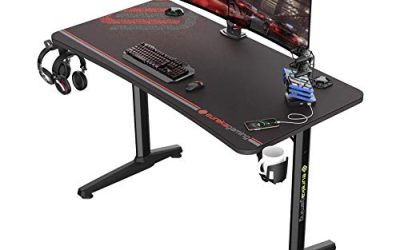
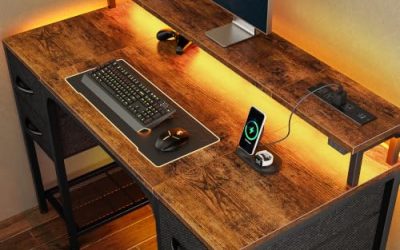
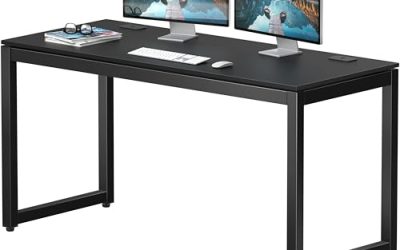
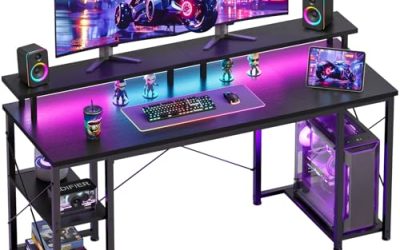
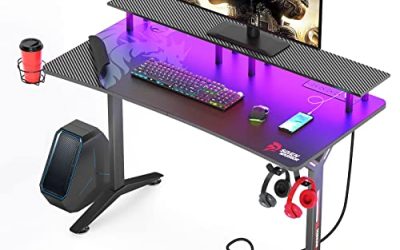
Arm aiming turns your desk into part of the mouse. At the low sensitivities tactical FPS players use, a single 180-degree turn can eat 40 centimeters of pad, and your forearm drags across the surface the whole way. So the real decision is not branding or RGB trim. It is whether the top is deep enough to hold your monitor at a sane distance while your forearm stays on the surface, wide enough that a flick never runs out of room, and stiff enough that a sweep does not shake the screen.
This guide is for low-sensitivity FPS players who aim with their full arm, players moving up from a small desk pad to a desk-wide surface, and sit-stand gamers who want sweep space and a motor. Every desk below was picked from the names and specifications on its Amazon product page: desktop dimensions, lift range, load rating and frame construction as the listing states them.
Top 3 picks at a glance


Quick Picks
As an Amazon Associate we earn from qualifying purchases.
| Product | Best for | Key spec from title |
|---|---|---|
| Arozzi Arena Medium Gaming Desk | Full-surface pad for the widest sweeps | Full-Surface Mousepad |
| Secretlab MAGNUS Pro | Cable-free battlestations | Integrated Power Supply Column |
| ErGear Height Adjustable Electric Standing Desk 63 x 28 | The widest electric top in this guide | 63 x 28 Inches |
| SHW 55 x 28 Electric Height Adjustable Standing Desk | Smaller rooms that still need sweep room | 55 x 28 Inches, Memory Preset |
How to Choose
Start with depth, not width
Depth decides how an arm-aiming desk actually feels. With 24 inches of depth, a monitor stand eats the back third, your keyboard sits in the middle, and your forearm hangs off the front edge, so every sweep pivots on the desk lip. At 28 to 30 inches deep, the monitor moves back to a healthier viewing distance, the keyboard shifts up, and your forearm rests fully on the surface through the whole stroke. That full contact is what makes long flicks repeatable. When you compare listings, read the depth figure first and treat anything under 27 inches as a compromise for this play style.
Measure the sweep zone you actually get
Headline width is not mouse room. From the listed width, subtract your keyboard, the monitor feet or clamp, speakers and any tower sitting on the top, and what remains is your sweep zone. A low-sensitivity player wants roughly 50 centimeters of uninterrupted surface beside the keyboard for turns, plus a pad that covers it without a raised edge to catch the mouse feet. Full-surface pad desks remove the edge problem entirely. With a separate XL pad, check its depth against the desk depth: a pad around 19 to 20 inches deep on a 28-inch desk still leaves bare desktop in front of it.
Frame stiffness matters more at standing height
A desk that feels solid at sitting height can wobble at standing height, and wobble is poison for arm aiming because the monitor moves independently of your hand. Look at how the listing describes the frame: solid steel construction, reinforced lifting columns and a published load rating are the signals that matter. Two-leg electric frames vary a lot here, so the load figure is a useful proxy — a frame rated well above your gear’s weight works less hard and sways less. Fixed steel-leg desks skip the question entirely, which is one reason some competitive players still prefer them.
Keep monitors and cables out of the sweep
Your mouse area loses space to everything that shares the top. A monitor arm clamps at the back edge and returns the depth the stock stand was using, which is the single easiest upgrade for an arm aimer. Cable routing matters too: cutouts, grommets and under-desk trays keep display and power cables from drooping into the pad zone, and a wireless mouse removes the cable drag that bungees only partly fix. On an electric desk, leave slack in every cable for full lift height, or the first time you raise the desk something will pull tight and drag across your sweep.
The 4 Best Options
Arozzi Arena Medium Gaming Desk

The Arena Medium keeps the one feature arm aimers care about most and trims the rest. Its 55.1-inch width is the narrowest here, but the top runs 29.7 inches deep — the deepest in this guide — and the entire surface is a microfiber mousepad, so there is no pad edge to catch a mouse foot mid-flick and no seam under your forearm. The listing describes the pad as water-resistant and machine washable, with three cutouts feeding cables into a mesh basket underneath and a steel frame holding a fixed 28-inch height. It suits a dedicated gaming corner where the desk never needs to become a standing workstation.
Specs
- Desktop: 55.1 x 29.7 in (140 x 75.5 cm)
- Height: fixed 28 in (71 cm)
- Surface: full-surface microfiber mousepad, water-resistant and machine washable
- Cable routing: 3 surface cutouts with under-desk mesh basket
- Frame: steel legs and frame
- Fits up to 2 large monitors, per the listing
Best for: low-sensitivity FPS players who want the whole desktop to be the mousepad.
Watch out for: the fixed height cannot adapt — check that 28 inches matches your chair and elbow height before ordering, because there is no adjustment later.
ASIN: B0DPNFJSPS
Secretlab MAGNUS Pro
The MAGNUS Pro is the pick for players who want a battlestation that looks wired by nobody. The 59.1-inch steel top carries a MAGPAD desk mat, and power routes through an integrated supply column in the leg, so one cable reaches the wall and a full-length tray hides the rest. Electric lift runs from 25.6 to 49.2 inches with three memory presets on a built-in control panel, and the listing’s maximum weight recommendation is 265 pounds, which is headroom that keeps the top steady at standing height. At 27.6 inches deep it is the shallowest top here, so plan on a monitor arm.
Specs
- Desktop: 59.1 x 27.6 in, steel top with MAGPAD desk mat
- Height range: 25.6 to 49.2 in, electric, 3 memory presets
- Maximum weight recommendation: 265 lb
- Top material: MDF with steel (SPCC), powder coated
- Integrated power supply column and built-in cable management tray
- Item weight: 125.7 lb
Best for: sit-stand gamers who want zero visible cables and a steel top that stays put.
Watch out for: this listing is the 59.1-inch Regular size — the range includes other sizes, so confirm the size option before checkout, and budget a monitor arm to win back depth.
ASIN: B0G1SCVHQ7
ErGear Height Adjustable Electric Standing Desk 63 x 28
ErGear’s 63-inch model is the widest electric desk in this guide, and width is what a tower, two monitors and a big pad compete for. The listing gives a height range of 28.35 to 46.46 inches with three saved memory settings, a solid steel frame with aerospace-grade lifting column connectors, and a maximum load of 176 pounds — enough for a dual-monitor setup with the PC underneath instead of on the top. The desktop is listed at 63 by 28 inches, so a desk-wide pad still leaves a strip of surface in front for your forearms. The Natural finish shown here is the variant tied to the ASIN below.
Specs
- Desktop: 63 x 28 in (listed size 63 x 27.6 in)
- Height range: 28.35 to 46.46 in, electric
- Memory: 3 saved height settings
- Maximum load: 176 lb
- Frame: solid steel with aerospace-grade lifting column connectors
- Model: EGESD7N, Natural finish
Best for: arm aimers who want the widest electric top and presets for shared desks.
Watch out for: the title rounds the depth up to 28 inches while the listed size is 27.6 inches — measure your pad against 27.6, and keep the total gear weight under the 176-pound limit.
ASIN: B0B4228GNB
SHW 55 x 28 Electric Height Adjustable Standing Desk
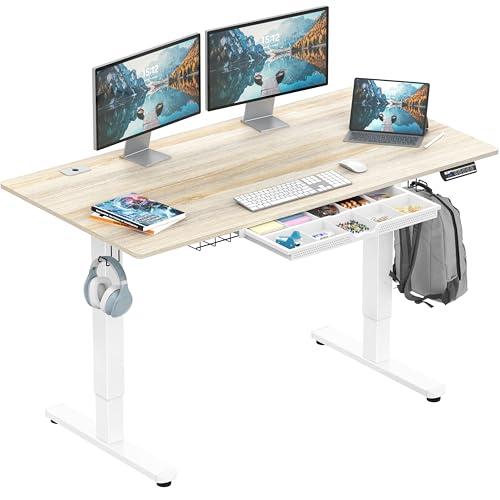
The SHW is the compact answer for a bedroom or shared room that cannot spare a 63-inch footprint. Its top measures 55 by 28 inches, so the depth your forearm needs survives even though the width shrinks, and the electric frame adjusts from 28 to 45 inches through a memory preset controller with an LED display. A built-in drawer with adjustable compartments swallows spare cables, a second mouse and batteries, which keeps the surface itself clear for the pad. For a single-monitor setup with the tower on the floor, the remaining sweep zone beside a keyboard is still enough for full-arm turns.
Specs
- Desktop: 55 x 28 in
- Height range: 28 to 45 in, electric
- Controller: memory preset with LED display, 3 memory presets
- Storage: built-in drawer with adjustable compartments
- Top thickness: 1 in
- Sold by EPFamily Direct, ships from Amazon
Best for: smaller rooms where a 55-inch desk must still deliver full-length sweeps.
Watch out for: the under-top drawer reduces thigh clearance — if you sit close with your chair arms high, check the drawer depth against your seated position.
ASIN: B07Q3TGL7M
Which One Fits Your Situation
You flick through 180s in tactical shooters
Pick the Arozzi Arena Medium. Your game is built on wide, fast turns, and this is the only desk here where the mousepad is the desktop: 29.7 inches of depth, edge to edge, with nothing to catch on. The fixed height is a fair trade when the desk does one job — gaming — and your chair height is already dialed in around it.
You game and work at the same desk all day
Pick the ErGear 63 x 28. The widest top here holds a work setup and a gaming setup without evicting your sweep zone, and three memory presets let you store a sitting work height, a sitting gaming height and a standing height. Its 176-pound rating covers a dual-monitor arm and peripherals with the tower kept underneath.
You want a battlestation with no visible cables
Pick the Secretlab MAGNUS Pro. The integrated power column means the desk itself runs on a single cable, the full-length tray hides the power strip, and the magnetic steel top works with magnetic cable anchors. It is also the strongest frame here on paper, with a 265-pound maximum weight recommendation for heavy multi-monitor rigs.
Your room is tight but your sensitivity is low
Pick the SHW 55 x 28. At 55 inches wide it fits rooms the 63-inch desks cannot, yet the 28-inch depth preserves the forearm support and monitor distance that arm aiming needs. Run one monitor, keep the tower on the floor, and the drawer keeps the small surface from filling with clutter that steals mouse room.
Common Mistakes
- Buying by width alone: a 63-inch desk that is only 24 inches deep gives an arm aimer less usable surface than a 55-inch desk that is 30 inches deep.
- Putting the PC tower on the right side of the top, directly in the sweep zone, instead of on the floor or a side stand.
- Choosing a two-piece splice top without checking where the seam falls — a join line under the pad area can catch mouse feet during long strokes.
- Ignoring wobble at full standing height: a frame that feels fine seated may sway when raised, so compare load ratings and frame construction in the listing.
- Forgetting the monitor stand’s footprint: deep stock feet can eat 8 to 10 inches of depth, which is why a monitor arm is close to mandatory for this play style.
Frequently Asked Questions
How deep should a desk be for arm aiming?
Aim for 28 to 30 inches. That depth lets the monitor sit at a comfortable viewing distance while your keyboard and your full forearm share the surface, so sweeps pivot from the shoulder instead of the wrist. Desks around 24 inches deep force your forearm off the front edge, which changes your aim mechanics and tires your arm over a long session.
Is a 55-inch desk wide enough for low-sensitivity play?
Yes, with a single monitor and the tower off the top. A 55-inch top leaves roughly 50 centimeters of clear sweep beside a full-size keyboard once the monitor is arm-mounted or pushed back, which covers most 180-degree turns at common tactical FPS sensitivities. If you run two monitors plus a tower on the desk, step up to a 63-inch top instead.
Fixed-height or electric desk for FPS gaming?
Both work; the trade is stability against flexibility. A fixed steel-leg desk has no lift mechanism to flex, so it is the simplest route to a shake-free top. A good electric frame with a strong load rating stays steady too and adds sit-stand play, but check the listed load figure and expect some movement at maximum height on lighter frames.
Is a full-surface pad desk better than a separate XL mousepad?
For arm aiming, the full-surface desk removes the two failure points of a separate pad: the raised edge your mouse can catch during a flick, and the pad slowly migrating across the top. A separate XL pad on a deep desk is close behind and easier to replace when it wears. Either way, the pad or surface should cover your whole sweep, not just the area around the keyboard.
Related guides
More from Amazon
Programs that pair well with the guide above. Offers and eligibility are set by Amazon and may change.
Free shipping on eligible items, Prime Video and more. Eligible new members can start with a free trial.
Start a Prime free trialAd-free music streaming. Eligible new subscribers can start with a free trial.
Try Music Unlimited freeA Prime membership for ages 18-24 with a trial period. Eligibility is set by Amazon.
See Prime for Young AdultsAudiobooks and podcasts to listen to on the go. Eligible new members can start with a free trial.
Try Audible freeAs an Amazon Associate we earn from qualifying purchases.