Mounting a gaming monitor on the wall changes the whole desk equation. With the screen floating above the surface, the desk no longer needs to hold a heavy stand or a riser, and every inch of the top is free for a keyboard, a mouse and the gear that actually gets used during a session. Finding the best desks under gaming monitor on wall setups is therefore less about monitor support and more about depth, width, height and cable routing. A desk that is too deep pushes the keyboard too far from the wall and wastes floor space, while a desk that is too shallow leaves no room for a full-size keyboard and a wide mouse pad. The five desks below were chosen because they sit comfortably beneath a wall-mounted screen, keep cables tidy and leave the playing surface clear.
Top 3 picks at a glance


What to Look For
Depth that matches the wall gap. With the monitor on the wall, the desk can sit close to the wall, so a depth between 19 and 32 inches works for most rooms. Shallow desks around 19 to 24 inches keep the keyboard within easy reach of the wall and leave more floor space behind the chair. Deeper desks around 32 inches suit players who want a large mouse pad and room for a stream deck, a notebook or a pair of speakers in front of the screen.
Width for the whole setup. A wall-mounted monitor does not take desk space, but the keyboard, mouse, speakers and any console controller still need room. A width of 44 inches is the practical minimum for a single ultrawide setup, while 55 to 63 inches leaves room for a second device, a headset stand or a small set of speakers without crowding the mouse area.
Height and leg clearance. Most gaming desks sit between 28 and 30 inches high, which pairs well with a standard gaming chair and a wall-mounted screen at eye level. Check that the legs and any crossbar leave enough knee room, and that the desk height can be adjusted if the monitor mount places the screen higher or lower than a typical stand would.
Cable routing built in. A wall-mounted monitor means cables run from the wall down to the desk, so grommet holes, a cable net or a tray under the top matter more than ever. Without a path for the display cable and the power cord, the clean look of a wall mount is lost the moment the cables dangle in front of the desk.
Stability under load. Even without a monitor on the surface, a gaming desk still carries a keyboard, a mouse, speakers, a headset and sometimes a tower. A steel frame and a solid top keep the surface steady during fast mouse movements, and a stated load limit gives a clear sense of what the desk can hold.
Surface texture and mouse glide. Many gaming desks ship with a full-surface mouse pad or a carbon-fiber texture. A smooth, consistent surface keeps mouse movement predictable across the whole top, which matters when the monitor is fixed to the wall and the seating position does not change.
Corner fit and reversibility. If the wall mount sits in a corner, an L-shaped desk uses the dead space well and keeps the screen centered on the player. Reversible layouts let the long side run along the wall with the mount, while the short side holds a tower or a set of shelves.
Assembly and footprint. A desk that splits into sections is easier to carry into a room and around a wall-mounted screen that is already in place. Measure the door, the wall and the chair clearance before choosing a 63-inch model, since a wide desk is hard to move once assembled.
Top Picks
1. SHW 55-Inch Commercial-Grade Office Computer Desk, Black
The SHW 55-inch desk is a simple, sturdy rectangle that fits neatly under a wall-mounted gaming monitor. At 55 inches wide and just under 24 inches deep, it leaves a generous keyboard and mouse area while staying close enough to the wall that the screen above it feels part of the desk rather than floating far behind it. The powder-coated alloy steel frame and engineered wood top give the surface a firm, flat feel, and the desk carries a 10-year limited warranty from the maker. Two grommet openings in the top let the display cable and power cord drop straight down from the wall mount and under the desk, which keeps the front edge clean. The height is fixed at 28 inches, a comfortable match for most gaming chairs, and adjustable glides on the feet help level the desk on uneven floors. Because the top is a single flat slab with no hutch, no riser and no monitor shelf, nothing competes with the wall-mounted screen for visual space. The plain black finish suits a gaming room without drawing attention away from the monitor, and the 55-inch width leaves room for a keyboard, a full-size mouse pad, a headset stand and a small speaker on one side. For a player who wants a no-frills desk that simply works under a wall-mounted screen, the SHW is a strong, affordable-shaped option with a proven frame.
2. EUREKA ERGONOMIC Z1-S Pro Gaming Desk, 44.5-Inch
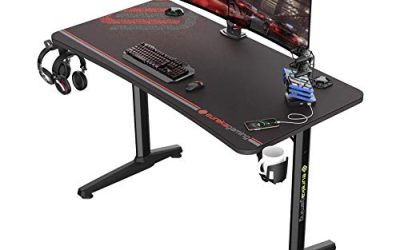
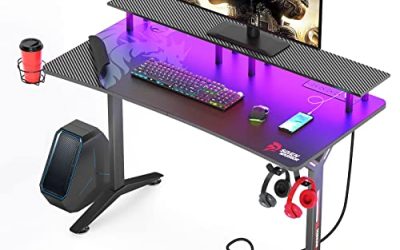
The Z1-S Pro is the compact pick in this roundup, and its 44.5-inch width makes it a natural fit for a wall-mounted monitor in a smaller room or a bedroom corner. The Z-shaped steel frame leaves the leg area open, so the chair can slide in close to the wall and the player sits at a comfortable distance from the screen. Built-in LED lights along the frame add a glow that matches a gaming setup, and the desk ships with a controller stand, a cup holder, a headphone hook and a free mouse pad, so the small surface stays organized without extra accessories. Cable grommets in the top give the wall-mount cables a direct path down and out of sight. The carbon-fiber textured top resists scratches from a keyboard and a mouse, and the Z-frame design keeps the desk steady during quick movements. At 44.5 inches wide, the Z1-S Pro suits a single monitor on the wall with a tenkeyless or full-size keyboard and a medium mouse pad, though a second device or a large speaker set will crowd the surface. The height is fixed, so players who sit very low or very high should check the 29-inch height against their chair before committing. For tight wall spaces where a 55-inch desk would block a door or a closet, the Z1-S Pro keeps the setup compact while still looking like a proper gaming desk.
3. Arozzi Arena Ultrawide Curved Gaming Desk, 63-Inch
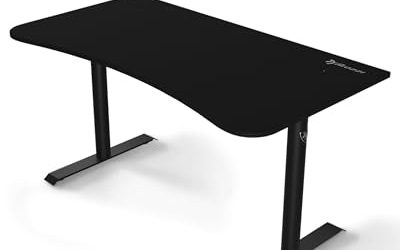
The Arozzi Arena Ultrawide is the largest desk here, and its 63-inch width and 32-inch depth give a wall-mounted monitor setup room to breathe. The full-surface microfiber mouse pad covers the entire top, is water resistant and can be removed for washing, so the whole playing area feels consistent from one edge to the other. Three cut-outs in the top are made for monitor mounts, which is useful even when the main screen hangs on the wall, since a second small display or a webcam arm can pass through without drilling. A cable management net under the top holds the display cable, power cords and USB leads out of view, keeping the clean look that a wall mount is meant to create. The steel legs adjust in height from about 28 to 32 inches, letting the desk meet the wall-mounted screen at the right eye level for different chairs. With a stated load capacity of 176 pounds, the Arena handles a keyboard, a mouse, speakers, a headset and a tower on the floor beside it without flexing. The curved front edge lets the player sit close to the wall without the corners pressing into the arms, a small detail that matters during long sessions. The top splits into three sections for transport, which helps when carrying the desk into a room where the monitor is already mounted. Players with a wide ultrawide or a dual-screen wall setup will appreciate the extra depth, though the 32-inch depth needs a room with enough floor space behind the chair.
4. SEDETA L Shaped Gaming Desk, 63-Inch

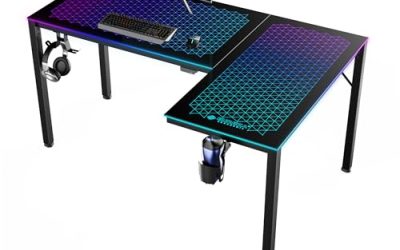
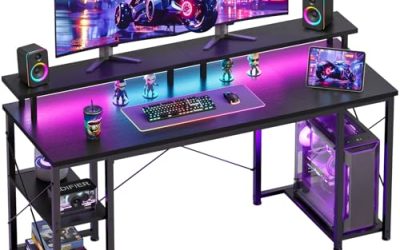
The SEDETA L-shaped desk is the shallowest option in this roundup at 18.9 inches deep, and that slim profile is exactly what makes it work so well under a wall-mounted gaming monitor. The desk hugs the wall, the keyboard sits close to the screen, and the player does not need to reach across a deep surface to type or aim. The 63-inch L shape wraps around a corner, so the long side runs under the wall-mounted monitor while the short side holds a tower, a set of books or a console. A built-in power outlet with USB ports sits on the top, which means the keyboard, phone and headset can charge without a separate strip cluttering the surface. Five storage shelves on the side keep games, controllers and cables off the playing area, and LED lights add a subtle glow to the corner setup. The layout is reversible, so the shelves and the long side can swap to match a left or right corner. The metal and wood frame feels solid under a full keyboard and mouse setup, and the powder-coated finish resists scuffs. Because the depth is only 18.9 inches, a very large mouse pad or a full-size keyboard with a wrist rest will fill the surface, so players who like a deep mouse area should measure their pad first. For a corner wall mount where floor space is tight, the SEDETA turns dead corner space into a complete gaming station.
5. EUREKA ERGONOMIC L60 Corner Desk, 60-Inch, Right Side

The EUREKA L60 is a corner desk built for heavy setups, and its L shape places the wall-mounted monitor at the center of the playing area. The long side measures about 61 inches and the short side about 44 inches, with a 30-inch height that matches most gaming chairs. A carbon steel frame and a P2 particle board top give the desk a firm base, and the manual lists a 176-pound load limit, which covers a keyboard, a mouse, speakers and any gear that sits on the surface. A free mouse pad ships with the desk, and built-in cable management keeps the wall-mount cables routed under the top rather than hanging in front of it. The L shape is handy when the monitor mount sits in a corner, since the screen can center on the player while the side wing holds a tower, a printer or a stack of games. The right-side layout places the long wing on the right, so players should check the room layout before choosing this orientation. Assembly takes some time, and the desk is heavy once built, so it is best assembled in the room where it will live. The simple black finish and the clean lines suit a gaming room, and the wide surface leaves room for a full keyboard, a large mouse pad and a headset stand without crowding. For a corner wall mount with a heavy load of gear, the L60 is a steady, spacious choice.
Comparison at a Glance
| Desk | Width | Depth | Height | Standout Feature |
|---|---|---|---|---|
| SHW 55-Inch | 55 in | 24 in | 28 in | Two cable grommets, 10-year warranty |
| EUREKA Z1-S Pro | 44.5 in | 23.6 in | 29 in | Compact Z-frame, LED lights included |
| Arozzi Arena Ultrawide | 63 in | 32 in | 28–32 in | Full-surface mouse pad, mount cut-outs |
| SEDETA L Shaped | 63 in | 18.9 in | 29.5 in | Shallowest depth, built-in power outlet |
| EUREKA L60 Corner | 61 in | 44 in overall | 30 in | Corner L shape, 176 lb manual load limit |
FAQ
How deep should a desk be under a wall-mounted gaming monitor?
A depth between 19 and 32 inches covers most setups. Shallow desks around 19 to 24 inches keep the keyboard close to the wall and save floor space, while deeper desks around 32 inches leave room for a large mouse pad and extra gear in front of the screen. Measure the distance from the wall to the front edge of the chair, and leave enough room for the keyboard and the mouse to sit comfortably without the elbows hanging off the front edge.
How high should a wall-mounted gaming monitor sit above the desk?
The center of the screen should sit roughly at eye level when seated, which usually puts the bottom edge of the monitor about 6 to 10 inches above the desk surface. A mount with tilt and height adjustment makes this easy to fine-tune after the desk is in place. If the monitor sits too high, the neck tilts back during long sessions, and if it sits too low, the top of the screen can clash with items on the desk.
Do I still need a monitor stand or riser with a wall-mounted screen?
No. The wall mount replaces the stand entirely, which is the main advantage of this setup. The freed surface can hold a keyboard, a mouse pad, speakers or a headset stand instead. A small riser can still help if the player wants a shelf for a webcam or a soundbar, but it is optional rather than required.
How do I hide cables when the monitor is on the wall?
Run the display cable and power cord down the wall in a cable raceway or a channel, then through a grommet hole or a cable net under the desk. Desks with built-in grommets, trays or netting make this simple, and a short cable run between the wall and the desk keeps everything out of sight. Keep a little slack in the cables so the mount can tilt without pulling on the connectors.
Conclusion
A wall-mounted gaming monitor frees the desk, and the right desk makes the most of that freedom. The SHW 55-inch desk is the straightforward pick for a single screen, the EUREKA Z1-S Pro fits tight rooms, the Arozzi Arena Ultrawide gives a large setup room to spread out, the SEDETA L-shaped desk hugs a corner wall, and the EUREKA L60 corner desk handles a heavy load of gear. Measure the wall, the chair clearance and the mouse pad first, then choose the depth and width that match the room. With the screen on the wall and the cables routed out of sight, the desk becomes a clean, open playing surface.
Disclosure: As an Amazon Associate, custombuiltgamingpc.com earns from qualifying purchases.
Related guides
More from Amazon
Programs that pair well with the guide above. Offers and eligibility are set by Amazon and may change.
Free shipping on eligible items, Prime Video and more. Eligible new members can start with a free trial.
Start a Prime free trialAd-free music streaming. Eligible new subscribers can start with a free trial.
Try Music Unlimited freeA Prime membership for ages 18-24 with a trial period. Eligibility is set by Amazon.
See Prime for Young AdultsAudiobooks and podcasts to listen to on the go. Eligible new members can start with a free trial.
Try Audible freeAs an Amazon Associate we earn from qualifying purchases.