As an Amazon Associate we earn from qualifying purchases.
Choosing a gaming desk is a decision about how your setup will live in your room, and forum discussion is a useful place to research it. A desk has to hold your monitors, your PC, your keyboard and mouse, and all the cables that connect them, while leaving you enough space to play for hours. Forum threads are full of people who have already faced your trade-offs, from fitting a wide monitor setup into a small bedroom to finding a desktop that does not wobble during intense matches.
This guide is for anyone about to buy a desk and learn from those conversations first. First-time builders setting up a gaming corner from scratch, players upgrading from a small or borrowed desk, multi-monitor gamers who need real surface area, and renters who cannot drill into walls will all find something useful here. Read the criteria below, note the questions that match your situation, and take them to a community where experienced owners can answer from daily use.
How to Choose
Size and Layout for Your Gear and Room
Start by measuring the wall or corner where the desk will go, then measure the gear that has to sit on it. A single ultrawide monitor, a pair of standard monitors, and a full tower case each eat a different amount of surface, so a desk that looks generous in a photo can feel cramped once everything is in place. Sketch the layout on paper, including where the PC will sit, how far back the monitors can go, and whether your elbows will clear the desk edge. Leave room for a mouse pad, a drink, and a notebook, because a desk that only fits the hardware will annoy you every day.
Desktop Material and Frame Stability
The desktop surface decides how the desk feels under your arms and how it handles daily wear, while the frame decides whether it stays steady. Solid wood and thick laminate tops tend to feel warm and resist minor scratches, while glass tops look clean but show dust and fingerprints quickly. Ask community members how a material has held up after a year of use, whether the edges chip, and whether drinks leave marks. Just as important, check the frame design: crossbars, sturdy legs, and a well-braced structure keep the desk from swaying when you lean on it or type hard.
Height Adjustment and Ergonomics
The right desk height lets your forearms rest level with the keyboard and your eyes meet the top third of the monitor without tilting your neck. Fixed-height desks work well when the height happens to match your chair and your body, but adjustable desks give you room to fine-tune the fit and to stand for part of a long session. When you browse discussions, look for owners of a similar height describing what setting they use and whether the adjustment mechanism still feels smooth after months of use. A comfortable posture matters more than any feature list, because it shapes every hour you spend at the desk.
Cable Management and Accessory Mounting
A gaming setup collects cables fast: monitor power and video leads, a PC power cable, keyboard and mouse cords, headset and speaker wires, and a charger or two. Good cable management keeps those cords routed, supported, and out of the way of your feet and chair wheels. Look for a cable tray, grommet holes, or a rear channel, and ask forum members how much slack the tray really holds once everything is plugged in. Also think about where accessories will mount, such as a monitor arm clamp, a headphone hook, or a controller holder, and check that the desktop edge and thickness accept those clamps.
Which One Fits Your Situation
You Are Building Your First Gaming Setup
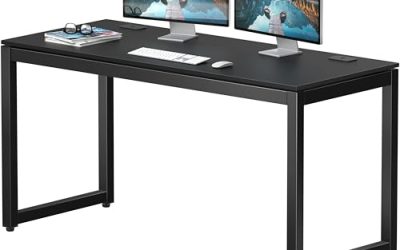
If this is your first desk, keep the layout simple and leave yourself room to grow. A straight rectangular desk with a solid frame gives you a surface for one monitor, a PC, and your peripherals, and it is easy to rearrange later. Ask the community what first-time buyers wish they had measured before ordering, and heed warnings about desks that look large online but arrive smaller than expected.
You Run Two or Three Monitors
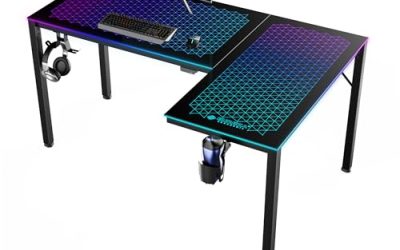
Width comes first for multi-monitor gamers, because each extra screen adds horizontal span and a monitor arm needs clamping space at the back. An L-shaped desk or a wide straight desk both work, but the corner of an L-shape can waste space if your monitors sit flat. Ask owners how they arranged two or three screens on the same model and how far back the screens sit.
You Share a Small Room or a Rental
Small rooms reward desks that fit the wall without blocking a door or a window, and rentals reward designs that need no drilling or fixings. Measure the tightest dimension, including the space your chair needs to roll back, and look for compact desks with a narrow depth that still hold your monitor at a safe distance. Renters often describe freestanding cable solutions and layouts that survive a move.
You Sit for Long Sessions and Want to Stand Sometimes
Long sessions make adjustability worth considering, because alternating between sitting and standing breaks up stiffness. A height-adjustable desk lets you change posture without rebuilding the setup, as long as the frame stays stable at standing height and the cables have enough slack to move. Ask long-session players whether they use the standing option weekly or forgot it after the first month.
Common Mistakes
- Buying for the photo instead of the room. A desk that looks impressive in a staged picture can be too wide for your wall, too deep for your chair, or too tall for your seating. Measure the floor space, the doorway the desk must pass through, and the distance from the wall to your chair before you look at any model, and compare those numbers with the dimensions in the listing rather than trusting how the desk looks in a wide-angle shot. Community photos can also mislead, because a tidy desk in a large room hides how little clearance the owner really has. Before shortlisting anything, tape the footprint on the floor and sit in your chair behind it to see whether the size feels right in real space.
- Forgetting the PC tower. Many buyers plan the surface for monitors and peripherals, then realise the tower has nowhere sensible to go. A tower on the floor collects dust and gets kicked, while a tower on the desk eats a large share of the surface. Decide in advance whether the case will sit on the desk, on a small stand beside it, or under it, and check that the chosen spot leaves airflow around the case and keeps the power button and front ports within easy reach. Also check the cable length from the tower to the monitors and the wall outlet, since a new position can stretch a short display cable or power lead. Owners often mention which placement worked for their case size, so ask for the case model and the desk width together when you compare notes.
- Ignoring depth and monitor distance. Width gets all the attention, but depth decides whether your monitor sits at a comfortable viewing distance and whether your keyboard leaves room for your wrists. A shallow desk pushes the screen close to your face and crowds your arms, which leads to eye strain and cramped aim. Ask community members what depth they use with your monitor size, and remember that a monitor arm or a thick monitor stand changes how much usable depth you actually have. Depth also affects where your elbows rest, and a desk that forces your arms forward will tire your shoulders over a long session. If your room limits depth, a monitor arm can push the screen back and free several inches, which is a fix many forum members recommend before buying a deeper desk.
- Skipping cable planning until everything is plugged in. Cables are easy to ignore while the desk is empty and frustrating once every device is connected. Without a tray or a routing plan, cords hang behind the desk, snag on chair wheels, and make cleaning a chore. Plan the routes before you buy: count the cables, check where the power outlets sit, and make sure the desk has a tray or channel that can hold the full bundle with slack for height changes or monitor adjustments. A tidy plan also makes later changes easier, because adding a second monitor or a new peripheral should not mean rewiring everything from scratch. Leave spare capacity in the tray and a little slack in each cable, so the setup can grow without turning into a tangled bundle behind the desk.
- Treating forum advice as a verdict instead of a starting point. Community threads are valuable because they come from real owners, but every poster has a different room, body, monitor size, and tolerance for wobble. One person praising a desk and another criticising the same model can both be right about their own setups. Use the discussion to build a shortlist and a list of questions, then check the dimensions, the frame design, and the return terms yourself before committing to a purchase. The most useful threads are the ones where posters explain their room, their gear, and what they tried before settling, because that context lets you judge whether their conclusion fits you. Collect several opinions, weigh the ones closest to your situation most heavily, and treat a single strong opinion as a prompt to check the details yourself.
Frequently Asked Questions
What should I ask in a gaming desk forum before buying?
Share your room dimensions, monitor size and count, PC placement, and chair height, then ask owners of the desk you are considering how it handles that exact combination. Useful questions cover stability during typing, usable depth with a monitor arm, cable tray capacity, and how the surface has worn over time.
How much desk space do I need for a gaming PC and monitors?
It depends on your monitor count and whether the tower sits on the desk, so map the full layout on paper before ordering. Give each monitor its full width plus breathing room, reserve space for the keyboard and mouse pad, and keep the tower off the main surface if you can.
Is a standing desk worth it for gaming?
It is worth considering if you play for long sessions and want to change posture during the day, because standing for part of a session can ease stiffness. The value depends on whether you will actually use the adjustment regularly and whether the frame stays steady at standing height.
What matters more: the desktop material or the frame?
Both matter, but they solve different problems, so neither can be ignored. The material shapes comfort, durability, and how the surface handles spills and scratches, while the frame decides stability and wobble. A beautiful top on a weak frame will sway, and a strong frame with a thin top will wear quickly.
Related guides
More from Amazon
Programs that pair well with the guide above. Offers and eligibility are set by Amazon and may change.
Free shipping on eligible items, Prime Video and more. Eligible new members can start with a free trial.
Start a Prime free trialAd-free music streaming. Eligible new subscribers can start with a free trial.
Try Music Unlimited freeA Prime membership for ages 18-24 with a trial period. Eligibility is set by Amazon.
See Prime for Young AdultsAudiobooks and podcasts to listen to on the go. Eligible new members can start with a free trial.
Try Audible freeAs an Amazon Associate we earn from qualifying purchases.