A gaming desk in this budget range forces a real trade-off: a wide surface for two monitors, built-in power, storage, or lighting, and most desks here give you two of those at most. The decision that matters is which feature you will actually use every day, because a desk with outlets you never reach for is worth less than a plain desk that fits your room. Measure your wall, count your monitors, and check how much depth your keyboard and monitor stand need before you fall for a light strip.
This guide is for gamers building a first setup or replacing a wobbly table without spending over the budget tier, and for anyone sharing a desk with work or study. Every desk below was picked from its name and specifications on its Amazon product page, comparing desktop size, depth, power, storage, and stated load limits so the choice comes down to fit, not marketing.
Our Top Picks
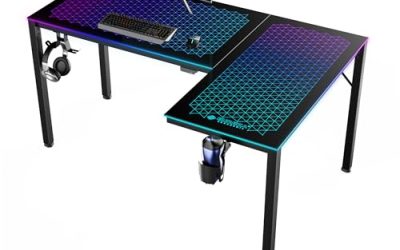
 ODK 53" L Shaped Gaming Desk with Shelves53 Inch53.15 x 39.37 x 58.27 inches46.1 poundsCheck on Amazon


Top 3 picks at a glance

Quick Picks
As an Amazon Associate we earn from qualifying purchases.
| Product | Best for | Key spec from title |
|---|---|---|
| EUREKA ERGONOMIC 47 Inch Gaming Desk | A compact dual-monitor setup with a full-surface mouse pad | 47 inch gaming desk with full mouse pad |
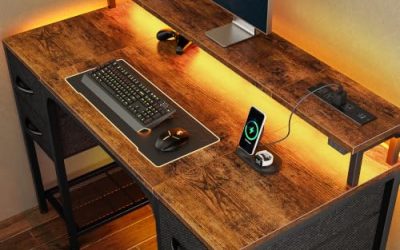
| MOTPK Gaming Desk with Power Outlet and LED Lights, 47 Inch | A single-wall setup that needs built-in power and a monitor shelf | 47 inch gaming desk with power outlet and LED lights |
| Homall L Shaped Gaming Desk with LED Lights and Power Outlets, 47 Inch | A corner setup that needs a drawer and shelves | 47 inch L shaped gaming desk with LED lights and power outlets |
| ODK 53 Inch L Shaped Gaming Desk with Shelves, LED and Outlets | A corner setup with a tower, shelves, and charging in one unit | 53 inch L shaped gaming desk with shelves, LED and outlets |
| SEDETA L Shaped Gaming Desk, Reversible, with Power Outlet and Pegboard | A two-zone setup with a pegboard wall for gear and accessories | L shaped gaming desk with power outlet and pegboard |
How to Choose
Measure width, depth, and the wall first
A 47-inch desk sounds generous until a monitor stand, a keyboard, and a headset take the front edge, so measure the wall and the depth, not just the width. Most desks here are 19 to 24 inches deep, and that depth decides whether a monitor sits at a comfortable distance or crowds your keyboard. Tape the footprint on the floor, leave room for your chair to slide back, and check doorways and radiators before ordering. An L-shaped desk needs a real corner with clearance on both sides, and a hutch or pegboard needs a wall tall enough to clear it.
Decide how many monitors and where the tower goes
Two monitors need roughly 47 inches of width if they sit side by side on stands, while a single ultrawide can work on a narrower desk with a monitor arm. A raised monitor shelf frees the desktop but adds height, so check that it clears any shelf above the desk. Your tower needs a home too: a desk with a PC storage shelf or a CPU stand keeps it off the floor and out of the dust, while a plain rectangular desk may force the tower under the desk where cables and airflow get awkward.
Treat built-in power as a convenience, not a replacement
Desks with built-in outlets put charging within reach, which helps when your monitor, speakers, and phone charger all compete for wall sockets. Count the outlets on the listing and compare them with what you actually plug in daily, because three AC outlets plus two USB ports cover a typical setup but not a setup with a console, a lamp, and a second PC. Remember the desk still needs one wall outlet for its own power strip, and the cord length decides how far from the wall it can sit. Keep the strip accessible so you can switch it off without crawling behind the desk.
Check the frame, load limit, and assembly effort
A steel frame with adjustable leveling feet stays steady on uneven floors, while a light frame can wobble when you lean on it during a tense match. Read the stated maximum weight and compare it with your monitors, tower, and anything else that will live on top, leaving headroom rather than loading it to the limit. Most of these desks need assembly, and L-shaped models with shelves or a pegboard take longer and go easier with a second person. Keep the manual and the hardware bag until the desk is fully built, since a missing bolt discovered halfway through is hard to fix.
The 5 Best Options
EUREKA ERGONOMIC 47 Inch Gaming Desk
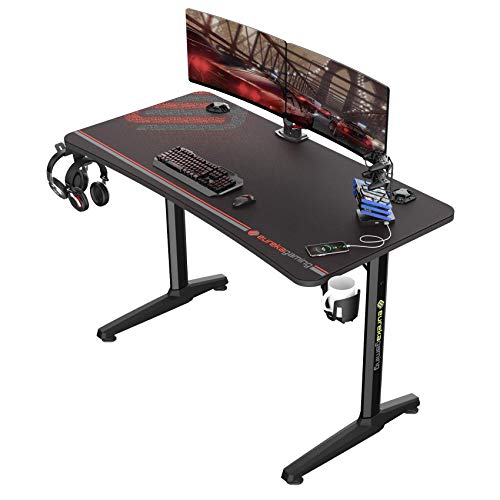
The EUREKA ERGONOMIC 47-inch desk is the straightforward pick for a single-wall setup: a wide carbon-fiber-look top, a full-surface mouse pad, and a handle rack with USB charging ports for controllers. Its K-shaped frame and included cup holder and headphone hook keep the essentials off the desktop without adding shelves you may not need. At just over 47 inches wide it fits two monitors on stands, and the simple rectangular shape slides against any wall. It suits a first gaming setup where surface space and stability matter more than lighting or storage.
Specs
- Desktop dimensions: 47.25 x 23.62 x 30.12 inches
- Maximum weight recommendation: 180 pounds
- Full-surface mouse pad included
- Handle rack with USB charging ports
- Cup holder and headphone hook included
- Metal frame with carbon-fiber-look top
- Model number: ERK-GIP-P47B-V1
- Color: Black
Best for: A compact dual-monitor setup on a single wall.
Watch out for: It has no built-in AC outlets and no storage shelves, so power and gear storage need separate solutions.
MOTPK Gaming Desk with Power Outlet and LED Lights, 47 Inch
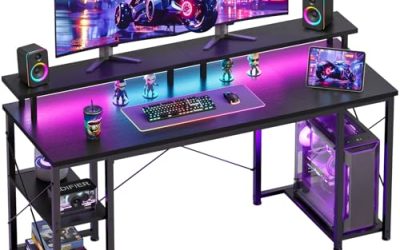
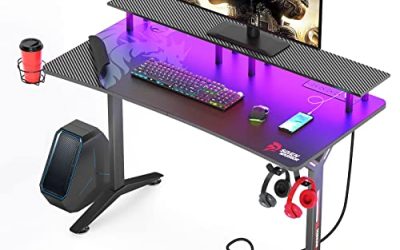
The MOTPK 47-inch desk packs the most built-in features into a rectangular footprint, with a power outlet unit, LED lighting, a full-width monitor shelf, and a two-tier storage shelf underneath. The monitor shelf holds up to 40 pounds, which covers two smaller monitors or one larger display, while the lower shelf gives the tower a dedicated spot with 19.2 inches of height. The carbon-fiber-texture top and steel alloy base keep the look and structure consistent with the rest of this list. It is a strong fit when one desk must handle power, lighting, and storage without turning into a corner unit.
Specs
- Product dimensions: 23 x 47 x 35 inches
- Item weight: 43 pounds
- Built-in power outlet with 3 AC outlets and 2 USB ports
- LED lights with 20 modes and 10 colors
- Full-sized monitor shelf with 40-pound maximum weight
- 2 shelves, including a PC storage shelf
- Bottom shelf height: 19.2 inches
- Steel alloy base with engineered wood top in carbon fiber texture
- Color: Black
Best for: A single-wall setup that needs built-in power, lighting, and a tower shelf.
Watch out for: The 35-inch overall height includes the monitor shelf, so measure clearance under any wall shelf above the desk.
Homall L Shaped Gaming Desk with LED Lights and Power Outlets, 47 Inch
The Homall 47-inch L-shaped desk turns a corner into usable space, pairing a reversible layout with LED lighting, power outlets, a monitor stand, two shelves, and a single drawer. The reversible design lets the return sit on the left or the right, which matters in a small room where the door or window decides the layout. The drawer gives small items a closed home, while the open shelves hold books, consoles, or a headset. It works well as a combined gaming and study desk where one corner has to do two jobs.
Specs
- Item dimensions: 31.5 x 47.3 x 33.4 inches
- Working surface diagonal length: 55.5 inches
- LED lights and power outlets built in
- Reversible L-shaped layout
- 2 shelves and 1 drawer
- Monitor stand included
- Shape: L-Shape
- Color: Black
Best for: A corner setup that needs a drawer, shelves, and a reversible layout.
Watch out for: The shelves and drawer sit on one side, so legroom on that side is tighter than on the open side.
ODK 53 Inch L Shaped Gaming Desk with Shelves, LED and Outlets
The ODK 53-inch L-shaped desk is the widest corner option here, with dual shelves, a CPU stand, a headphone hook, and a storage bag alongside its built-in power and LED lighting. Its 53-inch main run gives two monitors room to breathe, and the reversible return fits either side of a corner. The X-shaped steel frame supports the longer top, and the LED strip offers 10 colors, 8 brightness grades, and 10 dynamic modes with a memory function. It fits a gamer who wants the tower, storage, and charging handled by the desk itself rather than by add-ons.
Specs
- Workstation dimensions: 53 x 18.9 x 29.8 inches
- Dual shelves, CPU stand, headphone hook, and storage bag included
- 3 AC outlets and 2 USB ports
- LED lighting with 10 colors, 8 brightness grades, and 10 dynamic modes, plus memory function
- Reversible L-shaped layout
- X-shaped steel frame
- Color: Black
Best for: A corner setup with a tower, shelves, and built-in charging in one unit.
Watch out for: At 18.9 inches deep it is the shallowest desk here, so a deep monitor stand or a large keyboard can crowd the front edge.
SEDETA L Shaped Gaming Desk, Reversible, with Power Outlet and Pegboard
The SEDETA desk is the most configurable pick, converting between a 67-inch L-shaped corner desk and a 94.5-inch long desk, with a 47.2-inch pegboard, a 21.7-inch keyboard tray, and two storage shelves. Its power unit provides 4 AC outlets and 2 USB ports, the most on this list, and the LED lighting is controlled by app with music sync. The pegboard keeps controllers, headphones, and small accessories visible and off the desktop. It suits a shared room where the desk doubles as a workspace and the wall above it needs to work as storage.
Specs
- Item dimensions: 19.7 x 67 x 57 inches in L-shaped configuration
- Converts to a 94.5-inch long desk
- Item weight: 76 pounds
- Pegboard length: 47.2 inches
- Keyboard tray: 21.7 inches
- Power outlet with 4 AC outlets and 2 USB ports
- LED lights with RGB color and app control
- 2 storage shelves
- Tabletop thickness: 0.75 inches
- Color: Black
Best for: A two-zone setup with a pegboard wall for gear and a long or corner layout.
Watch out for: At 57 inches tall with the pegboard and hutch, it dominates a small wall, and at 76 pounds it needs two people to move and assemble safely.
Which One Fits Your Situation
You have one straight wall and two monitors
Pick the EUREKA ERGONOMIC 47-inch desk. Its full-surface mouse pad and 47.25-inch width give two monitors a stable home without shelves or a corner eating floor space. The 23.62-inch depth leaves room for a keyboard in front of the screens, and the simple rectangular shape fits any straight wall. Add a separate power strip on the wall, since the desk has no built-in AC outlets.
You want power, lighting, and a tower shelf without a corner desk
Pick the MOTPK 47-inch desk. Its 3 AC outlets and 2 USB ports, LED lighting, monitor shelf, and PC storage shelf cover the extras in one rectangular unit, so you do not need a corner or separate accessories. The monitor shelf lifts screens to a comfortable height while the lower shelf keeps the tower off the floor. Measure the 35-inch overall height against any shelf above it before ordering.
Your only free spot is a corner
Pick the Homall 47-inch L-shaped desk if you want a drawer and shelves, or the ODK 53-inch desk if you want more width and a CPU stand. Both reverse to fit either side of the corner, but the ODK is wider while the Homall adds a closed drawer for small items. Check the depth on the side your chair will use, since the shelves sit on one side and the ODK is only 18.9 inches deep.
You share the desk with work or study and need wall storage
Pick the SEDETA L-shaped desk. Its pegboard, keyboard tray, and 4 AC outlets turn the wall above the desk into organized storage, and the long-desk configuration works when two people need the surface at once. The keyboard tray frees desktop space for notebooks or a second screen, while the pegboard keeps controllers and headphones visible. Plan for its 57-inch height and 76-pound weight during assembly.
Common Mistakes
- Buying by width alone and ignoring depth, then finding the monitor sits too close to the keyboard.
- Choosing an L-shaped desk without checking which side the return can go on in your room.
- Counting on built-in outlets to replace a wall socket, when the desk itself still needs one wall outlet.
- Loading the desktop to its stated maximum weight instead of leaving headroom for monitors and a tower.
- Skipping the tape measure for the pegboard or hutch height and discovering it hits a window frame or wall shelf.
Frequently Asked Questions
What size gaming desk fits two monitors?
A 47-inch desk fits two monitors on stands in most setups, with room left for a keyboard in front. Measure your monitor stands first, since wide feet eat more width than the screens themselves, and a monitor arm or a raised shelf can free several inches. If your monitors are 27 inches or larger, the 53-inch ODK or the SEDETA in its long configuration gives more breathing room.
Is a 47-inch gaming desk big enough for a PC and console?
Yes, when the tower has a dedicated spot. The MOTPK has a PC storage shelf under the desk, and the ODK includes a CPU stand, so the tower stays off the desktop. Keep the console on the desk only if the depth allows it behind the keyboard, since a console plus a monitor stand can crowd a shallow top.
Do gaming desks with built-in outlets need assembly near a wall socket?
Yes, the desk needs one wall outlet for its own power unit, and the cord length limits how far it can sit from the wall. Place the desk before assembling the shelves or pegboard, and route the cord where it will not run under a chair leg. Keep the power unit reachable so you can switch it off without moving the desk.
How much weight can a budget gaming desk hold?
It varies by model, so read the listing rather than assuming. The EUREKA ERGONOMIC 47-inch desk lists a 180-pound maximum weight, and the MOTPK monitor shelf lists a separate 40-pound limit. Spread heavy items across the frame, keep the tower on its shelf or stand, and stay below the stated limits.
Related guides
More from Amazon
Programs that pair well with the guide above. Offers and eligibility are set by Amazon and may change.
Free shipping on eligible items, Prime Video and more. Eligible new members can start with a free trial.
Start a Prime free trialAd-free music streaming. Eligible new subscribers can start with a free trial.
Try Music Unlimited freeA Prime membership for ages 18-24 with a trial period. Eligibility is set by Amazon.
See Prime for Young AdultsAudiobooks and podcasts to listen to on the go. Eligible new members can start with a free trial.
Try Audible freeAs an Amazon Associate we earn from qualifying purchases.