Two monitors change what a desk has to do. A single screen lets you get away with a narrow top and a keyboard pushed to one side, but a second panel needs real width, a stable frame and enough depth for a keyboard, a mouse and two monitor bases or arms without everything crowding together. Pick the wrong size and you end up turning your head at an awkward angle, stacking gear on the floor or watching one screen wobble every time you type.
This guide looks at three wide gaming desks that give two monitors room to breathe. One suits a player who wants storage and a raised monitor stand built in, one suits a player who wants a wraparound shape with a lit shelf for the screens, and one suits a player who wants to change height through the day. Each desk below measures 55 inches across, so two standard monitors fit side by side with space left for a keyboard and mouse.
Our Top Picks


Top 3 picks at a glance

Quick Picks
As an Amazon Associate we earn from qualifying purchases
| Product | Best for | Key spec from title |
|---|---|---|
| ODK 55 Inch Gaming Desk with LED Lights and Storage Shelves | Storage and a raised monitor stand | 55.11-inch top with full monitor stand |
| EUREKA ERGONOMIC Gaming Desk, 55-Inch W-Shaped Computer Desk with LED Shelf | Wraparound shape and a lit monitor shelf | 55-inch W-shaped desktop with LED shelf |
| Homall Height Adjustable Electric Standing Desk, 55 x 28 Inches | Sitting and standing through the day | 55 x 28-inch top with electric lift |
How to Choose
Measure the width your two monitors really need
Two 24-inch monitors side by side take up roughly 44 inches once you count the bezels and a small gap between them, while two 27-inch monitors need closer to 50 inches before you add anything else. A 55-inch desktop leaves room for both screens plus a keyboard in front of them, which is why it has become the practical minimum for a dual-monitor gaming setup. Measure each monitor from outer edge to outer edge, add the gap you want between them, and then check that the desk still leaves space for a mouse and a drink. If you plan to mount the screens on arms, remember that the clamp needs a solid rear edge and clearance behind the desk.
Check depth before you fall for a wide top
Width gets all the attention, but depth decides whether your keyboard, mouse and monitor bases all fit without your wrists hanging over the front edge. A depth of 24 inches or more gives a full-size keyboard room in front of the screens and leaves space to pull the monitors back a little for a comfortable viewing distance. Shallower tops around 20 inches can still work when the monitors sit on a raised stand or on arms, because the stand frees the surface underneath for the keyboard. Sit in your chair, hold your arms where you type, and picture the distance from the front edge to the screens before you commit to a shallow desk.
Look at the frame and the load it can carry
Two monitors, a keyboard, a mouse, speakers and a tower add up to real weight, and a desk that flexes under that load will make the screens shake during fast mouse movement. A steel frame with a wide leg layout spreads the weight and keeps the top steady, while a thin frame with narrow legs can feel springy at the corners. Check the load figure on the listing and compare it with the combined weight of your gear, giving yourself a margin for a heavier monitor upgrade later. A desk that feels planted when you lean on a corner is the one that will keep two screens still during a long session.
Decide how the monitors will sit on the desk
A raised monitor stand lifts both screens to eye level and opens the space underneath for a keyboard, a notebook or a console controller, which suits a shallow desk very well. A dual monitor mount holds the screens on arms and frees the whole surface, but it needs a desk edge thick enough for the clamp and a frame that will not flex when the arms are tightened. Placing the monitors directly on the desktop is the simplest route and works when the desk is deep enough, though it leaves the screens lower and takes up surface space. Choose the mounting style first, then check that the desk you like supports it rather than discovering the clash after assembly.
The 3 Best Options
ODK 55 Inch Gaming Desk with LED Lights and Storage Shelves
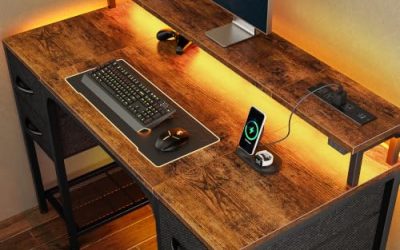
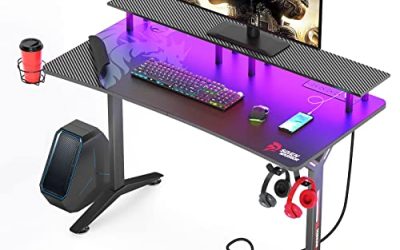
The ODK desk suits a player who wants the whole setup organised in one place. A full-width monitor stand runs across the back of the 55.11-inch top, so two monitors sit raised above the keyboard while the space beneath the stand stays free for a controller, a headset or a notebook. Storage shelves and a CPU stand sit at the sides, which keeps the tower off the floor and cables closer to where they connect. LED lighting runs along the desk and adds atmosphere to evening sessions. The shallow 19.6-inch depth is the main compromise, so this desk works best with the monitors on the raised stand.
Specs
- Desktop: 55.11 x 19.6 inches
- Height: 34 inches
- Monitor stand: full-width raised stand
- Storage: shelves and CPU stand included
- Lighting: built-in LED lighting
- Power: power outlets and USB charging port
Best for: players who want storage, a raised monitor stand and lighting in one desk.
Watch out for: the 19.6-inch depth is shallow, so measure your keyboard and mouse space before ordering.
ASIN: B0C531H9KP
EUREKA ERGONOMIC Gaming Desk, 55-Inch W-Shaped Computer Desk with LED Shelf
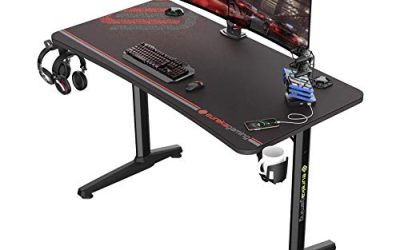
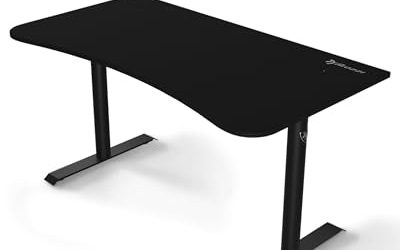
The EUREKA ERGONOMIC desk takes a different approach with a W-shaped top that wraps the play area around the chair. The angled wings bring the keyboard and mouse closer while the centre of the 55-inch desktop holds the two monitors, which makes long sessions feel less stretched out than a straight desk of the same width. A raised LED shelf gives the screens a dedicated home and leaves the surface below free for a keyboard, a console or everyday gear. The alloy steel K-frame keeps the structure grounded, and the brushed metallic gray finish pairs easily with dark gaming gear.
Specs
- Desktop: 55-inch W-shaped top
- Frame: alloy steel K-frame
- Top material: engineered wood with powder-coated finish
- Colour: Brushed Metallic Gray
- Monitor shelf: raised LED shelf
- Model: ERK-FD07-55-BA
- Warranty: 1-year limited manufacturer warranty
Best for: players who want a wraparound shape with a lit shelf for two monitors.
Watch out for: the listing does not publish a depth figure, so confirm the surface depth fits your keyboard and monitor bases.
ASIN: B0GLHPC8PW
Homall Height Adjustable Electric Standing Desk, 55 x 28 Inches
The Homall standing desk is the pick for a player who spends long hours seated and wants to change posture without moving the setup. An electric lift raises or lowers the 55 x 28-inch top at a steady speed with low motor noise, and an LED screen shows the current height while it moves. Four programmable presets let each person return to a favourite height with one press, which matters when two people share one station. The deeper 28-inch surface gives two monitors, a full-size keyboard and a mouse room to sit side by side, and the alloy T-shaped bracket carries the full load of a dual-monitor build.
Specs
- Desktop: 55 x 28 inches
- Lift: electric height adjustment with LED display
- Presets: 4 programmable height presets
- Frame: alloy T-shaped metal bracket
- Load rating: 154 lb
- Colour: White
- Model: 4422
Best for: players who want to switch between sitting and standing during long sessions.
Watch out for: the listing does not state the minimum and maximum height range, so confirm it fits your chair and your standing height.
ASIN: B0FYMR93VM
Which One Fits Your Situation
You want storage and a tidy setup in one purchase
Choose the ODK desk when your room has no spare shelf for a tower, a console and the clutter that gathers around a gaming PC. The storage shelves and CPU stand keep gear off the floor, the raised monitor stand lifts both screens to a comfortable height, and the lighting adds atmosphere without extra accessories. The shallow depth means you should keep the monitors on the stand and the keyboard in front of it.
You want the setup to wrap around you
Choose the EUREKA ERGONOMIC desk when you like a cockpit feel and want the keyboard and mouse close to hand. The W-shaped top pulls the play area inward, the LED shelf gives the monitors a clear home, and the steel K-frame keeps the whole station steady during fast play. Measure the room carefully first, because the angled wings need a little more floor space than a straight desk of the same width.
You sit for hours and want to stand between matches
Choose the Homall standing desk when long sessions leave your back and shoulders stiff and you want to change height without rebuilding the setup. The electric lift and four presets make the switch quick, and the deep 28-inch top is the roomiest of the three for two monitors and a full keyboard. Check the height range against your chair and your standing height before ordering, since the listing leaves that figure unstated.
You share the desk with someone else
Choose the Homall standing desk again when two people of different heights use the same station. Four presets store a sitting height for each person, so nobody has to hold a button and guess the right position every time they sit down. The wide top also gives each person room to keep a keyboard and a notebook on the desk without pushing the monitors aside.
Common Mistakes
- Buying a desk by width alone and forgetting depth, so the keyboard ends up hanging over the front edge.
- Placing two large monitors on a narrow top and leaving no room for a mouse, which forces an awkward arm angle.
- Clamping monitor arms to a thin edge that flexes, so the screens wobble during play.
- Ignoring cable paths and letting power bricks and display cables pile up behind the monitors.
- Skipping a tape measure and discovering the desk blocks a door, a radiator or a window after assembly.
Frequently Asked Questions
How wide should a desk be for two monitors?
A 55-inch desk is the practical minimum for most dual-monitor gaming setups. Two 24-inch monitors need roughly 44 inches side by side, and two 27-inch monitors need closer to 50 inches, so a 55-inch top leaves room for a keyboard and a mouse as well. Measure each monitor from edge to edge, add a small gap between them, and check the total against the desk width before ordering.
Is a 55-inch desk wide enough for two 27-inch monitors?
Yes, two 27-inch monitors fit on a 55-inch desk with the bezels nearly touching and a little room left at the sides. The fit gets tight if both monitors sit on wide desktop stands, so monitor arms or a raised stand help a lot at this size. Keep the keyboard in front of the screens and leave a few inches for the mouse to move freely.
Do I need a monitor stand or monitor arms for two screens?
Neither is required, but both help on a 55-inch desk. A raised stand lifts the screens to eye level and frees the surface underneath for a keyboard, while arms free the whole desktop and let you angle each screen. Arms need a solid rear edge for the clamp, so check the desk edge and frame before choosing them over a stand.
Can a gaming desk hold two monitors and a PC tower?
Yes, when the frame is rated for the combined weight of the screens, the tower and the peripherals. Steel frames with a wide leg layout handle this load well, and a CPU stand keeps the tower off the floor while leaving the desktop free. Add up the weight of your gear, compare it with the load figure on the listing, and leave a margin for a heavier monitor upgrade later.
Related guides
More from Amazon
Programs that pair well with the guide above. Offers and eligibility are set by Amazon and may change.
Free shipping on eligible items, Prime Video and more. Eligible new members can start with a free trial.
Start a Prime free trialAd-free music streaming. Eligible new subscribers can start with a free trial.
Try Music Unlimited freeA Prime membership for ages 18-24 with a trial period. Eligibility is set by Amazon.
See Prime for Young AdultsAudiobooks and podcasts to listen to on the go. Eligible new members can start with a free trial.
Try Audible freeAs an Amazon Associate we earn from qualifying purchases.