
The Thermalright ARGB and Fan HUB X12 IR is the best overall fan hub in this group for most PC builds: it handles up to 12 PWM fans and 12 addressable RGB devices from one SATA-powered box and adds an infrared remote. Builders with a smaller case can step down to the 8-port Thermalright, while those who prefer a radio remote and ten ports can look at the Auotac. An ARGB fan hub is a small board that fans out one motherboard fan header and one 5V addressable lighting header to many fans, powered separately from the power supply.
Our Top Picks
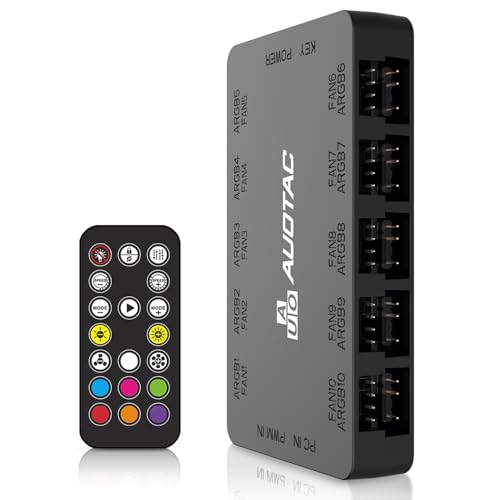 Auotac ARGB PWM Fan Hub with RF Remote3.95 x 2.25 x 0.65 inches3.95 x 2.25 x 0.65 inches0 PoundsCheck on Amazon
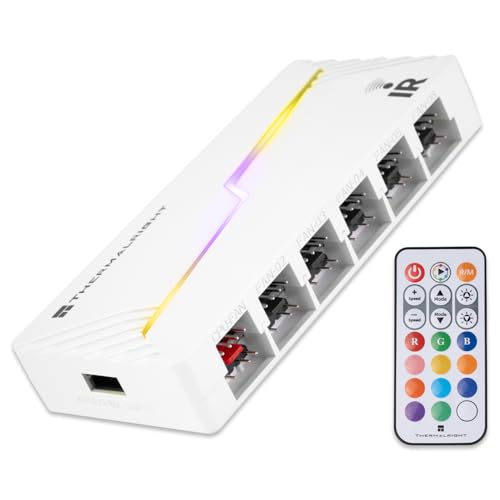
 Thermalright ARGB Fan HUB Controller Support 8 Groups5.51 x 0.63 x 2.52 inches0.2 poundsCheck on Amazon

Top 3 picks at a glance
Quick List
- Auotac ARGB PWM Fan Hub (first listing) – best for ten fans with an RF remote and dual SATA power
- Auotac ARGB PWM Fan Hub (second listing) – best as the alternate colorway or revision of the same ten-port design
- Thermalright ARGB Fan HUB, 8-port – best for mid-size cases that need eight fan and lighting groups
- Thermalright ARGB and Fan HUB X12 IR, White – best for white builds that need twelve ports and a remote
- Thermalright ARGB and Fan HUB X12 IR, Black – best for black builds that need twelve ports and a remote
- Thermalright X12 IR Black, 12-port PWM – best as a second black twelve-port listing with its own wording
Which One Is Right for You?
| If you… | Choose |
|---|---|
| run a large case with more than eight fans | Thermalright X12 IR (White or Black) |
| want a black twelve-port hub from the second listing | Thermalright X12 IR Black, 12-port PWM |
| prefer a radio-frequency remote and two SATA power inputs | Auotac ARGB PWM Fan Hub (first listing) |
| need the same Auotac design and want to compare variants | Auotac ARGB PWM Fan Hub (second listing) |
| build in a mid-tower with about eight fans or fewer | Thermalright ARGB Fan HUB, 8-port |
| want a hub that follows motherboard lighting rather than a handheld remote | Thermalright ARGB Fan HUB, 8-port |
Three questions settle most choices: how many fans and lighting devices you really have, whether you want a handheld remote or motherboard control, and whether your power supply has a spare SATA lead. Remember that every hub here requires a 5V three-pin addressable lighting header on the motherboard, not an older 12V four-pin RGB header.
All 6 Picks in Detail
1. Auotac ARGB PWM Fan Hub – Best for Ten Fans With an RF Remote
As an Amazon Associate we earn from qualifying purchases at no extra cost to you.
The first Auotac listing describes an ARGB PWM fan hub with an RF remote controller that connects ten case fans through 5V three-pin addressable and 12V four-pin PWM connectors. The listing also highlights stable dual SATA power input and magnetic suction mounting. Two SATA inputs spread the electrical load across two power cables, which matters when many fans spin up together.
A radio-frequency remote does not need line of sight, so you can change fan speed or lighting from behind a closed side panel or a desk edge. The listing also says the hub reads fan speed and adjusts PWM speed, but for motherboard-based fan curves you will still connect a PWM signal cable to a motherboard fan header. Manufacturer-style descriptions mention a PWM sync cable, an ARGB sync cable and a dual SATA lead in the box; confirm the contents on the product page.
- Up to ten fans, 5V three-pin ARGB and 12V four-pin PWM
- RF remote for speed and lighting
- Dual SATA power input
- Magnetic mounting to a steel case panel
- Black colorway per the listing
Pros:
- Remote works through a closed chassis
- Two SATA power inputs reduce strain on a single cable
- Magnetic mount needs no screws
Cons:
- Ten ports fall short of the twelve on the larger Thermalright hubs
- Per-port current ratings are not stated in the listing title
This hub suits someone building in a large airflow case who values convenience: you can dim lights at night or drop fan speed during a movie without opening the side panel. The trade-off is that the listing gives no per-port current rating in the title, so add up the fan label values yourself before loading every port. Against the Thermalright X12 IR, it offers an RF remote and dual power, but fewer ports.
2. Auotac ARGB PWM Fan Hub (Second Listing) – Best as an Alternate Variant

The second Auotac listing carries nearly the same title as the first: an ARGB PWM fan hub with an RF remote for ten case fans, 5V three-pin ARGB and 12V four-pin PWM connectors, and dual SATA power input. The truncated listing name does not show what separates the two entries, which may be a colorway, a bundle or a hardware revision. Treat the pair as the same design family and confirm the variant details on the product page.
If the first listing is out of stock, this one is a reasonable substitute. The same practical advice applies: connect a PWM cable to a motherboard fan header for speed control and an ARGB cable to a 5V header for synced lighting, then power the hub from the power supply.
- Ten-fan capacity per the listing
- RF remote and dual SATA power input
- 5V three-pin ARGB and 12V four-pin PWM ports
- Magnetic suction mounting
- Differences from the first listing: confirm on listing
Pros:
- Familiar ten-port layout with a wireless remote
- Dual power input for steadier supply
Cons:
- Listing name does not distinguish it from the first entry
- No stated per-port current limit
Because both Auotac listings share a design, the practical decision comes down to color, bundle contents and availability rather than a different feature set. Read the product page for the included cables, the remote type and any stated current rating, and compare those fields side by side before committing. Choose between it and the first Auotac listing based on availability and whichever variant detail the product page confirms.
3. Thermalright ARGB Fan HUB (8-Port) – Best for Mid-Size Cases

The Thermalright eight-port hub is the simplest design in the group. The listing describes support for eight groups of fans, eight four-pin PWM ports, 5V three-pin ARGB connections, strong adhesive plus magnetic suction, and a SATA power lead. It explicitly does not support 12V four-pin RGB devices, which is the key compatibility warning for any addressable hub.
Specification pages for this hub family note that the single fan plugged into the marked port is the one that reports its speed to the motherboard, so put the fan or pump whose RPM you want to monitor there. There is no handheld remote in the listing name, so lighting and speed follow the motherboard signals. For a mid-size case with eight or fewer fans, that simplicity is an advantage.
- Eight PWM fan ports and eight 5V ARGB ports
- SATA power input (confirm if the cable is included)
- Adhesive and magnetic mounting
- 12V four-pin RGB not supported
- Motherboard-based control; remote not stated
Pros:
- Compact and uncomplicated
- Clear compatibility warning in the listing
Cons:
- Fewer ports than the twelve-port models
- No remote stated in the listing
A typical use is a mid-tower with a front trio of intake fans, a rear exhaust and a top radiator, which fits within eight ports with a couple of spares. Mounting is flexible because the listing mentions both adhesive and magnetic options, so it also works on plastic or aluminum panels where a magnet alone would not hold. It is the best match for builders who want less, and the X12 IR is the step up when you need more ports or a remote.
4. Thermalright ARGB and Fan HUB X12 IR (White) – Best for White Builds With Twelve Ports
This is the white version of the X12 IR. The listing describes support for twelve groups of fans, three-pin ARGB and four-pin PWM connections, SATA power direct input and an infrared remote. Manufacturer information lists dimensions of roughly 108 by 50 by 21 millimeters, a 500 millimeter input cable and a rating of about one amp per connector, and notes a dedicated CPU fan port so the motherboard can read fan speed.
An infrared remote needs a clear line from the remote to the hub’s receiver, so mount the hub where a window or open side can reach it. The listing, like the other Thermalright entries, states that 12V four-pin RGB is not supported. White finish makes it blend into light-colored cases or white-themed builds.
- Twelve PWM ports and twelve 5V three-pin ARGB ports
- SATA power direct input; confirm whether a cable is included
- Infrared remote for speed and lighting
- About 108 x 50 x 21 mm per the maker
- White color option
Pros:
- High port count for large builds
- White finish suits light themes
Cons:
- Infrared remote needs a line of sight
- Power cable inclusion differs between sellers
White hubs are less common than black ones, which makes this entry useful for builders who want lighting accessories and cables to match a white motherboard shroud, white fans and a white case interior. The hub is small enough to tuck behind a motherboard tray or beside a power supply shroud, so appearance matters mostly where it is visible through glass. It is functionally the twin of the black X12 IR, so choose by case color.
5. Thermalright ARGB and Fan HUB X12 IR (Black) – Best for Black Builds With Twelve Ports

The black X12 IR is the default choice for most dark, tempered-glass builds. The listing repeats the core specification: twelve groups of fans, three-pin ARGB and four-pin PWM support, SATA power direct input and an infrared remote. The listing again warns that 12V four-pin RGB is not supported.
In practice, twelve ports let you wire a full set of intake and exhaust fans, a radiator and several lit accessories to one controller. You still need one PWM header and one 5V ARGB header on the motherboard if you want software or BIOS-based control instead of the remote. The hub mounts with a soft magnetic backing, so a steel panel is the easiest place for it.
- Twelve groups of fans and ARGB devices
- Infrared remote
- SATA power input
- Magnetic backing for steel panels
- Black color
Pros:
- Handles large fan counts from one box
- Black finish hides well behind glass
Cons:
- Remote requires a line of sight
- Plastic mounting needs a clear steel surface
It also leaves room to grow: a builder who starts with nine fans and a pair of lighting strips still has spare ports for a future radiator or extra case fans. If your case is small, the twelve-port count may be overkill, and the simpler eight-port hub will be easier to hide. Compared with the 8-port model, you gain four ports and a remote at the cost of a slightly larger board.
6. Thermalright X12 IR Black (12-Port PWM) – Best as a Second Black Twelve-Port Listing

The sixth entry is another black X12 IR listing, described as a twelve-port four-pin PWM controller with 5V three-pin ARGB and support for twelve fan interface connections, with a remote included. Its wording differs from the fifth entry, but the core design looks identical. If you are choosing between the two, check which one is in stock and which one states the contents of the package most clearly.
Because the title is truncated, confirm whether the SATA lead is included and whether any accessories differ from the other black listing. The same safety rule applies as with every hub in this guide: connect only 5V three-pin addressable devices to the ARGB ports.
- Twelve PWM ports and twelve ARGB connections
- Remote included per the listing
- 5V three-pin ARGB only
- Black finish
- Package contents: confirm on listing
Pros:
- Same port count as the other X12 IR models
- Remote included
Cons:
- Listing title overlaps with another entry
- Package contents are not fully clear from the name
For a large build with a radiator, several case fans and a few lit accessories, the twelve-port count gives the most headroom of any hub on this page. Keep the cable lengths in mind too: the manufacturer lists a roughly 500 millimeter input cable for the X12 family, which is plenty for most mid-towers but worth checking in a full tower where the SATA lead may need to travel farther. Pick it over the fifth entry only if its listing confirms details that the other leaves open.
Specs Compared
| Model | Fan ports | ARGB | Remote | Power input | Mounting |
|---|---|---|---|---|---|
| Auotac ARGB PWM Fan Hub (first) | Up to 10 fans | 5V 3-pin | RF remote | Dual SATA | Magnetic |
| Auotac ARGB PWM Fan Hub (second) | Up to 10 fans | 5V 3-pin | RF remote | Dual SATA | Magnetic |
| Thermalright ARGB Fan HUB (8-port) | 8 PWM ports | 5V 3-pin | Not stated | SATA | Adhesive and magnetic |
| Thermalright X12 IR White | 12 groups | 5V 3-pin | Infrared | SATA direct | Magnetic backing per maker |
| Thermalright X12 IR Black | 12 groups | 5V 3-pin | Infrared | SATA direct | Magnetic backing per maker |
| Thermalright X12 IR Black (12-port PWM) | 12 ports | 5V 3-pin | Included per listing | Confirm on listing | Confirm on listing |
How We Chose These
This ranking comes from reading, not from physical use. We began with the products in current catalog listings and compared the fan port count, lighting standard, remote type, power input and mounting method stated in each title and specification field. We then checked those claims against manufacturer-style product descriptions where available. Hubs that clearly state 5V three-pin addressable support and warn against 12V RGB ranked higher because that distinction prevents damage. Where two listings carry nearly identical names, we say so openly and ask readers to confirm the differences on the product page.
What to Look For
5V ARGB versus 12V RGB: the compatibility trap
Addressable RGB (ARGB) uses a three-pin connector carrying 5 volts, a data line and ground. Older non-addressable RGB uses a four-pin connector carrying 12 volts and three color channels. The two headers look similar but are electrically different, and plugging 12V RGB gear into a 5V ARGB port, or the reverse, can permanently damage LEDs and controllers.
Every hub in this guide supports 5V three-pin addressable devices only. Before connecting anything, check the label on the fan or strip, find the pin count, and match it to the port. If in doubt, leave it disconnected until you have confirmed the specification.
PWM headers, fan speed signals and the RPM port
A four-pin PWM fan accepts a 25 kHz control signal, so the motherboard can slow it down or speed it up without changing the 12V supply. A hub passes that control signal to many fans at once and generally reports the speed of only one of them back to the motherboard. Place the fan or pump you most care about in the speed-reporting port, usually marked on the board.
Three-pin DC fans work on a PWM hub, but they are controlled by voltage and may not slow as smoothly. Pumps and liquid cooler fans often need to run at a fixed speed, so check the manufacturer’s guidance before putting them behind a hub.
Power budget: SATA input and per-port current
Most hubs take their power from a SATA lead on the power supply, not from the thin motherboard fan header. That matters because a header typically supports roughly one to two amps in total, while a hub can feed a dozen fans. The Thermalright manufacturer data cited here lists about one amp per connector, which is more than any common case fan needs.
A worked rule of thumb: a modern 120mm case fan draws between 0.1 and 0.3 amps. Twelve fans at 0.25 amps add up to 3 amps, or about 36 watts at 12 volts, which is comfortable for a SATA lead. High-speed industrial fans or large radiators with powerful fans draw more, so add up the figures printed on the fan labels and stay well within the hub rating.
Remote type: infrared, RF or motherboard sync
An infrared remote needs a clear line of sight to the hub, similar to a television remote, so choose a mounting spot near an open side or a glass panel. A radio-frequency remote passes through plastic and thin metal, which suits closed chassis. Motherboard sync lets you control lighting from the manufacturer’s software, but it only works if the motherboard has a free 5V ARGB header and the software supports it.
A worked wiring example
Picture a mid-tower with three front intake fans, one rear exhaust fan, three top exhaust fans on a radiator and one CPU fan, eight fans in total, all with addressable lighting. Plug the CPU fan into the motherboard CPU header as usual, and connect the other seven fans to the hub. Run one cable from the hub’s PWM input to a motherboard chassis-fan header, one from its ARGB input to a 5V header, and one SATA lead to the power supply. That leaves one spare port on an 8-port model, which is why many builders round up to ten or twelve ports to leave space for later additions.
Mounting and cable routing
Magnetic mounts hold well on steel panels but do nothing on plastic or aluminum, so many hubs also include adhesive. Place the hub near the fans, away from hot components, and leave a cable run to the SATA power lead. Route lighting cables separately from fan cables where you can, so a stray connector does not end up on the wrong port.
Questions
Do I still need motherboard headers if I use a hub?
Yes. The hub needs one PWM header for fan speed control and one 5V ARGB header for lighting sync, unless you plan to run it only from its remote. The SATA lead only supplies power.
Can I plug 12V RGB fans into these hubs?
No. The Thermalright listings state that 12V four-pin RGB is not supported, and the Auotac ports are described as 5V three-pin ARGB. Plugging in 12V RGB can damage the lights, so use only addressable 5V devices.
Does the hub work without the remote?
In most cases yes, because the hub follows the PWM and ARGB signals from the motherboard. The remote is an extra way to change speed and lighting. Check the product page for how the hub behaves when both remote and motherboard signals are connected.
How many fans can one hub handle?
The count depends on the model, from eight on the smaller Thermalright to ten on the Auotac and twelve on the X12 IR. Also add up the current draw of the fans and keep it within the hub’s rating.
Why is my fan speed not showing in software?
Many hubs report only one fan’s speed back to the motherboard, so only that port shows an RPM reading. Move the fan you want to monitor into the reporting port, which is usually labeled on the board or in the manual.
Can I chain two hubs together?
Possibly, but it adds complexity and may exceed the signal or power limits of a single motherboard header. Check the manufacturer’s guidance, or choose a hub with enough ports in the first place.
Update History
- October 20, 2026 – Initial publication; product set drawn from current catalog listings.
- Check the product page for current specifications and availability before buying.
Sources
- Manufacturer-style product descriptions and specification pages for Thermalright and Auotac
- Retailer listing titles and specification fields


