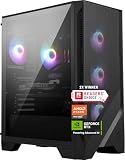
For most gaming PC buyers the RTX 5070 Ti is the better value; the RTX 5080 is worth it only if you play at 4K with high settings or want the most headroom from a card that will stay in your PC for years. Both carry the same 16 GB of GDDR7, so the step up buys more compute and bandwidth, not more video memory. This guide lays out the verified spec gap, the power and case checks that trip people up, a simple way to decide, and which RTX 5070 Ti desktops on this page suit which buyer.
Our Top Picks


Top 3 picks at a glance
Quick Verdict
| Your situation | Our verdict |
|---|---|
| 1440p gaming at high refresh rates | RTX 5070 Ti. The extra GPU power of the 5080 is the least noticeable here. |
| 4K gaming with ray tracing and high settings | RTX 5080 is the more comfortable fit, because its gains matter most as the resolution climbs. |
| Hoping the 5080 has more VRAM | It does not. Both have 16 GB of GDDR7 on a 256-bit bus. |
| Buying a prebuilt with a 750 W power supply | Stay with the 5070 Ti. NVIDIA recommends 850 W for the 5080. |
| Waiting for an RTX 50 Super refresh | No release date has been announced by NVIDIA; reports point to delays tied to memory supply. Do not plan around it. |
| Keeping the card for five years | The 5080 buys a larger margin, but the gap is modest. A newer card in a few years is usually a better use of the extra budget. |
The Key Differences
What NVIDIA’s specs say
The gap between these two cards is real but not enormous. According to NVIDIA and spec aggregators that agree with each other, the RTX 5070 Ti has 8,960 CUDA cores and the RTX 5080 has 10,752, which is exactly 20 percent more. Memory is the same capacity and bus on both, though the 5080 uses faster modules, so bandwidth rises by about 7 percent.
| Spec | RTX 5070 Ti | RTX 5080 | Difference |
|---|---|---|---|
| CUDA cores | 8,960 | 10,752 | +20% |
| Memory | 16 GB GDDR7 | 16 GB GDDR7 | Same |
| Memory bus | 256-bit | 256-bit | Same |
| Memory speed | 28 Gbps | 30 Gbps | +7% |
| Bandwidth | 896 GB/s | 960 GB/s | +7% |
| Boost clock (reference) | about 2.45 GHz | about 2.62 GHz | +7% |
| Total graphics power | 300 W | 360 W | +20% |
| Recommended PSU | 750 W | 850 W | +100 W |
The core count, power and PSU figures come from NVIDIA’s product pages; memory speed, bandwidth and clock figures come from consistent third-party spec listings. Partner cards often ship with higher factory clocks, so a specific model can differ.
The step up is not more efficient
Divide cores by watts and you get about 29.9 cores per watt for the 5070 Ti and the same 29.9 for the 5080. The extra 20 percent of shader hardware arrives with 20 percent more board power. Stepping up therefore gives you a bigger card in every sense, not a smarter one. It means more heat to move and a bigger demand on the power supply and case airflow.
Why the real-world gain is usually smaller than the core gap
A 20 percent core advantage rarely turns into a 20 percent frame-rate advantage. Clock speed, memory bandwidth and, most importantly, the CPU all limit how much of the extra hardware a game can use. At 1440p with a high refresh target, a game may be limited by the processor before the 5080’s extra cores matter. At 4K the GPU does more of the work, so the gap shows up more. We have not run our own measurements, so check current published reviews for the specific games you play rather than relying on a single headline number.
Same VRAM, same feature set
Both cards use NVIDIA’s Blackwell architecture with DLSS 4, including Multi Frame Generation and Reflex 2, and both offer three DisplayPort 2.1b outputs and one HDMI 2.1b output. Neither card gains a software advantage from the step up. If a game runs out of 16 GB of video memory at 4K with ray tracing and the highest texture settings, both cards hit the same wall. If you want more than 16 GB, the current options sit higher in NVIDIA’s line-up.
Super refresh and timing
Rumored RTX 50 Super variants would raise VRAM (24 GB on the 5070 Ti and 5080 class), but NVIDIA has not announced them. Press reports through 2026 describe repeated delays linked to the expense and supply of 3 GB GDDR7 memory modules. Treat any launch date as unconfirmed. If you need a PC now, buy for the card you can get today.
How to Decide
Use these checks in order. Treat the numbers as rules of thumb, not guarantees.
- Match the card to the monitor. Count the pixels. A 1440p screen has 3.69 million pixels, a 4K screen has 8.29 million, which is 2.25 times as many. If you game at 1440p, the 5070 Ti already has a lot of headroom. If you are buying a 4K display, the 5080’s extra margin is easier to use.
- Check the power supply. NVIDIA recommends 750 W for the 5070 Ti and 850 W for the 5080. As a rough illustration, add the GPU’s 300 W or 360 W to a Ryzen 7 9800X3D’s 120 W TDP: that is about 420 W versus 480 W before the rest of the system. A 750 W unit running 420 W of CPU and GPU load is about 56 percent loaded, which is comfortable. Quick power spikes can exceed rated figures, so leave headroom.
- Check the case. NVIDIA’s Founders Edition cards of both models measure 304 mm long in published listings, but partner cards vary in length and thickness. Compare your case’s maximum GPU length with the exact model and leave a few millimeters spare.
- Check the CPU. A modern 8-core processor is plenty for either card at 4K. At 1440p high refresh, a stronger gaming CPU gets you more out of the GPU than a step up in graphics.
- Decide whether the extra budget has a better home. Money left over after choosing the 5070 Ti can go toward a faster monitor, more storage or a bigger power supply, which may affect daily use more than 20 percent extra shader hardware.
A worked example: a buyer plans a 1440p, 165 Hz monitor and a prebuilt with a 750 W power supply. Pixels: 3.69 million. PSU: exactly the 5070 Ti recommendation. Verdict: the 5070 Ti, with the savings put toward storage. A second buyer plans a 4K display at 120 Hz with ray tracing and wants five years from the card. Pixels: 8.29 million. A PSU of at least 850 W is needed. Verdict: the 5080, if a build with that supply is available.
Products That Fit
Every desktop listed here uses an RTX 5070 Ti, so they sit on the value side of the decision. If you decide on the 5080, use the checks above to compare listings that name that card and an 850 W or larger power supply.
Skytech Ryzen 7 9800X3D, RTX 5070 Ti, 1TB – for 1440p and 4K gamers who want a strong CPU
As an Amazon Associate we earn from qualifying purchases at no extra cost to you.

This listing pairs the RTX 5070 Ti with a Ryzen 7 9800X3D, which suits the “1440p at high refresh” row because the gaming-focused CPU lets the GPU work harder. The title gives 32 GB of RAM and a 1TB SSD. A sibling listing names an 850 W Gold power supply, which would leave a margin for the 5070 Ti, but the exact unit and cooler on this storage option are not stated, so confirm on listing.
- Ryzen 7 9800X3D, RTX 5070 Ti, 32GB RAM
- 1TB SSD per the listing title
- Power supply, cooler and motherboard: confirm on listing
- Windows 11 per sibling listings; confirm on listing
Caveat: 1TB fills quickly with modern games, so plan a second drive.
Skytech Ryzen 7 9800X3D, RTX 5070 Ti, 2TB – for buyers who want more storage and PSU headroom

The same core hardware as above with a bigger drive, and the listing title spells out a Gen4 NVMe SSD, DDR5 6000 memory and an 850 W Gold ATX 3 power supply, followed by a 360 mm cooler. That 850 W unit meets NVIDIA’s recommendation for the RTX 5080 as well, which makes this the most flexible listing on the page if you might upgrade the graphics card later.
- Ryzen 7 9800X3D, RTX 5070 Ti, 32GB DDR5 6000
- 2TB Gen4 NVMe SSD
- 850W Gold ATX 3 power supply and 360 mm cooler per the title
- Windows 11 included per the title
Caveat: the case airflow and motherboard are not detailed in the title, so confirm on listing.
Lenovo Legion Tower 5 (2026) – for buyers who value a branded warranty and support
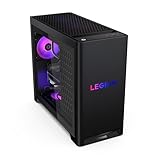
Lenovo’s tower combines an RTX 5070 Ti with a Ryzen 7 9800X3D, 32 GB of memory and 1TB of storage, and it ships with Windows 11 Home. It suits buyers who want a mainstream brand and a conventional warranty route. The power supply wattage is not stated in the listing text, so check Lenovo’s spec sheet for this exact model before assuming it matches a 750 W or 850 W recommendation.
- RTX 5070 Ti and Ryzen 7 9800X3D on the AM5 platform
- 32GB memory and 1TB storage
- Windows 11 Home; three months of Game Pass per the listing
- Power supply and cooler: confirm on listing
Caveat: branded desktops can use non-standard parts, which limits later upgrades.
ZOTAC MEK Ryzen 7 9700X, RTX 5070 Ti – for a compact, value-led build

The MEK pairs a ZOTAC RTX 5070 Ti 16GB with a Ryzen 7 9700X, a processor aimed at general performance rather than the gaming-specific cache of the 9800X3D. Retailer listings for this model describe 32 GB of DDR5, a 1TB NVMe SSD and a 750 W Gold power supply, which meets the 5070 Ti recommendation exactly but not the 5080’s. That fits a buyer who is confident they want the 5070 Ti and will not upgrade the card.
- RTX 5070 Ti 16GB and Ryzen 7 9700X
- 32GB DDR5 and 1TB NVMe SSD per retailer listings
- 750W 80+ Gold power supply per retailer listings; confirm on listing
- Wi-Fi 6E; Windows edition: confirm on listing
Caveat: with a 750 W supply there is no margin to move up to an RTX 5080 later without replacing the power supply.
Common Mistakes
- Assuming the RTX 5080 has more VRAM than the 5070 Ti. Both have 16 GB.
- Paying for the 5080 while gaming on a 1080p or 1440p 60 Hz monitor, where the extra margin goes unused.
- Ignoring the power supply in a prebuilt. A listing may not name the wattage, and a 750 W unit leaves no 5080 upgrade path.
- Measuring only the card length and forgetting its thickness and the cable bend space at the side of the case.
- Waiting indefinitely for a Super refresh that has not been announced.
- Choosing the GPU first and leaving a weak CPU or slow single-channel memory to hold it back.
Questions
Is the RTX 5080 much faster than the 5070 Ti?
It has 20 percent more CUDA cores and about 7 percent more memory bandwidth, so it is faster, but the real-world gap depends on resolution and the CPU. Expect more benefit at 4K than at 1440p. Check published reviews for your games.
Do I need a bigger power supply for the RTX 5080?
NVIDIA recommends 850 W for the RTX 5080 and 750 W for the 5070 Ti. If your build or prebuilt already has 850 W or more, either card is within guidance. A 750 W supply is the minimum for the 5070 Ti only.
Will an RTX 5070 Ti run 4K games?
NVIDIA describes the 5070 Ti as delivering strong 1440p and 4K frame rates, and DLSS 4 helps at 4K. The experience depends on the game and settings, and 4K with maximum ray tracing is where the 5080 gains the most.
Should I wait for an RTX 50 Super card?
Only if you can live without a new PC. NVIDIA has not confirmed a release, and reports describe delays linked to memory supply and expense. Buying what suits your monitor today is the safer plan.
Update History
- October 14, 2026 – Initial publication.
- Check the product page for current specifications and availability before buying.
Sources
- NVIDIA GeForce RTX 5070 family product page (CUDA cores, memory, power, PSU recommendation)
- NVIDIA GeForce RTX 5080 product page (CUDA cores, power, PSU recommendation, dimensions)
- Consolidated third-party GPU spec listings (memory speed, bandwidth, boost clock)
- AMD and retailer specification listings for the Ryzen 7 9800X3D (120 W TDP)
- Retailer listing fields for each desktop
- Press coverage of the RTX 50 Super delay reports