The best AMD CPU for overclocking in 2026 is the Ryzen 7 9800X3D for a gaming-focused PC: its unlocked multiplier, excellent AM5 motherboard support, manageable power consumption, and large 3D V-Cache make it easier to tune than AMD’s hotter 12- and 16-core processors.
For heavier workstation workloads, the Ryzen 9 9950X is the better overclocking platform because it provides 16 conventional Zen 5 cores and substantial thermal headroom once you use a powerful cooler. The Ryzen 7 9700X is the sensible lower-cost choice, while the Ryzen 9 9950X3D is the premium option for someone who wants top-tier gaming and strong multithreaded performance but should prioritize careful tuning over aggressive voltage.
As an Amazon Associate we earn from qualifying purchases at no extra cost to you.

Our Top Picks

AMD overclocking choices compared
| Processor | Cores / threads | Rated TDP | Overclocking outlook | Recommended cooler | Best use |
|---|---|---|---|---|---|
| Ryzen 7 9800X3D | 8 / 16 | 120 W | Excellent gaming tuning; curve optimization and memory tuning are especially useful | Strong dual-tower air cooler or 240 mm AIO | High-refresh gaming |
| Ryzen 9 9950X3D | 16 / 32 | 170 W | Very fast, but heat and voltage management matter more than raw multiplier increases | 280 mm or 360 mm AIO | Gaming plus demanding productivity |
| Ryzen 9 9950X | 16 / 32 | 170 W | Best conventional Zen 5 choice for all-core overclocking | 280 mm or 360 mm AIO | Rendering, compiling, and simulation |
| Ryzen 7 9700X | 8 / 16 | 65 W | Good efficiency and tuning flexibility, with less absolute performance than the 9800X3D | Quality tower air cooler | Balanced gaming and general use |
| Ryzen 5 9600X | 6 / 12 | 65 W | Affordable to tune, although six cores may limit long-term high-end gaming builds | Mid-range tower air cooler | Value-oriented builds |
TDP is not the same as maximum package power. A 170 W Ryzen 9 can draw considerably more than its rated TDP under motherboard-enhanced limits, while a tuned 65 W Ryzen 7 can use much less performance per watt than an aggressively overclocked chip. Treat the figures above as thermal-planning categories rather than guaranteed wall-power measurements.
Why the Ryzen 7 9800X3D is the best gaming overclocking CPU
The 9800X3D combines eight Zen 5 cores with 3D V-Cache and is fully unlocked for CPU and memory tuning. Its strongest gains usually come from Precision Boost Overdrive, Curve Optimizer, and DDR5 tuning rather than forcing a large fixed all-core frequency. That approach preserves high boost behavior in lightly threaded games while reducing voltage and temperature in sustained workloads.
It also avoids the complexity of a 16-core chip with two compute chiplets. A single eight-core gaming processor is easier to cool evenly, easier to validate, and less likely to expose scheduling differences between chiplets. If your PC is mainly for gaming at 1080p or 1440p with a high-end graphics card, the 9800X3D is a more coherent choice than paying for cores your games will rarely use.
Its limitation is value outside gaming. A Ryzen 9 9950X can finish heavily threaded work much faster, and a 9950X3D can provide both very high gaming performance and strong creator performance. Those processors are better choices when the PC is also a workstation.
When the Ryzen 9 9950X is the better overclocking choice
The Ryzen 9 9950X is the clearest choice for traditional manual overclocking. Its 16 Zen 5 cores make it suitable for CPU rendering, code compilation, video encoding, virtual machines, and other workloads that scale across all available threads. Unlike an X3D model, it is not constrained by the same cache-related voltage and temperature considerations, so an experienced builder has more freedom to test fixed all-core settings.
The trade-off is power. Suppose a stock-heavy workload makes the processor package draw about 200 W and your graphics card draws 350 W. Adding 60 W for the motherboard, memory, storage, fans, and USB devices gives this estimate:
200 W CPU + 350 W GPU + 60 W platform = 610 W sustained system load.
Allowing 25 percent headroom for transient spikes and capacitor aging produces approximately 763 W. That makes a quality 850 W power supply a sensible minimum for this example, while a 1000 W unit offers more margin if the graphics card is also overclocked. The calculation is more useful than selecting a power supply from CPU TDP alone.
How the other unlocked AMD processors fit
Ryzen 9 9950X3D
Choose the 9950X3D when gaming and productivity are both first-class requirements. It offers the core count of a Ryzen 9 workstation processor with the gaming advantages of 3D V-Cache. However, the best tuning strategy is usually a negative Curve Optimizer offset, sensible boost limits, and carefully tested memory settings. A large manual voltage increase can create heat without producing a worthwhile gaming improvement.
Ryzen 7 9700X
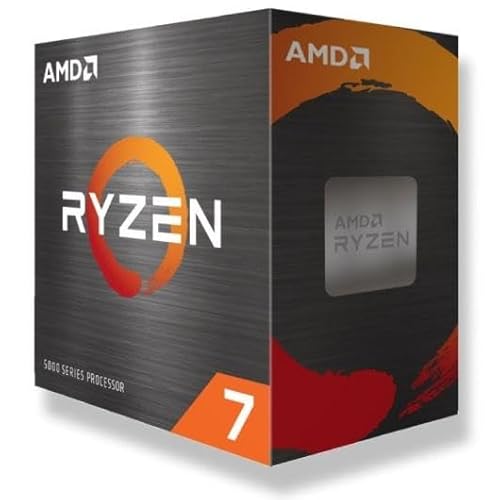
The 9700X is an efficient eight-core option with a 65 W rated TDP. It is easier to cool and can be attractive for a quiet system or a compact case. Its gaming performance is strong, but the 9800X3D generally makes more sense when the graphics card and monitor are high end. Select the 9700X if lower heat, lower system cost, or productivity efficiency matters more than maximum gaming frame rate.
Ryzen 5 9600X
The 9600X gives overclockers an inexpensive entry to AM5. Six Zen 5 cores remain capable for gaming, especially at 1440p where the graphics card often limits performance. It is a good match for a mid-range GPU, but the upgrade path should be part of the decision: an eight-core processor is more comfortable for a new premium gaming build intended to last several years.
Motherboard and memory requirements
All of these processors use the AM5 socket. A B650 or B650E motherboard can support serious tuning when its firmware is current and its voltage-regulator heatsinks are adequate. X670E and X870E boards add connectivity and expansion rather than automatically providing higher CPU performance. Do not pay for a flagship chipset solely because its name implies better overclocking.
- Choose a board with a substantial VRM heatsink, BIOS flashback, and current AMD AGESA firmware.
- Use two matched DDR5 modules rather than four modules when possible; two DIMMs are usually easier to run at high memory speeds.
- For a balanced AM5 build, DDR5-6000 with a suitable low-latency configuration is a practical starting point. Faster kits may work, but stability depends on the individual CPU and motherboard.
- Enable EXPO only after confirming the system is stable at default settings. Memory instability can look like a CPU overclock failure.
- Check the board’s supported CPU list and BIOS version before assembling an older AM5 system.
PCIe 5.0 support varies by chipset and motherboard layout. It is relevant for future storage and graphics upgrades, but it does not itself increase current CPU overclocking headroom.
A safe starting method for Ryzen overclocking
- Update the BIOS and install monitoring software. Record stock temperatures, clock behavior, and performance in a repeatable workload before changing anything.
- Enable EXPO separately. Run a memory test and several game or productivity sessions. This isolates memory problems from CPU problems.
- Start with Precision Boost Overdrive. Use the motherboard’s advanced PBO controls, but begin with conservative limits rather than unlimited motherboard mode.
- Apply Curve Optimizer gradually. Begin around a negative 5 all-core offset, test, then try negative 10 if stable. Some cores may need separate values; the best core is not always the most tolerant of a large negative offset.
- Test sustained and burst workloads. Use a repeatable multicore test, a single-core test, and several actual games. A PC that completes one benchmark can still crash during shader compilation or sleep-state transitions.
- Set a temperature limit appropriate to the cooler. Lowering the limit can reduce fan noise and prevent a small performance gain from becoming a large heat increase.
For X3D processors, avoid copying voltage settings designed for non-X3D Ryzen chips. The objective is usually better boost efficiency, not the highest fixed clock. For the 9950X, a fixed all-core overclock can make sense for an always-loaded workstation, but it may reduce lightly threaded boost performance.
Decision matrix: which AMD CPU should you buy?
| Your situation | Best choice | Reason |
|---|---|---|
| Gaming first, high-refresh 1080p or 1440p | Ryzen 7 9800X3D | Excellent gaming performance with practical PBO and memory tuning |
| Gaming plus rendering or video production | Ryzen 9 9950X3D | Large core count and cache-focused gaming performance |
| All-core workloads and manual overclocking | Ryzen 9 9950X | Maximum conventional Zen 5 core capacity and flexible tuning |
| Quiet, efficient eight-core PC | Ryzen 7 9700X | Low rated power and straightforward cooling |
| Lower-cost AM5 build | Ryzen 5 9600X | Unlocked six-core performance without requiring an expensive cooler |
Final recommendation
Buy the Ryzen 7 9800X3D if “overclocking” means extracting the best gaming performance through PBO, Curve Optimizer, and DDR5 tuning. Buy the Ryzen 9 9950X if sustained multicore work and manual all-core overclocking matter more than gaming efficiency. The 9950X3D is the premium compromise, while the 9700X and 9600X are better matched to quieter or more budget-conscious systems.
In every case, spend as much attention on cooling, BIOS maturity, memory stability, and power-supply headroom as on the processor itself. A stable, efficient tuning profile is usually faster in real use than an unstable headline clock speed.