A custom gaming PC in 2026 costs anywhere from roughly $600 for an entry-level 1080p build to $3,000 or more for a high-end 4K rig, with the sweet spot for most buyers landing between $1,100 and $1,800 depending on target resolution and refresh rate. Below are real line-item part breakdowns for four tiers, the extra costs most builders forget to budget for, and a cost-per-frame comparison showing which tier actually delivers the best value.
As an Amazon Associate we earn from qualifying purchases at no extra cost to you.


Our Top Picks
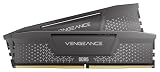
 CORSAIR Vengeance RGB DDR5 RAM 32GB32GB (2 x 16GB)5.43 x 0.27 x 1.77 inches0.11 poundsCheck on Amazon



Top 3 picks at a glance
What drives the price: resolution and refresh rate
GPU cost scales almost directly with the pixel and frame workload you’re asking it to render. A quick way to see this: 1080p at 60Hz needs the GPU to push roughly 124 million pixels per second (1920x1080x60). A 1440p 144Hz target needs about 597 million pixels per second, nearly 5x the throughput. That jump is why the GPU line item roughly quadruples between the 1080p tier and the high-refresh 1440p tier below, while CPU and RAM costs barely move.
Tier 1: $600 budget 1080p build
This tier targets 1080p at 60-100fps on medium-high settings in most competitive and mid-weight titles. The GPU is the weak link, so pair it with a modest CPU rather than overspending on either side.
| Component | Spec class | Typical price range |
|---|---|---|
| CPU | 6-core budget chip (e.g. Ryzen 5 or Core i3-class) | $100–$140 |
| Motherboard | Budget B-series board | $70–$90 |
| GPU | Entry 1080p card, 8GB VRAM | $180–$220 |
| RAM | 16GB DDR5-5200 | $45–$60 |
| Storage | 1TB NVMe SSD | $45–$60 |
| PSU | 450-550W 80+ Bronze | $45–$60 |
| Case | Basic airflow case | $40–$55 |
| Total | $525–$685 |
Tier 2: $1,100 1440p build
This is the current all-rounder tier: 1440p at 60-100fps on high settings in most games, with headroom for esports titles well above 144fps.
| Component | Spec class | Typical price range |
|---|---|---|
| CPU | 6-8 core mainstream chip (Ryzen 5/7 or Core i5-class) | $180–$230 |
| Motherboard | Mid-range B-series, Wi-Fi optional | $110–$140 |
| GPU | Mid-range 1440p card, 12GB VRAM | $330–$400 |
| RAM | 32GB DDR5-6000 | $75–$95 |
| Storage | 1-2TB NVMe SSD | $60–$100 |
| PSU | 650W 80+ Gold | $70–$90 |
| Case + fans | Mid-tower with 3 included fans | $60–$80 |
| Total | $885–$1,135 |
Tier 3: $1,800 high-refresh 1440p build
Built for 1440p at 144fps+ with high or max settings, or light 4K at lower frame targets. This is where GPU spend accelerates sharply relative to the other tiers.
| Component | Spec class | Typical price range |
|---|---|---|
| CPU | 8-core high-performance chip (Ryzen 7 or Core i5/i7-class) | $250–$320 |
| Motherboard | Mid-range B/X-series, Wi-Fi 6 | $140–$180 |
| GPU | High-end 1440p/entry 4K card, 16GB VRAM | $600–$750 |
| RAM | 32GB DDR5-6000 CL30 | $85–$110 |
| Storage | 2TB NVMe SSD (Gen4) | $100–$130 |
| CPU cooler | Mid-range tower air cooler | $35–$55 |
| PSU | 750W 80+ Gold | $90–$120 |
| Case + fans | Airflow mid-tower, 4-5 fans total | $90–$120 |
| Total | $1,390–$1,785 |
Tier 4: $3,000+ 4K build
Targets native 4K at 60-144fps on max settings. VRAM becomes the binding constraint here: uncompressed 4K textures and higher-res frame buffers push real-world usage toward 12-16GB in demanding titles, so this tier isn’t optional spending, it’s a requirement to avoid stutter from VRAM overflow.
| Component | Spec class | Typical price range |
|---|---|---|
| CPU | High-end 8-16 core chip (Ryzen 9 or Core i7/i9-class) | $380–$550 |
| Motherboard | X-series, Wi-Fi 6E/7 | $220–$300 |
| GPU | High-end 4K card, 16-24GB VRAM | $1,100–$1,600 |
| RAM | 32-64GB DDR5-6400 | $110–$180 |
| Storage | 2TB+ NVMe SSD (Gen4/5) | $130–$200 |
| CPU cooler | 280mm+ AIO liquid cooler | $90–$140 |
| PSU | 850-1000W 80+ Gold/Platinum | $130–$180 |
| Case + fans | Premium airflow case, 5-6 fans | $120–$170 |
| Total | $2,280–$3,320 |
The hidden extras most budgets miss
Every tier above covers core hardware only. These line items get skipped in rough budgeting and then show up as surprise costs at checkout:
- Windows license: $100-$140 for a retail Home license if you don’t have a spare key. Some builders use a Linux distro or an existing license to skip this, but budget for it if you need one.
- A PSU with real headroom: the wattage figures in the tables assume a quality unit from a reputable brand with proper protections (OCP, OVP, SCP). A bargain-bin PSU at the same wattage is a false saving, it’s the single component most likely to damage everything else in the case if it fails.
- Case fans beyond the stock 1-2: most cases ship with fewer fans than they have mounts for. Budget $8-$15 per additional fan, typically 2-3 extra for good airflow.
- Thermal paste: coolers usually include a pre-applied layer, but a quality aftermarket tube ($6-$10) is worth having for reapplication after dusting or if you swap coolers later.
- Surge protection: a basic power strip doesn’t protect against spikes. A dedicated surge protector or a small UPS runs $25-$80 and is cheap insurance against a $1,500+ build.
- Monitor and peripherals: none of the tiers above include a display, keyboard, mouse, or headset. A 1440p 144Hz monitor alone typically runs $200-$350.
Realistically, add $150-$250 to any of the tiers above once Windows, extra fans, thermal paste, and surge protection are factored in.
Cost-per-frame: which tier is the best value
Comparing total build cost against typical performance in a demanding modern title (using average fps at each tier’s native resolution and target settings) shows diminishing returns as you move up:
| Tier | Build cost | Typical fps (demanding title, native res) | Cost per frame |
|---|---|---|---|
| $600 1080p | ~$605 | ~75fps | ~$8 |
| $1,100 1440p | ~$1,010 | ~90fps | ~$11 |
| $1,800 high-refresh 1440p | ~$1,590 | ~130fps | ~$12 |
| $3,000+ 4K | ~$2,800 | ~95fps (4K) | ~$29 |
The $600 tier technically returns the most frames per dollar, but it does so at the lowest resolution and with the least longevity, a modest GPU today ages into “turn settings down” territory within 2-3 years. The $1,100-$1,800 range is where cost-per-frame stays close to the budget tier while delivering a resolution and refresh rate that holds up longer. The 4K tier’s cost-per-frame roughly doubles because native 4K rendering demands disproportionately more GPU silicon for the same frame rate, you’re paying for resolution and longevity at the top end, not raw frames.
Which tier fits your situation
| Your situation | Recommended tier |
|---|---|
| Esports titles only, 1080p monitor, tightest budget | $600 tier |
| Mixed gaming library, want settings headroom, 1440p monitor | $1,100 tier |
| Competitive shooter player wanting high refresh at 1440p | $1,800 tier |
| Already own or plan to buy a 4K display, want max settings | $3,000+ tier |
| Streaming or heavy multitasking alongside gaming | $1,800 tier or higher (extra CPU cores matter here) |
If you’re unsure, the $1,100-$1,800 range gives the best balance of current performance and the ability to drop GPU prices in a future upgrade rather than rebuilding the whole system.
Frequently asked questions
Is 32GB of RAM necessary for a gaming PC?
No, 32GB is not necessary for every gaming PC, but it is the standard recommendation for the 1440p and high-refresh tiers. The budget build uses 16GB DDR5-5200, while the other builds specify 32GB, with 32-64GB listed for the 4K tier. More memory can also help when streaming or multitasking alongside gaming.
Does the build cost include Windows?
No, the listed build totals cover core hardware and do not include Windows. A retail Home license may be needed if you do not already have a spare key. The article also notes that some builders use a Linux distro or an existing license instead, so the operating system can be handled separately from the hardware purchase.
How much VRAM should a gaming PC have?
The recommended VRAM depends on the target resolution and settings. The 1080p tier uses an entry card with 8GB, the 1440p tier specifies 12GB, and the high-refresh 1440p tier lists 16GB. For demanding native 4K gaming, the article identifies 16-24GB as the high-end range and describes VRAM as a binding constraint.
Do I need liquid cooling for a gaming PC?
No, liquid cooling is not required for most of the builds described. The high-refresh 1440p tier uses a mid-range tower air cooler, while the 4K tier specifies a 280mm+ AIO liquid cooler. The budget and mainstream tiers do not list a separate CPU cooler, so cooling requirements vary with the processor and tier.