
In modern interior design, the trend toward minimalism has transformed how we view home offices and entertainment centers. Heavy, towering desktop computers that once dominated floor space or cluttered under-desk legroom are being replaced by sleek, ultra-compact Small Form Factor (SFF) systems. Designing a Mini-ITX build is much like planning a custom-built cabinet or organizing a compact kitchen: every single fraction of an inch counts, and spatial efficiency is paramount.
When curating components for a small-scale computer, the power supply unit (PSU) acts as the foundation of your spatial layout. Unlike standard desktop builds where you can drop in almost any power supply, a Mini-ITX case requires a careful balance of physical dimensions, cable management clearance, and thermal efficiency. Choosing the wrong size can lead to a system that physically will not close, or worse, a cramped interior that chokes airflow and compromises the peace and quiet of your living space.
As an Amazon Associate we earn from qualifying purchases at no extra cost to you.


Our Top Picks


Top 3 picks at a glance
The Short Answer
For the vast majority of Mini-ITX builds, the standard SFX (Small Form Factor) power supply is the ideal size. Measuring 4.92 inches wide, 2.5 inches high, and 3.94 inches deep (125mm x 63.5mm x 100mm), SFX units provide the perfect balance of compact footprint and high power output.
While some slightly larger Mini-ITX cases can accommodate a standard ATX power supply, doing so heavily restricts room for cable routing and airflow. Conversely, ultra-slim console-style cases may require a highly specialized, narrow form factor known as Flex ATX. For a standard, high-performance Mini-ITX build, sticking to a dedicated SFX or SFX-L unit with fully modular cables will yield the cleanest aesthetic and the easiest assembly process. Expect to spend between $35 and $130 depending on the wattage and efficiency rating required for your components.
Standard Sizes
To plan your desk layout or media console integration, you must first understand the physical form factors available on the market. Power supplies are categorized by industry-standard dimensions, each tailored to specific chassis depths and thermal limits.
| Form Factor | Dimensions (Inches, W x H x D) | Dimensions (Centimeters, W x H x D) | Typical Wattage Range | Average Price Range |
|---|---|---|---|---|
| Flex ATX (1U) | 3.2″ x 1.6″ x 5.9″ | 8.15 x 4.05 x 15.0 cm | 250W – 500W | $45 – $90 |
| SFX | 4.92″ x 2.5″ x 3.94″ | 12.5 x 6.35 x 10.0 cm | 400W – 850W | $35 – $160 |
| SFX-L | 4.92″ x 2.5″ x 5.12″ | 12.5 x 6.35 x 13.0 cm | 500W – 1000W | $100 – $180 |
| ATX (Standard) | 5.9″ x 3.4″ x 5.5″ to 7.1″ | 15.0 x 8.6 x 14.0 to 18.0 cm | 450W – 1200W+ | $60 – $250+ |
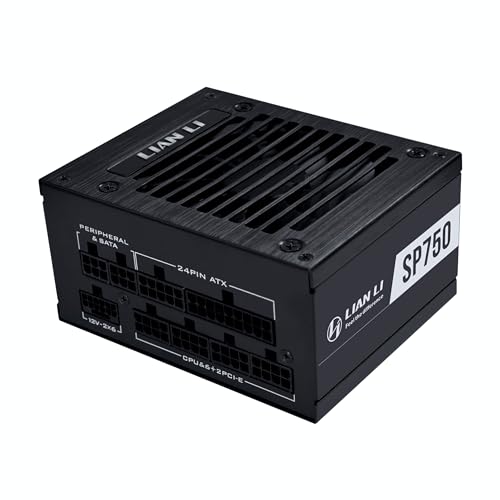
Each form factor serves a specific structural niche. For example, a entry-level option like the APEVIA SFX-AP400W (around $34) fits seamlessly into compact office setups, while high-end hardware demands premium density units like the LIAN LI SP750 V2 (around $120), which packs 750W of Gold-rated power into a standard SFX frame. In highly specialized, thin-profile media builds, a modular Flex ATX unit like the Rosewill VIT 500W (around $49) is preferred due to its narrow, elongated shape.
How to Measure Your Space
Much like measuring a room for a new sectional sofa, fitting a power supply into a tiny computer chassis requires accounting for both the item itself and the “breathing room” around it. Follow these steps to ensure a flawless physical fit:
- Identify Your Case’s Factory PSU Specifications: Consult your chassis manual to determine the supported form factors. If it states “SFX only,” do not attempt to force an SFX-L or ATX unit inside.
- Measure the Cable Bend Radius (Depth Clearance): Do not just measure the physical depth of the power supply box. If an SFX power supply is 3.94 inches deep, you must add at least 1.5 to 2 inches (3.8 to 5 cm) of clearance directly in front of the cable ports. Modular cables require space to bend safely without pressing hard against your graphics card or case panels.
- Check the Mounting Bracket Configuration: Many modern SFF cases ship with multi-purpose brackets. Measure the screw-hole layout on your case’s power supply mount. If you are mounting an SFX unit into an ATX-designed space, verify whether your chosen power supply includes an ATX-to-SFX adapter plate.
- Assess Fan Intake and Exhaust Clearances: A power supply must pull in cool air and expel heat to operate quietly. Measure the distance between the PSU intake fan and the nearest solid panel. Ideally, there should be at least 0.5 inches (1.27 cm) of open space, or a direct mesh ventilation window, to keep noise levels down and prevent thermal throttling.
By Room or Use Case
How you intend to integrate your Mini-ITX computer into your living space will heavily dictate the physical size, wattage, and noise tolerance of the power supply you choose.
The Minimalist Home Office (Desk Setup)
If your PC sits directly on your desktop, visual clutter and noise pollution are your primary concerns. For a standard productivity and light creative workstation, a compact SFX power supply in the 400W to 500W range is ideal. Models such as the Apevia ITX-PFC500W Fully Modular ITX (around $49) offer excellent spatial economy. Because it is fully modular, you only plug in the exact cables you need, leaving the rest of the chassis open for clean airflow. This reduces dust buildup and keeps the workspace looking tidy and professional.
The Living Room Media Center (HTPC)
When integrating a computer into a media console or TV stand, height and depth are severely restricted. Many home theater PC (HTPC) cabinets are designed to look like traditional audio receivers, utilizing ultra-slim profiles. Here, a Flex ATX power supply like the Rosewill VIT 500W is highly beneficial. Its narrow 3.2-inch width and shallow 1.6-inch height allow it to slide into console-style cases easily. This setup keeps your entertainment center looking streamlined, though you should opt for models with quiet, high-quality internal fans (like double ball-bearing designs) to avoid fan whine during quiet movie scenes.
The High-Performance Gaming Den
For dedicated gaming spaces where the PC needs to drive high-resolution displays, power density is key. You will need a premium SFX power supply capable of handling 750W or more, such as the LIAN LI SP750 V2. This class of power supply fits the standard compact SFX footprint but utilizes high-grade internal components to deliver clean power to demanding graphics cards. By keeping the power supply small, you preserve valuable space inside the chassis for larger cooling fans and liquid cooling radiators, ensuring your system runs cool and quiet during intense gaming sessions.
Common Sizing Mistakes
Even seasoned builders can run into spatial roadblocks when assembling a Small Form Factor system. Avoid these common physical design pitfalls:
- Buying Non-Modular in SFF Cases: Non-modular power supplies have all cables permanently attached. In a tiny Mini-ITX case, you will have nowhere to hide the unused, bulky cables. This blocks airflow, collects dust, and ruins the clean look of your build.
- Ignoring SFX-L Depth: Many builders assume SFX and SFX-L are interchangeable. However, that extra 1.18 inches (3 cm) of depth on an SFX-L unit can completely block the installation of a long graphics card or press directly against a bottom-mounted liquid cooling pump.
- Overlooking Fan Noise vs. Size: Smaller power supplies require smaller fans to fit inside their frames. A Flex ATX unit typically uses a tiny 40mm fan, which must spin at incredibly high RPMs to keep things cool, creating a high-pitched whine. If quietness is a priority for your home, stick to SFX (which uses 80mm to 92mm fans) or SFX-L (which uses 120mm fans).
- Forgetting the Power Cord Angle: In extremely compact cases, the internal power extension cable must plug into the back of your PSU at a sharp angle. Check the orientation of the AC receptacle on the power supply to ensure your case’s internal extension cable won’t be blocked by the chassis frame.
FAQ
Can I use a standard ATX power supply in a Mini-ITX case?
Only if the specific case manufacturer has designed the chassis to support it. While some larger Mini-ITX cases feature ATX mounting brackets, doing so is generally discouraged. Standard ATX power supplies take up valuable spatial real estate, severely limiting cable management and restricting the size of the graphics card you can install.
What is the difference between SFX and SFX-L power supplies?
The primary difference is depth. A standard SFX power supply is 3.94 inches (10.0 cm) deep, whereas an SFX-L power supply is 5.12 inches (13.0 cm) deep. The extra length of the SFX-L design allows manufacturers to install a larger 120mm fan, which can spin more slowly and quietly than the 80mm or 92mm fans typically found in standard SFX units.
How many watts do I need for a typical Mini-ITX build in 2026?
For a standard home office or casual media PC, a 400W to 500W power supply is more than sufficient. However, for high-end gaming or creative workstations featuring modern graphics cards, a 750W to 850W SFX power supply is recommended to handle transient power spikes safely and ensure long-term system stability.
Are modular power supplies necessary for small form factor builds?
While not strictly mandatory, modular power supplies are highly recommended for any Mini-ITX build. Because you can detach any cables your system doesn’t actively use, you save an immense amount of physical space. This makes the assembly process much less frustrating and directly improves internal airflow and system temperatures.









