
Our Top Picks
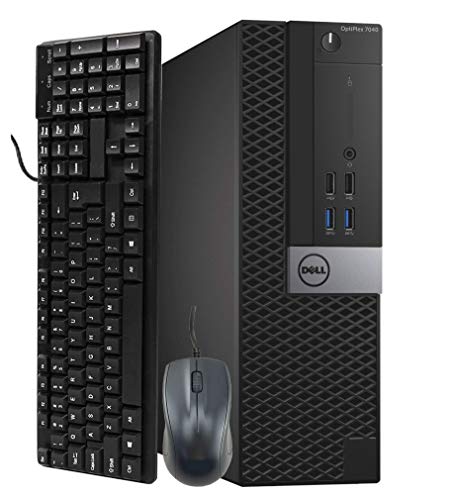 Dell Optiplex 7040 Business SFF Computer Small TowerSmall11.4 x 3.6 x 11.5 Inches12 poundsCheck on Amazon


Top 3 picks at a glance
The Short Answer
A Small Form Factor (SFF) PC requires remarkably little desk space compared to a traditional mid-tower desktop. If you position a standard commercial SFF PC (such as a Dell Optiplex 3050, 7040, 7050, or 7060 SFF) vertically, it needs a physical footprint of only about 11.4 inches by 3.7 inches (29 cm x 9.3 cm). This translates to roughly 42 square inches (0.03 square meters) of actual desk surface.
However, when calculating how much desk space does sff pc need, you must look beyond the physical metal chassis. To prevent cable strain and system overheating, you need to factor in an additional 3 to 4 inches of clearance behind the PC for power, HDMI, DisplayPort, and USB cables, as well as 2 to 3 inches of open space around the ventilation intake and exhaust grilles. When accounting for these real-world clearances, a vertically oriented SFF PC occupies a functional desk footprint of approximately 15.4 inches in depth by 6.7 inches in width.
As an Amazon Associate we earn from qualifying purchases at no extra cost to you.



If you choose to lay the PC horizontally flat on your desk, the physical footprint increases to 11.4 inches by 11.5 inches. While this takes up more surface area (about 131 square inches), it opens up the option of placing your monitor directly on top of the steel chassis, effectively reclaiming that lost desk space.
Standard Sizes
Not all Small Form Factor computers are built to the same dimensions. The SFF ecosystem ranges from ultra-compact micro PCs that fit in the palm of your hand to custom gaming Mini-ITX cases designed to house high-end graphics cards. The table below details the typical physical dimensions, weights, power profiles, and desk footprints for the three primary classes of SFF computers on the market today.
| PC Class & Examples | Physical Dimensions (H x W x D) | Dimensions in Metric (H x W x D) | Average Weight & Wattage | Minimum Desk Footprint (Vertical Setup) |
|---|---|---|---|---|
| Ultra Small / Micro PC (e.g., Dell Micro, Intel NUC, Mac Mini) |
7.2″ x 1.4″ x 7.0″ | 18.2 cm x 3.6 cm x 17.8 cm | 2.5 – 3.0 lbs 65W – 90W external brick |
10.0″ x 3.4″ (with cable clearance) |
| Traditional Commercial SFF (e.g., Dell Optiplex 7050/7060 SFF) |
11.4″ x 3.7″ x 11.5″ | 29.0 cm x 9.3 cm x 29.2 cm | 11.0 – 13.0 lbs 180W – 240W internal PSU |
15.5″ x 6.7″ (with cable clearance) |
| Gaming Mini-ITX SFF (e.g., Fractal Terra, Lian Li A4-H2O) |
13.5″ x 6.0″ x 8.5″ | 34.3 cm x 15.3 cm x 21.8 cm | 8.0 – 12.0 lbs 450W – 750W SFX PSU |
12.5″ x 10.0″ (with air clearance) |
For budget-conscious buyers, renewed commercial models like the Dell Optiplex series offer an incredibly space-efficient and cost-effective entry point. These units typically range in price from $160 to $400 depending on the generation of the processor (ranging from Intel 6th Gen i5 up to 8th Gen i7) and memory configurations (16GB to 32GB RAM). They provide standard, predictable dimensions that make desk planning straightforward.
How to Measure Your Space
Before purchasing an SFF PC, you should measure your desk setup to ensure a seamless integration. Follow these four steps to accurately assess your available workspace:
- Choose Your Orientation: Decide whether you will stand the computer vertically or lay it horizontally. Vertical orientation saves the most surface area but is more prone to tipping if bumped. Horizontal orientation is more stable and allows you to stack a monitor on top, but it requires a larger flat continuous surface.
- Measure the Depth of Your Desk: Standard home office desks are either 24 inches or 30 inches deep. If you have a 24-inch deep desk and place an SFF PC (11.5 inches deep) vertically facing forward, you will have about 12.5 inches of depth left for your keyboard and wrists. Measure from the back wall or monitor stand to the front edge of your desk to ensure you have comfortable clearance.
- Account for Cable Bend Radius: Do not measure just the metal box. Standard power cords and DisplayPort cables require at least 3 inches of rigid space behind the computer port before they can safely bend downward. Attempting to cram a system flush against a wall will damage your ports and cables over time.
- Verify Overhead Clearance: If your desk has a hutch, a built-in monitor riser, or low shelving, measure the vertical clearance. A standard SFF PC stood vertically requires a minimum of 12 inches of vertical clearance, plus an extra inch of overhead room to allow heat to dissipate upward.
By Room or Use Case
The Dedicated Home Office
In a dedicated home office with a standard 48-inch to 60-inch wide desk, an SFF PC is a productivity booster. Because it takes up less than 7 inches of width when stood vertically, you can easily position it next to a dual-monitor setup without crowding your workspace. This leaves ample room for desktop document trays, charging docks, and a large mousepad. If you are designing an ergonomic workspace in 2026, keeping the computer off the floor and on the desk reduces dust intake significantly, prolonging the life of your hardware.
The Cozy Bedroom or Studio Apartment
When your bedroom or living area has to double as an office, you are often limited to small writing desks or corner desks measuring just 32 to 36 inches wide. In these tight quarters, every square inch counts. An SFF PC can easily sit directly behind your monitor or be tucked neatly into a corner. Its compact footprint ensures you still have room to write in a notebook or set down a cup of coffee without feeling cramped.
The Living Room Media Center
Many users deploy affordable, renewed SFF PCs (costing between $165 and $380) as Home Theater PCs (HTPCs) or local media servers. When placed horizontally, these sleek black chassis fit perfectly inside standard TV consoles, media cabinets, or shelving units, which typically feature shelving compartments that are 15 to 18 inches deep. The low-profile design ensures they blend in naturally alongside game consoles and audio receivers.
Shared Family Desks or Study Nooks
For shared family spaces, homework stations, or kitchen nooks, clutter is the enemy. Using an SFF PC in a vertical orientation keeps the desk open for textbooks, art projects, and school supplies. Because these machines run quietly (often drawing under 65 watts during basic web browsing and word processing), they will not create annoying background noise in shared household areas.
Common Sizing Mistakes
When planning a small-footprint workspace, avoid these frequent layout and measurement pitfalls:
- Blocking Air Intakes: SFF PCs pack powerful components into a very small volume. Blocking the front intake vents or the rear exhaust grilles with books, paperwork, or office decor will cause the internal fans to spin at maximum speed, creating excess noise and causing the CPU to thermal throttle.
- Forgetting the Power Brick: While commercial SFF PCs like the Dell Optiplex series have internal power supplies, smaller Micro and Mini PCs rely on bulky, external power bricks. These bricks can be up to 6 inches long and require their own space on the desk or tucked into a cable management tray underneath.
- Ignoring Front Port Access: Do not tuck your SFF PC so deep into a corner or behind a monitor that you cannot reach the front power button, headphone jack, or USB ports. You need at least 4 inches of open hand clearance in front of the machine to comfortably plug in flash drives or accessories.
- Underestimating Cable Weight: Because SFF PCs are lightweight (often under 12 pounds), a bundle of heavy, stiff cables hanging off the back of a desk can actually pull a vertically oriented micro or mini PC backward or cause it to sit crooked. Use zip ties or cable clips to anchor your cables to the desk frame.
FAQ
Can I place a Small Form Factor PC horizontally to save desk space?
Yes. Most commercial SFF computers are designed with small rubber feet on both the bottom and one of the side panels, allowing them to be safely operated in either a vertical or horizontal orientation. Placing the PC horizontally is an excellent space-saving strategy if you place your monitor stand directly on top of the computer chassis, which elevates your screen to an ergonomic viewing height while keeping your desk surface clear.
How much clearance does an SFF PC need for proper ventilation?
An SFF PC needs a absolute minimum of 2 inches of open clearance on all sides where ventilation vents are present, and at least 3 to 4 inches of clearance at the primary exhaust vent (typically located at the rear of the chassis). Restricting this airflow will trap heat inside the compact chassis, leading to elevated operating temperatures and potential hardware degradation over time.
Are SFF PCs heavy enough to require a heavy-duty desk?
No. Standard commercial SFF PCs weigh between 11 and 13 pounds (5 to 6 kg), while Ultra-Small/Micro PCs weigh less than 3 pounds (1.3 kg). Any standard writing desk, computer desk, or floating wall shelf—including those made of lightweight materials like particle board, MDF, or tempered glass—can easily and safely support the weight of an SFF computer.
Can I mount an SFF PC under my desk or behind a monitor?
Yes. Many Micro and traditional SFF PCs feature built-in VESA mounting screw holes on their chassis, or are compatible with inexpensive aftermarket mounting brackets. This allows you to mount the PC directly to the underside of your wooden desktop, or mount it to the back of your computer monitor, completely freeing up your desktop surface area.
Related guides
- Best Gaming PC for Fortnite: Eight Prebuilt Desktops Sorted by Refresh Rate Goal (2026)
- Best RX 9070 XT Prebuilt Gaming PCs: Seven Desktops and Three Cards Compared: 10 Compared (2026)
- CyberPowerPC vs iBUYPOWER Gaming PC: How the Two Brands Compare
- Best RX 9070 XT Prebuilt Gaming PC (2026): 5 Picks Compared









