
Our Top Picks


The Short Answer
Whether you should buy an open-air PC case depends entirely on your physical environment and tolerance for maintenance. If you work in a clean, pet-free, adult-only space and frequently swap out hardware, an open-frame chassis is an outstanding, thermally superior choice. However, if your home has pets, curious children, high dust levels, or you require absolute silence, you should skip it. There is no middle ground: you are trading physical protection and dust filtration for unmatched thermal performance and easy component access.
What You Actually Get
When you transition from a traditional closed-chassis tower to an open-air frame, the physical reality of your desktop setup changes dramatically. A standard mid-tower case is a metal box measuring roughly 18 x 9 x 18 inches and weighing between 15 and 25 pounds empty. When fully built, it acts as a self-contained ecosystem where intake and exhaust fans manage a pressurized wind tunnel.
As an Amazon Associate we earn from qualifying purchases at no extra cost to you.

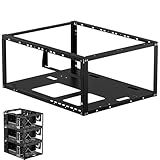
An open-air case, often referred to as a test bench or open frame, strips away the exterior walls entirely. You are left with a minimalist skeleton of aluminum extrusions, steel plates, or acrylic panels. Popular entry-level options like the AL01 Open Frame DIY PC Test Bench (priced around $19) weigh less than 3 pounds and feature a tiny footprint designed specifically for ATX or Micro-ATX motherboards. Slightly more robust options, such as stackable techbench server racks priced around $36, offer modular tiers for multi-GPU setups, E-ATX boards, and liquid cooling radiators.
Instead of hiding your components behind tempered glass or steel panels, an open frame displays your motherboard, power supply, graphics card, and cabling directly to the room. The physical footprint is often wider but significantly shorter than a standard tower, with average dimensions around 14 x 10 x 6 inches for a flat test bench. This changes how you interact with your computer: cables are plugged directly into exposed ports, power buttons are often simple tactile switches on the frame, and there are no magnetic dust filters to slide out and clean.
Pros
- Unrivaled Thermal Performance: Because there are no glass panels or restrictive metal grilles to block airflow, your graphics card and CPU cooler pull fresh, ambient room air directly. This can lower system temperatures by 5°C to 10°C compared to restrictive closed cases, preventing thermal throttling during intense workloads.
- Effortless Hardware Access: For hardware enthusiasts, developers, and tinkerers, the open frame is a massive time-saver. You do not have to unscrew side panels or wiggle your hands into tight corners to swap out a graphics card, add a stick of RAM, or clear the CMOS battery.
- Bold Industrial Aesthetic: From a home design perspective, an open-air PC acts as a high-tech centerpiece. It highlights the raw, mechanical beauty of modern circuit boards, copper heat pipes, and custom liquid-cooling loops, making it a favorite for minimalist or industrial-themed home offices.
- Compact and Lightweight Footprint: Stripping away the outer shell removes significant bulk. These frames are easy to relocate, take up less vertical space on a desk, and can even be tucked away on sturdy shelving units.
Cons
- Rapid Dust Accumulation: Without intake filters to catch airborne particles, dust settles directly onto your motherboard, graphics card backplate, and heatsink fins. Over time, this dust layer acts as an insulator, requiring you to manually clean the system with compressed air every few weeks.
- Complete Lack of Physical Protection: Your expensive components are entirely vulnerable to the outside world. A spilled drink, a curious cat looking for a warm spot to sleep, or a stray elbow can cause catastrophic physical damage or a short circuit.
- Unfiltered Acoustic Noise: Closed PC cases act as acoustic barriers, muffling the high-pitched whine of graphics card coils (coil whine) and the hum of spinning fans. On an open frame, every click, whir, and fan bearing noise travels directly to your ears unimpeded.
- No Electromagnetic Shielding: Traditional metal PC cases act as Faraday cages, containing electromagnetic interference (EMI). An open-air system can occasionally cause static or interference with nearby wireless devices, high-end audio interfaces, or sensitive studio microphones.
Who Should Buy It
An open-air PC case is an exceptional fit for specific users. It is highly recommended for hardware testers, software developers who frequently swap components, and overclockers who need direct access to the motherboard. It is also an excellent choice for design-conscious professionals who want to build a clean, wall-mounted display piece or a minimalist desk setup. Looking ahead to 2026, as high-end graphics cards continue to push thermal and power limits past 450 watts, managing ambient heat in a small home office is more critical than ever; an open frame handles these high-wattage components effortlessly without turning your PC case into an oven.
Who Should Skip It
You should avoid an open-air case if your computer sits on the floor, if you have free-roaming pets (especially cats or dogs that shed), or if you have young children in the household. It is also a poor choice for dusty environments, such as workshops, garages, or homes with old carpeting and poor HVAC filtration. Finally, if you are sensitive to fan noise or coil whine and prefer a dead-silent workspace while working or gaming, a heavily insulated, closed quiet-computing case is a much better investment.
Cheaper Alternatives
If you want the benefits of an open-air layout but are hesitant about the cost of premium open-frame chassis, there are several budget-friendly options and DIY workarounds to consider. Below is a comparison of affordable entry-level paths:
| Option | Estimated Cost | Primary Trade-off |
|---|---|---|
| DIY Acrylic/Metal Test Bench (e.g., AL01) | $15 – $25 | Basic structural rigidity; limited support for heavy 3-fan graphics cards or large liquid cooling radiators. |
| Stackable Multi-Tier Techbench | $30 – $45 | Larger physical footprint; requires extensive manual assembly and careful cable routing to look tidy. |
| Budget Mesh Mid-Tower Case | $50 – $70 | Takes up more physical desk space, but offers basic dust filtration and physical protection while retaining high airflow. |
| The “Motherboard Box” Method (DIY) | $0 | Zero physical protection, high risk of accidental damage, and no structural brackets to secure heavy graphics cards. |
FAQ
Are open-air PC cases safe from static electricity?
Yes, they are safe as long as they are assembled correctly. Quality open-air frames are made of conductive metals like aluminum or steel, which ground the power supply directly to the frame. As long as your power supply is plugged into a grounded three-prong wall outlet, your components remain grounded and safe from static buildup.
Do open-frame computers run louder than closed cases?
Generally, yes. While your system fans may run at lower speeds because the components are running cooler, there are no solid panels or sound-dampening materials to block the noise. You will hear the direct hum of the CPU cooler, the rush of air from the GPU, and any electrical coil whine much more clearly than you would with a sealed case.
How often do you need to clean an open-air PC?
In an average household, you should expect to blow off the components with a can of compressed air or an electric duster once every two to four weeks. Unlike closed cases where dust is trapped on removable mesh filters, dust on an open frame settles directly onto the horizontal surfaces of your motherboard and GPU.
Can you mount an open-air PC case on a wall?
Many premium open-frame chassis are designed with built-in VESA mounting holes, allowing you to hang them on a wall just like a television. However, budget test benches (like the $20 to $40 models) usually lack these mounting brackets and are designed strictly for flat desktop use unless you perform custom modifications.
Related guides
- Best Gaming PC for Fortnite: Eight Prebuilt Desktops Sorted by Refresh Rate Goal (2026)
- Best RX 9070 XT Prebuilt Gaming PCs: Seven Desktops and Three Cards Compared: 10 Compared (2026)
- CyberPowerPC vs iBUYPOWER Gaming PC: How the Two Brands Compare
- Best RX 9070 XT Prebuilt Gaming PC (2026): 5 Picks Compared









