
When designing a modern home office, a cozy living room media center, or a dedicated creative studio, we often spend weeks obsessing over the perfect desk, ergonomic chairs, and ambient lighting. Yet, one of the most significant disruptors of home comfort sits quietly inside your computer chassis: the graphics processing unit (GPU). A high-performance graphics card is essentially a small space heater. How that card manages its heat directly impacts your room's ambient temperature, the acoustic comfort of your living space, and how often you have to vacuum dust out of your workspace.
The real decision a homeowner or remote professional faces when choosing between a blower style GPU and an open axial fan GPU isn't just about frame rates or rendering speeds. It is a choice about home integration. Do you want a system that quietly disperses heat into your room through a larger, well-ventilated chassis, or do you need a compact, self-contained unit that immediately exhausts hot air out of your living space through the back of your PC?
As an Amazon Associate we earn from qualifying purchases at no extra cost to you.
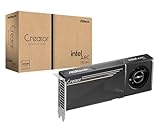



To help illustrate these differences, we will look at how workstation-grade blower models, such as the premium ASRock Intel Arc Pro B70 Creator 32GB or the mid-range ASRock Intel Arc Pro B60 Creator 24GB, compare to consumer-focused open axial designs like the ASUS Dual Radeon RX 9060 XT 16GB. We will also touch on how auxiliary cooling components, such as the AC Infinity AXIAL 8038 cabinet fan, play a role in managing your home's overall thermal layout.
Our Top Picks
 ASUS Dual Radeon RX 9060 XT 16GB GDDR6RX9060XT|16GB|Black8 x 4.7 x 1.9 inches1.3 poundsCheck on Amazon


Top 3 picks at a glance
Quick Verdict
For most open-air home offices, family living rooms, and setups where quiet operation is the highest priority, the open axial fan GPU is the superior choice. It runs cooler, operates much quieter under heavy loads, and fits beautifully into standard mid-tower cases that match modern home decor.
However, if you are working in a cramped studio apartment, building a compact home-theater PC (HTPC) inside a media console, or running a multi-GPU workstation for heavy rendering, the blower style GPU is indispensable. By exhausting hot air directly out of the back panel, it protects other delicate internal components and prevents your small room from turning into an oven.
Side by Side
Understanding how these two thermal designs interact with your home environment requires looking at their physical and operational characteristics side by side.
| Feature | Blower Style GPU | Open Axial Fan GPU |
|---|---|---|
| Acoustic Comfort | Moderate to high pitch whine under load (45–55 dBA) | Low hum to near-silent operation (30–40 dBA) |
| Heat Exhaust Path | Directly out the rear of the PC chassis, outside the room-facing case | Dispersed inside the PC case, requiring secondary case fans to exhaust |
| Space Needed | Highly compact; usually strictly dual-slot or single-slot designs | Thicker, wider; often requires 2.5 to 3.5 slots of clearance |
| Maintenance | Low; sealed shroud prevents dust buildup on internal motherboard parts | Moderate; open heatsinks attract household dust and pet dander |
| Durability | High; single robust radial fan designed for continuous industrial workloads | Variable; multiple fans mean more points of mechanical failure |
| Aesthetics | Industrial, minimalist, and utilitarian; rarely features heavy RGB lighting | Stylized, modern, often features glass-friendly designs and customizable LEDs |
| Price Range | $600 to $1,300+ (typically geared toward professional workstations) | $200 to $1,000+ (highly competitive consumer and gaming market) |
| Best For | Small form factor builds, multi-GPU arrays, warm climates, dusty rooms | Quiet home offices, spacious gaming desks, open-air setups |
Where Blower Style GPU Wins
Blower style graphics cards utilize a single, enclosed radial fan at the tail end of the card. This fan pulls air from inside the case, forces it across a sealed vapor chamber or heatsink, and shoots it directly out of the rear I/O bracket of your computer. This closed-loop airflow design offers several distinct advantages for home users.
First, blower cards are unmatched in ambient temperature control within the computer chassis itself. In a compact living room media console or a tight desk compartment, heat buildup is a silent killer of electronics. Because a blower card like the ASRock Intel Arc Pro B60 Creator 24GB channels its heat entirely out of the back of the case, it does not raise the internal temperature of your CPU, RAM, or storage drives. This makes it incredibly easy to design a compact, hidden workstation without worrying about complex internal airflow schemes.
Second, blowers excel in dust and pet hair management. If you share your home with cats or dogs, airborne dander and hair are constant threats to open electronics. A blower card's heatsink is completely encased in a protective plastic or metal shroud. Dust has a harder time settling inside the fins because the high-velocity air stream acts as a self-cleaning mechanism.
Finally, blowers are designed for modular stackability. If you are running a home-based editing business that requires multiple graphics cards stacked side by side, open axial fans will choke on each other's recycled hot air. High-end workstations utilizing cards like the ASRock Intel Arc Pro B70 Creator 32GB can be placed directly adjacent to one another because each card draws air from the front and exhausts it out the back independently.
Where Open Axial Fan GPU Wins
Open axial fan GPUs are the most common graphics cards on the market today, featuring two or three large, exposed fans that blow air directly downward onto an open array of aluminum cooling fins. This design is highly favored for several lifestyle-centric reasons.
The primary advantage of an open axial card is whisper-quiet operation. Because axial fans, much like the residential-grade AC Infinity AXIAL 8038 cabinet fan, move large volumes of air at lower rotational speeds (RPM), they do not produce the high-pitched, turbine-like whine associated with blower fans. Under typical home office workloads, an axial card like the ASUS Dual Radeon RX 9060 XT 16GB can turn its fans off entirely, relying on passive cooling to remain completely silent. This is a game-changer for shared household spaces, study rooms, or recording environments where background noise must be kept to an absolute minimum.
Additionally, open axial fans provide superior thermal performance for the GPU core itself. Because the heatsink surface area is significantly larger and completely exposed to the air inside the case, the graphics chip runs noticeably cooler than its blower-style counterparts. Lower operating temperatures mean the card can maintain peak performance for longer periods without thermal throttling, extending the overall lifespan of your silicon.
From an interior design perspective, axial cards are also far more visually appealing. They are designed to be shown off through tempered glass side panels, featuring elegant shroud designs, brushed metal backplates, and subtle ambient lighting that can be customized to match your room's color palette.
Cost Over 5 Years
When investing in home hardware, it is important to look beyond the initial retail price and calculate the total cost of ownership over a five-year lifecycle. This includes energy consumption, maintenance supplies, and potential hardware replacement costs.
Initial Purchase Price: Blower cards, particularly those built for professional creator workloads, tend to carry a premium. For instance, the professional-grade ASRock Intel Arc Pro B70 Creator 32GB retails around $1,300, while its smaller sibling, the ASRock Intel Arc Pro B60 Creator 24GB, sits at around $650. In contrast, a highly capable consumer axial card like the ASUS Dual Radeon RX 9060 XT 16GB offers excellent performance at a more accessible entry point of around $530.
Electricity and HVAC Costs: A GPU drawing 200W to 300W of power for several hours a day acts as a space heater. If you live in a warm climate, an open axial fan card dumps that heat directly into your room, forcing your home air conditioning unit to work harder to maintain a comfortable temperature. Over five years, the slight cooling efficiency of a blower card that vents heat directly outside the chassis (or close to a window/exhaust vent) can save a modest but noticeable amount on your summer utility bills.
Maintenance and Longevity: Axial cards require more frequent cleaning. Over five years, you will spend more on cans of compressed air and dust filters to keep an open axial card free of household debris. However, because axial fans run cooler and at lower speeds, their bearings tend to last longer. If a single fan fails on a dual-fan axial card, the card can often still run safely. If the single radial fan on a blower card fails, the card will overheat instantly, requiring a total shroud replacement.
Which One for Your Home
Small Apartment or Studio
In a compact living space, every degree of ambient temperature matters. An open axial card will quickly warm up a small bedroom or studio during a long evening of work or gaming. For these tight quarters, a blower style GPU is highly recommended. It acts as its own exhaust system, helping to push warm air out of your living zone. Pair it with a ventilated desk setup to keep your small space feeling fresh and comfortable.
Family Home with Kids and Pets
Homes with pets and active children are naturally high-dust environments. Pet hair, carpet fibers, and dander quickly clog the complex, exposed fins of open axial cards. A blower style card, with its enclosed shroud and robust intake, is much better protected against household debris. It requires less frequent deep cleaning, making it a low-maintenance, worry-free choice for a busy family computer room.
Rental Property or Home Office
If you work from home and spend hours on video calls, acoustic control is your top priority. The low-pitched, subtle hum of an open axial fan GPU like the ASUS Dual Radeon RX 9060 XT 16GB will not be picked up by sensitive desk microphones. This ensures your professional presentation remains undisturbed, making axial cards the premier choice for dedicated home workspaces and rental units where you cannot modify walls to isolate computer noise.
Long-Term Home with a Dedicated Game Room
For homeowners designing a permanent, dedicated media or gaming room heading into 2026, styling and peak performance are paramount. An open axial fan GPU fits perfectly into large, well-ventilated cases that serve as visual centerpieces on your desk. With plenty of physical space, you can easily install quiet system fans or cabinet exhaust systems (such as an AC Infinity AXIAL 8038) to manage the room's overall airflow, allowing you to enjoy maximum performance with minimal acoustic intrusion.
FAQ
Are blower style GPUs louder than open axial GPUs?
Yes. Because blower cards rely on a single, smaller radial fan to force air through a narrow chamber, they must spin at much higher speeds to move the same volume of air as two or three large axial fans. This results in a higher-pitched, more noticeable rushing air sound under heavy processing loads.
Can I install a blower GPU in any standard computer case?
Absolutely. Blower GPUs use standard PCIe slots and mounting brackets. In fact, because they are typically thinner and do not spill heat into the case, they are often much easier to install in tight, compact, or older computer cases than bulky, wide open axial cards.
Do blower GPUs require a vapor chamber to run cool?
While not strictly required, high-end blower cards like the ASRock Intel Arc Pro B70 Creator 32GB utilize advanced cooling technologies like vapor chambers and premium thermal interface materials (such as Honeywell PTM7950) to maximize heat transfer within their compact, enclosed footprints.
How often should I clean the fans on my home GPU?
For an open axial fan GPU in a standard home, you should gently blow out the heatsink with compressed air every 6 months. For blower style cards, because of their enclosed nature, a quick inspection every 12 months is usually sufficient to ensure the rear exhaust bracket remains free of household dust blockages.









