
For years, home computers were relegated to dusty corners beneath heavy oak desks, hidden away like unsightly appliances. Today, the personal computer is a design statement. As remote work and home gaming setups have merged into our primary living spaces, choosing a PC is no longer just about processor speeds and storage capacity—it is a major interior design decision. Your computer is now a piece of furniture that sits prominently on your desk, influencing the visual flow, light distribution, and overall aesthetic of your room.
When planning a new desktop setup, the first major stylistic fork in the road is color. Specifically, the debate centers on a clean, Scandinavian-inspired white aesthetic versus a classic, stealthy black configuration. However, this choice is not merely cosmetic. The white pc build vs black pc build cost discrepancy is a very real factor that can significantly impact your overall budget, component availability, and long-term maintenance routine. Balancing your design aspirations with practical financial boundaries requires understanding why these price differences exist and how each choice interacts with your home environment.
As an Amazon Associate we earn from qualifying purchases at no extra cost to you.




Our Top Picks



Top 3 picks at a glance
Quick Verdict
If your priority is maximizing performance per dollar while keeping maintenance to a minimum, a black PC build is the clear winner. Black components are the industry standard, widely available, and free from the pricing premiums often associated with specialty finishes. However, if you are designing a bright, minimalist home office, a Scandinavian-style study, or a living room workspace where visual harmony is paramount, the investment in a white PC build is highly justified. While it carries an aesthetic premium of roughly 10% to 25% on individual components, its ability to blend into light-colored interiors and make small rooms feel larger is unmatched by traditional black hardware.
Side by Side
To help you visualize how these two design paths compare across functional, financial, and aesthetic categories, we have broken down the essential differences below:
| Feature | White PC Build | Black PC Build |
|---|---|---|
| Comfort & Visual Glare | Bright, reflects ambient light; reduces eye strain in well-lit rooms but can be distracting in dark environments. | Absorbs light; blends seamlessly into low-light rooms, though high-contrast RGB lighting can create sharp glare. |
| Durability & Finish Wear | Susceptible to UV yellowing over time; white plastics and coatings can show scuffs, stains, and oils easily. | Highly resistant to discoloration; hides minor scratches well, though matte finishes can show oily fingerprints. |
| Price Range (Typical Mid-to-High End) | $1,200 to $3,500+ (often carries a 10% to 25% premium on matching white parts). | $1,000 to $3,000+ (baseline pricing with frequent discounts and massive component variety). |
| Maintenance & Cleaning | High maintenance; dark household dust, pet hair, and lint stand out immediately against white surfaces. | Moderate maintenance; light-colored dust is visible, but general grime and smudges are naturally masked. |
| Space Needed (Visual Footprint) | Feels visually lighter and smaller; ideal for maintaining an open, airy feeling on compact desks. | Feels visually heavier and more solid; can dominate a small desk or clash with delicate, light-colored furniture. |
| Aesthetic & Look | Minimalist, modern, clinical, Scandinavian, or futuristic. | Stealthy, industrial, classic, executive, or traditional. |
| Resale Value | High demand among niche buyers, but a smaller total buying audience; matching sets sell well. | Consistent, high demand across the entire market; incredibly easy to sell individual parts quickly. |
| Best For | Modern home offices, bright living rooms, minimalist workspaces, and design-conscious creators. | Dedicated gaming rooms, traditional studies, budget-conscious builders, and busy family households. |
Where White Pc Build Wins
From an interior design perspective, a white PC build is a transformative element for a room. Traditional black computer towers carry a heavy “visual weight.” When placed on a light oak, ash, or white lacquer desk, a large black box acts as a visual black hole, drawing the eye away from your carefully curated decor. A white build, conversely, diffuses light rather than absorbing it. This helps keep your workspace feeling open, airy, and clean—crucial for mental clarity during long working hours.
Furthermore, white builds excel at showcasing subtle, sophisticated lighting. Instead of the aggressive, high-contrast glow of RGB lights against a dark chassis, light reflecting off white internal components produces a soft, pastel-like ambient glow. This makes it much easier to integrate a high-performance computer into shared family spaces or elegant guest bedrooms without it looking like an imposing piece of arcade machinery.
For those who want this clean, high-end look without the hassle of hunting down scarce individual white parts, prebuilt options offer an elegant shortcut. Systems like the KOTIN Prebuilt Gaming PC Ryzen 7 7800X3D, 32GB DDR5, RTX 5060 Ti 8GB, 1TB (priced at $1899.99) demonstrate how a premium white aesthetic can be delivered as a cohesive, high-performance package. By choosing a curated prebuilt, you avoid the frustration of matching different manufacturers’ varying shades of white plastics and metals, ensuring a unified look that complements modern home furnishings perfectly.
Where Black Pc Build Cost Wins
While white builds win the battle of modern aesthetics, black builds dominate when it comes to the raw economics of tech. When analyzing the white pc build vs black pc build cost, the financial advantage of going black is undeniable. Because black is the default color for the vast majority of computer hardware manufacturing, brands produce these components in massive volumes. This scale of economy translates directly to lower shelf prices, frequent sales, and better bundle deals.
When you build a white PC, you often run into the “white tax.” Manufacturers must run separate, smaller production lines to apply white powder coatings, white solder masks on motherboards, and white sheathing on power supply cables. These specialized runs cost more to execute. For example, a high-end graphics card or motherboard in white can easily cost $30 to $100 more than its identical black counterpart. Over an entire system build—including the case, fans, liquid cooler, RAM, power supply, and cables—this premium quickly compounds.
Opting for a black system allows you to redirect those aesthetic premiums directly into faster processors, better graphics cards, or larger storage drives. For instance, the suevery Pre Built Gaming PC Core I9 RTX 5060TI 8G Desktop Computer (priced at $1606.48) offers an incredibly powerful Core i9 processor at a highly competitive price point, showcasing how choosing a black-dominant configuration maximizes your raw computing power per dollar spent.
Additionally, choosing a black theme gives you access to some of the finest structural designs on the market at highly accessible prices. The CORSAIR 3500X RS ARGB Panoramic Mid-Tower PC Case – Black (around $82) is a prime example of a premium, modern chassis that provides a gorgeous, panoramic glass view of your components without demanding a premium price tag. Its black frame anchors the design, offering a sophisticated, clean border that frames your internal components like a piece of high-tech art.
Cost Over 5 Years
When calculating the true cost of ownership for a home computer, it is vital to look beyond the initial purchase price. Over a five-year lifecycle, maintenance, upgrades, and depreciation paint a very clear picture of how color choices affect your wallet.
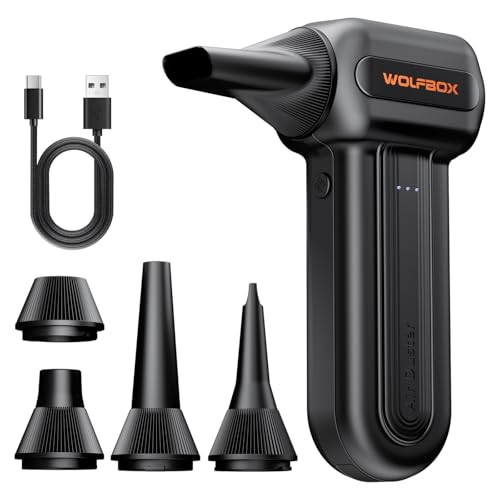
First, consider the cost of keeping the machine clean. White PC cases and components show dark household dust, pet dander, and lint almost instantly. To keep a white build looking pristine, you will need to clean it far more frequently. Investing in a high-quality maintenance tool, such as the WOLFBOX MF60 Compressed Air Duster, 3-Speed Adjustable, Electric, Cordless (around $33), is highly recommended. This reusable duster saves you from buying dozens of disposable canned air canisters over the years and is essential for keeping delicate white fan blades and heat sinks free of grey dust buildup.
Second, we must account for environmental wear. Over a five-year period, exposure to natural sunlight from your home office window can cause certain white plastics and painted surfaces to yellow due to UV degradation. This uneven discoloration can ruin the clean look of your setup, potentially forcing you to replace cases or trim pieces prematurely to keep your room looking cohesive. Black finishes, by contrast, are incredibly stable under UV exposure and hide the natural aging process of plastics and metals beautifully.
Finally, there is the upgrade cycle. If a component fails or needs an upgrade in three or four years, finding a matching white replacement part at a reasonable price can be challenging, as older white components quickly go out of production. In contrast, compatible black components will always be plentiful and cheap on both the new and used markets. By the time we reach 2026, the secondary market for standard black hardware will remain incredibly liquid, whereas finding specific vintage white parts to match an older theme will likely command a collector’s premium.
Which One for Your Home
To determine which option best suits your household, let us look at how these choices perform in real-world living situations.
Small Apartment
In a compact studio or a small one-bedroom apartment, your desk is often visible from your bed, your dining table, or your sofa. In this scenario, a heavy black tower can make an already tight space feel cramped and cluttered. A white PC build is ideal here. Its light-reflective surfaces mimic the surrounding walls, visually receding into the background and keeping your living space feeling open, bright, and uncluttered.
Family with Kids/Pets
If your home is a bustling environment filled with children, dogs, or cats, a white build can quickly become a maintenance nightmare. Sticky fingers, flying pet hair, and accidental scuffs will turn a pristine white setup into an eyesore in days. A black build is far more forgiving in a busy family home. It naturally hides smudges, pet hair is less visible against its dark chassis, and its durable black finishes are much easier to wipe down without leaving unsightly streaks.
Rental
As a renter, you cannot always control the wall colors, flooring finishes, or lighting conditions of your home. A black PC build offers the ultimate versatility for a rental lifestyle. Whether your next apartment has dark industrial brick walls, warm wood paneling, or retro carpeting, a classic black setup will always coordinate. It acts as a neutral anchor that fits into any design scheme you might inherit.
Long-Term Home
If you own your home and have designed a dedicated, permanent workspace with specific furniture—such as a custom-built white desk, floating shelves, and minimalist lighting—investing in a white PC build is highly rewarding. Because you do not plan to change your environment anytime soon, you can curate a highly tailored, beautiful workspace where the computer acts as a permanent, sculptural design element that perfectly matches your home’s architectural style.
FAQ
Why do white PC components cost more than black ones?
White components carry a premium because they are manufactured in smaller quantities than standard black parts. This requires factories to halt main production lines, clean the machinery, and run specialized batches of white powder coating, white plastics, and white circuit boards. These extra steps and lower production volumes increase the manufacturing cost per unit, which is passed on to the consumer as an aesthetic premium.
Does a white PC build get dirty faster than a black one?
A white PC does not attract more physical dust than a black one, but it shows dark household dust, lint, and pet dander much faster. Conversely, very light grey dust can sometimes show up clearly on matte black surfaces, but general dirt, oily fingerprints, and smudges are much more visible on white surfaces. Regular, light maintenance is required to keep a white build looking fresh.
Can I mix white and black components to save money?
Absolutely. Creating a “panda” or “stormtrooper” build is an excellent way to balance cost and style. By choosing a black case with white internal components, or a white case with black hardware inside, you can bypass the premium prices of rare white motherboards and graphics cards while still achieving a striking, high-contrast modern look that fits beautifully in contemporary spaces.
Do white PC cases yellow over time?
Some white cases can develop a yellow tint over time, particularly those made with cheaper ABS plastics that are frequently exposed to direct sunlight or ambient heat. To prevent this, place your computer away from direct window light, and choose high-quality cases constructed primarily of powder-coated steel, aluminum, and tempered glass, which are highly resistant to UV-induced discoloration.









