
Our Top Picks

The Short Answer
Yes — a prebuilt gaming PC is worth it for most buyers in 2026, with one condition: you have to be willing to pay roughly a 10–20% premium over the cost of the same parts bought separately. If that premium is unacceptable to you and you’re comfortable troubleshooting on your own, build custom. If you want a working machine that boots into a game the same afternoon, a prebuilt is the smarter buy.
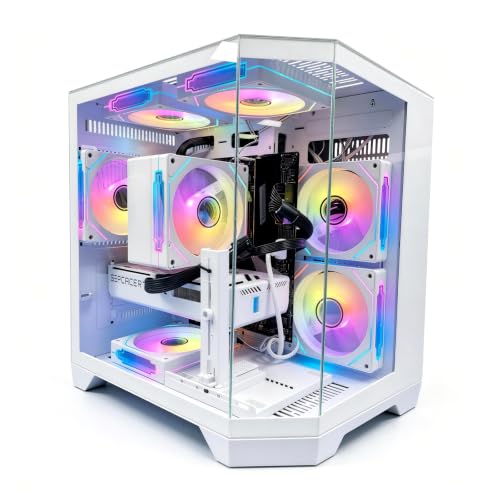
That’s the honest math. A system like the LXZ prebuilt with a Ryzen 7 8700F, RTX 5060, 16GB of DDR5, and a 1TB SSD at around $1,300 is difficult to beat part-for-part once you factor in a Windows license (about $100–140), a case, a quality power supply, and — critically — your own time.
As an Amazon Associate we earn from qualifying purchases at no extra cost to you.
What You Actually Get
A prebuilt gaming PC arrives fully assembled, cable-managed, stress-tested, and running Windows out of the box. You plug in a monitor, keyboard, mouse, and power cable, sign in, and install your games. Total setup time: 20–40 minutes.
Inside, you’re typically getting a current-generation CPU and GPU pairing — for example, an AMD Ryzen 7 8700F (an 8-core chip with a 65W TDP) matched to an NVIDIA GeForce RTX 5060 or RTX 5060 Ti, 16GB of DDR5 memory, and a 1TB NVMe SSD. A full tower generally measures around 18–20 inches tall, 8–10 inches wide, and 16–18 inches deep, weighing 25–35 pounds. The power supply is usually 550–650W, which is adequate for these components with headroom to spare.
A custom build gets you the exact same silicon. The difference is that you pick every component — case, motherboard, cooler, PSU brand, RAM speed — and you assemble it yourself. That takes most first-time builders 3–5 hours, plus research time before you ever order a part.
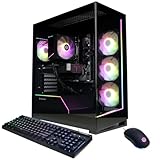
The catch to watch: some budget prebuilts cut corners on the parts you can’t easily see. Proprietary motherboards, generic 450W–500W power supplies with no brand name, and single-channel RAM configurations are the classic offenders. Reputable builders like CyberPowerPC generally use standard, named components, which matters when something fails at year two.
Pros
- Zero assembly risk. No bent CPU pins, no shorts from a misplaced standoff, no POST failures at 11 p.m. with no spare parts to debug with.
- One warranty covers everything. If the system dies, one phone call handles it. A custom build means dealing with four or five separate manufacturers and RMA shipping at your own expense.
- GPU pricing still favors bundles. System integrators buy graphics cards in volume, which is why a prebuilt with an RTX 5060 Ti — like the CyberPowerPC at around $1,500 — can be close to the cost of the card alone at retail during tight supply periods.
- Windows included and configured. Licensed, activated, and drivers installed. That’s $100–140 and an hour of your time you don’t spend.
- Real performance, not degraded performance. Modern prebuilts run full-spec components. A Ryzen 7 8700F + RTX 5060 system plays 1080p and 1440p titles exactly as well as the identical parts in a hand-built machine.
- Financing is easier. Retailers and builders offer monthly payment plans on complete systems that most part retailers don’t.
Cons
- The premium is real. Expect to pay $150–300 more than a DIY equivalent at typical prices, sometimes more during sales on individual components.
- Component quality can be a lottery. Some budget builds ship with slow 2666MHz RAM, anonymous PSUs, or cramped cases with poor airflow that thermally throttle the GPU by a few percent.
- Less upgrade headroom in cheap builds. A proprietary motherboard or undersized PSU can force you to replace both when you want a new GPU in three years.
- Bloatware. Expect to uninstall 30–60 minutes’ worth of trial software and vendor utilities on day one.
- You don’t learn the machine. First-time builders gain the confidence to swap a failed GPU or add RAM themselves. Prebuilt owners often pay for service calls on $30 fixes.
- Storage may be minimum-spec. A 1TB SSD fills fast when modern games run 100–150GB each. Budget another $60–90 for a second drive sooner than you think.
Who Should Buy It
Buy prebuilt if any of these describe you: it’s your first gaming PC and you don’t own spare parts; your time is worth more than the 10–20% markup; you want a single warranty and one support number; or you’ve found a sale where the prebuilt costs the same as — or less than — the parts. That last scenario happens more often than people assume, especially around GPU launches and holiday sales, and it’s when prebuilts become outright no-brainers.
Who Should Skip It
Skip the prebuilt if you genuinely enjoy building, you already have a case, PSU, or storage you can carry over, you want a specific aesthetic or small form factor the integrators don’t offer, or you’re chasing maximum frames per dollar and willing to hunt sales across five retailers. Enthusiasts who plan to upgrade every 18 months should also build — a fully standard custom system makes component swaps painless.
Cheaper Alternatives
| Option | Cost | Trade-off |
|---|---|---|
| Buy a prebuilt on major sale instead of at list price | $1,000–$1,150 for RTX 5060-class systems | Requires patience and fast fingers; stock sells out in hours |
| Build the same Ryzen 7 8700F + RTX 5060 system yourself | Roughly $1,100–$1,250 in parts | 3–5 hours of labor, no unified warranty, must troubleshoot alone |
| Buy a refurbished or open-box prebuilt from a major retailer | $850–$1,050 | Shorter warranty (often 90 days), cosmetic wear, limited stock |
| Console (PlayStation or Xbox) plus a basic PC or laptop | $500–$700 total | No mouse-and-keyboard titles, no upgrades, locked 30/60fps targets in many games |
FAQ
How much more does a prebuilt cost than building it myself?
Typically 10–20%, or roughly $150–300 on a $1,200–$1,500 build. During GPU supply crunches or component sales, that gap can shrink to zero or even invert, making the prebuilt the cheaper option.
Do prebuilt PCs use worse parts?
Sometimes, but less than they used to. Budget models may include generic power supplies, slower RAM, or proprietary motherboards. Stick with established builders that list named components — check that the PSU is 550W or better from a recognizable brand and that RAM runs in dual-channel DDR5.
Is a prebuilt good for 1440p gaming?
Yes. A system with an RTX 5060 Ti, like the CyberPowerPC configuration at around $1,500, is well matched for 1440p at high settings in most titles. The RTX 5060 at the LXZ’s around $1,300 price point is a stronger fit for high-refresh 1080p or entry-level 1440p.
Can I upgrade a prebuilt gaming PC later?
Usually yes — RAM and storage upgrades are nearly always straightforward. GPU upgrades depend on the case clearance and power supply. If the unit shipped with a 650W or higher standard ATX PSU and a standard motherboard, you’ll have an easy upgrade path for years.
Related guides
- Best Gaming PC for Fortnite: Eight Prebuilt Desktops Sorted by Refresh Rate Goal (2026)
- Best RX 9070 XT Prebuilt Gaming PCs: Seven Desktops and Three Cards Compared: 10 Compared (2026)
- CyberPowerPC vs iBUYPOWER Gaming PC: How the Two Brands Compare
- Best RX 9070 XT Prebuilt Gaming PC (2026): 5 Picks Compared









