
Choosing a streaming PC used to be simple: you bought parts, built it, and that was that. Today, the prebuilt market has matured to the point where a boxed system can match or beat a self-built rig on raw performance — and often on price, since manufacturers buy GPUs and CPUs in bulk. The real decision facing a streamer in 2026 isn’t “will a prebuilt be fast enough?” It’s whether you value the control, upgrade path, and hands-on knowledge of a custom build, or the warranty, convenience, and speed-to-first-stream of a prebuilt one. This guide breaks both options down specifically for streaming workloads, where you’re not just playing a game — you’re encoding video, running overlays, managing chat, and keeping your audio chain clean at the same time.
Our Top Picks
Pros & cons
- Built-in 11.3 inch smart display shows live temps and usage
- 850W 80+ Gold PSU leaves headroom for upgrades
- Arrives fully assembled with Windows 11 Home installed
- Monitor must connect to the graphics card, not motherboard ports
- 360mm liquid cooler takes up significant case space
 Logitech Creators Blue Yeti USB Microphone for PC1 Count (Pack of 1)4.92 x 4.72 x 11.61 inches3.51 poundsCheck on Amazon


Top 3 picks at a glance
Quick Verdict
If you want to be live this weekend with a system that’s covered by a single warranty, buy a prebuilt. Something like the Skytech Gaming PC with a Ryzen 7 9850X3D and RX 9070 XT (around $2,900) will handle 1440p gaming plus dual-PC-quality encoding without you touching a screwdriver. If you’re on a tighter budget, the KOTIN Prebuilt with an RTX 5070 and Ryzen 7 9700X (around $2,100) covers 1080p/60 streaming comfortably. Choose a custom build if you enjoy the process, want to hand-pick every component, need unusual requirements (specific port layouts, silent cooling, massive storage), or plan to upgrade incrementally over years. For most people who stream casually to seriously, a well-chosen prebuilt is now the rational default.
As an Amazon Associate we earn from qualifying purchases at no extra cost to you.


Side by Side
| Factor | Prebuilt Streaming PC | Custom Streaming PC |
|---|---|---|
| Comfort of setup | Unbox, plug in, install OBS — you’re live in under an hour | Half a day to a full weekend, plus troubleshooting time |
| Durability/reliability | Tested as a complete system before shipping; one warranty covers everything (typically 1–3 years) | Depends on your part selection and build quality; individual part warranties of 3–10 years |
| Price range | $1,000–$3,000 for streaming-capable systems; the KOTIN sits at around $2,100, the Skytech at around $2,900 | Comparable or slightly cheaper if you reuse parts and shop sales; can easily exceed $3,000 with premium components |
| Maintenance | Blow out dust every 3–6 months; minimal otherwise | Same cleaning, plus you handle driver issues, BIOS updates, and part swaps yourself |
| Space needed | Mid-tower cases run roughly 18–20 inches tall and 8–9 inches wide; both options are similar | Fully flexible — you can build a small-form-factor box under 15 liters if desk space is tight |
| Look | Increasingly attractive: tempered glass, RGB fans, clean cable management out of the box | Total control over aesthetics, from stealth black to showpiece water-cooled |
| Resale value | Sells as a complete, working system — easier to move used | Parts sell individually, often recovering more total value, but takes longer |
| Upgrade path | Limited by the case, motherboard, and power supply the manufacturer chose | Unlimited — swap GPU, add drives, upgrade CPU within socket |
| Warranty support | One call to one company | You diagnose which component failed and deal with each manufacturer |
| Best for | First-time streamers, busy people, anyone who wants a guarantee | Enthusiasts, tinkerers, budget optimizers, and streamers with niche needs |
Where Prebuilt Wins
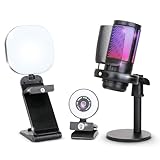
Time to first stream. A prebuilt arrives assembled, cable-managed, with Windows installed and drivers updated. Pair it with a plug-and-play audio solution like the Logitech Blue Yeti (around $99) — a USB condenser mic with four pickup patterns and onboard Blue VO!CE effects — and an all-in-one kit like the 1080P webcam, RGB mic, and LED light bundle (around $79), and your entire setup is live in an afternoon for well under $3,100.
Single-point warranty. If the GPU dies eight months in, you don’t troubleshoot — you call the builder. For anyone streaming on a schedule, that matters. Downtime is lost content.
Price competitiveness. Bulk purchasing means prebuilts from reputable brands are often within $100–$200 of the identical parts list at retail, and occasionally cheaper during sales. The days of prebuilts charging a huge “laziness tax” on good systems are largely behind us.
Validated configurations. Reputable builders pair CPUs, GPUs, coolers, and power supplies that actually work together under sustained streaming loads, which reduces the chance you’ll fight stability problems mid-broadcast.
Where Custom Pc for Streaming Setup Wins
Component control. Streaming has specific demands: you want a strong CPU for x264 encoding (or a modern GPU for NVENC/AV1), 32GB of RAM as a sensible floor, fast NVMe storage for recordings, and a motherboard with enough USB ports for your mic, camera, and capture devices. Building custom lets you prioritize exactly those things instead of accepting a builder’s balance.
No proprietary parts. Some budget prebuilts use odd-sized motherboards, nonstandard power supplies, or locked BIOSes. A custom build guarantees every part is replaceable with something off the shelf.
Staged spending. You can build a $1,400 streaming rig now and drop in a better GPU next year. With a prebuilt, the upgrade path may be capped by the PSU wattage (often 650–850W) or cramped case airflow.
Noise and thermals on your terms. If your mic picks up fan noise, a custom build lets you choose quiet case fans, an oversized air cooler or 240mm AIO, and undervolt settings — all things you can’t easily change on many prebuilts.
The knowledge. When something goes wrong live, a builder knows their machine inside and out. That’s genuinely valuable for anyone whose income depends on uptime.
Cost Over 5 Years
Assuming a streaming-capable tier in both camps:
Prebuilt route: around $2,100 (KOTIN-class) to around $2,900 (Skytech-class) up front. Add roughly $180–$400 over five years for a second SSD, extra case fans, and thermal paste. Warranty covers most hardware failures, so repair costs stay near zero until out of warranty, then budget $0–$300 for a GPU or PSU replacement risk. Realistic five-year total: about $2,300–$3,600, plus peripherals.
Custom route: $1,800–$2,800 for an equivalent initial build, with the possibility of saving $200–$400 by reusing a case, storage, or PSU and catching sales. Expect one meaningful mid-life upgrade — commonly a GPU at the three-year mark — costing $400–$700. Total: about $2,200–$3,500.
The honest takeaway: five-year costs are close to a wash. Prebuilts have eliminated most of the price penalty, and your time and risk tolerance should drive the decision more than the invoice.
Which One for Your Home
Small Apartment or Shared Desk
Either works, but a compact prebuilt mid-tower (roughly 18 x 8 x 17 inches, 25–35 pounds) slides under most desks. If space is truly critical, custom building opens the door to a small-form-factor case under 15 liters that a prebuilt lineup may not offer. A boom-mounted Blue Yeti and a clip-on light from a webcam kit keep your footprint minimal.
Family with Kids or Pets
Prebuilt wins here. If a soda hits the tower or a pet chews a cable, one warranty call resolves it. Ground-level towers also collect dust and pet hair faster in busy homes, so either way plan to clean intake filters every 2–3 months.
Rental or Temporary Living
Both are easy to move compared to a custom water-cooled loop, but a prebuilt’s boxed, complete-system nature makes it the simplest to pack, ship, and resell when you relocate. Nothing is loose, and nothing was assembled to fit one room’s airflow quirks.
Long-Term Home Base
If you’re settled and streaming is a multi-year commitment, a custom build’s upgrade path starts to pay off: new GPU in year three, bigger storage in year four, all without replacing the whole machine. Set the tower on a hard surface with 4–6 inches of clearance behind it for airflow, and it’ll serve through several upgrade cycles.
FAQ
Do you really need a powerful PC to stream?
For 1080p streaming with NVENC or AV1 hardware encoding, a modern 6–8 core CPU and a current midrange GPU handle most games. The 32GB of RAM found in both prebuilts above is the practical sweet spot for running a game, OBS, chat, and a browser simultaneously.
Is a prebuilt good enough for streaming in 2026?
Yes. Systems like the Skytech with a Ryzen 7 9850X3D and RX 9070 XT deliver encoding headroom that exceeds what most streamers will ever use, and budget-tier prebuilts around $2,000 handle 1080p/60 streams without breaking a sweat.
Can I upgrade a prebuilt later?
Often yes — RAM and storage are almost always upgradeable, and GPUs frequently are. Check the power supply wattage (aim for at least 750W if you plan a future high-end GPU) and confirm the case fits full-length cards before buying.
What should I buy first: PC, mic, or camera?
The PC, since nothing works without it. But don’t skip audio — viewers forgive mediocre video far more than bad sound. A around $99 Blue Yeti plus a around $79 webcam-and-light kit covers the essentials, leaving budget headroom for the computer itself.
Related guides
- Best Gaming PC for Fortnite: Eight Prebuilt Desktops Sorted by Refresh Rate Goal (2026)
- Best RX 9070 XT Prebuilt Gaming PCs: Seven Desktops and Three Cards Compared: 10 Compared (2026)
- CyberPowerPC vs iBUYPOWER Gaming PC: How the Two Brands Compare
- Best RX 9070 XT Prebuilt Gaming PC (2026): 5 Picks Compared









