
If your gaming setup shares a room with your home office, guest room, or a cramped apartment corner, you already know the problem: a full-tower PC eats desk real estate, blocks monitor space, and turns every cable run into a negotiation. A micro-ATX custom build solves it — you keep upgrade paths like a discrete GPU and standard ATX power supply, but shrink the footprint to something that fits under a 24-inch monitor arm or beside a 27-inch display. The catch is that “compact” means compromises on GPU length, CPU cooler height, and airflow, and picking the wrong case means returning a $300 graphics card that’s 20mm too long.
We ranked eight micro-ATX cases built for desk-side gaming, from a around $36 budget shell to a around $99 dual-chamber showpiece. Whether you’re building a 65-watt APU system for esports titles or a 250-watt GPU rig for AAA games, there’s a chassis here that matches your parts list and your desk’s remaining square footage.
As an Amazon Associate we earn from qualifying purchases at no extra cost to you.



Our Top Picks
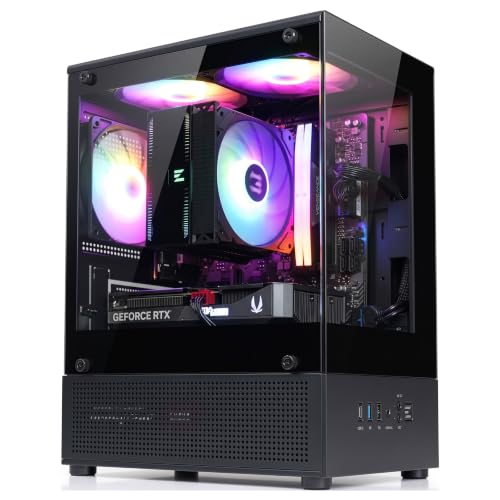 Zalman CUBIX-G Micro-ATX MATX Compact Mini Tower Gaming11.42 x 7.87 x 15.63 Inches7.05 PoundsCheck on Amazon
 Zalman CUBIX Compact Micro-ATX MATX Mini ITX PCSmall11.96 x 6.29 x 13.85 Inches5.73 PoundsCheck on Amazon
 ASUS Prime AP201 Tempered Glass Micro-ATX PC CaseTempered Glass|Black8.7 x 13.7 x 18.1 inches12.7 PoundsCheck on Amazon
 Cooler Master Q300L V2 Micro-ATX TowerMicro-ATX Tower15.2 x 9.1 x 15 inches11.68 PoundsCheck on Amazon
Top 3 picks at a glance
Quick Picks
| Product | Best for | Price |
|---|---|---|
| Zalman CUBIX-G Micro-ATX Compact Mini Tower | Best overall value | Check on Amazon |
| Lian Li O11D Mini V2 Flow | Best premium showcase build | Check on Amazon |
| Zalman M4 SE RGB Gaming Case | Best budget RGB | Check on Amazon |
| Zalman CUBIX M-ATX with 80mm Fan | Best ultra-budget build | Check on Amazon |
| ASUS Prime AP201 Tempered Glass | Best airflow-to-price ratio | Check on Amazon |
| Cooler Master Q300L V2 | Best cooling flexibility | Check on Amazon |
| Shiny Snake G600 Wood Front | Best desk aesthetics | Check on Amazon |
| JONSBO C6 Mini Mesh | Best tool-free access | $65 |
How We Compared
We focused on cases that fit a compact gaming desk scenario: small enough to sit beside a monitor without dominating the surface, but roomy enough for real gaming hardware. Priority went to micro-ATX chassis with verified GPU clearance between 200mm and 360mm, CPU cooler heights from 75mm to 159mm, mesh or ventilated front panels for thermals, and tempered glass or clean aesthetics for a desk-visible build. Price spread mattered too — we wanted genuine options at $40, $60, $80, and $100 so builders at every budget have a defensible pick. We favored cases with practical touches: magnetic dust filters, tool-free panels, included fans, and modern USB specs like 3.2 Gen 2×2. No case here requires exotic small-form-factor parts; every one takes a standard micro-ATX board and ATX power supply.
The 8 Best Picks
1. Zalman CUBIX-G Micro-ATX Compact Mini Tower — Best Overall Value
At around $44, the CUBIX-G is the case we’d hand to most first-time compact builders. The mini-tower footprint slides into the gap beside a monitor stand, the black steel-and-glass look reads clean on any desk, and the layout accepts standard micro-ATX boards and GPUs without forcing a parts list. It’s the rare budget chassis that doesn’t scream “budget” once your build is inside. If you’re spending most of your money on the GPU and need the enclosure to disappear financially, start here.
- Pro: Sub-$50 price leaves budget for better components
- Pro: Compact mini-tower footprint fits tight desk spaces
- Con: Minimal included cooling means planning your own fan layout
Skip it if you want bundled RGB fans or a premium airflow mesh front out of the box — the ASUS Prime AP201 or Q300L V2 handle thermals with less effort.
2. Lian Li O11D Mini V2 Flow — Best Premium Showcase Build
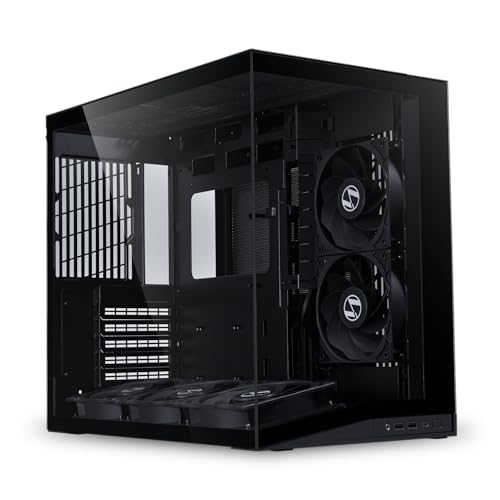
The O11D Mini V2 Flow at around $99 is for builders who want the desk PC to be the centerpiece, not a hidden box. The dual-chamber design hides cables and the power supply behind the motherboard tray, the Flow’s perforated front maximizes airflow, and the bundle includes five non-RGB reverse fans pre-configured for intake — a genuine value given quality fans run $10–20 each. It fits ATX boards and longer GPUs than most micro-ATX cases dare. If you’re building a custom-loop or top-tier air-cooled rig for 2026 and want it visible, this is the one.
- Pro: Five included reverse fans deliver balanced airflow out of the box
- Pro: Dual-chamber layout simplifies cable management dramatically
- Con: Larger footprint than true micro-ATX shells; it’s not the smallest option here
Skip it if desk space is at an absolute premium or your budget tops out at $50 — the CUBIX-G covers that ground.
3. Zalman M4 SE Micro-ATX RGB Gaming Case — Best Budget RGB
For around $54, the M4 SE brings RGB lighting to a compact micro-ATX build without the usual $90 price tag. It’s aimed at gamers who want the desk build to look alive — think esports setups, dorm rooms, and streaming corners — while still taking standard MATX boards and mid-length GPUs. The tempered glass side shows off the lighting, and Zalman keeps the layout simple enough for a weekend first build. It’s a sweet spot between the bare-bones CUBIX models and the pricier showcase cases.
- Pro: RGB styling at a mid-budget price point
- Pro: Tempered glass panel for showcasing the build
- Con: Airflow is adequate rather than excellent for sustained heavy loads
Skip it if you’re running a hot 250W+ GPU on long sessions — a mesh-front option like the AP201 or C6 will keep components cooler.
4. Zalman CUBIX M-ATX with 80mm Fan — Best Ultra-Budget Build
At around $36, this is the cheapest way to enclose a micro-ATX gaming build without scavenging a secondhand office PC shell. The included 80mm fan won’t win thermal awards, but it covers the basics for modest builds — think 65W APUs, low-profile coolers, and single-fan GPUs playing esports titles at 1080p. It’s also a smart pick for a kid’s first PC, a HTPC-adjacent gaming box, or any build where the case budget genuinely needs to stay under $40.
- Pro: Lowest price in the roundup by a wide margin
- Pro: Included fan means it runs out of the box
- Con: 80mm fan and compact interior limit high-wattage builds
Skip it entirely if your GPU exceeds entry-level class or your CPU cooler stands taller than low-profile height — step up to the CUBIX-G or Q300L V2.
5. ASUS Prime AP201 Tempered Glass — Best Airflow-to-Price Ratio
The AP201 at around $79 is the thinking builder’s micro-ATX case: a mesh-centric design from ASUS’s Prime line with tempered glass and a layout tuned for airflow rather than just looks. It comfortably hosts gaming-class GPUs and tower coolers, making it the case to buy if you’re pairing a mid-range CPU with a 200–300W graphics card in a compact footprint. The build quality feels a tier above its price, and the tempered glass keeps the desk presentation intact.
- Pro: Mesh-driven airflow suits high-wattage gaming components
- Pro: Tempered glass without sacrificing front-panel ventilation
- Con: Costs $35 more than the value pick for similar capacity
Skip it if your build is a 65W APU and a modest GPU — that’s paying for thermal headroom you won’t use. The M4 SE covers style duty cheaper.
6. Cooler Master Q300L V2 — Best Cooling Flexibility
The Q300L V2 at around $69 is the spec sheet nerd’s pick, and we mean that as a compliment. Fully ventilated airflow with magnetic patterned dust filters means you can configure intake and exhaust exactly how your build needs it. CPU cooler clearance reaches 159mm — enough for big tower air coolers — and 360mm GPU support covers flagship-length cards. The USB 3.2 Gen 2×2 (20Gbps) front port is genuinely future-proof for fast external drives. For a compact case that refuses to constrain your parts list, this is the one.
- Pro: 159mm CPU cooler and 360mm GPU clearance remove most build limits
- Pro: 20Gbps USB front port and magnetic dust filters are rare at this price
- Con: Fully ventilated panel design shows dust faster than sealed designs
Skip it if you want a silent, filtered, sealed aesthetic — or if the honeycomb pattern clashes with your desk’s look. The Shiny Snake G600 is the style alternative.
7. Shiny Snake G600 Wood Front — Best Desk Aesthetics
The G600 at around $84 is for the desk where the PC is part of the room design. The white chassis with a wood front panel pairs with walnut desks, warm LED lighting, and the whole cozy-gaming aesthetic that’s taken over setup photos. Underneath the good looks it’s a proper compact MATX case that handles standard gaming components. If you’ve spent real money making your workspace beautiful and a black mesh box would ruin it, this is your case.
- Pro: Wood-and-white finish that complements styled desk setups
- Pro: Compact MATX footprint with genuine gaming capability
- Con: Light-colored panels show scuffs and fingerprints more readily
Skip it if you prioritize maximum airflow over appearance — dark mesh cases like the AP201 or Q300L V2 move air more freely. Also skip if white-and-wood clashes with your setup.
8. JONSBO C6 Mini Mesh — Best Tool-Free Access
The JONSBO C6 at $65 is the tinkerer’s compact case: an upper cover and side panel that open tool-free mean upgrades, cleaning, and cable adjustments take seconds instead of a screwdriver hunt. The mesh front keeps a compact interior breathing, and JONSBO’s aluminum-case design pedigree shows in the fit and finish. The limits are clear — a 75mm CPU cooler ceiling and 200–255mm GPU range mean it’s built for slim coolers and mid-length cards, not 300W flagships. For a clean 1080p/1440p build you’ll actually service, it’s excellent.
- Pro: Tool-free top and side access makes maintenance effortless
- Pro: Mesh front supports solid thermals in a small chassis
- Con: 75mm cooler and 255mm GPU ceilings rule out high-end hardware
Skip it if you’re running a big tower cooler or a long triple-fan GPU — the Q300L V2 (159mm/360mm clearances) is the headroom pick.
Buying Guide
Match Clearance to Your Parts List — Before You Buy
Micro-ATX compact cases fail builds in two predictable ways: GPU length and CPU cooler height. Check your graphics card’s length against the case’s GPU clearance — the JONSBO C6 tops out at 255mm while the Q300L V2 accepts 360mm, a difference of over four inches. Similarly, a 75mm cooler ceiling (C6) fits only low-profile coolers, while 159mm (Q300L V2) fits most tower coolers. Write down your GPU length and cooler height first, then filter cases. Also verify power supply depth: the C6 caps ATX PSU length at 185mm, and deep modular units often exceed that.
Airflow vs. Aesthetics vs. Acoustics
Mesh-front cases like the AP201, Q300L V2, and C6 move the most air, which matters if your GPU draws 250W or more during long gaming sessions. Glass-front or panel-heavy designs like the M4 SE trade a few degrees for looks — fine for 1080p esports builds, riskier for sustained AAA loads. If the PC sits on your desk beside your monitor, fan noise becomes a daily factor: budget cases with 80mm fans (CUBIX M-ATX) spin faster and whine more than cases supporting 120mm or 140mm fans, which move the same air at lower RPM. Plan at least two intake fans and one exhaust for any gaming build.
Desk Fit and Long-Term Usability
Measure your actual desk space before falling for a case — a “compact” dual-chamber design like the O11D Mini V2 still has a bigger footprint than a vertical mini-tower like the CUBIX-G. Decide whether the PC sits on the desk (prioritize looks and quiet: G600, O11D Mini V2) or under it (prioritize airflow and dust filters: Q300L V2, C6). Think about service life too: tool-free panels (C6), a fast front USB port (Q300L V2’s 20Gbps), and magnetic dust filters all pay off over years of upgrades. Spending $20 more on a case you’ll keep through three GPU generations is usually the right call.
Our Verdict
For most compact gaming desk builds, the Zalman CUBIX-G at around $44 is the pick — it takes standard gaming hardware in a genuinely small footprint for under $50, leaving budget for the components that actually determine performance. If you’re running a hot, high-end build, spend up to the ASUS Prime AP201 (around $79) or Cooler Master Q300L V2 (around $69) for the airflow and clearance headroom that protects your investment. Style-first builders should choose the Shiny Snake G600 (around $84) for desk-visible setups or the Lian Li O11D Mini V2 Flow (around $99) if the build itself is the showcase. And if the budget is truly tight, the Zalman CUBIX M-ATX (around $36) proves a functional compact gaming enclosure costs less than a mousepad.
FAQ
Is micro-ATX actually a good choice for gaming, or should I go full ATX?
For a compact desk setup, micro-ATX is the sweet spot. Modern MATX boards offer the same chipset features, RAM capacity, and PCIe slots as their ATX siblings — you mostly give up expansion slots you wouldn’t use anyway. Every case in this roundup accepts discrete GPUs up to 360mm (Q300L V2), so you lose virtually no performance and reclaim significant desk space.
How much GPU length do I actually need?
Measure your specific card. Triple-fan flagship GPUs commonly run 300–340mm, so the Q300L V2’s 360mm clearance fits anything. Mid-range dual-fan cards typically fall between 220–280mm, which the JONSBO C6 (255mm max) handles at the upper end. Budget single-fan cards under 220mm fit every case here. Always leave 10–15mm of margin beyond the card’s listed length for cables and sag brackets.
Will a small case overheat my components?
Not if you match the case to the hardware. The mesh-front cases (AP201, Q300L V2, C6) with two or three properly configured fans keep gaming-class components within normal thermal ranges. Problems arise when a 250W+ GPU gets crammed into a chassis with a single 80mm exhaust fan — that’s a parts-list mistake, not a form-factor flaw. Choose mesh airflow for high-wattage builds and you’ll be fine.
What’s a realistic total budget for a compact gaming build around these cases?
Using the around $36–around $99 case range here, a solid 1080p gaming build with a mid-range CPU, B-series MATX motherboard, 16–32GB of RAM, a 1TB NVMe drive, a 550–650W ATX power supply, and a mid-range GPU typically lands between $700 and $1,200 total. The case is roughly 5–10% of that budget — which is exactly why overpaying for the enclosure while underspending on the GPU is the most common compact-build mistake.









