
Our Top Picks


Top 3 picks at a glance
The Short Answer
When you buy a new graphics card, you want your power supply to have enough headroom so the system stays stable under sudden load spikes without wasting money on capacity you will never use. The rule of thumb most builders follow: take your CPU’s recommended power, add the graphics card’s rated board power (TDP), add roughly 50 to 100 watts for the rest of the system, then leave 20 to 30 percent headroom on top. In practice, this means a 500 to 550W PSU comfortably covers a 150W card, while a 350W flagship like the RTX 3090 class wants an 850W unit. And remember that power is only half the story — physical clearance inside your case matters just as much, which is why this guide includes real card dimensions alongside the wattage advice.
A quality unit from Corsair, Seasonic, be quiet!, EVGA, or Thermaltake with an 80 Plus Bronze rating or better will deliver its rated power cleanly. Cheap no-name supplies often cannot sustain their labeled wattage, so effective headroom shrinks.
As an Amazon Associate we earn from qualifying purchases at no extra cost to you.


Standard Sizes
Graphics cards are sold in a few standard physical formats, and matching the format to your case is as important as matching the wattage. Here are the typical dimensions you will encounter:
| Card Format | Length (in / cm) | Height (in / cm) | Slots Used | Typical Power Draw |
|---|---|---|---|---|
| Low profile (half-height) | 5.7–6.7 in / 14.5–17 cm | 2.7 in / 6.9 cm | 2 | 19–75W |
| Compact / short single or dual fan | 6.9–8.3 in / 17.5–21 cm | 4.4 in / 11.2 cm | 2 | 75–160W |
| Mid-range dual fan | 8.7–11 in / 22–28 cm | 4.4–4.9 in / 11.2–12.5 cm | 2–2.5 | 160–250W |
| Full-size triple fan | 11.4–12.6 in / 29–32 cm | 4.9–5.5 in / 12.5–14 cm | 2.5–3.5 | 250–420W |
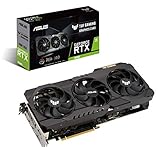
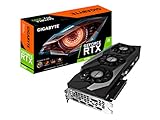
To ground those ranges in real products: an entry-level GeForce GT 610 2GB DDR3 low profile card measures roughly 6.3 by 2.7 inches (16 by 6.9 cm), weighs under half a pound, and sips about 29W — it runs entirely off the PCIe slot with no power connector at all, so even a 300W factory supply has plenty of headroom. The SOYO GeForce GT 740 4GB low profile card is similar at about 6.7 inches (17 cm) long and around 49W, also slot-powered. At the opposite end, the ASUS TUF Gaming RTX 3090 OC Edition measures approximately 11.8 by 5.1 inches (30 by 13 cm), weighs about 3.5 pounds, draws 350W, and wants an 850W power supply with two dedicated 8-pin connectors. The GIGABYTE RTX 3090 Gaming OC 24G is even longer at roughly 12.6 inches (32 cm) with a triple WINDFORCE fan stack, same 350W board power and 850W PSU recommendation. Price spread across these tiers runs from about $50 for entry cards to $1,970–$2,000 for flagship models, and the PSU budget scales accordingly: $0 extra for slot-powered cards, $80–$120 for a solid 550W unit, $130–$180 for a quality 850W.
How to Measure Your Space
Before you order anything, take ten minutes with a tape measure and a notepad:
- Measure maximum card length. Find the distance from the rear of the PCIe slot’s retaining bracket to the first obstruction inside the case — usually the front fan mount, drive cage, or radiator. Subtract 0.4 inches (1 cm) for airflow clearance. Most mid-tower cases fit cards up to 12.2–13 inches (31–33 cm); compact cases often cap out at 8–10.5 inches (20–27 cm).
- Measure available height. With the side panel off, measure from the top of the PCIe slot to the case’s side panel or cable channel. Standard cards need about 5.5 inches (14 cm); low-profile slots only accept 2.7 inches (6.9 cm).
- Count expansion slot openings. A dual-fan card typically blocks two slots; triple-fan and thick cards block 2.5 to 4. If your slim desktop has only two half-height slots, you are limited to low-profile cards like the GT 740 class.
- Check your PSU label, not just the wattage number. Confirm it has the PCIe power connectors your new card needs (6-pin, 8-pin, or 12VHPWR) and note its age. An 850W unit from more than eight years ago may not deliver peak transient loads reliably.
- Weigh the consideration for sag. Cards over 3 pounds and 11 inches long benefit from a support bracket. Note whether your case has a nearby anchor point.
By Room or Use Case
Home Office and Everyday Desktop
Web work, streaming video, and light photo editing rarely need more than the 29–75W an entry card draws. A GeForce GT 610 class card ($50) or a low-profile GT 740 ($70) adds display outputs — HDMI, DVI, VGA — to an older desktop with no dedicated graphics, and your existing 300–400W supply needs zero headroom calculations. Physically, these half-height cards fit virtually any case, including slim SFF and HTPC enclosures with as little as 2.7 inches of clearance.
Gaming in a Small Form Factor Build
SFF cases like the NZXT H1 or Fractal Terra typically accept cards up to 10–12 inches long and pair with compact SFX power supplies rated 600–750W. Target a card in the 150–250W class, and budget a 650–750W 80 Plus Gold SFX unit ($120–$160) for comfortable headroom during transient spikes, which can momentarily hit twice a card’s rated draw.
Mid-Tower 1440p Gaming Rig
This is the sweet spot most builders land in. A 200–300W card in a standard ATX case with 11–12.5 inches of card clearance pairs with a 750W 80 Plus Gold ATX supply ($100–$140). That leaves roughly 25 percent headroom over a realistic full-system draw of 450–550W.
Enthusiast 4K and Content Creation
Flagship cards drawing 350–450W, like the RTX 3090 models listed above, demand an 850W supply minimum — 1000W if you also run a high-draw CPU like an Intel Core i9 or AMD Ryzen 9 under sustained rendering loads. Expect to spend $140–$200 on a quality 850–1000W 80 Plus Gold or Platinum unit with fully modular cables. Verify your case clears a 12.6-inch card and plan on a support bracket for anything over 3 pounds.
Media Center (HTPC) and Living Room PC
Small, quiet, and low heat are the priorities. A slot-powered low-profile card under 50W keeps a 150–250W mini supply running cool and fan-silent. Total system draw stays low enough that even transient spikes never approach the supply’s limit — maximum headroom by design.
Common Sizing Mistakes
- Confusing total PSU wattage with card wattage. A 350W card does not need a 350W supply; it needs a supply sized for the whole system plus headroom — hence 850W.
- Ignoring transient spikes. Modern GPUs can briefly draw 1.5–2× their rated power for milliseconds. A supply running at 95 percent load trips its over-current protection. The 20–30 percent headroom rule exists for exactly this reason.
- Buying for the card you might upgrade to. Paying for 1000W today when your 250W card needs 650W wastes $60–$80 — unless a major upgrade is genuinely planned within a year.
- Measuring the case width but not the cable bend radius. Cards using 12VHPWR connectors need about 1.4 inches (3.5 cm) of clearance past the connector for the cable to seat without a sharp bend.
- Overlooking slot count. A beautiful triple-fan card is useless in a case with only two expansion slot openings.
- Trusting a bargain-bin PSU’s label. If a 700W supply costs $35, assume it delivers closer to 450W reliably. Headroom on paper means nothing with a weak unit.
FAQ
Is 100W of headroom enough over my card’s rated power?
Usually, yes. If your estimated full-system draw is 500W on a 600W supply, that is about 17 percent headroom plus the 100W buffer — workable with a quality unit. For high-draw cards prone to large spikes, 20–30 percent is safer.
Can a power supply be too powerful for my build?
Functionally, no — a PSU only delivers the load your components demand, and efficiency curves are flat on modern units. The only cost is money and, in very small cases, physical space for a larger chassis.
What happens if my PSU doesn’t have enough headroom?
Expect random shutdowns or black screens during game loading or heavy rendering, when the card spikes past the supply’s protection threshold. It rarely damages hardware on modern supplies, but it makes the system unusable for demanding tasks.
Do low-profile cards ever need extra PCIe power connectors?
Almost never. Cards like the GT 610 (29W) and GT 740 (49W) draw all power from the slot, which supplies up to 75W. That is precisely why they suit slim desktops with modest factory supplies — no headroom math required at all.









