
Our Top Picks

The Short Answer
Usually, no — extended warranties on prebuilt gaming and office PCs are rarely worth the money, with one clear exception: they can make sense if the warranty includes on-site or advance replacement service and covers the power supply and graphics card for three or more years. Those two components are the most likely to fail in a prebuilt system, and shipping a 30-plus-pound tower back to a depot at your own expense can erase any savings.
For everything else, the math favors skipping the upsell. A typical extended warranty costs $150 to $400 on a gaming desktop — roughly 5% to 12% of the purchase price — while independent reliability data and standard manufacturer coverage already protect you through the period when most defects appear.
As an Amazon Associate we earn from qualifying purchases at no extra cost to you.

What You Actually Get
Extended warranties on prebuilt PCs generally fall into three buckets, and it pays to know which one you’re being sold:
Manufacturer extended service plans (from brands like Dell, HP, and Lenovo) usually add one to three years beyond the standard one-year warranty. These are the most legitimate of the bunch: they use the company’s own or authorized technicians, offer genuine parts, and often include next-business-day on-site service on higher tiers. Expect to pay $80 to $250 for two additional years depending on the machine.
Retailer plans (the version pushed at checkout) cost more — often 10% to 20% of the system price — and typically provide depot service, meaning you box up the PC and ship it. Coverage can also exclude “user damage,” a category broad enough to spark disputes over whether a failed fan counts.
Third-party plans from insurance-style providers are the cheapest upfront but the most likely to involve claim friction: deductibles per service event, required diagnostics from specific shops, and reimbursement caps tied to depreciated value rather than replacement cost.
Almost all of them cover hardware failure only — not software problems, not virus removal, not upgrades gone wrong, and not data recovery. Read the exclusion list before buying, because “accidental damage” is only included in premium tiers, and even then often capped at one or two incidents.
Pros
- Real parts-and-labor coverage on expensive components. An RTX-class GPU or a 360mm all-in-one liquid cooler can cost $400 to $1,000+ to replace out of pocket. A warranty that covers the full assembly removes that risk.
- Labor is included. Diagnosing a failed motherboard swap runs $75 to $150 per hour at most repair shops. Warranty service includes diagnosis and installation at no charge.
- On-site service on premium plans saves enormous hassle. A prebuilt tower can weigh 25 to 40 pounds with packaging; a technician coming to you is worth real money if you’re not comfortable pulling a GPU yourself.
- Transferability. Many manufacturer plans transfer with the PC if you sell it, which can add resale value.
- Peace of mind for non-technical buyers. If opening a case sounds intimidating, paying for coverage is buying convenience, and that has legitimate value.
Cons
- The economics usually favor the seller. Consumer Reports has long advised skipping extended warranties on electronics because total payout across all buyers rarely exceeds total premium collected. You’re insuring against a low-probability event at a high premium.
- Redundant coverage. Your credit card may already extend the manufacturer warranty by up to a year, and the manufacturer’s own warranty covers the first 12 months — statistically the most defect-prone window.
- Depot shipping costs and delays. Some plans require you to pay freight on repairs, and turnarounds of two to four weeks are common during peak seasons.
- Exclusions nibble at the promise. Power surges (unless you have a surge protector, sometimes with proof), cosmetic damage, fans treated as “consumables,” and batteries are frequently excluded.
- The money compounds. $300 invested in quality case fans, a surge protector or small UPS, and extra thermal paste will prevent or mitigate more failures than the warranty ever would.
Who Should Buy It
Consider the extended warranty if most of these describe you:
You’re spending $2,500 or more on a high-wattage system — think a rig pulling 600 to 850 watts under load with a flagship GPU and a liquid cooler, where a single component failure means a $700+ repair. You plan to run the machine hard for three to five years, folding or rendering overnight. You work from home and downtime genuinely costs you money. You’re not comfortable troubleshooting hardware, and the plan includes on-site or advance-cross-ship service. And you’d pay for the plan with a card that doesn’t already extend the base warranty (otherwise you’re paying twice for overlapping protection).
Buying a high-end system like the Horizon Autherium Dragon RGB I9 RTX Gaming PC — around $3,200 with a Core i9 up to 5.4GHz, 64GB of RAM, a 5TB storage array, and an RTX 5070 OC cooled by a 360mm AIO — is exactly the scenario where a $250 to $350 three-year plan with on-site service is defensible. The replacement cost of an i9-class board and CPU alone would exceed the premium. (By the time 2026 model refreshes arrive, check whether the manufacturer plan covers parts that are still in production; coverage on discontinued boards gets murky.)
Who Should Skip It
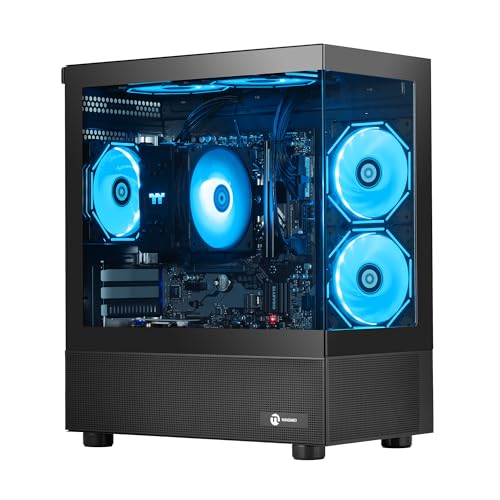
Skip it if you’re buying a budget or midrange prebuilt, where the warranty premium approaches the cost of the part most likely to fail. On a system like the NINGMEI Prebuilt Gaming PC with a Ryzen 7 5700G, 16GB of DDR4, and integrated-class graphics at around $760, a $120 to $150 extended plan is nearly 20% of the purchase price — and the most expensive component in the box is a $200 to $280 APU-and-board combo. One year of included coverage plus a credit card’s extension is plenty.
Also skip it if you enjoy tinkering, own a screwdriver and a spare PSU, or plan to upgrade the machine anyway — most warranties void or complicate GPU and PSU swaps, which defeats the main reason enthusiasts buy prebuilts in the first place. And skip any plan that’s depot-only on a heavy tower; shipping costs and damage risk during transit make the “protection” self-defeating.
Cheaper Alternatives
| Option | Cost | Trade-off |
|---|---|---|
| Credit card extended warranty (double the manufacturer term, often up to one extra year) | $0 | Usually reimbursement-based; you pay for the repair first and file for credit. Claim documentation required. |
| A quality surge protector or 600–850VA UPS | $60–$130 | Prevents the most common “warranty event” — power-related failure — but covers nothing else. |
| Self-insurance: deposit the warranty price in a savings bucket | $150–$400 set aside | If nothing fails (the likely outcome), you keep the money; if something does, you fund the repair yourself and shop for parts. |
| Manufacturer warranty upgrade directly from the maker (skip the retailer version) | $80–$250 for 2 extra years | Shorter term than retail plans and no accidental-damage coverage, but far cheaper with genuine parts and better claim experiences. |
| Homeowner’s or renter’s insurance rider for electronics | $30–$75/year | Best for theft, fire, and surge events; high deductibles ($250–$500) make it useless for single-component failures. |
FAQ
Do extended warranties cover GPU failure on a prebuilt PC?
Yes, in most plans the graphics card is covered hardware — and on high-end systems it’s the single best reason to consider coverage, since replacement costs run $400 to $1,200. Verify in writing that the GPU is explicitly included and that the plan covers the full assembly rather than individual parts with per-part caps.
Does opening the case or upgrading parts void a prebuilt warranty?
It varies. Major manufacturers (Dell, HP, Lenovo) generally allow RAM and storage upgrades without voiding coverage. Many boutique builders mark the PSU or a case seal, and some retail plans void coverage entirely if any component is swapped. Ask before you buy, and keep the original parts.
How long do prebuilt PCs actually last without a warranty?
A well-maintained desktop typically runs five to eight years, with the PSU and GPU as the most common failure points around years four through six. Storage drives are the other watch item; most consumer SSDs are rated for three to five years of typical use, so keeping backups matters more than any warranty.
Is it better to buy the warranty at checkout or later?
Later, if the option exists. Manufacturer extended plans can usually be purchased within 30 to 90 days of the original purchase, which gives you time to research the plan’s terms, confirm your card doesn’t already extend coverage, and see whether the machine develops early defects covered by the base warranty anyway.
Related guides
- Best Gaming PC for Fortnite: Eight Prebuilt Desktops Sorted by Refresh Rate Goal (2026)
- Best RX 9070 XT Prebuilt Gaming PCs: Seven Desktops and Three Cards Compared: 10 Compared (2026)
- CyberPowerPC vs iBUYPOWER Gaming PC: How the Two Brands Compare
- Best RX 9070 XT Prebuilt Gaming PC (2026): 5 Picks Compared









