
Our Top Picks
 LIAN LI 4 Slots Vertical GPU Kit6.61 x 5.81 x 9.25 inches6.61 x 5.81 x 9.25 Inches2.36 PoundsCheck on Amazon

The Short Answer
Vertical GPU mounting is worth it if your case supports it, your GPU is a hefty three- or four-slot card, and you’re willing to accept a small performance cost — typically a 1–4% drop in frame rates with a PCIe 4.0 riser, or virtually none at all with a PCIe 5.0 riser on a modern board. If your case can’t fit the card vertically, or you’re trying to squeeze one into a budget build where $75 matters, skip it. That’s the one condition that decides everything: the case has to be designed for it. Forcing a vertical mount into a case without the clearance usually costs you airflow and front-panel fans, and that trade is almost never worth the look.
What You Actually Get
A vertical GPU kit is three things sold together: a riser cable, a mounting bracket, and the hardware to attach both. The riser cable is a flexible PCIe extension — one end plugs into your motherboard’s PCIe x16 slot, the other into your graphics card, which now sits parallel to the motherboard instead of perpendicular to it. The bracket replaces or supplements your case’s PCIe slot covers and holds the card’s weight so the riser doesn’t carry the load alone.
As an Amazon Associate we earn from qualifying purchases at no extra cost to you.
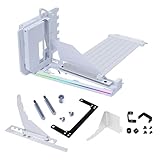

Kits generally come in two flavors right now. PCIe 4.0 risers, like the NZXT Vertical GPU Mounting Kit (AB-RH175-B1), which bundles a 175mm PCIe 4.0 x16 riser with a steel bracket for around $79, are mature and stable. PCIe 5.0 risers, like the LIAN LI 4-Slot Vertical GPU Kit (VG4v4) at around $74, use newer cables and signal conditioners to handle the higher data rate of PCIe 5.0 boards — relevant if you’re pairing a card like an RTX 5080 or Radeon RX 9070 XT with a PCIe 5.0 motherboard.
Expect kits to cost between $60 and $100 depending on slot count (3-slot and 4-slot versions exist to match your card’s thickness) and PCIe generation. Some cases include a bracket and a riser in the box; buying a kit for those is paying twice.
Pros
- Showcase value. If you spent $1,000–$2,000 on a graphics card, a vertical mount turns the fans and faceplate toward the glass panel instead of the floor. In a build with RGB or a statement cooler, it’s the single biggest visual upgrade you can make for under $100.
- Better view of the card’s thickness. Four-slot cards like an RTX 4090 (roughly 61mm wide, 2.2–2.5kg) read as enormous and impressive when displayed edge-on.
- Can improve small-clearance sag issues. The bracket supports the card’s full length, eliminating GPU sag that a single anti-sag arm might not fully fix on a 12-inch-plus card.
- Easier access. With the card facing outward, checking fans, cleaning dust, and swapping cables is more convenient than reaching behind a shrouded card.
- Modern risers cost almost nothing in performance. PCIe 5.0 kits like the LIAN LI VG4v4 effectively close the bandwidth gap that plagued older PCIe 3.0 risers, which could cost 5–10% in GPU-limited games.
Cons
- Cost for what it is. $60–$100 for a cable and a piece of bent steel is a lot, especially stacked on an already expensive case.
- Airflow penalty in many cases. A vertically mounted card sits closer to the glass side panel, often 20–30mm away versus 40–60mm of open air in a horizontal layout. Restricted intake can push GPU temps up a few degrees Celsius; the exact number depends entirely on your case, so check reviews of your specific enclosure before buying.
- Lost fan slots. Many cases require removing bottom or front intake fans to make vertical clearance. Trading a 120mm or 140mm fan for aesthetics hurts thermals more than the riser itself does.
- Riser cables can be flaky. Poorly shielded or overly long risers cause instability, especially at PCIe 5.0 speeds. Sticking with a reputable kit matters more here than with any other component.
- Cable management changes. The card’s 12V-2×6 or 8-pin connectors now face the glass, and power cables routed past a vertical card can be visible and awkward.
- It locks in your layout. Moving to a new case later may mean the bracket, riser length, or slot count no longer fits.
Who Should Buy It
Buy a vertical kit if all three apply: your case explicitly supports vertical mounting with adequate clearance (check the manufacturer’s specs — you generally want at least 60–70mm between the motherboard tray and the glass for a card plus breathing room), your card is a flagship you actually want to display, and you’re using a riser rated for your motherboard’s PCIe generation. Enthusiast showcase builds, open-display rigs, and anyone with a 3- or 4-slot card in a case like the Lian Li O11 series or NZXT H-series with the accessory mount are the natural audience. If you’re choosing between a PCIe 4.0 and 5.0 kit for a current-gen board and card, the 5.0 option is the safer long-term pick.
Who Should Skip It
Skip it if your case lacks native vertical support — improvising with zip ties and the stock bracket ends badly. Skip it if your build is thermally marginal already; adding a glass-restricted GPU to a hot-running case is asking for throttling. Skip it if you’re running a compact mid-tower with a 300mm-long card and tight clearances. And skip it on a budget build — that $75–$80 is better spent on a better SSD or case fans than on showing off a mid-range card.
Cheaper Alternatives
| Option | Cost | Trade-off |
|---|---|---|
| Buy a case with a vertical mount and riser included | $0 extra (baked into a $100–$200 case) | Limits your case choice; bundled risers are sometimes PCIe 4.0 only |
| Anti-sag bracket (adjustable support arm) | $10–$20 | Fixes sag but the card still faces down; purely functional |
| Tempered-glass-friendly case orientation (rotated case, e.g. dual-chamber designs) | $90–$180 total case cost | Changes the whole build plan, not just the GPU |
| Do nothing | $0 | You see the top shroud of the card through the glass instead of the fans — cosmetic only |
FAQ
Does vertical mounting hurt GPU performance?
Minimally, with a good riser. A quality PCIe 4.0 riser typically costs 1–4% of frame rate; a PCIe 5.0 riser on a PCIe 5.0 board is close to negligible. The bigger performance risk is thermal — reduced clearance to the glass panel can raise GPU temperatures a few degrees, and cases that force you to delete an intake fan hurt more than the riser itself.
Do I need a PCIe 5.0 riser cable?
If your motherboard and graphics card both support PCIe 5.0, yes — PCIe 4.0 risers can be unstable or force the slot down to 4.0 speeds on 5.0 platforms. If you’re on an older PCIe 4.0 or 3.0 system, a 4.0 riser is fine and often cheaper.
How much clearance does a vertical GPU need?
Measure your card’s thickness first: a 2-slot card is roughly 40mm, a 3-slot around 60mm, and a 4-slot flagship around 65–75mm. Add at least 15–25mm of air gap behind the card to the glass panel. That means many vertical setups realistically need 80–100mm between the motherboard and side panel — a spec most budget cases don’t meet.
Will a vertical mount void my GPU warranty?
No. Using a riser cable and bracket doesn’t modify the card, and manufacturers’ warranties cover the GPU itself regardless of orientation. The things to watch are physical stress on the PCIe slot from a poorly supported card and riser-cable-related instability, neither of which is a warranty issue — just make sure the bracket actually bears the card’s weight, which for a 2kg+ flagship is not optional.









