
Our Top Picks

The Short Answer
Yes, water cooling is worth it for a gaming PC — but only if you’re running a high-wattage CPU (roughly 150W and up) or you genuinely care about noise levels and how the build looks. If you’re gaming on a mid-range chip like a Ryzen 5 or Core i5, a quality $40–$90 air cooler will deliver nearly identical performance for less money. In other words: buy liquid cooling for the thermal headroom and acoustics, not for extra frames per second.
One important distinction before we go further: an all-in-one (AIO) liquid cooler — a sealed unit from brands like Arctic, Corsair, or NZXT — is what most gamers mean by “water cooling.” A custom open loop, where you assemble and maintain the loop yourself, is a different animal entirely. This article focuses on AIOs, with a brief note on custom loops near the end.
As an Amazon Associate we earn from qualifying purchases at no extra cost to you.

What You Actually Get
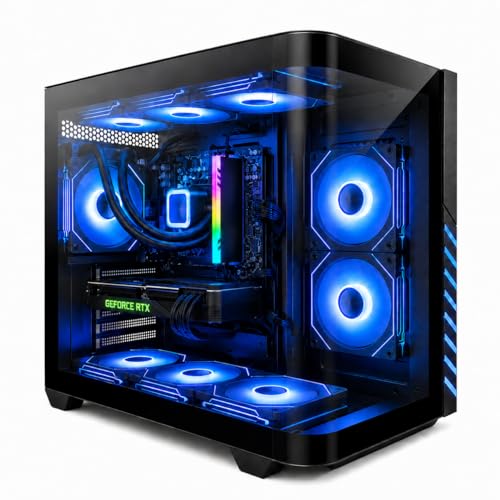
A modern AIO cooler consists of a cold plate that mounts to your CPU, a pump integrated into the CPU block, flexible tubing running to a radiator, and one or more fans pushing air through that radiator. The liquid (usually a water-glycol mix) absorbs heat at the CPU and releases it through the radiator fins.
The performance difference versus air is real but narrower than marketing suggests. A 240mm AIO handling a 200W+ processor will typically keep it 5–12°C cooler than a budget air tower under sustained load, and a 360mm AIO adds a few more degrees of headroom on top. Under normal gaming loads — where most CPUs draw 65–120W — the gap shrinks to just a handful of degrees, often imperceptible in real-world frame rates.
Where liquid cooling clearly wins is acoustics and clearance. Because heat is moved to a large radiator surface area, fans can spin slower, and bulky RAM heatspreaders or VRM clearance issues that plague big air towers simply disappear around the socket.
Many prebuilt systems now ship with liquid cooling as standard equipment. For example, liquid-cooled gaming desktops pairing a Ryzen 7 8700F with an RTX 4060 Ti and 16GB of DDR5 currently sell in the $1,100–$1,250 range, while air-cooled alternatives with newer silicon — like a Ryzen 7 5700X paired with an RTX 5060 — run around $1,250–$1,350. The lesson: liquid cooling itself isn’t a huge price premium anymore; it’s often bundled rather than sold as a $200 add-on.
Pros
- Better sustained thermals on hot CPUs. Chips like the Ryzen 9 7900X or Core i9-14900K, which can pull 200–253W, benefit meaningfully from a 280mm or 360mm radiator.
- Lower noise under load. Large radiator surface area means fans can idle around 800–1,200 RPM instead of 1,800+ RPM, which most people find dramatically quieter.
- Cleaner build aesthetics. No towering fin stack blocking your view of the motherboard; many AIOs include ARGB fans and pump caps.
- Better case compatibility in small builds. In compact cases where a 165mm air tower won’t fit, a 240mm radiator is often the only option.
- More consistent boost clocks. Cooler CPUs hold their boost behavior longer during long gaming sessions and CPU-heavy tasks like rendering or compiling.
- Prices have dropped. Capable 240mm AIOs now start around $60–$80, with excellent 360mm units in the $110–$160 range.
Cons
- Pumps fail. AIO pumps are a single point of failure, and most carry a 3–6 year warranty. When the pump dies, the whole unit dies — air cooler fans and heatsinks don’t have this issue.
- Limited lifespan. Coolant permeates tubing slowly over the years; expect roughly 5–7 years of service before replacement is prudent, even if nothing fails outright.
- More installation complexity. You’re mounting a radiator, routing tubes, and finding somewhere for the pump cable. It’s not hard, but it’s more steps than bolting on an air tower.
- Potential leak risk. Rare, but a leak near expensive components is a real concern, and it’s why some builders stick to air on expensive systems.
- No benefit on cool-running CPUs. On a 65W part, a $50 air cooler matches a $130 AIO in performance. You’d be paying for looks and sound, not temperature.
- Wasted radiator space in some cases. If your case only supports a 120mm radiator up top, you may see worse results than a good mid-size air cooler.
Who Should Buy It
- Gamers running high-end or overclocked CPUs — anything with a 150W+ stock power draw or a 200W+ boost limit.
- Anyone sensitive to noise, especially if your PC sits on your desk rather than the floor.
- Builders who want maximum thermal headroom for long sessions of demanding titles, streaming, or content creation alongside gaming.
- Small-form-factor builders where an air tower physically won’t fit.
- Buyers of prebuilt systems who see liquid cooling bundled for free — in that case, take it.
Who Should Skip It
- Budget builders on a 65W–88W CPU, where every dollar is better spent on a faster GPU — that’s where frames come from.
- Anyone who wants a truly set-and-forget machine; a good air cooler like a $35–$50 dual-tower unit can last a decade across multiple CPU upgrades.
- Builders worried about long-term reliability in a system they can’t easily service.
- People who bought an AIO primarily expecting higher FPS — on a mid-range CPU, you’ll see single-digit percentage differences at best.
Cheaper Alternatives
| Option | Cost | Trade-off |
|---|---|---|
| Quality dual-tower air cooler (e.g., a 120mm–140mm fin stack unit) | $35–$90 | Slightly louder at full load; bulky; handles up to roughly 230W just fine |
| Stock or single-tower cooler | $0–$30 | Adequate for 65W–95W CPUs; noticeably louder and 10–20°C hotter under load |
| Undervolting / power-limit tuning your existing cooler | $0 | Free 5–15°C improvement, but requires BIOS tweaks and a little patience; can slightly cap peak boost |
| Better case airflow (2–3 extra 120mm fans) | $20–$45 | Helps everything — CPU, GPU, VRMs — but doesn’t beat a radiator on a genuinely hot chip |
Custom open loops are the alternative for enthusiasts, not a budget option — expect $300–$600+ in parts and regular maintenance (coolant top-offs every 6–12 months). They outperform AIOs, but only justify themselves if building the loop is part of the hobby.
FAQ
Does water cooling increase FPS?
Indirectly, and only sometimes. If your CPU is thermally throttling, liquid cooling can restore lost performance. On a properly cooled mid-range CPU, expect identical or near-identical frame rates — GPU choice drives gaming performance far more than CPU temperature does.
How long does an AIO liquid cooler last?
Most last 5–7 years. Manufacturer warranties typically run 3–6 years, and gradual coolant loss through permeable tubing is the main long-term limiting factor. Air coolers, by comparison, essentially last forever with a fan swap.
Is a 240mm or 360mm AIO better for gaming?
A 240mm radiator (two 120mm fans, roughly 277mm × 120mm × 27mm) is plenty for CPUs up to about 200W. Step up to a 360mm (three fans, around 395mm long) for 200W+ flagship chips, or if you want the fans running even slower and quieter. Check your case’s supported radiator sizes before buying.
Do liquid-cooled gaming PCs require maintenance?
Not in the way custom loops do. AIOs are sealed and maintenance-free — just clean dust from the radiator every few months and keep an ear out for pump rattle, which signals it’s time for a warranty claim.
Related guides
- Best Gaming PC for Fortnite: Eight Prebuilt Desktops Sorted by Refresh Rate Goal (2026)
- Best RX 9070 XT Prebuilt Gaming PCs: Seven Desktops and Three Cards Compared: 10 Compared (2026)
- CyberPowerPC vs iBUYPOWER Gaming PC: How the Two Brands Compare
- Best RX 9070 XT Prebuilt Gaming PC (2026): 5 Picks Compared









