
Our Top Picks
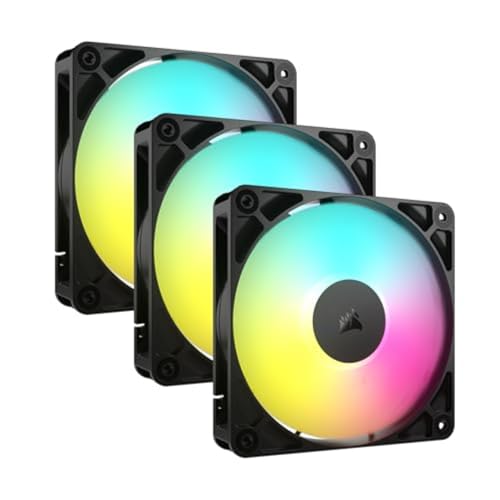
 DARKROCK Black F120 3in1 120mm Infinite Mirror Design120mm-Forward4.7 x 1 x 4.7 InchesCheck on Amazon
Top 3 picks at a glance
The Short Answer
For most standard gaming PCs, the ideal configuration is three to four case fans. This setup typically consists of two or three front intake fans pulling cool air into the chassis and one rear exhaust fan pushing hot air out. This layout creates balanced air pressure, keeping mid-range graphics cards and processors running within safe thermal limits without generating excessive noise.
If you are building an entry-level gaming PC with lower-power components (drawing under 250 watts total), two fans (one intake and one exhaust) are completely sufficient. Conversely, if you are housing high-end, enthusiast-grade hardware that draws 500 to 800+ watts of power, you will need five to nine fans. These larger configurations often work in tandem with liquid cooling radiators to maintain safe temperatures during heavy gaming sessions or workstation tasks.
As an Amazon Associate we earn from qualifying purchases at no extra cost to you.


Standard Sizes
Case fans are measured by their outer frame dimensions in millimeters. While 120mm is the industry standard, larger 140mm fans are incredibly common in modern mid-tower and full-tower cases. Understanding these dimensions is crucial for ensuring the fans fit your specific PC case mountings and do not collide with interior components like the motherboard, RAM, or CPU cooler.
| Nominal Fan Size | Dimensions in Inches (W x H x D) | Dimensions in Centimeters (W x H x D) | Typical Weight | Average Airflow Range (CFM) |
|---|---|---|---|---|
| 80mm | 3.15 x 3.15 x 0.98 in | 8.0 x 8.0 x 2.5 cm | 70 to 90 grams | 20 to 35 CFM |
| 120mm | 4.72 x 4.72 x 0.98 in | 12.0 x 12.0 x 2.5 cm | 130 to 160 grams | 50 to 75 CFM |
| 140mm | 5.51 x 5.51 x 0.98 in | 14.0 x 14.0 x 2.5 cm | 160 to 200 grams | 60 to 95 CFM |
| 200mm | 7.87 x 7.87 x 1.18 in | 20.0 x 20.0 x 3.0 cm | 250 to 300 grams | 110 to 150 CFM |
Most standard computer cases utilize the 25mm (0.98 in) depth profile. However, some low-profile or small-form-factor (SFF) cases may require slim fans, which typically measure just 15mm (0.59 in) in depth.
How to Measure Your Space
Before purchasing case fans, you must verify what sizes your PC chassis can physically accommodate. Case manufacturers design specific mounting tracks that can host multiple configurations. Follow these steps to measure your space accurately:
- Consult Your Case Specifications: The easiest way to determine fan compatibility is to check the manufacturer manual. It will state exactly how many 120mm or 140mm fans can fit on the front, top, rear, and bottom panels.
- Measure the Mounting Hole Spacing: If you do not have the manual, measure the distance between the screw holes on the case chassis. For a 120mm fan, the distance between adjacent screw holes is exactly 105mm (4.13 in). For a 140mm fan, the distance is 125mm (4.92 in).
- Check Clearance Near the Motherboard: Measure the distance between the top edge of your motherboard and the top panel of the case. Standard fans require at least 25mm (0.98 in) of clearance. If you plan to install a liquid cooling radiator along with the fans, you will need at least 52mm to 55mm (2.05 to 2.17 in) of total clearance to avoid hitting the motherboard VRM heatsinks or RAM modules.
- Assess Graphics Card Clearance: If you are planning to mount fans on the bottom panel or front panel of a compact case, measure the distance from the front of your graphics card to the front metal bracket of the case. Ensure you leave at least 30mm (1.18 in) of space so the intake fans do not press against the GPU shroud.
By Room or Use Case
The number of fans you need depends heavily on where the computer is situated in your home and how the system is used. Noise levels, ambient room temperatures, and workload intensity all dictate your thermal management strategy.
Entry-Level & Budget Gaming Setups
If your gaming PC is located in a quiet bedroom or home office and is primarily used for light gaming, schoolwork, or browsing, thermal demands are low. Budget components, such as entry-level processors and graphics cards under 150 watts, do not generate massive amounts of heat. For these setups, a two-fan configuration (one front intake, one rear exhaust) is perfect. You can easily find budget-friendly triple packs of 120mm fans, such as those from Thermalright or DARKROCK, ranging from $11 to $16, which will give you all the cooling power you need with a spare fan left over.
Mid-Range Performance & Living Room Media PCs
For mid-range gaming PCs sitting in a living room media console or on a desk in a shared family space, controlling noise is just as important as managing heat. These systems typically pull between 250 and 400 watts. To keep the system quiet while maintaining excellent airflow, look toward a three-fan or four-fan setup. Using three larger 140mm fans or three high-quality, daisy-chained 120mm fans (like the Corsair RS120 series, which ranges from $30 to $40 for a triple pack) allows you to run the fans at a lower RPM (rotations per minute). This keeps the system whisper-quiet while moving a high volume of air through the chassis.
High-End Enthusiast & Dedicated Game Rooms
If you have a dedicated gaming room, studio, or home workstation where you run intensive 4K gaming, 3D rendering, or video editing, your system will generate substantial heat. Top-tier hardware can easily push system power consumption past 600 watts. For these environments, a robust system of five to nine fans is highly recommended. This often includes a three-fan liquid cooling radiator mounted to the top or front, supplemented by three front intake fans and a rear exhaust fan. Looking ahead to 2026, modern chassis designs increasingly feature dual-chamber layouts and panoramic glass panels, which rely entirely on strategic side, bottom, and top fan mounts to maintain healthy internal temperatures.
Common Sizing Mistakes
When planning a cooling layout, it is easy to make simple errors that can hurt thermal performance or increase dust buildup. Avoid these common pitfalls:
- Creating Negative Air Pressure: Having more exhaust fans than intake fans causes air to be sucked in through the unshielded cracks and gaps in your case, leading to rapid dust accumulation. Always aim for positive air pressure (more intake than exhaust) or balanced air pressure to keep dust filters working effectively.
- Mixing Fan Sizes on the Same Bracket: Do not attempt to mount a 120mm fan directly adjacent to a 140mm fan on the same mounting bracket unless the case manual explicitly supports it. It can cause air turbulence, structural vibration, and mounting alignment issues.
- Ignoring Fan Depth and Clearance: Buying standard 25mm thick fans for an ultra-compact, small-form-factor home theater PC can block power supply cables or press directly against the CPU cooler. Always verify the physical clearance depth of your chassis before buying.
- Incorrect Fan Orientation: Installing intake fans backward so they act as exhaust (or vice versa) disrupts the natural front-to-back airflow path. Look for the small directional arrows embossed on the plastic frame of the fan to confirm the direction of airflow and blade rotation.
FAQ
Are 140mm fans better than 120mm fans?
Yes, in most scenarios where your case can accommodate them. Because 140mm fans have a larger surface area, they can move the same volume of air (measured in CFM) at a lower rotational speed (RPM) than a 120mm fan. This results in much quieter operation while maintaining excellent cooling performance.
Do I need an exhaust fan if I have three front intake fans?
Yes, you should always have at least one exhaust fan. While three intake fans will force hot air out of the case naturally through passive ventilation, a dedicated rear or top exhaust fan actively pulls hot air away from the CPU cooler and graphics card, preventing heat pockets from forming inside the chassis.
How much do quality PC case fans cost?
Budget-friendly triple packs of 120mm fans with basic RGB lighting typically cost between $11 and $18. Mid-range fans with improved bearings and quieter acoustics cost around $10 to $15 per individual fan. Premium fans featuring magnetic dome bearings, advanced daisy-chain wiring, and software control can range from $25 to $40 or more per fan.
Can I mix different brands of fans in the same computer case?
Physically, yes. You can mount any brand of fan to any compatible bracket. However, mixing brands can make controlling addressable RGB (ARGB) lighting and fan speeds more difficult, as different manufacturers use proprietary connectors or different control software. For the cleanest look and easiest setup, try to use the same brand and model of fans throughout your build.
Related guides
- Best Gaming PC for Fortnite: Eight Prebuilt Desktops Sorted by Refresh Rate Goal (2026)
- Best RX 9070 XT Prebuilt Gaming PCs: Seven Desktops and Three Cards Compared: 10 Compared (2026)
- CyberPowerPC vs iBUYPOWER Gaming PC: How the Two Brands Compare
- Best RX 9070 XT Prebuilt Gaming PC (2026): 5 Picks Compared









