
Our Top Picks
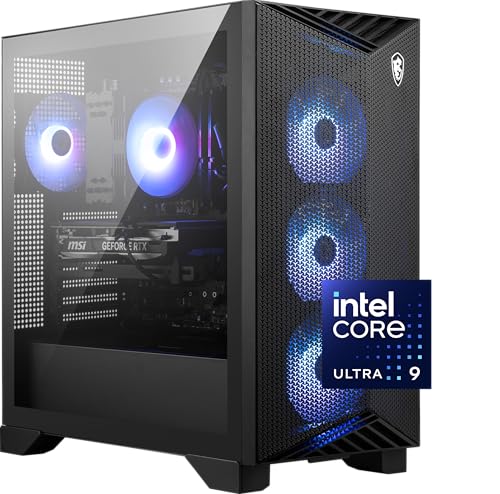 msi Aegis R2 AI Gaming Desktop: Intel Core3271.64 cubic inches19.4 x 9.1 x 19 inches26.9 poundsCheck on Amazon

The Short Answer
No, you do not need liquid cooling in a prebuilt desktop unless you are running a top-tier, overclocked processor that pulls over 200 watts of power under sustained heavy workloads. For the vast majority of users—including mainstream gamers, home office professionals, and creative editors—a high-quality air cooler is more than sufficient, significantly cheaper, and completely free of the long-term maintenance risks associated with liquid systems.
What You Actually Get
When shopping for a new home office setup or gaming rig, one question dominates the forums: do i need liquid cooling in prebuilt desktop systems? To answer this, it helps to understand what you are actually paying for when a manufacturer installs a liquid loop.
As an Amazon Associate we earn from qualifying purchases at no extra cost to you.

Most liquid-cooled prebuilt desktops use All-in-One (AIO) closed-loop liquid coolers. These systems consist of a CPU block, a pump, flexible tubing, and a radiator (typically sized at 120mm, 240mm, or 360mm) equipped with fans. The liquid absorbs heat directly from the processor, the pump moves the heated liquid to the radiator, and the fans blow air through the radiator fins to dissipate the heat out of the computer case.
In contrast, air cooling relies on a metal heatsink (usually aluminum with copper heat pipes) and one or two fans attached directly to the CPU block. It is a simpler mechanical process with fewer moving parts.
Consider how this plays out in actual retail options. A budget-friendly system like the ZYNEEX Prebuilt Gaming Desktop PC (around $900) utilizes an ARGB air cooler to easily manage the modest thermal output of its AMD Ryzen 5 5500 processor and GeForce RTX 3050 graphics card. This desktop pulls under 300 watts from the wall under full load, meaning a liquid cooler would offer zero performance benefit while adding unnecessary cost.
Even on the extreme high end, liquid cooling isn’t always mandatory. The heavy-duty msi Aegis R2 AI Gaming Desktop ($2554) pairs a massive Intel Core Ultra 9 285 processor with an NVIDIA GeForce RTX 5070Ti. Despite these top-tier components, it successfully relies on an advanced air-cooling configuration. This proves that smart case design, adequate ventilation, and robust heatsinks can handle elite components without resorting to liquid plumbing.
Pros
- Slow Thermal Saturation: Liquid has a high specific heat capacity. It takes longer for liquid to warm up than metal heatsinks, meaning your computer’s fans won’t instantly ramp up to maximum speed during short, bursty tasks like launching an application or rendering a quick video.
- Clean Internal Aesthetics: Liquid cooling blocks are much smaller than bulky air-cooling towers. This leaves the center of your motherboard visible, showcasing your RAM, custom lighting, and motherboard design.
- No Motherboard Sag: Large, high-end air coolers can weigh between 2.5 and 3.2 pounds. Over time, this heavy weight hanging off your vertically mounted motherboard can cause slight PCB warping. Liquid CPU blocks are incredibly light, as the heavy radiator is mounted directly to the steel chassis frame.
- Zero Memory Clearance Issues: Massive air coolers often overhang RAM slots, forcing you to buy low-profile memory or adjust fan heights. Liquid cooling completely eliminates RAM clearance worries.
Cons
- Limited Lifespan: Air coolers can last decades; if a fan dies, you simply swap in a new $15 fan. Liquid AIO coolers have a finite lifespan of 3 to 6 years. Over time, liquid naturally permeates through the rubber tubes, and the mechanical pump will eventually fail. When the pump dies, the entire unit must be replaced.
- Catastrophic Failure Risk: While rare in modern prebuilts, liquid coolers can leak. A slow drip of conductive fluid can instantly destroy your motherboard, graphics card, and power supply, turning a $2000 investment into a paperweight.
- Higher Initial Cost: Opting for a liquid-cooled prebuilt typically adds a premium of $100 to $250 to the final price tag, money that could otherwise be spent on a faster graphics card, more storage, or a better monitor.
- Idle Pump Noise: Even when your computer is sitting idle on your desk, the liquid pump must run continuously. This creates a low-frequency hum or buzzing sound that some users find more annoying than the gentle whoosh of air fans.
Who Should Buy It
You should opt for a liquid-cooled prebuilt desktop if you plan to use your computer as a heavy-duty workstation for sustained, multi-hour CPU tasks. If you regularly queue up 3D renders, export hours of 4K video, compile massive software databases, or run complex physics simulations, your CPU will constantly pull 150 to 250+ watts. Under these specific conditions, a 280mm or 360mm liquid radiator keeps the processor from thermal throttling, allowing it to maintain maximum boost clocks for hours on end.
Additionally, if you are placing your desktop in a tight, poorly ventilated cabinet or a small home office where ambient temperatures regularly rise, the direct heat exhaustion of a liquid radiator can help control internal case temperatures better than a standard air tower.
Who Should Skip It
You should skip liquid cooling if you want a reliable, low-maintenance machine that will sit under your desk for the next five to seven years without requiring a second thought. Mainstream gamers, remote office workers, and everyday users do not need liquid setups.
If you are looking at mid-range systems under $1,500, every dollar saved on cooling should go toward better core components. A system like the ZYNEEX Prebuilt (around $900) is highly efficient because it keeps thermal solutions simple. Even if you are purchasing a premium machine like the msi Aegis R2 AI ($2554) to handle the advanced software demands of 2026, premium air cooling is more than capable of keeping your high-end system quiet, cool, and safe from liquid leaks.
Cheaper Alternatives
If you decide to skip the liquid loop, you can still achieve excellent thermals and low noise levels. Below are the most common air-cooling alternatives used in prebuilt systems, along with their typical costs and trade-offs:
| Cooling Option | Average Cost Range | Key Trade-off |
|---|---|---|
| Single-Tower Air Cooler (e.g., 120mm Fan) | $20 – $45 | May run loud under heavy gaming loads; struggle with CPUs pulling over 125 watts. |
| Dual-Tower Air Cooler (e.g., Dual 120mm/140mm Fans) | $40 – $85 | Extremely bulky; can block RAM slots and requires a wider PC case (at least 8.5 inches of clearance). |
| High-Flow Case Fan Upgrade (Adding 3 PWM Intake Fans) | $30 – $60 | Does not cool the CPU directly, but lowers ambient system temperatures by 5°C to 10°C to assist simpler CPU coolers. |
FAQ
Will liquid cooling give me more FPS in video games?
Generally, no. Liquid cooling only improves frame rates if your CPU was previously getting so hot (usually above 90°C to 95°C) that it had to drop its clock speeds to protect itself from damage. If your current air cooler keeps your CPU under 80°C, switching to a liquid cooler will not yield any extra performance or higher frame rates.
Do prebuilt liquid coolers require refilling?
No. Almost all prebuilt desktops equipped with liquid cooling use closed-loop All-in-One (AIO) systems. These are completely sealed at the factory and are designed never to be opened or refilled. Trying to open one will void your warranty and likely cause a leak.
Is liquid cooling louder than air cooling?
At idle or light tasks, liquid cooling can actually be louder because the mechanical pump must run at a constant speed, producing a faint hum. Under heavy gaming loads, a high-quality liquid cooler is usually quieter than a cheap air cooler because its large radiator surface area allows the fans to spin at lower, quieter speeds to dissipate the same amount of heat.
What happens when a prebuilt’s liquid cooler fails?
When the pump in an AIO cooler fails, the liquid stops circulating. Within minutes, your CPU temperatures will spike to 100°C, even when just sitting on your desktop. Your computer will automatically shut down to prevent permanent damage. You will have to remove the entire liquid unit and install a replacement cooling system before you can use the PC again.
Related guides
- Best Gaming PC for Fortnite: Eight Prebuilt Desktops Sorted by Refresh Rate Goal (2026)
- Best RX 9070 XT Prebuilt Gaming PCs: Seven Desktops and Three Cards Compared: 10 Compared (2026)
- CyberPowerPC vs iBUYPOWER Gaming PC: How the Two Brands Compare
- Best RX 9070 XT Prebuilt Gaming PC (2026): 5 Picks Compared









