
Setting up a modern home office or a dedicated gaming corner involves more than just selecting an ergonomic desk and a comfortable chair. It requires managing the physical environment of your room—specifically, the heat and noise generated by your computer. When shopping for a new desktop, the central dilemma most buyers face is choosing between an air cooling vs liquid cooling prebuilt pc.
This decision goes far beyond simple tech specs. It directly impacts your daily life at home. An air-cooled system relies on large metal heatsinks and high-RPM fans that can sound like a mini jet engine during intense tasks, potentially disrupting a quiet household. On the other hand, a liquid-cooled system uses a liquid loop to pull heat away quietly, but it introduces a fluid-filled radiator into a chassis packed with delicate electronics. Balancing your home’s ambient temperature, your tolerance for noise, and your willingness to perform maintenance is the key to making the right choice.
As an Amazon Associate we earn from qualifying purchases at no extra cost to you.



Our Top Picks



Top 3 picks at a glance
Quick Verdict
If you prioritize absolute reliability, zero maintenance, and a budget-friendly price tag, an air-cooled prebuilt PC is the best choice for your home. It is ideal for busy family spaces and dusty environments. However, if you want a whisper-quiet home office, plan to place your PC on top of your desk as a visual centerpiece, or run demanding creative software, a liquid-cooled prebuilt PC is well worth the premium investment.
Side by Side
To help you visualize how these two cooling methods integrate into your domestic space, here is a direct comparison of their key features:
| Feature | Air Cooling Prebuilt PC | Liquid Cooling Prebuilt PC |
|---|---|---|
| Acoustic Comfort | Audible fan hum under heavy loads; quiet at idle. | Whisper-quiet under load; faint pump hum at idle. |
| Durability & Lifespan | Extremely high; only fans can fail (easily replaced). | Moderate; pumps degrade over 3 to 6 years. |
| Price Range | $800 to $2,000 (More budget-friendly options). | $1,100 to $4,000+ (Carries a premium for plumbing). |
| Maintenance Required | Occasional dusting with compressed air. | Dusting radiators; checking for rare pump degradation. |
| Space Needed (Chassis) | Requires a wider case to clear tall CPU coolers (150mm+). | Requires top or front radiator mounting space. |
| Visual Look | Industrial, bulky, blocks view of the motherboard. | Sleek, modern, often features RGB lighting on the water block. |
| Resale Value | Holds value well due to low wear-and-tear parts. | Slightly lower component trust after 4+ years of pump wear. |
| Best For | Families, pet owners, rentals, and budget setups. | Quiet home offices, hot climates, and high-end design suites. |
Where Air Cooling Wins
Air cooling is the traditional workhorse of the computer world, relying on basic physics: heat pipes draw warmth away from the processor up into a stack of thin aluminum fins, where one or more fans blow the heat away. The primary advantage of this system in a home environment is its sheer simplicity and reliability.
With an air-cooled system, there are no liquids to worry about, no pumps that can develop a high-pitched whine over time, and zero risk of a catastrophic leak onto your hardwood floor or carpet. If a fan fails after years of service, your computer won’t immediately overheat and shut down; the massive metal heatsink will still provide passive cooling while you spend $15 and ten minutes replacing the standard fan.
For high-performance needs, premium prebuilts like the KOTIN Gaming PC, Ryzen 7 9700X, RX 9070 XT 16GB, 32GB DDR5, 1TB SSD ($2399.99) showcase how modern hardware can run incredibly fast while utilizing optimized airflow designs. Air-cooled systems are also much easier to clean. If you have pets or live in a dusty area, a quick blast of compressed air every few months is all it takes to keep the heatsink clear. Furthermore, because air coolers are less expensive to manufacture, more of your budget goes directly toward faster graphics cards and processors rather than the cooling system itself.
Where Liquid Cooling Prebuilt Pc Wins
Liquid cooling—typically utilizing an All-In-One (AIO) closed-loop system in prebuilt desktops—uses a water block, a pump, a radiator, and tubes filled with coolant. The liquid absorbs heat from the CPU much more efficiently than air, carrying it to a radiator mounted at the top or front of the case, where fans blow it out of the chassis.
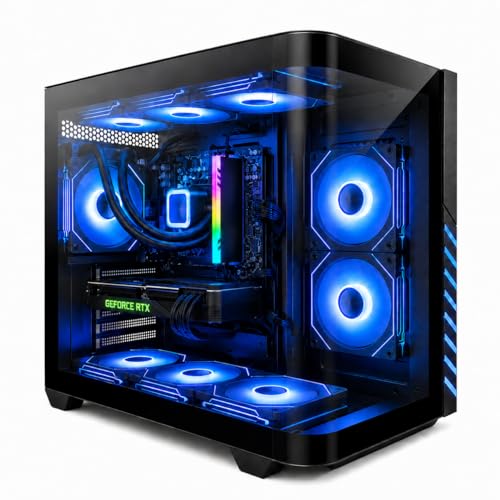
The standout benefit for a home is superior noise control. Because liquid has a high heat capacity, it absorbs sudden spikes in temperature without requiring the fans to instantly spin up to maximum speed. Under heavy workloads, like rendering video or playing demanding games, a system like the Gaming PC Desktop Liquid Cooled Ryzen 7 8700F RTX 4060 Ti 16GB DDR5 RAM ($1158.88) remains remarkably quiet. Instead of a harsh, high-pitched fan whine, you get a low, steady, and easily ignorable hum.
Aesthetically, liquid cooling is the undisputed winner for modern interior design. Without a massive metal tower blocking the center of your motherboard, the interior of your PC looks clean, spacious, and futuristic. This allows you to show off customizable RGB lighting and clean cable management through a tempered glass side panel, turning your computer into a piece of functional desk art rather than a hidden metal box under your desk.
Cost Over 5 Years
When calculating the true cost of an air cooling vs liquid cooling prebuilt pc, you must look past the initial retail price and consider the five-year operational and replacement costs.
- Air Cooling (5-Year Outlook): Your initial purchase is highly economical. Over five years, the only parts subject to wear are the fan bearings. If a fan starts to rattle or fail around year four, a high-quality replacement costs between $15 and $30. There are no fluids to evaporate and no pumps to die. Your total maintenance cost over half a decade is essentially the price of a few cans of compressed air (around $20).
- Liquid Cooling (5-Year Outlook): While the closed-loop systems in modern prebuilts are sealed and do not require refilling, the pump is a mechanical part that runs constantly. Most AIO liquid coolers have a lifespan of 3 to 6 years. By year five, there is a moderate chance the pump will need to be replaced due to motor wear or permeation (microscopic loss of liquid through the rubber tubes over time). Replacing an AIO liquid cooler costs between $80 and $180, and requires a more delicate installation process.
Which One for Your Home
Your physical living arrangement plays a massive role in which cooling type will serve you best. Here is how both systems fit into different home environments:
Small Apartment
In a small apartment or studio, your PC is often close to your bed or living space. A high-performance computer can quickly turn a small room into a sauna, emitting up to 350 to 500 watts of heat. Because liquid cooling manages heat transfer more efficiently, it helps keep the internal components cooler, though that heat still eventually vents into your room.
To keep your personal living space comfortable without running expensive central air conditioning, many apartment dwellers pair their setups with highly targeted room fans. Placing a Levoit Tower Fan for Bedroom, 28ft/s Fans that Blow Cold Air, 28dB Quiet (around $54) or a DREO Tower Fan for Bedroom, 28ft/s Velocity, Ultra Quiet Fan, 8 Speeds (around $59) near your desk area helps circulate the warm air exhausted by the PC, keeping your workspace comfortable without adding distracting noise to your home.
Family with Kids and Pets
If you have dogs, cats, or young children running around, air cooling is almost always the safer and more practical choice. Pet dander and hair are drawn into computer cases like magnets. In a liquid-cooled system, the dense fins of the radiator clog easily with hair, significantly reducing cooling efficiency and requiring tedious cleaning. Air-cooled heatsinks have wider fin spacing, making them much more forgiving of dust and pet hair. Additionally, there is zero risk of a curious child or pet bumping the desk and causing a physical shock that could stress a liquid tube fitting.
Rental Property
For renters who move every year or two, durability during transit is a major factor. A massive, top-heavy air cooler puts significant physical leverage on the motherboard when a PC is bounced around in the back of a moving truck. Liquid cooling loops, being lighter at the CPU block and securely anchored to the chassis frame via the radiator, are actually safer to transport over bumpy roads, provided the system is kept upright.
Long-Term Home Office
If you are designing a permanent, dedicated home office with an eye toward 2026 and beyond, quiet operation and clean aesthetics are likely your top priorities. A liquid-cooled prebuilt PC integrates beautifully into minimalist workspaces. It keeps your desk clutter-free, runs silently during video conference calls, and provides a polished, professional look that coordinates well with high-end office furniture.
FAQ
Does liquid cooling in a prebuilt PC require refilling?
No. Almost all liquid-cooled prebuilt PCs use All-In-One (AIO) closed-loop liquid coolers. These systems are permanently sealed at the factory and do not require you to add distilled water, change fluids, or perform any complex plumbing maintenance.
Is air cooling louder than liquid cooling?
Generally, yes, under heavy workloads. While high-quality air coolers can be very quiet at idle, their fans must spin much faster (and louder) to dissipate heat under heavy loads. Liquid coolers use the high thermal capacity of water to absorb heat quietly, meaning their fans can run at lower, quieter speeds even during intense tasks.
Can a prebuilt liquid cooler leak and ruin my computer?
While leaks are technically possible, they are extremely rare with modern prebuilt systems. Manufacturers use reinforced, braided rubber tubing and factory-sealed fittings designed to last the entire functional life of the computer. The risk of a leak in a modern prebuilt PC is less than one percent under normal home operating conditions.
How often do I need to clean dust out of each cooling system?
An air-cooled PC should be dusted out with compressed air every 3 to 6 months, especially if you have pets. A liquid-cooled PC’s radiator has much tighter fin spacing, meaning it can trap dust more easily. You should inspect and gently vacuum or blow dust off the radiator every 4 to 6 months to maintain optimal cooling performance.
Related guides
- Best Gaming PC for Fortnite: Eight Prebuilt Desktops Sorted by Refresh Rate Goal (2026)
- Best RX 9070 XT Prebuilt Gaming PCs: Seven Desktops and Three Cards Compared: 10 Compared (2026)
- CyberPowerPC vs iBUYPOWER Gaming PC: How the Two Brands Compare
- Best RX 9070 XT Prebuilt Gaming PC (2026): 5 Picks Compared









