
As an Amazon Associate we earn from qualifying purchases at no extra cost to you.


Our Top Picks



Top 3 picks at a glance
The Short Answer
For most gamers, a 1TB NVMe SSD is the sweet spot: it holds roughly 8 to 12 modern AAA games, costs $150 to $240, and fits any standard M.2 2280 slot. If you play a lot of large titles like Call of Duty or Baldur’s Gate 3, or you also store video and streaming files on the same drive, step up to 2TB — expect to pay $300 to $400 for a fast PCIe 4.0 model. Capacity matters far more than speed for gaming, because load times between a good PCIe 4.0 drive and a pricey PCIe 5.0 drive often differ by only a second or two. Buy the largest capacity your budget allows, and make sure the physical size (the 2280 form factor) matches your motherboard’s slot.
Standard Sizes
“Size” for SSDs means two things: storage capacity (measured in GB or TB) and physical dimensions (the M.2 form factor). Most gaming motherboards and consoles use the 2280 stick, which measures 80mm long — the 22 refers to a 22mm width and the 80 to an 80mm length. Here are the physical dimensions you’ll encounter:
| Form Factor | Length x Width (inches) | Length x Width (cm) | Common Use | Typical Weight |
|---|---|---|---|---|
| M.2 2280 | 3.15 x 0.87 in | 8.0 x 2.2 cm | Desktops, laptops, PS5 | 0.2–0.3 oz (6–9 g); 0.5–1 oz with heatsink |
| M.2 2242 | 1.65 x 0.87 in | 4.2 x 2.2 cm | Some ultracompact laptops | 0.15–0.25 oz (4–7 g) |
| M.2 2260 | 2.36 x 0.87 in | 6.0 x 2.2 cm | Older laptops, rare | 0.15–0.25 oz (4–7 g) |
| M.2 22110 | 4.33 x 0.87 in | 11.0 x 2.2 cm | Workstations, servers | 0.25–0.35 oz (7–10 g) |
| 2.5-inch SATA | 3.94 x 2.75 x 0.28 in | 10.0 x 7.0 x 0.7 cm | Older desktops, consoles | 1.4–2 oz (40–60 g) |
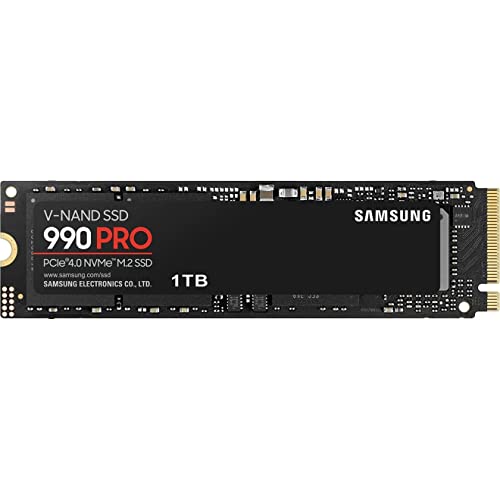
A bare M.2 2280 drive like the Samsung 990 PRO sits just 2 to 3mm tall above the motherboard. Add a heatsink and the total height grows to roughly 6 to 10mm — important clearance information if your drive slot sits under a graphics card. Power draw runs from about 3 to 5 watts idle up to 7 to 11 watts under full load for a PCIe 4.0 drive, and up to 12 to 14 watts for a PCIe 5.0 model like the 9100 PRO, which is why high-end drives benefit from a heatsink.
How to Measure Your Space
- Check your form factor. Open your PC case or laptop’s service panel and locate the M.2 slot on the motherboard. Most desktop boards and the PS5 accept only the 2280 length. If a standoff screw is positioned 80mm from the notch, you need a 2280 drive.
- Measure clearance height. Note how much vertical space exists between the M.2 slot and the graphics card or shroud above it. If clearance is under 10mm, choose a bare drive or a slim single-sided heatsink rather than a chunky double-decker cooler.
- Count your slots. Most boards have two or three M.2 slots. Check whether the second slot shares bandwidth with SATA ports — your manual will say. This affects placement, not size, but it’s worth knowing before you buy.
- Verify your interface. PCIe 5.0 drives work in PCIe 4.0 and 3.0 slots (at reduced speed), but a PCIe 3.0-only slot wastes the extra money. Match the drive generation to your board for the best value.
- For PS5 owners: Sony requires a PCIe 4.0 drive with a heatsink, 5,000 MB/s read speed or faster, and a total thickness including the heatsink of 11.25mm or less for the standard slot, or 8mm or less if using the attached cover.
By Room or Use Case
Everyday and Esports Gaming (500GB–1TB)
If you mostly play Fortnite, Valorant, League of Legends, Rocket League, or older titles, 500GB ($60–$90) can work, but 1TB is the better buy. Competitive games are small — most fit in 20 to 70GB — so a 1TB drive like the Samsung 990 PRO at around $240, or the value-oriented SIX 1TB PCIe 4.0 at around $170, gives you 10 to 20 games with room for the OS. Lighter systems may draw only 4 to 6 watts under load with these drives.
AAA and Enthusiast Gaming (1TB–2TB)
Modern AAA releases regularly weigh in at 75 to 150GB each, and Call of Duty installations can exceed 200GB with all modes. A 2TB drive — roughly $300 to $400 for a PCIe 4.0 flagship like the 990 PRO 2TB at $389 — holds 12 to 18 large titles and eliminates the install-uninstall shuffle. This is the capacity we recommend for anyone with a library of more than a handful of big games.
PS5 Expansion (1TB–2TB)
The PS5’s internal 825GB fills fast, and Sony’s guidance suggests 5,000 MB/s minimum read speed. Choose a PCIe 4.0 2280 drive with an included heatsink, such as the SIX 1TB at around $170 or the 990 PRO 1TB at around $240. Budget $150 to $250 for 1TB or $300 to $400 for 2TB, and confirm total thickness stays within the 11.25mm limit.
Content Creators and Streaming (2TB–4TB)
If your gaming PC also records gameplay, edits 4K video, or hosts a streaming library, game installs plus capture footage will overwhelm a 1TB drive within weeks. Go 2TB minimum — a PCIe 5.0 drive like the Samsung 9100 PRO 2TB at around $400 offers up to 14,700 MB/s for large file transfers, though games themselves won’t feel much faster than PCIe 4.0. Serious creators should consider a 4TB drive ($500–$700 as of 2026 pricing) or pair a 2TB game drive with a separate 2TB media drive.
Older Systems and Consoles (500GB–1TB, 2.5-inch)
If you’re upgrading an aging desktop, a PS4, or an Xbox One, the 2.5-inch SATA form factor is your option. These drives measure 3.94 x 2.75 x 0.28 inches, cap out around 560 MB/s, and cost roughly $50–$70 for 1TB. They’re the cheapest way to revive an old machine, but they can’t match NVMe speeds.
Common Sizing Mistakes
- Buying for speed instead of capacity. The difference between a 7,450 MB/s drive and a 14,700 MB/s drive rarely shows up in game load times — often a second or less. Spend that money on more gigabytes.
- Skipping the heatsink on a PS5. A bare drive will fail Sony’s 11.25mm thickness-with-heatsink requirement workflow and may thermally throttle. Buy a model with a heatsink included.
- Buying the wrong M.2 length. A 2242 drive will not fit an 80mm 2280 slot properly. Check your motherboard’s standoff positions before ordering.
- Underestimating game sizes. Buyers frequently assume 10GB per game from memory of the Xbox 360 era. Modern AAA titles run 75 to 150GB, and updates add tens of gigabytes over a game’s life.
- Filling the drive completely. SSDs slow down when nearly full. Keep 10 to 15% free — on a 1TB drive, that means treating roughly 850GB as your usable budget.
- Paying PCIe 5.0 prices on a PCIe 4.0 board. A 5.0 drive in a 4.0 slot runs at 4.0 speeds. Unless you’re building a top-tier rig, PCIe 4.0 delivers better value per dollar.
FAQ
Is 512GB enough for gaming?
Barely, and only for casual use. After Windows and essential apps, you’ll have about 400GB free — enough for four to six modern games. Most gamers outgrow 512GB within months, so 1TB is the practical minimum today.
Is 2TB better than 1TB for gaming?
Yes, if you play large AAA titles or keep many games installed at once. A 2TB drive holds roughly twice the library and costs 55 to 70% more, not double, so the price per gigabyte is usually better. For esports-only players, the extra capacity is wasted money.
Does SSD size affect FPS?
No. Capacity and speed affect load times, texture streaming, and installation times, but frame rates are determined by your GPU and CPU. A bigger or faster SSD will not raise your FPS.
What size SSD do I need for a PS5?
Get a PCIe 4.0 M.2 2280 drive with a heatsink, 5,000 MB/s read speed or better, and total thickness under 11.25mm. We recommend 1TB minimum ($150–$250) or 2TB ($300–$400) if you keep a large game library installed.









