
Our Top Picks

The Short Answer
The short answer is yes, but with a major caveat. If you are asking, “is building a small form factor pc hard?” the reality is that it depends entirely on your patience and your willingness to plan ahead. While a standard mid-tower computer assembly feels like putting together a spacious piece of flat-pack furniture, a Small Form Factor (SFF) build is more akin to solving a complex, three-dimensional puzzle. It is not inherently difficult in terms of the technical skills required—you are still plugging the same cables into the same slots—but the physical constraints, tight spatial tolerances, and strict component compatibility requirements make it significantly more challenging than building a traditional desktop.
What You Actually Get
When you commit to a Small Form Factor PC, you are choosing to condense a fully functional, high-performance computer into a chassis that is typically under 20 liters in volume. To put that in perspective, a standard mid-tower PC case occupies about 40 to 60 liters of space and takes up a massive footprint on your desk. An SFF case shrinks that footprint down to a fraction of the size, often measuring just 11 to 15 inches in height and 5 to 8 inches in width. This leaves your home office desk looking clean, organized, and uncluttered.
As an Amazon Associate we earn from qualifying purchases at no extra cost to you.


However, achieving this minimalist aesthetic requires making several physical compromises. Inside a small chassis, every single millimeter counts. You will be working with specialized, smaller components, such as Mini-ITX motherboards (which measure a mere 6.7 by 6.7 inches) and SFX (Small Form Factor) power supplies. Cable management becomes an art form; instead of stuffing excess wires into a hidden basement compartment, you must route, bend, and tie down every millimeter of copper to ensure it does not block cooling fans or prevent the chassis panels from closing. As we look forward to the sleek home office designs of 2026, the demand for these unobtrusive, high-density setups continues to grow, making the effort well worth it for design-conscious users.
Pros
- Exceptional Space Savings: An SFF PC reclaims valuable desk real estate. By reducing your computer’s footprint to less than one square foot, you gain more room for writing, secondary monitors, or minimalist desk decor.
- Premium, Furniture-Grade Aesthetics: Many small form factor cases are designed with premium materials like sandblasted aluminum, tempered glass, or real wood accents. They blend seamlessly into modern home interiors rather than looking like an eyesore.
- Portability: Weighing significantly less than a standard desktop (often between 8 to 15 pounds fully built), an SFF system is easy to pack into a backpack or carry-on bag for travel, LAN parties, or moving between a home office and a living room media center.
- No Performance Compromise: Despite their small size, modern SFF cases can house top-tier graphics cards and powerful multi-core processors, meaning you do not have to sacrifice gaming performance or rendering power for a smaller footprint.
Cons
- The “SFF Tax” (Higher Costs): Building small is undeniably more expensive. Mini-ITX motherboards often cost $30 to $80 more than their full-sized ATX counterparts, and SFX power supplies (ranging from 650W to 850W) carry a premium price tag of $120 to $200.
- Difficult Assembly and Cable Routing: You will likely scrape your knuckles, drop tiny screws into unreachable crevices, and have to plug in components in a very specific, non-intuitive order. If you install the CPU cooler first, you might find you can no longer reach the 8-pin power connector.
- Thermal and Noise Management: Smaller cases restrict airflow. With less air volume and smaller cooling fans (often restricted to 120mm or low-profile 92mm fans), your components will run hotter. To keep temperatures in check, fans must spin faster, resulting in a louder system under heavy workloads.
- Strict Component Limitations: You cannot simply buy any graphics card or CPU cooler on shelves. You must carefully cross-reference GPU lengths (often restricted to under 300mm) and CPU cooler heights (sometimes restricted to less than 70mm) before purchasing.
Who Should Buy It
You should build a Small Form Factor PC if you are a minimalist who values a clean, clutter-free desk environment, or if you live in a compact apartment where space is at a premium. It is also an excellent choice for creative professionals and gamers who want a powerful machine that can easily transition between a work desk and a living room television setup. If you genuinely enjoy the process of building, tinkering, and optimizing hardware, you will find the spatial puzzle of an SFF build incredibly rewarding.
Who Should Skip It
You should skip the SFF route if you are on a strict budget or if this is your very first PC build. The added cost of specialized parts can eat into your budget, leaving less money for performance-driving components like the GPU or CPU. Additionally, if you dislike troubleshooting, hate tight spaces, or want a completely silent computer that runs cool without custom fan curves, a traditional mid-tower case will offer a much friendlier, more forgiving experience.
Cheaper Alternatives
If you love the idea of a compact computer but are intimidated by the high price tag or the sheer difficulty of a true sub-20-liter Mini-ITX build, there are excellent middle-ground options. You can opt for budget-friendly compact cases or slightly larger Micro-ATX configurations that offer a similar aesthetic with much easier installation and lower costs.
| Chassis Option | Approximate Cost | Major Trade-off / Experience |
|---|---|---|
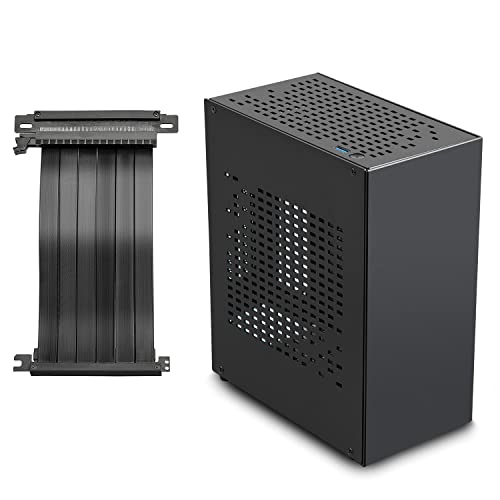
| JOYJOM Mini PC Case (Aluminum Mini ITX with PCIe 3.0 Riser) |
Check on Amazon | True SFF sandwich layout. Extremely compact and stylish, but requires tedious cable routing and is strictly limited to dual-slot graphics cards and low-profile CPU coolers. |
| Cooler Master Q300L V1 (Micro-ATX Case with Transparent Panel) |
Check on Amazon | Larger footprint than true SFF, but significantly cheaper. Accommodates inexpensive Micro-ATX motherboards and standard ATX power supplies, making assembly incredibly easy. |
| Standard Mid-Tower Case (Generic ATX Chassis) |
around $50 – around $90 | Takes up massive desk space and lacks the sleek, modern aesthetic of a compact build, but offers maximum airflow, zero component clearance issues, and the easiest building experience. |
FAQ
Do Small Form Factor PCs overheat easily?
While SFF PCs do run hotter than traditional mid-towers due to the limited air volume inside the chassis, they do not automatically overheat or thermal throttle if they are configured correctly. Modern SFF cases utilize clever layouts, such as “sandwich” designs that place the GPU and CPU in separate chambers, allowing each to draw fresh air directly from the outside. Proper cable management and selecting high-quality static pressure fans are essential to keeping temperatures safe.
Do I need special tools to build a small form factor PC?
No specialized tools are strictly required, but a few simple accessories will make the process significantly easier. A magnetic screwdriver (preferably with a long shaft) is invaluable for placing screws in deep, narrow crevices. Additionally, plenty of small zip ties, velcro straps, and a flashlight or headlamp will help you manage cables and see inside the dark corners of a compact chassis.
Are SFF PCs louder than standard desktop computers?
Generally, yes. Because SFF cases rely on smaller fans (such as 80mm or 120mm slim fans) to push air through tight spaces, those fans must spin at higher revolutions per minute (RPM) to achieve the same cooling capacity as larger 140mm fans. This results in a higher-pitched, more noticeable hum under load. However, you can mitigate this by adjusting your fan curves in the BIOS or investing in premium, quiet fans.
Can I upgrade a Small Form Factor PC in the future?
Yes, but your upgrade path will be more restricted. When upgrading a component like a graphics card, you cannot simply buy the latest flagship model without checking the physical dimensions. You will always be limited by the maximum GPU length, slot thickness, and power supply wattage capacity of your specific SFF case. Upgrading motherboards or coolers also requires taking almost the entire system apart due to the interlocking nature of the assembly.
Related guides
- Best Gaming PC for Fortnite: Eight Prebuilt Desktops Sorted by Refresh Rate Goal (2026)
- Best RX 9070 XT Prebuilt Gaming PCs: Seven Desktops and Three Cards Compared: 10 Compared (2026)
- CyberPowerPC vs iBUYPOWER Gaming PC: How the Two Brands Compare
- Best RX 9070 XT Prebuilt Gaming PC (2026): 5 Picks Compared









