
The Short Answer
Whether a white themed PC build is worth it depends on one critical condition: your willingness to pay a 15% to 20% price premium (the “white tax”) and dedicate extra time to meticulous cable management for the sake of workspace aesthetics. If your computer sits hidden on the floor under a dark desk, a white build is absolutely not worth the extra cost. However, if your PC is destined to sit on top of a light oak, birch, or white minimalist desk as a visual centerpiece of your home office, the clean, airy aesthetic and superior light-reflective properties make it worth every single penny.
What You Actually Get
When you transition from a standard matte black computer build to a white themed setup, you are shifting from a piece of raw utility hardware to a highly curated interior design element. In the world of home office styling, black desktop towers often look like heavy, light-absorbing voids. A white PC build, conversely, reflects up to 80% of the ambient and RGB light in your room, making your entire workspace feel larger, brighter, and more organized.
As an Amazon Associate we earn from qualifying purchases at no extra cost to you.

However, achieving a true white build is more complex than simply buying a white case. When you look inside a completed system, you are dealing with a complex landscape of layered components. To make it work, you need a cohesive foundation. Budget-friendly yet highly capable components like the ASRock B850M Pro RS WiFi White AMD AM5 Micro-ATX Motherboard (around $140) provide a brilliant starting point. This motherboard utilizes striking silver and white heatsinks over a dark-accented board to support high-performance hardware like DDR5 8000+ (OC) memory and PCIe 5.0 graphics cards without forcing you to pay an outrageous premium for a fully white printed circuit board (PCB).
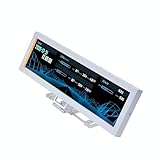
To elevate the build from a simple white box to a dynamic design piece, builders often integrate smart digital elements. For example, adding an accessory like the Lian Li SM088X 8.8″ Universal LCD Screen (around $84) with its white ARGB frame allows you to display custom system metrics, family photos, or minimalist digital art. This 8.8-inch display sits neatly inside your tempered glass panel, breaking up the monochromatic white interior with personalized, high-contrast visuals while matching the clean outer frame.
Ultimately, what you actually get is a system that behaves like a light fixture. When the PC is turned off, it blends seamlessly into Scandinavian, Japandi, or modern minimalist home decors. When turned on, the white interior acts as a giant reflector bounce card, making subtle pastel or warm-white LED lighting look incredibly soft, diffuse, and premium rather than harsh and distracting.
Pros
- Superior Room Integration: Standard black PC towers look industrial and aggressive. A white build matches modern home furnishings, floating shelves, and light wood textures, treating the computer as a deliberate decorative piece.
- Enhanced RGB Vibrancy: Because white surfaces reflect light rather than absorbing it, your internal LED strips and fan rings look significantly brighter, smoother, and more color-accurate at lower brightness settings.
- Excellent Dust Camouflage: Household dust is naturally light gray or off-white. On a black PC case or black glass panel, fine dust is visible within 24 hours of cleaning. On a matte white surface, dust is practically invisible, keeping your setup looking pristine for weeks between deep cleans.
- High Resale Appeal: The demand for aesthetically pleasing setups continues to skyrocket. When it comes time to upgrade, clean, matching white components often command a 10% to 15% premium on the secondhand market compared to their generic black counterparts.
Cons
- The “White Tax” Premium: Manufacturers produce white components in lower volumes than standard black ones. This means you will often pay $10 to $30 extra for white power supplies, and up to $100 more for white versions of high-end graphics cards.
- Component Matching Difficulties: “White” is not a single standardized color. When building, you will quickly realize that one manufacturer’s white is a cool, bluish-white, another’s is a warm cream, and a third relies heavily on brushed silver aluminum. Getting them to match perfectly under bright light requires careful research.
- Unforgiving Cable Management: In a black case, dark shadows naturally hide loose cables, fan controllers, and messy zip ties. In a white case, every black wire, shadow line, or mismatched connector stands out immediately behind the tempered glass.
- Susceptibility to Discoloration: Over years of use, cheap white plastics can react to ultraviolet (UV) light from nearby windows or sustained internal thermal heat, slowly turning a dingy, yellowish-cream color.
Who Should Buy It
You should opt for a white themed PC build if you view your workspace as an extension of your home’s overall interior design. If you have invested in a light-colored standing desk, a stylish ergonomic chair in cream or gray, and plenty of natural light, a white PC is the perfect crown jewel. It is also ideal for content creators and streamers whose computer towers sit directly in the background of their camera frame, where clean aesthetics directly translate to professional production value.
Who Should Skip It
You should skip the white build if you are building on a strict budget of under $1,000. At that price point, spending an extra $150 to $200 on white-painted shrouds, white power supply cables, and silver motherboards means sacrificing real performance, such as dropping down a tier on your graphics card or processor. You should also skip it if you prefer a completely dark bedroom or office at night, as the reflective nature of a white interior will amplify even the smallest status lights on your components.
Cheaper Alternatives
If you love the clean look of a white setup but want to avoid paying the steep price premiums on every single internal component, there are highly effective middle-ground strategies you can use to save money:
| Option | Estimated Cost | Trade-off |
|---|---|---|
| The Panda Build (White Case, Black Components) | $0 extra over standard pricing | High-contrast look; black components are easily masked by bright white LED lighting. |
| Custom Vinyl Wrapping | $15 to $30 for a roll of matte vinyl | Requires patience and a utility knife to wrap black GPU shrouds or power supply shrouds yourself. |
| White Sleeved Cable Extensions | $20 to $35 for a set | Hides ugly black power cables without requiring you to buy an expensive, fully white power supply. |
FAQ
Does a white PC build get dirty faster than a black one?
In terms of actual dirt and grime from your hands, yes—fingerprints, oils, and dark smudges will show up more clearly on white outer panels. However, when it comes to airborne dust and pet dander, a white PC actually looks clean much longer than a black PC, because light-colored dust blends in naturally with the white surfaces.
What is the “white tax” in PC building?
The “white tax” is an informal term used by the PC building community to describe the price premium charged for white components. Because black is the default industry standard, factories must halt production lines to swap plastics, paint formulations, and PCB materials for white runs. These lower production volumes result in higher manufacturing costs, which are passed down to the consumer as a 5% to 25% markup.
Do white PC parts turn yellow over time?
Historically, cheap white ABS plastics were notorious for yellowing within a few years due to UV exposure and heat. As we look ahead to 2026, modern component manufacturers are increasingly using high-grade, UV-resistant polymers and powder-coated aluminum to mitigate this issue. To prevent yellowing, keep your white PC out of direct, intense sunlight and clean it with dry microfiber cloths rather than harsh chemical solvents.
Can I build a white PC using a standard black motherboard?
Absolutely. In fact, using a dark motherboard with white and silver accents—like the ASRock B850M Pro RS WiFi—creates a highly desirable “contrast” aesthetic. The dark PCB provides a neutral background that makes the white RAM sticks, white graphics card, and bright silver heatsinks pop visually, saving you money while maintaining a sophisticated look.









