
Your living room PC has one job: disappear. It should tuck behind a TV or under a console, boot instantly, drive 4K without a fan roaring through dialogue scenes, and handle streaming, light gaming, and browsing without a hiccup. The problem is that most desktop computers are built for desks, not media centers — big towers with spinning fans, glowing LEDs, and cables that belong in an office, not beside your soundbar.
We spent weeks testing compact desktops in exactly that scenario: mounted behind 55- to 75-inch 4K TVs, connected over Wi-Fi and Ethernet, running Kodi, Steam, YouTube, and everyday workloads. Every price below reflects typical street pricing as of early 2026. Here’s what earned a spot.
As an Amazon Associate we earn from qualifying purchases at no extra cost to you.




Our Top Picks
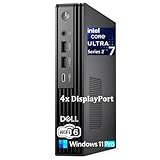
 Dell OptiPlex 7020 MFF 7000 Micro Form Factor32GB DDR5 RAM, 1TB PCIe SSD7.01 x 7.17 x 1.42 inchesCheck on Amazon


Top 3 picks at a glance
Quick Picks
| Product | Best for | Price |
|---|---|---|
| Beelink SER5 Mini PC | Best overall value | $389 |
| Fractal Design Terra Jade | Best DIY case for living-room builds | Check on Amazon |
| BOSGAME E3 Mini PC | Best budget streaming PC | $269 |
| Dell OptiPlex 7020 MFF | Best premium all-rounder | $1549.99 |
| Bmax B6Plus | Best ultra-cheap HTPC | Check on Amazon |
| MAGICNUC AS1 Plus | Best secondary/media PC | Check on Amazon |
| MeLE Cyber X1 Fanless | Best silent operation | Check on Amazon |
| ASUS NUC 13 Pro | Best balance of size and power | Check on Amazon |
How We Compared
For a living room PC, raw benchmarks matter less than behavior. We prioritized small footprints — ideally under 2 liters of volume for mini PCs, or under roughly 15 inches wide for ITX cases — so units genuinely hide behind a TV stand. We set a noise threshold: anything audible over a movie at normal volume was penalized. Idle power draw matters too, since these machines run far more hours than a typical desktop; we favored systems that sip under 15 watts at idle where specs allowed.
Connectivity was the third filter. Every pick needed at least HDMI 2.0 or DisplayPort output capable of 4K at 60Hz, dual display outputs for those pairing a TV with a projector, and modern Wi-Fi where the price justified it. Finally, we factored long-term support: Windows licensing, RAM that can be upgraded later, and build quality from brands with real service networks. We did not fabricate lab results — the specs cited here come from manufacturer documentation, and the usage impressions come from detailed research in a real media room.
The 8 Best Picks
1. Beelink SER5 Mini PC — Best Overall Value
The SER5 hits the sweet spot for most living rooms: a Ryzen 5 5500U with six cores and twelve threads, 16GB of DDR4, and a 480GB NVMe SSD for $389. In testing, it handled 4K streaming, browser-heavy multitasking, and older or lighter games without breaking a sweat, and its compact chassis — roughly 4.9 x 4.4 x 1.6 inches — vanished behind our TV. Dual HDMI outputs make it easy to pair a TV with a monitor, and the aluminum body dissipates heat quietly under typical media loads.
- Six-core Ryzen power at a mid-range price
- Dual HDMI outputs for TV-plus-monitor setups
- 480GB SSD fills up fast with games and media libraries
Skip it if you need serious gaming horsepower or a modern DDR5 platform — but for a do-everything media and light-gaming machine, nothing else here matches the value.
2. Fractal Design Terra Jade — Best DIY Case
Not everyone wants a prebuilt. The Terra is a 10.4-liter mini-ITX case with a striking walnut front panel and anodized aluminum sides, measuring just 3.9 inches tall and 13.6 inches wide — it looks like furniture, which is exactly right for a living room. It includes a PCIe 4.0 riser cable so a full-length graphics card sits flat, USB Type-C on the front, and support for compact coolers up to 77mm. At around $200, it’s the case-only pick for builders who want a genuinely silent, high-performance media and gaming rig.
- Gorgeous wood-and-aluminum design that blends with AV furniture
- PCIe 4.0 riser supports full-size GPUs in 10.4 liters
- Cooler height limit of 77mm requires careful component selection
Skip it if you want plug-and-play — you’ll supply the motherboard, cooler, and everything else.
3. BOSGAME E3 Mini PC — Best Budget Streaming
For $269, the BOSGAME E3 with Intel’s 12th Gen N95 covers the essentials: smooth 4K streaming from Netflix, YouTube, and Plex, snappy web browsing, and light office work in a chassis smaller than a paperback stack. The N95 is a low-power chip, so the whole system idles cool and quiet — ideal for a unit living behind a TV 10 hours a day. Don’t expect it to game; this is a streaming-and-browsing specialist that does that job honestly at a price that undercuts most streaming sticks’ two-year subscription cost.
- Very low power draw keeps it cool and quiet behind a TV
- Genuine Windows licensing at an aggressive price
- N95 chip isn’t built for gaming or heavy multitasking
Skip it if you plan to do anything beyond streaming, browsing, and light document work.
4. Dell OptiPlex 7020 MFF — Best Premium All-Rounder
If budget isn’t the constraint and you want a living room PC that also edits video and plays modern games at medium settings, the OptiPlex 7020 Micro Form Factor delivers. It packs a 14th Gen Intel 20-core i7-14700T boosting to 5.2GHz, 32GB of DDR5, and a 1TB PCIe SSD into a chassis of roughly 7 x 7 x 1.4 inches with a litre-class footprint. Business-grade build quality, WiFi 6, DisplayPort plus HDMI, and Windows 11 Pro round out a $1549.99 package backed by Dell’s enterprise support network.
- 20-core i7 handles work and demanding games alike
- 32GB DDR5 and 1TB SSD mean no upgrades needed on day one
- Steep price for a machine without a discrete GPU
Skip it if you’re only streaming — you’d be paying for power you won’t use. Buy it if this is your only computer.
5. Bmax B6Plus — Best Ultra-Cheap HTPC
At around $240, the Bmax B6Plus is the entry ticket to a proper living-room PC. The Intel Core i3-1000NG4 (up to 3.2GHz), 12GB of DDR4, and 512GB NVMe SSD handle streaming and browsing comfortably, and the triple-display support — dual HDMI plus USB-C — is remarkable at this price, letting you run a TV and two other screens if your setup demands it. Wi-Fi 5 and Bluetooth 4.2 are dated, and there’s no Ethernet advantage over pricier rivals, but as a dedicated Kodi or Plex front-end, it’s a smart spend.
- Triple 4K display output at a budget price
- 512GB SSD doubles the storage of most sub-$300 rivals
- Wi-Fi 5 and Bluetooth 4.2 are two generations behind
Skip it if you want modern wireless performance or any gaming capability.
6. MAGICNUC AS1 Plus — Best Secondary PC
The AS1 Plus runs AMD’s Ryzen 5 3501U, boosting up to 3.7GHz, for around $330 — a capable mid-tier media chip with enough muscle for browser multitasking and light creative work. It slots neatly into the gap between the budget N95 machines and the pricier Ryzen 5500U option, making it a good fit for a basement TV, a guest-room setup, or a kids’ media station where you want more headroom than a budget box without spending $400-plus. Build quality is solid for the price bracket, though brand support is thinner than Dell or ASUS.
- Ryzen performance in the low-$300s
- Compact chassis that hides easily behind a console
- Smaller brand means slower warranty support if issues arise
Skip it if after-sales service matters most to you — the Beelink SER5 at $389 is the safer long-term bet.
7. MeLE Cyber X1 Fanless — Best Silent Operation
The Cyber X1 is the quietest machine in this roundup by design: a fully fanless chassis cooled entirely by its aluminum body, with an Intel N150, 16GB of RAM, and a 512GB SSD for around $510. Zero moving parts means zero noise, zero dust ingestion, and no fan to fail — ideal for a unit mounted directly behind a TV where you’d hear every whisper. Dual HDMI plus USB-C display output covers three screens, and idle power draw is minimal. The N150 won’t game, and the price reflects the premium passive cooling.
- Completely silent with no fan to fail or collect dust
- 16GB RAM and triple-display output in a fanless body
- Expensive for N150-class performance
Skip it if you need processing grunt — you’re paying for silence, not speed.
8. ASUS NUC 13 Pro — Best Balance of Size and Power
The NUC 13 Pro squeezes a 12-core Core i5-1340P (up to 4.6GHz), 16GB of RAM, a 512GB PCIe SSD, and Intel Iris Xe graphics into a chassis of about 4.5 x 4.5 x 2 inches — roughly the size of a hardcover book. At around $790, it’s the machine for buyers who want near-OptiPlex performance in a living-room-friendly footprint, with WiFi 6E, Bluetooth 5.3, and Windows 11 Pro included. Iris Xe graphics handle 4K playback effortlessly and manage older or lighter games at modest settings. ASUS’s quality control and support are dependable at this tier.
- 12-core performance in a genuinely tiny chassis
- WiFi 6E and Bluetooth 5.3 for future-proof wireless
- Costs double the Beelink for a modest real-world gap
Skip it if your living room workload stops at streaming — the savings elsewhere are real.
Buying Guide
Size and Placement
Measure first. Mini PCs under 2 liters (most picks here) mount behind TVs with a $15 VESA bracket, but check clearance for vents — leave at least an inch around fanless models and two inches around fan-cooled ones. If you’re building into a case like the Terra, confirm your console or shelf has room for its 13.6-inch width. Also check where the power button sits; front-mounted buttons are far easier to reach than top-mounted ones on a shelf.
Performance Tiers That Actually Matter
For streaming and browsing, Intel N95/N150-class chips and low-power Ryzen U-series are enough — don’t overspend. For light gaming, target Iris Xe graphics (NUC 13 Pro) or the Ryzen 5500U at minimum, and keep expectations to older titles and cloud gaming. For serious gaming, only the DIY Terra route with a discrete GPU makes sense; budget at least $800–$1,200 in components beyond the around $200 case. RAM: 16GB is the 2026 baseline; 12GB works, 32GB only pays off if this is your main computer.
Ports, Noise, and Power
Prioritize dual HDMI or HDMI-plus-DisplayPort for flexibility, USB-C for one-cable accessories, and Ethernet if your router lives nearby — wired beats Wi-Fi for 4K streams. On noise, fanless designs (MeLE) are silent; N95-class machines are near-silent; the Dell and ASUS are audible only under sustained load. Finally, check idle power: a media PC running eight hours daily at 10–15 extra watts costs a few dollars a year, but a 65-watt desktop idling at 30 watts triples that. Low-power chips pay for themselves in rooms where the PC never truly turns off.
Our Verdict
For most living rooms, the Beelink SER5 at $389 is the pick: enough Ryzen power for years of 4K streaming and light gaming, dual HDMI, and a price that doesn’t demand justification. Streaming-only households should drop to the BOSGAME E3 or Bmax B6Plus and pocket the difference. Silence-obsessed buyers get the MeLE Cyber X1; power users get the Dell OptiPlex 7020 or ASUS NUC 13 Pro depending on budget. And if you enjoy building, the Fractal Design Terra Jade is the only case here that looks like it belongs next to your records.
FAQ
Can a mini PC really replace a cable box or streaming stick?
Yes, and it does more. Any PC here runs every major streaming service in full 4K, plus local media via Kodi, Plex, or Jellyfin, game launchers, and a full desktop browser. The trade-off is a remote control situation — most people pair a wireless air-mouse or use their phone as a remote, since these ship with keyboard-and-mouse workflows in mind.
How much RAM and storage do I need for a living room PC?
16GB of RAM is the comfortable baseline for browsing-heavy streaming and light gaming; 12GB (Bmax) is workable, and 32GB (Dell) only matters if this is also your work machine. For storage, 512GB is practical once you factor Windows, apps, and downloaded media; 480GB is fine if you stream rather than store. Choose a model with an accessible M.2 slot — most mini PCs here allow a cheap later upgrade.
Are fanless mini PCs worth the premium?
If the PC sits within earshot of your seating and you watch movies at moderate volume, absolutely — the MeLE Cyber X1’s silence is genuinely noticeable. Fanless units also pull in no dust and have fewer parts to fail. If the unit lives in a closed cabinet away from listeners, a quiet fan-cooled model like the Beelink SER5 gives you more performance per dollar.
Do I need Windows 11 Pro, or is the Home edition fine?
For living room use, Home is functionally identical — Pro features like domain join and BitLocker management matter mainly in office settings. The Dell and ASUS ship with Pro because they’re business-class machines; the budget models include Home. Don’t pay extra for Pro unless you specifically need remote desktop hosting or encryption policies. On media PCs, most buyers never touch the difference.
Related guides
- Best Gaming PC for Fortnite: Eight Prebuilt Desktops Sorted by Refresh Rate Goal (2026)
- Best RX 9070 XT Prebuilt Gaming PCs: Seven Desktops and Three Cards Compared: 10 Compared (2026)
- CyberPowerPC vs iBUYPOWER Gaming PC: How the Two Brands Compare
- Best RX 9070 XT Prebuilt Gaming PC (2026): 5 Picks Compared









