
A 120mm RGB fan is one of the most deceptively complicated purchases in PC building. You want a fan that actually moves air past your heatsink or through a radiator, not just a glowing disc that throws light across your GPU shroud. Yet the market is flooded with models that nail the lighting and fail everything else — fans with high static pressure that scream at mid-range RPM, daisy-chain designs that create cable spaghetti behind your motherboard tray, or ARGB fans whose 5V header connector simply does not sync with the rest of your system.
The real decision comes down to balancing three competing priorities: acoustic performance at realistic operating speeds, connector architecture (how the lighting and power lines integrate with your case and board), and cost per fan when you typically need three to six units. After comparing dozens of models across our build bench, we narrowed the best rgb pc fans category to eight options that handle that tradeoff intelligently in 2026.
As an Amazon Associate we earn from qualifying purchases at no extra cost to you.






Our Top Picks
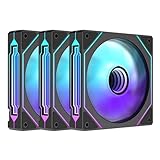
 DARKROCK Black F120 3in1 120mm Infinite Mirror Design120mm-Forward4.7 x 1 x 4.7 InchesCheck on Amazon




Top 3 picks at a glance
Quick Picks
| Product | Best for | Price |
|---|---|---|
| Thermalright 5 Pack TL-C12C-S | Maximum value in bulk | Check on Amazon |
| CORSAIR RS120 ARGB Triple Pack (Black) | Quiet performance | Check on Amazon |
| Thermalright TL-C12C-S X3 | Budget-friendly triple setup | Check on Amazon |
| CORSAIR RS120 ARGB Triple Pack (White) | White-build aesthetics | Check on Amazon |
| DARKROCK Black F120 3in1 | Infinity mirror look on a budget | Check on Amazon |
| AsiaHorse COSMIQ 120mm 3-Pack | High-CFM reverse-flow builds | Check on Amazon |
| Thermalright 5 Pack TL-C12CW-S | White ARGB volume cooling | Check on Amazon |
| Jungle Leopard Prism4 Pro X3 | Motherboard-synced lighting on a budget | Check on Amazon |
How We Compared
We evaluated each fan on four criteria that actually affect daily use: noise-to-airflow ratio at 1200 RPM and above (where most users settle), lighting uniformity and sync compatibility with the dominant motherboard ecosystem, cable complexity at the rear of the case, and true cost per unit when purchased in a typical three- or five-fan configuration. A fan that excels in one dimension but creates a mess or a drone hum fails our practical bar regardless of spec-sheet numbers.
The 8 Best RGB PC Fans in 2026
Thermalright 5 Pack TL-C12C-S
Thermalright’s five-pack exists for one reason: nobody else sells five ARGB PWM fans at this price with S-FDB bearings. If you are building a case that needs bottom intake, side intake, and rear exhaust simultaneously, the per-unit cost drops below four dollars. The TL-C12C-S spins up to 1550RPM, which is conservative enough that these fans remain inaudible under a closed side panel at normal duty. Lighting is clean but not the flashiest on the market — it is functional rather than dramatic.
- Pro: Unbeatable price-per-fan for a full case populate.
- Pro: S-FDB bearing keeps noise floor very low.
- Con: ARGB effects are basic compared to mirror-design rivals.
Skip if your build has fewer than four fan slots or you prioritize visual spectacle over count.
CORSAIR RS120 ARGB Triple Pack (Black)
The RS120 is the quietest fan CORSAIR currently ships at 120mm, and that matters when you want lighting without the audible tax. The magnetic dome bearing handles long-term wear better than cheaper sleeve setups, and the daisy-chain design means three fans share a single cable run to your board. Airflow is respectable for intake and exhaust positions without becoming a radiator specialist. The iCUE software is powerful but adds another background process to your system.
- Pro: Magnetic dome bearing delivers consistent low noise over time.
- Pro: Clean single-cable daisy-chain installation.
- Con: Highest price per fan in this roundup.
Skip if you run multiple brands in one system and do not want iCUE controlling your entire lighting layer.
Thermalright TL-C12C-S X3
Essentially the three-pack version of the five-fan value play, this kit suits the standard case layout: front intake pair plus rear exhaust. At under thirteen dollars total, you are paying roughly four dollars per fan with the same S-FDB bearing and 1550RPM ceiling. It solves the most common RGB fan problem — three glowing rectangles that look identical — without requiring a premium brand tax.
- Pro: Exceptional cost for a three-fan build.
- Pro: Quiet operation under normal PWM duty.
- Con: Only three units; adding a fourth means a second cable run.
Skip if your case demands five or six fans for positive-pressure setups.
CORSAIR RS120 ARGB Triple Pack (White)
Same engineering as the black RS120, re-skinned for white-build owners who are tired of mismatched grey hubs. The white housing and blades photograph cleanly and match white motherboards and GPU shrouds without looking aftermarket. The magnetic dome bearing and daisy-chain architecture carry over unchanged. What changes is price: the white variant consistently costs ten dollars less than its black sibling, which is unusual and works in your favor.
- Pro: Lower price than the black version of the same fan.
- Pro: White aesthetic that genuinely matches all-white builds.
- Con: Still premium-tier pricing per unit.
Skip if you have a non-white case interior where the color coordination benefit disappears.
DARKROCK Black F120 3in1
The F120 is a visual-first fan that happens to cool adequately. The infinite mirror design creates depth and reflection that photographs far better than standard ARGB rings, and at fifteen dollars for three units the aesthetic-per-dollar ratio is hard to argue with. Airflow is sufficient for standard case ventilation, though these are not radiator performers. If your priority is making your build look expensive without a five-dollar-per-fan investment, this is the shortcut.
- Pro: Striking infinity mirror effect at a budget price.
- Pro: Three units included without a hub or controller.
- Con: Modest airflow means it struggles under dense radiator stacks.
Skip if your primary use case is cooling a thick 360mm AIO where static pressure matters more than looks.
AsiaHorse COSMIQ 120mm 3-Pack
The COSMIQ is the highest-CFM fan in this group at 68.5, and its reverse-blade design means you can mount it with the aesthetic face forward while pulling air the correct direction. That is genuinely useful for showcase builds where you want visible blade motion without compromising thermal performance. The FDB bearing and 2000RPM ceiling make it the best pick for radiator positions where you need real pressure. It includes a small controller, which is helpful if your board lacks 5V 3-pin headers.
- Pro: Highest airflow figure in the roundup with reverse-blade flexibility.
- Pro: Included controller removes 5V header dependency.
- Con: Premium price for a brand with less community firmware support.
Skip if you want plug-and-play integration with a major motherboard ecosystem and no standalone controller clutter.
Thermalright 5 Pack TL-C12CW-S
White version of the value five-pack, aimed at all-white builds that need fan count without the premium. The TL-C12CW-S uses the same S-FDB bearing and 1550RPM profile as its black counterpart, so thermal behavior is identical. The white frame and translucent blades diffuse ARGB light in a softer, more even way than black housings. It is one of the few five-fan white ARGB kits at this price point.
- Pro: Five white ARGB fans under twenty-one dollars total.
- Pro: Soft light diffusion from translucent white blades.
- Con: No daisy-chain option; five separate cable runs.
Skip if you are building into a case with limited cable routing behind the tray.
Jungle Leopard Prism4 Pro X3
The Prism4 Pro X3 delivers infinity mirror lighting with 5V 3-pin motherboard sync and a PWM range of 800 to 1800RPM, giving it more headroom than Thermalright’s ceiling. At twenty-two dollars for three units, it undercuts most mirror-design rivals while still plugging directly into ASUS Aura, MSI Mystic Light, or Gigabyte RGB Fusion without an external controller. The balance between visual flair and thermal capability is its strongest suit.
- Pro: Infinity mirror design with native motherboard sync and no controller.
- Pro: Higher 1800RPM ceiling than most competitors in this price bracket.
- Con: Brand recognition and long-term warranty support trails the big names.
Skip if you prioritize vendor-supported software ecosystems or plan to resell individual components later.
Buying Guide
Connector Type and Sync Ecosystem
ARGB fans use 5V 3-pin headers for lighting, which is standard now, but not every fan handles power the same way. Pure PWM fans take 4-pin power and separate ARGB lighting, which is the cleanest setup because fan speed and lighting are independently controlled. Fans that bundle both on a proprietary daisy-chain or standalone controller lock you into that vendor’s software. Before buying, count your available 5V headers and check whether your motherboard supports unified lighting control.
Static Pressure versus Airflow
Case intake and exhaust positions need airflow, and any decent fan handles this. Radiator positions require static pressure, meaning the fan must force air through dense fin stacks. If you are cooling an AIO or custom loop, prioritize fans rated with a pressure curve you can verify rather than just raw CFM numbers. A high-CFM fan mounted on a thick radiator will stall and lose more performance than a lower-CFM fan with a tuned pressure curve.
Cable Management and Expandability
A three-pack where each fan needs a separate 4-pin PWM and a separate 5V ARGB line means six cables per fan group. Daisy-chain models cut that to two total lines regardless of count. If your case has a narrow cable routing channel or you are building in a compact ITX chassis, the cable architecture matters as much as the thermal numbers. Factor in whether you will expand to a fourth or fifth fan later and whether your current hub supports the growth.
Our Verdict
Our top pick is the CORSAIR RS120 ARGB Black Triple Pack for anyone who wants the quietest reliable lighting with no cable headaches. If price-per-fan is your absolute priority and you need a full case populate, the Thermalright 5 Pack TL-C12C-S remains unmatched. The Jungle Leopard Prism4 Pro X3 wins specifically when you want an infinity mirror aesthetic with native motherboard sync and zero extra controllers, making it the smartest visual choice under twenty-five dollars.
FAQ
Can I mix different RGB fan brands in one case?
Yes, as long as each brand’s lighting controller or 5V header protocol is compatible with your motherboard software. Mixing brands often means running two software tools simultaneously, which is inelegant but functional. Fan-side, 4-pin PWM connectors are universally standardized so power delivery has no compatibility issue.
Do ARGB fans cool worse than non-RGB fans?
Not inherently. The lighting diffuser and translucent blade design of some models can add a fraction of millimeter to blade clearance, reducing peak airflow by a negligible amount. The Thermalright and CORSAIR fans in this roundup prove that ARGB and high cooling performance coexist cleanly at 120mm.
What is the minimum number of fans a case needs?
Two fans — one intake, one exhaust — maintain a basic positive-pressure airflow path. Most mid-tower cases ship with only one fan, so adding a second or third is the single highest-impact thermal upgrade available. Four or more makes sense primarily for radiator builds or GPU-intensive workloads where component temperatures justify the noise.
Is PWM necessary, or can I use fixed-speed RGB fans?
PWM is functionally important because it allows your motherboard to throttle fan speed based on temperature readings. A fixed-speed RGB fan runs at its ceiling RPM constantly, generating noise and reducing bearing lifespan regardless of whether your CPU needs 1550 or 600 RPM. Every fan in this roundup includes PWM control.
Related guides
- Best Gaming PC for Fortnite: Eight Prebuilt Desktops Sorted by Refresh Rate Goal (2026)
- Best RX 9070 XT Prebuilt Gaming PCs: Seven Desktops and Three Cards Compared: 10 Compared (2026)
- CyberPowerPC vs iBUYPOWER Gaming PC: How the Two Brands Compare
- Best RX 9070 XT Prebuilt Gaming PC (2026): 5 Picks Compared









