Disclosure: As an Amazon Associate, we earn from qualifying purchases.
Our top pick: Thermaltake Core V21. Runner-up: Fractal Design Node 804.
A cube PC case trades the tall, narrow shape of a tower for a shorter, wider box, and that change of proportions is the whole point. A cube sits lower on or under a desk, spreads its internal volume sideways instead of upward, and in dual-chamber designs it moves the power supply and drives into a separate compartment behind or beside the motherboard. For a small gaming build, that layout can mean a tidier cable run, a graphics card that is easier to reach, and a finished PC that looks like a compact appliance rather than a shrunken tower.
The four cases in this guide are all true cube-form-factor cases, and each one was checked against a real Amazon US listing with a verified ASIN. This guide covers only those four verified models, rather than padding the list with cube cases whose listings could not be verified. Two of them take Micro ATX boards and two are Mini ITX only, so the motherboard you already own, or plan to buy, is the first filter to apply.
Cooling is the second filter. Cube cases have short internal air paths, and the models below take different approaches to moving air through that space, from a large pre-installed front fan to a mesh front panel on a very small chassis. Read the cooling notes for each case alongside its size, because the smallest cube here asks for more planning than the larger ones.
Our Top Picks

Top 3 picks at a glance
Quick Picks
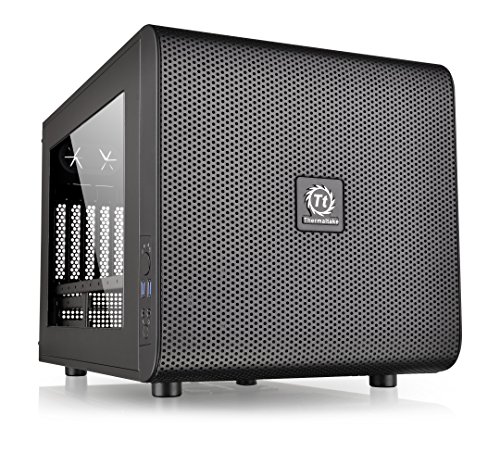
- Thermaltake Core V21 — Best overall cube case: Micro ATX and Mini ITX support, a 200mm front fan pre-installed, and a stackable design with interchangeable panels.
- Fractal Design Node 804 — Best for storage-heavy builds: a MicroATX dual-chamber cube with high drive capacity.
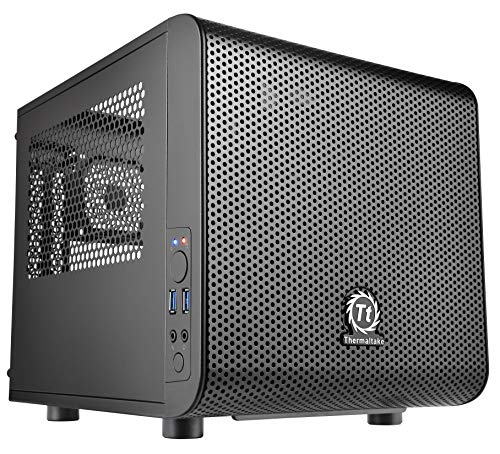
- Thermaltake Core V1 — Best simple Mini ITX cube: interchangeable side panels and a 200mm front fan pre-installed in a compact box.
- SilverStone SG13 — Best for the smallest footprint: a Mini-ITX cube of about 11.5 litres for tight desk and shelf spaces.
Thermaltake Core V21
OUR TOP PICK
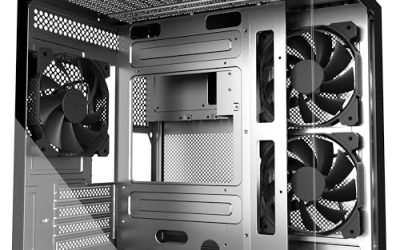
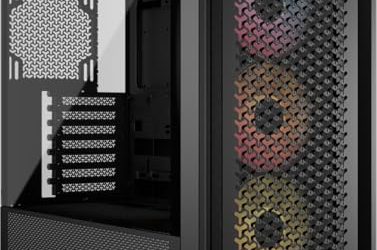
The Thermaltake Core V21 is the most flexible cube case in this guide, and the one to build around when the parts list is not yet final. As stated on the Amazon listing, it accepts Micro ATX and Mini ITX motherboards, which means it covers both of the mainstream small-board formats instead of locking the build to one of them. A builder who begins with a Mini ITX board can move up to a Micro ATX board later without changing the case, and that headroom is rare at this size.
As stated on the listing, the Core V21 measures 336 x 320 x 424 mm, so it is a wide, low box rather than a tall one, and it needs a desk or shelf with enough depth for that footprint. A 200mm front fan is pre-installed, as stated on the listing, which gives the case a large, slow-moving intake fan from the first build instead of leaving the front fan position empty. In a short cube chassis, a single large intake is a practical way to feed air to the motherboard chamber without filling the case with smaller fans.
Two features set the V21 apart from the other cubes here. The design is stackable, as stated on the listing, so a second unit can be placed on top to expand the build. The panels are interchangeable, as stated on the listing, so the windowed and solid panels can be swapped between sides to suit where the case sits and which side faces the room. Together those features make the V21 the cube to choose when the build is likely to change over time: more drives, a different board, or a new layout can be handled by reconfiguring the case rather than replacing it.
Specs
– Model: CA-1D5-00S1WN-00
– Motherboard support: Micro ATX and Mini ITX, as stated on the listing
– Dimensions: 336 x 320 x 424 mm, as stated on the listing
– Pre-installed fan: 200mm front fan, as stated on the listing
– Design: stackable, with interchangeable panels, as stated on the listing
Pros
– Takes both Micro ATX and Mini ITX boards, the widest board support in this guide
– 200mm front fan pre-installed
– Stackable design and interchangeable panels for builds that change over time
Cons
– The 336 x 320 x 424 mm footprint needs a deep desk or shelf
– Larger than a Mini ITX build strictly requires, so it is not the pick for the smallest possible PC
Fractal Design Node 804
The Fractal Design Node 804 is the runner-up, and the cube to choose when the build carries a lot of storage. As stated on the Amazon listing, it is a MicroATX cube with a dual-chamber layout, which places the motherboard and graphics card in one chamber and the power supply and drives in the other. That separation is the defining feature of the design: heat-producing components sit apart from the drive bays, and cables can be routed between the chambers instead of being gathered around the board.
The listing highlights high drive capacity, as stated on the Amazon listing, and that is where the Node 804 pulls ahead of the other cubes in this guide. A gaming PC that doubles as a media library, a capture machine that keeps large recordings, or a small home server in a gaming case will fill drive bays faster than a simple one-drive build, and the Node 804 is the case here that is built around that need. Its dual-chamber layout also suits builders who want the visible side of the PC to stay clean, since the drives and much of the cabling live out of sight in the second chamber.
Choose the Node 804 over the Core V21 when storage count and chamber separation matter more than panel swapping and stacking. Choose it over the two Mini ITX cubes when the build uses a MicroATX board, since neither of the smaller cases below can take one. Measure the space first, as with any cube: the wide, low shape needs a surface that suits it, and the case rewards a builder who plans the drive layout before the parts go in.
Specs
– Model: FD-CA-NODE-804-BL
– Motherboard support: MicroATX, as stated on the listing
– Layout: dual-chamber, as stated on the listing
– Storage: high drive capacity, as stated on the listing
Pros
– Dual-chamber layout separates the motherboard and graphics card from the drives and power supply
– High drive capacity, the strongest storage support in this guide
– MicroATX board support in a cube format
Cons
– MicroATX only, so a Mini ITX board leaves part of the case’s board space unused
– No stacking or panel-swapping system like the Core V21
Thermaltake Core V1
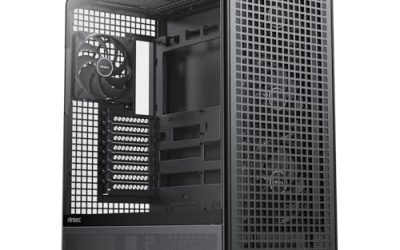
The Thermaltake Core V1 is the smaller Thermaltake cube in this guide, built around Mini ITX only. As stated on the Amazon listing, it has interchangeable side panels, so the panel arrangement can be changed to match how the case is placed, and a 200mm front fan is pre-installed, which is a generous intake for a case of this size. A large front fan moves air at lower speed, and in a compact cube that single intake does much of the cooling work for the whole build.
The Core V1 is the straightforward choice when the build is settled: a Mini ITX board, one graphics card, and a modest set of drives, in a box that sits neatly on a desk. It shares its design language with the larger Core V21 above, including the interchangeable panels, so a builder who likes the V21’s approach but has no need for Micro ATX support or stacking can take the same ideas in a smaller footprint. It is also the simpler case to plan around, because the Mini ITX format fixes the board size and narrows the parts list to what a small cube can hold.
Pick the Core V1 when the build is Mini ITX from the outset and will stay that way. If there is any chance of moving to a Micro ATX board later, the Core V21 is the safer Thermaltake choice, since the V1 cannot grow with the build in that direction. Before buying, confirm the graphics card length and cooler height against the case, as those two figures decide most small-cube builds.
Specs
– Model: CA-1B8-00S1WN-00
– Motherboard support: Mini ITX, as stated on the listing
– Pre-installed fan: 200mm front fan, as stated on the listing
– Panels: interchangeable side panels, as stated on the listing
Pros
– 200mm front fan pre-installed, a large intake for a compact cube
– Interchangeable side panels, shared with the larger Core V21
– Simple, settled Mini ITX builds are easy to plan in it
Cons
– Mini ITX only, with no path to a Micro ATX board later
– A separate Snow Edition exists under a different listing, so check the colour and listing before buying
SilverStone SG13
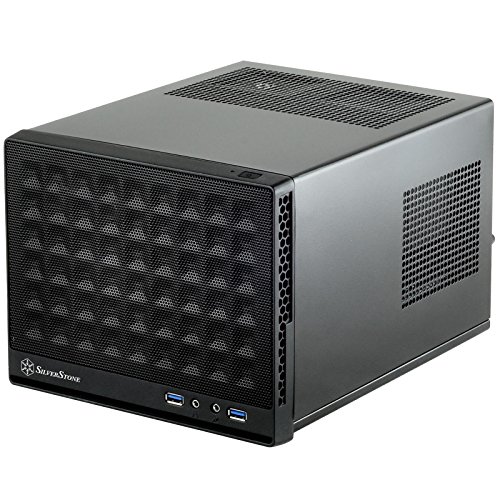
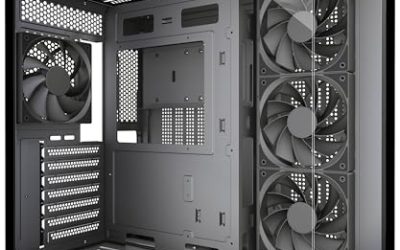
The SilverStone SG13 is the smallest case in this guide by a wide margin, and the one to choose when space is the deciding factor. As stated on the Amazon listing, this is the SST-SG13B-USA version with a mesh front panel in black. It is a Mini-ITX cube measuring 222 x 285 x 181 mm, as stated on the listing, with a volume of about 11.5 litres. That is small enough for a narrow shelf, a media unit, or the corner of a desk where none of the other cubes here would fit.
The mesh front matters at this size. In a chassis of about 11.5 litres there is little spare air volume, so a front panel that lets air pass freely helps the internal fans do their work, and the mesh version of the SG13 is the one to look for when the build includes a graphics card that will run under load for long sessions. The SG13 suits a living-room gaming PC or a compact second machine: one Mini-ITX board, one card, and a parts list chosen with the case’s limits in mind from the beginning.
Those limits are the trade-off. A case this small asks the builder to check every component dimension before ordering, including the power supply format, the graphics card length, and the CPU cooler height, because there is no spare room to absorb a part that runs long. Builders who enjoy that kind of planned, dense build will find the SG13 rewarding; builders who swap parts often will find the larger cubes above easier to live with. Note that an older SG13 listing also exists, so confirm the listing matches the SST-SG13B-USA model named here.
Specs
– Model: SST-SG13B-USA
– Motherboard support: Mini-ITX, as stated on the listing
– Dimensions: 222 x 285 x 181 mm, as stated on the listing
– Volume: about 11.5 litres, as stated on the listing
– Front panel: mesh, black finish, as stated on the listing
Pros
– Smallest footprint in this guide, at 222 x 285 x 181 mm and about 11.5 litres
– Mesh front panel suits airflow in a very compact chassis
– Fits shelves and media units where the larger cubes cannot go
Cons
– Every component dimension must be checked before ordering, with no spare room for oversized parts
– Mini-ITX only, and the dense layout makes frequent part swaps slow work
How to Choose
Begin with the motherboard, because it divides this guide cleanly in two. The Thermaltake Core V21 takes Micro ATX and Mini ITX boards, the Fractal Design Node 804 takes MicroATX, and the Thermaltake Core V1 and SilverStone SG13 are Mini ITX and Mini-ITX only. A board you already own settles the question at once, and a board you plan to buy should be chosen alongside the case, not before it, so the two are never mismatched.
Next, measure the space the case will occupy, in all three directions. Cube cases are shorter than towers but wider and often deeper than they look in photographs. The Core V21 is stated at 336 x 320 x 424 mm and the SG13 at 222 x 285 x 181 mm, and the gap between those two sets of figures shows how much the word cube can cover. Leave room behind the case for cables and above it for warm air to escape, and check that a shelf can carry the weight of a finished build, not only the empty case.
Then weigh storage against size. The Node 804 has the high drive capacity in this guide and a dual-chamber layout that keeps drives in their own compartment, which suits a PC that stores a large game library, recordings, or media files. The smaller cubes hold a leaner set of drives and reward a build that relies on one or two fast drives. Count the drives you own now and the ones you realistically expect to add, and let that count steer you between the Node 804 and the rest.
Cooling comes after size, and the two are linked. The Core V21 and Core V1 each have a 200mm front fan pre-installed, as stated on their listings, which gives those builds a large intake from the outset. The SG13 relies on its mesh front panel and careful part choice, because a chassis of about 11.5 litres has little room for extra fans. A build with a hot graphics card and long gaming sessions deserves the larger intake of the Thermaltake cubes or the chamber separation of the Node 804, while a modest build can live happily in the SG13.
Finally, think about how the build will change. The Core V21 is stackable and has interchangeable panels, the Core V1 has interchangeable side panels, and both suit builders who adjust their machines. The Node 804 suits a builder whose storage needs will grow. The SG13 suits a builder who plans once, builds once, and leaves the machine alone. Matching the case to that habit matters as much as any single specification, because a cube case is awkward to replace once a desk and cable run have been arranged around it.
FAQs
What makes a case a cube case rather than a small tower?
The proportions. A cube case is roughly as wide as it is tall, with a low, box-like shape, instead of the tall and narrow profile of a tower. The Core V21 at 336 x 320 x 424 mm shows the shape clearly. Many cube designs also split the interior into two chambers, as the Node 804 does, placing the power supply and drives beside or behind the motherboard rather than below it.
Can a cube PC case hold a full gaming graphics card?
It depends on the case, and the card length must be checked against the case before buying. The Micro ATX cubes here, the Core V21 and the Node 804, have the roomier interiors for gaming cards. The SG13, at about 11.5 litres, is the tightest fit in this guide, so its card length, power supply format, and cooler height all need confirming against the listing before the parts are ordered.
Which of these cube cases is right for a first small build?
The Thermaltake Core V21 is the most forgiving starting point, because it takes both Micro ATX and Mini ITX boards, has a 200mm front fan pre-installed, and can be reconfigured with its interchangeable panels as the build changes. The Core V1 is a good simpler alternative when the build is Mini ITX only and will stay that way.
Conclusion
For most small gaming builds, the Thermaltake Core V21 is the top pick, with support for both Micro ATX and Mini ITX boards, a 200mm front fan pre-installed, and a stackable design with interchangeable panels. The Fractal Design Node 804 is the runner-up for storage-heavy MicroATX builds, with its dual-chamber layout and high drive capacity. The Core V1 covers settled Mini ITX builds, and the SilverStone SG13 fits the tightest spaces at about 11.5 litres. Before buying, measure the desk or shelf space and confirm the board size, graphics card length, and cooler height against the case you choose.
Related guides
More from Amazon
Programs that pair well with the guide above. Offers and eligibility are set by Amazon and may change.
Free shipping on eligible items, Prime Video and more. Eligible new members can start with a free trial.
Start a Prime free trialAd-free music streaming. Eligible new subscribers can start with a free trial.
Try Music Unlimited freeA Prime membership for ages 18-24 with a trial period. Eligibility is set by Amazon.
See Prime for Young AdultsAudiobooks and podcasts to listen to on the go. Eligible new members can start with a free trial.
Try Audible freeAs an Amazon Associate we earn from qualifying purchases.